
Azure Application Gateway (3) 设置URL路由
《Windows Azure Platform 系列文章目录》
在之前的文章中,笔者介绍了Azure Web App可以设置URL路由。如下图:
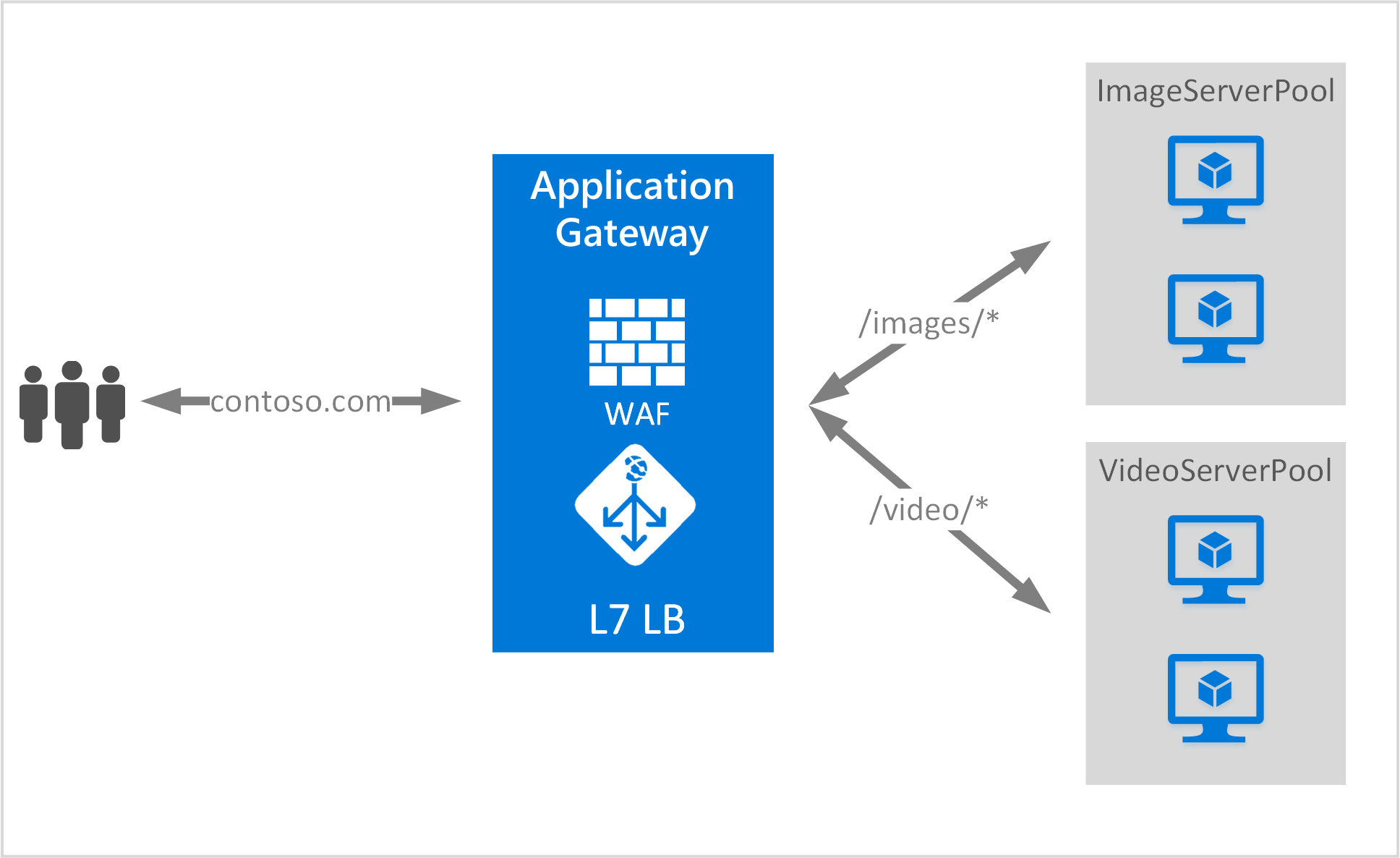
在这里笔者简单介绍一下,首先我们还是创建以下资源:
1.创建一个新的Azure Resource Group,命名为LeiAppGWRG
2.创建一个新的ARM Virtual Network,命名为LeiAppGatewayVNet
有两个Subnet,分别为web-subnet,CIDR: 10.0.0.0/24
另外一个subnet,叫appgateway-subnet,专门给Application Gateway使用,CIDR:10.0.1.0/24
3.在创建新的Application Gateway,命名为:LeiAppGateway
需要注意:如果我们要针对80端口设置URL Routing,我们必须设置Listener Configuration为Port 81
不可以是Port 80,因为会被占用需要修改
不可以是Port 80,因为会被占用需要修改
不可以是Port 80,因为会被占用需要修改

然后等Azure Application Gateway创建完毕
在这里还需要强调一下,当我们接下来还要操作的步骤:
1.针对80端口,增加Listener
2.不要修改和使用默认的appGatewayBackendPool
3.在Backend Pools,创建新的imagesBackendPool,并设置Backend Addresses
4.在Backend Pools,创建新的videosBackendPool,并设置Backend Addresses
5.最后配置一下Application Gateway的Rules
1.接下来开始第一部分,针对80端口,增加Listener
我们选择Application Gateway,选择Listener,然后点击 + Basic。
新增加针对80端口的Listerner: appGateway80Listener。如下图:

2.不要修改和使用默认的appGatewayBackendPool
3.选择Application Gateway,选择Backend Pool,然后点击Add。增加新的imagesBackendPool,并设置Backend Addresses
当我们访问这个imagesBackendPool的时候,Application Gateway会把请求发送到内网IP为10.0.0.4和10.0.0.5的这2台VM

4.选择Application Gateway,选择Backend Pool,然后点击Add。增加videosBackendPool,Address设置为10.0.0.11和10.0.0.12
这样我们访问url路径为/images的时候,Application Gateway会把请求发送到内网IP为10.0.0.11和10.0.0.12的这2台VM

5.最后,我们设置Rules,点击+ Path-based,命名为pathBasedRule。
Listener选择之前创建的appGateway80Listener
Default backend pool为appGatewayBackendPool
注意下图的BackEndPool,选择默认的appGatewayBackendPool和我们新创建的imagessBackendPool。
需要注意,当我们访问Application Gateway的地址时候,访问逻辑是这样的:
(1)如果我们访问URL路径为/images/*的时候,请求被发送到imagesBackendPool,对应的内网IP地址为10.0.0.4和10.0.0.5
(2)如果我们访问URL路径为/videos/*的时候,请求被发送到videosBackendPool,对应的内网IP地址为10.0.0.11和10.0.0.12
(3)当Path不匹配的时候,请求被发送到默认的imagesBackendPool。
截图如下:

6.准备Backend Pool所需要的虚拟机。
然后我们在先创建新的Azure ARM Storage Account,然后创建4台Windows Server 2012 R2的虚拟机,对应的IP如下:
| 虚拟机名称 | 内网IP地址 | Virtual Network子网 | 对应Application Gateway的Backend Pool | 对应Application Gateway的访问URL路径 | 备注 |
| ImagesVM01 | 10.0.0.4 | web-subnet | appGatewayBackendPool | /images/* | 安装IIS,增加虚拟目录images。修改IIS欢迎页面为虚拟机机器名 |
| ImagesVM02 | 10.0.0.5 | web-subnet | appGatewayBackendPool | /images/* | 安装IIS,增加虚拟目录images。修改IIS欢迎页面为虚拟机机器名 |
| VideosVM01 | 10.0.0.11 | web-subnet | videosBackendPool | /videos/* | 安装IIS,增加虚拟目录videos。修改IIS欢迎页面为虚拟机机器名 |
| VideosVM02 | 10.0.0.12 | web-subnet | videosBackendPool | /videos/* | 安装IIS,增加虚拟目录videos。修改IIS欢迎页面为虚拟机机器名 |
创建完毕后,请记住,因为我们针对Port 80设置Application Gateway,需要在上面的VM上安装IIS,并增加相应的虚拟目录。
7.然后我们查看Azure Application Gateway,点击Overview,就可以查看到这个Application Gateway的动态IP(注意是动态IP地址,不是静态IP)和DNS Name。
如下图:

动态IP是: 139.219.234.106
DNS是:ceca34df-a6ed-4914-8137-f44223e220e6.chinacloudapp.cn
8.我们访问上面的Frontend Public IP Address,比如:
这个请求就会被发送到appGatewayBackendPool的两台VM,内网IP分为别10.0.0.4和10.0.0.5

我们访问:http://139.219.234.106/videos/
这个这个请求就会被发送到videosBackendPool的两台VM,内网IP分为别10.0.0.11和10.0.0.12

Azure Application Gateway (3) 设置URL路由的更多相关文章
- Azure Application Gateway (4) 设置URL路由 - PowerShell
<Windows Azure Platform 系列文章目录> 本文将介绍如果使用Azure PowerShell,创建Azure Application Gateway URL Rout ...
- Azure Application Gateway (1) 入门
<Windows Azure Platform 系列文章目录> 请读者注意,Azure Application Gateway在ASM模式下,只能通过PowerShell创建 具体可以参考 ...
- Azure Application Gateway(一)对后端 Web App 进行负载均衡
一,引言 今天,我们学习一个新的知识点-----Azure Application Gateway,通过Azure 应用程序网关为我么后端的服务提供负载均衡的功能.我们再文章头中大概先了解一下什么是应 ...
- Azure Application Gateway(二)对后端 VM 进行负载均衡
一,引言 上一节有讲到使用 Azure Application Gateway 为我们后端类型为 Web App 的 Demo 项目提供负载均衡,Azure Application Gateway 的 ...
- Azure Application Gateway (5) Application Gateway SSL Offload配置
<Windows Azure Platform 系列文章目录> 之前有个客户提出了一个需求,他们的互联网访问的架构分为两种: 1.第一层是使用Azure Application Gatew ...
- Azure Application Gateway (2) 面向公网的Application Gateway
<Windows Azure Platform 系列文章目录> 本章将介绍如何创建面向公网的Application Gateway,我们需要准备以下工作: 1.创建新的Azure Reso ...
- Windows Azure支持七层负载均衡--Application Gateway
一直以来Windows Azure的负载均衡(Loadbalancer)功能一直被客户诟病,无法其竞争对手(特别是国内的云厂商)匹敌. Windows Azure的负载均衡器是四层的,前期的版本不支持 ...
- 【Azure 事件中心】为应用程序网关(Application Gateway with WAF) 配置诊断日志,发送到事件中心
问题描述 在Application Gateway中,开启WAF(Web application firewall)后,现在需要把访问的日志输出到第三方分析代码中进行分析,如何来获取WAF的诊断日志呢 ...
- Ionic 动态配置url路由的设置
随着Ionic App功能的不断增加,需要路由的url设置就越来越多,不喜欢在config函数中写一堆硬代码,一则不美,二则维护起来也麻烦,能不能把这些数据独立出来呢? 经过查找资料与各种实验,最终找 ...
随机推荐
- 最长下降子序列O(n^2)及O(n*log(n))解法
求最长下降子序列和LIS基本思路是完全一样的,都是很经典的DP题目. 问题大都类似于 有一个序列 a1,a2,a3...ak..an,求其最长下降子序列(或者求其最长不下降子序列)的长度. 以最长下降 ...
- Putty部署tomcat
webserver下是tomcatprojects放置项目源代码webapp下放置项目 1. 输入地址栏 登入进去32 192.168.1.32 端口号22 2.进入projects文件夹 cd pr ...
- bat获取所有的参数
bat默认只能获取到1-9个参数,分别用%1 %2 ... %9引用,如果传给bat的参数大于9个,就必须用shift. 工作需要,要写个bat脚本,获取所有的参数,再将所有的参数传给Java,代码如 ...
- 华为oj 挑7
#include<iostream> using namespace std; bool ishave_7(int n); int main(){ int num,k=0; cin> ...
- python中实现定时器Timer
实现定时器最简单的办法是就是循环中间嵌time.sleep(seconds), 这里我就不赘述了 # encoding: UTF-8 import threading #Timer(定时器)是Thre ...
- 删除Mysql数据表中多余的重复记录的sql语句
数据表 sniper_tb 中存在主键 id,字段url,现需要在url字段上添加 unique,但由于url存在重复记录,导致添加失败. 如何删除表中多余的url重复记录,仅保持一条? 思路一 将 ...
- .Net组件程序设计之序列化
.Net组件程序设计之序列化 自动序列化 本篇给大家讲解一下在.NET中的序列化,它的用处非常之多,特别是对于某种环境下保存某种状态是很好的方法,接下来就来看一下吧. Serializable属性 ...
- 《Entity Framework 6 Recipes》中文翻译系列 (20) -----第四章 ASP.NET MVC中使用实体框架之在MVC中构建一个CRUD示例
翻译的初衷以及为什么选择<Entity Framework 6 Recipes>来学习,请看本系列开篇 第四章 ASP.NET MVC中使用实体框架 ASP.NET是一个免费的Web框架 ...
- java 反编译利器JD-JUI
下载地址: http://download.csdn.net/download/suixingbugai/4145221
- 调试的时候 line not available!
手贱, 不小心修改了一个地方,后面调试代码的时候,总感觉不对.出现: line not available, 总是到不了源码里面,反复部署了N次还是一样, 非常郁闷,... 搞了一两个小时后,后面醒悟 ...