
基于vue手写tree插件那点事
Tree树形控件在前端开发中必不可少,对于数据的展示现在网站大都采取树形展示。因为大数据全部展示出来对于用户来说是不友好的。今天我们自己手写一个Tree插件。
iview提供的控件
- iview已经很成熟了,如果说我写的控件和iview提供的控件谁更好,那肯定是选择iview , 手写控件只是为了更好的了解vue父子组件之间的通信的。 请读者还是不要拿我的控件和iview或者其他第三方的去对比。下面我们先来看看iview的Tree控件如何使用
<template>

    <Tree :data="data2" show-checkbox></Tree>

</template>

<script>

    export default {

        data () {

            return {

                data2: [

                    {

                        title: 'parent 1',

                        expand: true,

                        children: [

                            {

                                title: 'parent 1-1',

                                expand: true,

                                children: [

                                    {

                                        title: 'leaf 1-1-1'

                                    },

                                    {

                                        title: 'leaf 1-1-2'

                                    }

                                ]

                            },

                            {

                                title: 'parent 1-2',

                                expand: true,

                                children: [

                                    {

                                        title: 'leaf 1-2-1'

                                    },

                                    {

                                        title: 'leaf 1-2-1'

                                    }

                                ]

                            }

                        ]

                    }

                ]

            }

        }

    }

</script>
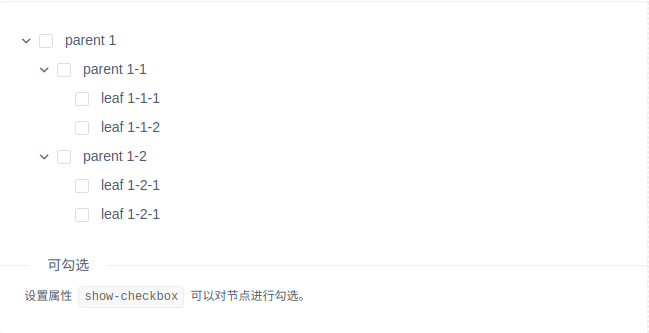
- 上述的代码形成的效果如下
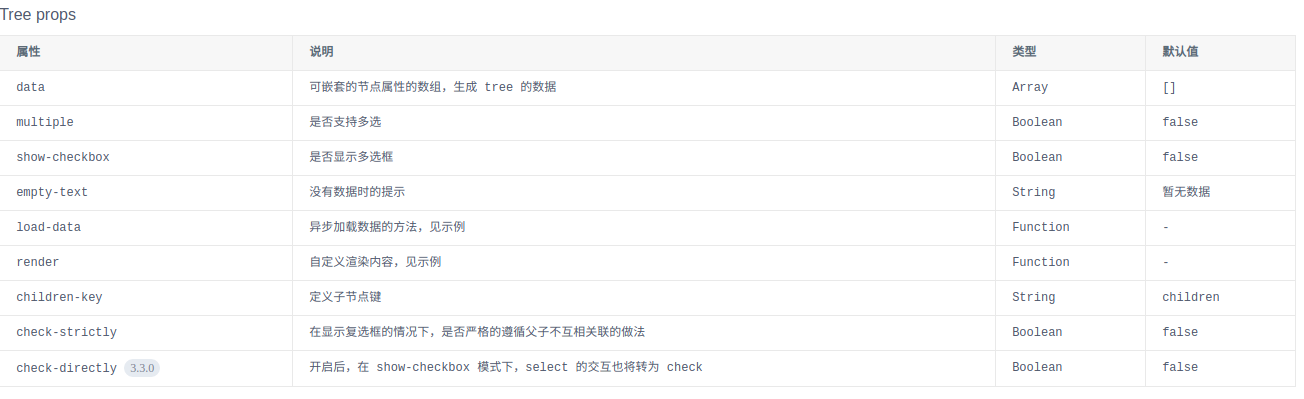
- 在使用Tree控件时在Template中还有如下树形可以使用(根据自己需求)
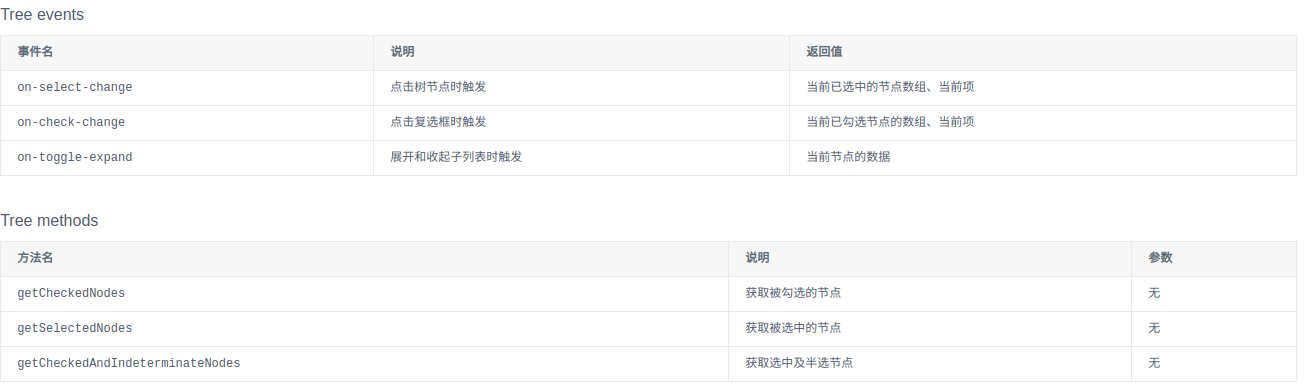
- 然后就是控件的一些事件捕获
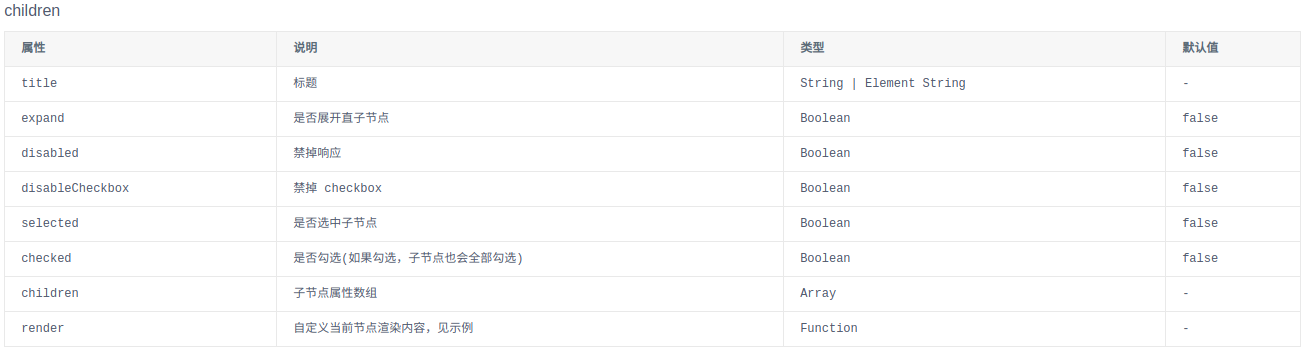
- 子节点的一些设置
- 对于iview的Tree总结就是一句话:到位!。在这里小编也推荐大家使用iview来开发。这个框架对于后端程序员来说是个福利。因为我们不需要了解太专业的前端的只是就能够满足80%的需求了。
手写控件
同样的我们先来看看他的用法其实和iview一样。用我们封装好的模板就行了。下面是做一个部门树。部门下面挂着人员这个功能。
<zxhtree

        v-if="userChange"

        class="item"

        treekey="deptId"

        treename="deptName"

        treechildren="children"

        :model="deptData"

        :ids="sysUserRole.deptIds"

        :names="sysUserRole.deptNames"

        @keyname="selectedUserObj"

>

</zxhtree>
js就是去填补上述的数据,比如deptData、sysUserRole这些。至于这些属性代表什么意思我们先不着急看。先上个效果图。
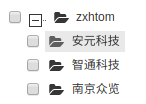
那么我们的zxhtree控件是在哪里注册的呢,这里被我们抽离在component.js里。Vue.component('zxhtree', {});
继续在zxhtree里看除绑定的节点是template: '#tree-template'。
tree-template的模板是在component.html中写好的
<script type="text/x-template" id="tree-template">

    <div>

        <tree-item

                class="item"

                :treekey="treekey"

                v-for="(model, index) in model"

                :treename="treename"

                :treechildren="treechildren"

                :model="model"

                :ids="ids"

                :names="names"

                @keyname="selectedObj"

                @data="synchdata"

        >

        </tree-item>

    </div>

</script>
而在tree-template用到的tree-item控件才是真正的tree控件。这里是为了将树形包裹起来,所以才包裹了一层模板。
tree-item对应的模板代码是
<script type="text/x-template" id="item-template">

    <ul class="ztree">

        <li class="level0" @blur="blur" @focus="focus" tabindex="0" hidefocus="true" treenode="">

            <input type="checkbox" :disabled="model.disabled" :ref="model[treename]" :checked="checkStatus" @click="selectedObj"/>

            <span title="" @click="toggle" :class="openStatus" treenode_switch=""></span>

            <a :class="selectClass" treenode_a="" onclick="" target="_blank" style="" :title="model[treename]">

                <span title="" treenode_ico="" class="button ico_open" style=""></span>

                <span @dblclick="toggle" class="node_name">{{model[treename]}}</span>

            </a>

            <tree-item

                class="item"

                v-show="open"

                v-for="(model, index) in model[treechildren]"

                :key="index"

                :model="model"

                :treekey="treekey"

                :treename="treename"

                :vistreekey="vistreekey"

                :vistreename="vistreename"

                :treechildren="treechildren"

                ref="child"

                @keyname="keyname"

            >

            </tree-item>

        </li>

    </ul>

</script>
可以很明显的看到这里我们使用了递归进行展示树形结构。因为树形结构你无法确定层级。所以在里面又使用了针对子节点的展示tree-item.
| 属性 | 含义 | 示例 |
|---|---|---|
| treekey | 内部树形展示 | deptId |
| vistreekey | 树形展示key | deptId |
| ids | 默认显示的数据 | 无 |
| names | 默认显示的数据 | 无 |
| treename | 内部真是展示数据 | deptName |
| vistreename | 树形展示数据 | deptName |
| treechildren | 当前树的子节点数据 | 无 |
| model | 当前树的数据 | 无 |
| (M)keyname | 用于接受返回的数据 | 无 |
手写控件扩展
控件接受数据处理逻辑
//接收到数据在外面套一层

if(this.model[this.treekey]==undefined){

    this.treekey=this.vistreekey;

}

if(this.model[this.treename]==undefined){

    this.treename=this.vistreename;

}

if (this.model.disabled == true) {

    this.model.disabled = 'disabled';

}

console.log('组件注册了吗');

if ((','+this.ids+',').indexOf(','+this.model[this.treekey]+',') == -1) {

    this.checkStatus = false;

    this.model.checkStatus=this.checkStatus;

} else {

    this.checkStatus=true;

    this.model.checkStatus=this.checkStatus;

    this.treekeys[this.model[this.treekey]]= this.checkStatus;

    this.treenames[this.model[this.treename]]= this.checkStatus;

    this.opt.key=this.treekeys;

    this.opt['name']=this.treenames;

}

if(this.ids!=''){

    var idarr = this.ids;

    for(var index in idarr){

        this.treekeys[idarr[index]]=true;

    }

    if (this.names.indexOf(",") == -1&&this.names!='') {

        this.treenames[this.names]=true;

    }else{

        var namearr = this.names.split(",");

        for(var index in namearr){

            this.treenames[namearr[index]]=true;

        }

    }

}
渲染默认数据
var newOpt ={'key':{},'name':{}};

    newOpt.key = Object.assign(this.opt.key, opt.key);

    newOpt.name = Object.assign(this.opt.name, opt.name);

    var flag=false;

    for(var index in this.model[this.treechildren]){

        if(newOpt.key[this.model[this.treechildren][index][this.treekey]]!=true){

            flag=true;

        }

    }

    if(!flag){

        newOpt.key[this.model[this.treekey]]=true;

        newOpt.name[this.model[this.treename]]=true;

        this.checkStatus=true;

        this.model.checkStatus=true;

    }

    for(var key in newOpt){

        this.filterRealCheck(newOpt[key]);

    }

    this.opt=newOpt;

    this.$emit('keyname', newOpt);
选择节点数据处理
if(selected instanceof MouseEvent){

    this.checkStatus=!this.checkStatus;

}else{

    this.checkStatus=selected;

}

this.model.checkStatus=this.checkStatus;

if (this.model.expected != true) {

    this.treekeys[this.model[this.treekey]]= this.checkStatus;

    this.treenames[this.model[this.treename]]= this.checkStatus;

    this.opt.key=this.treekeys;

    this.opt['name']=this.treenames;

}

for(var index in this.$refs.child){

    this.$refs.child[index].selectedObj(this.checkStatus);

}

this.$emit('keyname', this.opt);
手写控件总结
因为笔者是侧重后端,所以前端知识不是很好,这个组件写的也是很乱。这个组件是之前临时写的。里面没有进行系统的梳理,上述的逻辑也是很乱。读者需要的可以选择下列加入战队(#addMe)联系我
需要源码的可关注下面公众号发点击进群后咨询。
# 加入战队
微信公众号

主题

基于vue手写tree插件那点事的更多相关文章
- 基于Vue手写一个下拉刷新
当然不乏有很多下拉刷新的插件可以直接使用,但是自定义程度不强,大部分都只能改改文字,很难满足设计师的创意,譬如淘宝和京东首页那种效果,就需要自己花心思倒腾了,最近刚好有这种需求,做完了稍微总结一下,具 ...
- 放弃antd table,基于React手写一个虚拟滚动的表格
缘起 标题有点夸张,并不是完全放弃antd-table,毕竟在react的生态圈里,对国人来说,比较好用的PC端组件库,也就antd了.即便经历了2018年圣诞彩蛋事件,antd的使用者也不仅不减,反 ...
- Tensorflow之基于MNIST手写识别的入门介绍
Tensorflow是当下AI热潮下,最为受欢迎的开源框架.无论是从Github上的fork数量还是star数量,还是从支持的语音,开发资料,社区活跃度等多方面,他当之为superstar. 在前面介 ...
- [年薪60W分水岭]基于Netty手写Apache Dubbo(带注册中心和注解)
阅读这篇文章之前,建议先阅读和这篇文章关联的内容. 1. 详细剖析分布式微服务架构下网络通信的底层实现原理(图解) 2. (年薪60W的技巧)工作了5年,你真的理解Netty以及为什么要用吗?(深度干 ...
- vue手写轮播
<!DOCTYPE html> <html lang="en"> <head> <meta charset="UTF-8&quo ...
- vue手写的轮播图片,解决已经修改data中的值,页面标签已绑定,但页面没效果
1.效果 2.index.html <!DOCTYPE html> <html lang="en"> <link> <meta chars ...
- 基于netty手写RPC框架
代码目录结构 rpc-common存放公共类 rpc-interface为rpc调用方需要调用的接口 rpc-register提供服务的注册与发现 rpc-client为rpc调用方底层实现 rpc- ...
- vue 手写倒计时,样式需要自己调。( 亲测可用,就是没有样式 )
先写一个 js 文件,这个文件是工具类文件,需要单独开一个js // 计算出时间戳的具体数据:比如将85400转化为 n天n时n分n秒 export function formateTimeStamp ...
- 基于vue的图片查看插件vue-photo-preview
1. 安装 在任务管理器中输入命令 2. 在项目main.js中引入 3.在所需要的项目中直接使用 还有两个属性,可以看需求添加 preview-title-enable="false&qu ...
随机推荐
- 9.22考试 crf的视察 题解
这道题当时第一反应就是一道典型的NOIP第一题的难度,绝对要A掉,不然分数一定会被拉开. 然后就开始分析,暴力是一开始想的是用二维树状数组打加上暴力枚举长度,然而这道题满足二分性质,所以时间复杂度就是 ...
- UVA10375 选择与除法 Choose and divide 题解
题目链接: https://www.luogu.org/problemnew/show/UVA10375 分析: 这道题可以用唯一分解定理来做. 什么是唯一分解定理?百度即可,这里也简介一下. 对于任 ...
- Spring MVC + Spring + MyBatis 框架整合
本文介绍使用SSM框架开发web项目Demo. 一.创建一个web-Poject项目 1.导入相关jar文件至lib下.“相关jar文件” --提取密码 oraw 2.修改web.xml文件 < ...
- 《VR入门系列教程》之6---VR硬件介绍及DK1
第二章 VR硬件介绍 本章主要介绍当前比较流行的消费版VR设备,包括VR头显以及应用运行的PC和手机平台. 即使是在这工业高速发展的时代,一些大厂(比如Facebook的Oculus ...
- windows和linux下如何对拍
对拍是各种计算机考试检查时必备工具,实际上十分强大,只要你的暴力没有写错就没有问题. 对拍的意思:(怎么有点语文课的意思雾) 对:看见'对'就可以知道有两个. 拍:就是把两个程序结果拍在一起,对照(有 ...
- linux初学者-Apache篇
linux初学者-Apache篇 Apache提供了超文本传输协议http,httpd是Apache超文本传输协议的主服务器.下文将对httpd的安装和配置进行简单的叙述. ...
- springcloud-eureka
作者:纯洁的微笑出处:http://www.ityouknow.com/ 版权归作者所有,转载请注明出处 Eureka是Netflix开源的一款提供服务注册和发现的产品,它提供了完整的Service ...
- js里的Document对象介绍
activeElement 返回代表文档中dangqianhuodejiaodianyuansudeduixaing body 返回代表文档中body元素 ...
- vuex的实现
源代码可以查看我的github: https://github.com/Jasonwang911/TryHardEveryDay/tree/master/Vuex/vuex-resouce 欢迎s ...
- 史上最强Java开发环境搭建
在项目产品开发中,开发环境搭建是软件开发的首要阶段,也是必须阶段,只有开发环境搭建好了,方可进行开发,良好的开发环境搭建,为后续的开发工作带来极大便利. 对于大公司来说,软件开发环境搭建工作一般是由运 ...