
QML::Rectangle组件
QML的Rectangle组件,描绘一个矩形,一个可视化的对象。
外加设置属性来达到我们想要的效果。常用的有矩形的颜色,边框颜色,圆角等设置。
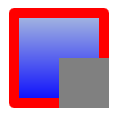
 Rectangle{

           x://这里的坐标是相对于它的父窗口,也就是Window

           y:

           width: ;

           height: ;//一定要指定出大小才能显示

           visible: true

           antialiasing: true;//抗锯齿,默认就是开启的

           border.width: ;

           border.color: "red";//边框的一些属性

           color: "blue"//内部的颜色

           radius: //圆角半径

           gradient: Gradient{//颜色渐变

               GradientStop { position: 0.0; color: "lightsteelblue" }

               GradientStop { position: 1.0; color: "blue" }

           }

           clip:true//这一属性设置表示如果他的子类超出了范围,那么就剪切掉,不让他显示和起作用

           Rectangle{

               id:son

               x:;  //基于父窗口的位置

               y:;

               width: ;

               height: ;

               color: "gray";

           }

    }
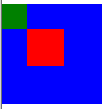
 Rectangle {

        color: "blue"

        width: ; height:

        Rectangle {

            color: "green"

            width: ; height:

        }

        Rectangle {

            color: "red"

            x: ; y: ; width: ; height:

            scale: 1.5  //放大1.5倍

            transformOrigin: "TopLeft" //改变元素的原点位置

        }

    }
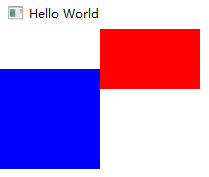
  Row {

          Rectangle {

              width: ; height:

              color: "blue"

              transform: Translate { y:  }//下移

          }

          Rectangle {

              width: ; height:

              color: "red"

              transform: Translate { y: - }//上移

          }

      }
   Rectangle {

        width: ; height:

        color: "red"

        PropertyAnimation on x { to: ; duration: ; loops: Animation.Infinite } //从(0,0)坐标移动到(50。50),

        PropertyAnimation on y { to: ; duration: ; loops: Animation.Infinite }//1000表示一秒时间, duration 越大移动越慢

    }

    Rectangle {

        width: ; height:

        color: "red"

        PropertyAnimation on x { to: ; duration: ; easing.type: Easing.OutBounce }

        PropertyAnimation on y { to: ; duration: ; easing.type: Easing.OutBounce }//移动到50,50 ,OutBounce 动画效果

    }

    Rectangle {

        width: ; height: ; anchors.centerIn: parent

        color: "red"

        RotationAnimation on rotation { to: ; direction: RotationAnimation.Clockwise } //旋转90°

    }

    Rectangle {

       width: ; height:

       ColorAnimation on color { from: "red"; to: "yellow"; duration:  } //在1s时间内 颜色变化

   }
  // Rectangle 跟随鼠标移动 写法一

    Item {

        width: ; height:

        Rectangle {

            id: rect

            width: ; height:

            color: "red"

            Behavior on x { PropertyAnimation { duration:  } }

            Behavior on y { PropertyAnimation { duration:  } }

        }

        MouseArea {

            anchors.fill: parent

            onClicked: { rect.x = mouse.x; rect.y = mouse.y }

        }

    }

    // Rectangle 跟随鼠标移动 写法二

    Rectangle {

           id: rect

           width: ; height:

           color: "red"

           PropertyAnimation {

               id: animation

               target: rect

               properties: "x,y"

               duration:

           }

           MouseArea {

               anchors.fill: parent

               onClicked: {

                   animation.to = ;

                   animation.running = true;

               }

           }

       }

    // Rectangle 跟随鼠标移动 写法三

    Rectangle {

           id: rect

           width: ; height:

           color: "red"

           MouseArea {

               anchors.fill: parent

               onClicked: rect.state = "moved"

           }

           states: State {

               name: "moved"

               PropertyChanges { target: rect; x: ; y:  }

           }

           transitions: Transition {

               PropertyAnimation { properties: "x,y"; duration:  }

           }

       }
 // 自由落体动画效果

    Rectangle {

        id: rect

        width: ; height:

        Image {

            id: img

            source: "colors.png"

            anchors.horizontalCenter: parent.horizontalCenter

            y:

            SequentialAnimation on y {

                loops: Animation.Infinite

                NumberAnimation { to: rect.height - img.height;

                    easing.type: Easing.OutBounce; duration:  }

                PauseAnimation { duration:  }

                NumberAnimation { to: ; easing.type: Easing.OutQuad;

                    duration:  }

            }

        }

    }
QML::Rectangle组件的更多相关文章
- 从头学Qt Quick(3)-- 用QML写一个简单的颜色选择器
先看一下效果图: 实现功能:点击不同的色块可以改变文字的颜色. 实现步骤: 一.创建一个默认的Qt Quick工程: 二.添加文件Cell.qml 这一步主要是为了实现一个自定义的组件,这个组件就是我 ...
- QML Object Attributes QML对象属性
QML Object Attributes Every QML object type has a defined set of attributes. Each instance of an obj ...
- qml demo分析(samegame-拼图游戏)
一.效果展示 相信大家都玩儿过连连看游戏,而且此款游戏也是闲时一款打发时间的趣事,那么接下来我将分析一款类似的游戏,完全使用qml编写界面,复杂逻辑使用js完成.由于此游戏包含4种游戏模式,因此本篇文 ...
- OpenLayers学习笔记(二)— QML与HTML通信之画图
作者: 狐狸家的鱼 Github: 八至 本文链接:QML与 HTML通信—实现QML中点击功能按钮在地图上画图 一.HTML-map var drarGraphic; var drawType;fu ...
- QML与C++混合编程详解(转)
原文转自:http://blog.csdn.net/ieearth/article/details/42243553 原文转自:https://www.cnblogs.com/findumars/p/ ...
- QML与C++混合编程详解
1.QML与C++为什么要混合编程 QML与C++为什么要混合编程,简单来说,就是使用QML高效便捷地构建UI,而C++则用来实现业务逻辑和复杂算法,下面介绍了两者间交互的方法与技巧. 2.QML访问 ...
- qt quick中qml编程语言
Qt QML 入门 — 使用C++定义QML类型 发表于 2013 年 3 月 11 日 注册C++类 注册可实例化的类型 注册不实例化的QML类型 附带属性 注册C++类 注册可实例化的类型 如 ...
- QML 语言基础
在<Qt Quick 简单介绍>中我们提到 QML 语法和 Json 相似,请參考<Qt on Android: http下载与Json解析>查看 Json 语法.当然这里我们 ...
- QtQuick多页面切换、多页面切换动画、多个qml文件数据交互
一.QtQuick多页面切换方法 (1)“隐藏法” 前一个视图visible设为false或者透明度opacity设为0,相当于“隐藏”了,实际还存在: 要显示的视图visible设为true或者透明 ...
随机推荐
- 解决spark dataframe get 报空指针异常 java.lang.NullPointerException
Spark 编程读取hive,hbase, 文本等外部数据生成dataframe后,一般我们都会map遍历get数据的每个字段,此时如果原始数据为null时,如果不进行判断直接转化为string,就会 ...
- C# detect latest .net framework installed on PC
static void GetNetVersionDemo() { using (RegistryKey ndpKey = RegistryKey.OpenBaseKey(RegistryHive.L ...
- C# 管道通信 (client —— server)Framework2.0版本也可用
//管道服务类public class PipServer { [DllImport("kernel32.dll", SetLastError = true)] public st ...
- 常用类-excel转csv
public class ExcelFileHelper { public static bool SaveAsCsv(string excelFilePath, string destination ...
- 解决vscode中golang插件依赖安装失败问题
vscode中安装ms-vscode.go插件后可以开启对go语言的支持,ms-vscode.go插件需要依赖一些工具,安装完成后提示 gocode go-outline go-symbols gur ...
- MacOS~jenkins里解决docker执行权限问题
一 全局配置项设置 需要添加全局变量项,例如名称docker,路径/usr/local 添加一个jenkinsfile文件,用于运行docker命令 pipeline { agent any tool ...
- Add a Parametrized Action 添加带参数的按钮
In this lesson, you will learn how to add a Parametrized Action. These types of Actions are slightly ...
- 松软科技web课堂:SQLServer之HAVING 子句
HAVING 子句 在 SQL 中增加 HAVING 子句原因是,WHERE 关键字无法与合计函数一起使用. SQL HAVING 语法 SELECT column_name, aggregate_f ...
- 松软科技带你学开发:SQL--COUNT() 函数
SQL COUNT() 语法 SQL COUNT(column_name) 语法 COUNT(column_name) 函数返回指定列的值的数目(NULL 不计入): SELECT COUNT(col ...
- Xcode报错:could not attach to pid:"1764"
这种错误不是什么问题,按照参考链接操作即可,亲测有效: https://www.cnblogs.com/luorende/p/6295945.html 在运行项目时出现了如下错误 (基本上重新启动项目 ...