
“selenium.common.exceptions.SessionNotCreatedException: Message: Unable to find a matching set of capabilities“解决办法
问题:
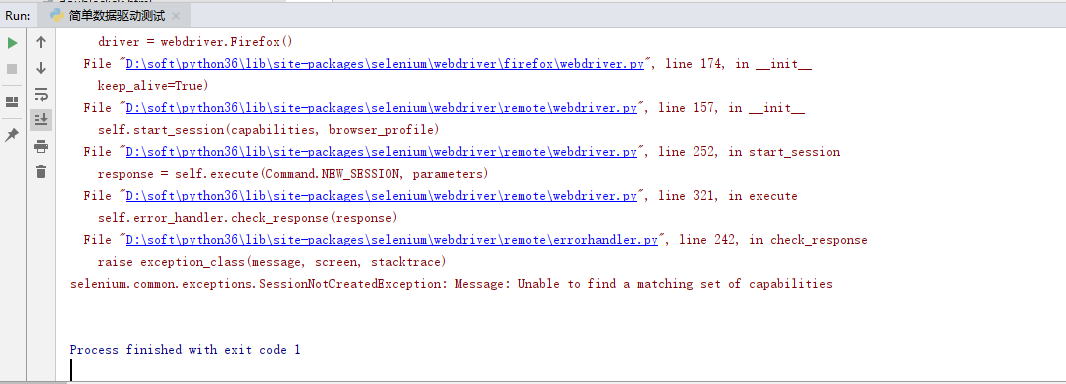
原因:firefox浏览器版本和浏览器驱动版本不匹配
解决办法:卸载高版本浏览器,安装低版本浏览器
下载地址:http://ftp.mozilla.org/pub/firefox/releases/
比如http://ftp.mozilla.org/pub/firefox/releases/58.0/win64/zh-CN/
58.0指版本,win64指64位,zh-CN指简体中文
目前我能成功的环境为:
驱动:geckodriver-v0.24.0-win64.zip 浏览器:v58.0
“selenium.common.exceptions.SessionNotCreatedException: Message: Unable to find a matching set of capabilities“解决办法的更多相关文章
- 错误:selenium.common.exceptions.SessionNotCreatedException: Message: Unable to find a matching set of capabilities
错误再现 原因:firefox浏览器版本和浏览器驱动版本不匹配 解决办法:卸载高版本浏览器,安装低版本浏览器
- python无法启动火狐浏览器且报错“selenium.common.exceptions.WebDriverException: Message: Unable to find a matching set of capabilities”
安装了python2,使用pip安装了selenium,但是在使用时,报了“selenium.common.exceptions.WebDriverException: Message: 'gecko ...
- 运行selenium脚本,报seleneium common exception.SessionNotCreatedException:Message:Unable to find a matching set of capabilities错误
- 如何解决错误【selenium.common.exceptions.SessionNotCreatedException】
如何解决错误[selenium.common.exceptions.SessionNotCreatedException] [问题起因] 2018年12月26日晚,启动我的pycharm准备学习s ...
- selenium使用报错“selenium.common.exceptions.WebDriverException: Message: 'geckodriver' executable needs to be in PATH.”
安装了python3,使用pip安装了selenium,但是在使用时,报了“selenium.common.exceptions.WebDriverException: Message: 'gecko ...
- 更新浏览器,导致编写脚本报错Message: Unable to find a matching set of capabilities
卸载更新浏览器后,所编写的脚本无法运行,报如下的错误:selenium.common.exceptions.WebDriverException: Message: Unable to find a ...
- python2.7运行selenium webdriver api报错Unable to find a matching set of capabilities
在火狐浏览器33版本,python2.7运行selenium webdriver api报错:SessionNotCreatedException: Message: Unable to find a ...
- selenium.common.exceptions.TimeoutException: Message: Screenshot: available via screen
在使用selenium+phantomjs的时候在Windows平台下能够正常工作,在Linux下却不能,并得到错误信息: selenium.common.exceptions.TimeoutExce ...
- selenium使用遇到的问题(selenium.common.exceptions.WebDriverException: Message: 'chromedriver' executable needs to be in PATH.)
1.安装pip3 install selenium 2.使用browser=webdriver.Chrome()时报错 :selenium.common.exceptions.WebDriverExc ...
随机推荐
- ckeditor中 config.js等通过ckeditor.js引入文件手动修改方法
因为除了ckeditor.js之外的引用文件是通过ckeditor.js自动添加<script>或<link>标签实现文件的引入,引入的根目录是展示页面的地址.有时需要手动修改 ...
- 连环清洁工之特殊任务--java资源如何关闭?
小C是一名特殊的黑客,他专门为黑客提供服务,扫除黑客攻击的痕迹,避免被查到为何人攻击. 今天他正兴致勃勃的玩游戏<连环清洁工>,连环清洁工是由iFun4all S.A.制作发行的一款犯罪题 ...
- MOOC C++笔记(二):类和对象基础
第二周:类和对象基础 面向对象程序设计的四个基本特点 抽象.封装.继承.多态. 面向对象程序设计的过程 1.从客观事物抽象出类 抽象出的事物带有成员函数与成员变量(类似于带函数的结构体) 成员变量和成 ...
- 06: RGB、YUV和HSV颜色空间模型
RGBA是代表Red(红色)Green(绿色)Blue(蓝色)和Alpha的色彩空间 YUV:Y"表示明亮度(Luminance或Luma),也就是灰阶值:而"U"和&q ...
- Vue学习之不同组件之间的消息传递
<!DOCTYPE html> <html lang="en"> <head> <meta charset="UTF-8&quo ...
- hadoop集群zookeeper迁移
1. zookeeper作用 ZooKeepr在Hadoop中的应用主要有: 1.1 HDFS中NameNode的HA和YARN中ResourceManager的HA. 1.2 存储RMStateSt ...
- 安装vue开发环境
每次搜索vue开发环境安装时,总是有很多种版本,虽然都能安装完成,但还是整理下自己觉得比较好的版本吧 1.首先安装nodeJs以及也把git安装好(反正开发也是需要git),安装完成后执行 node ...
- Cisco交换机、路由器,密码恢复
一.路由器密码恢复 1.重启路由器,同时按下ctrl + breack键中断IOS的加载,路由器进入ROM Monitor模式 2.将配置寄存器的值更改为 0x2142,表示在启动时忽略startup ...
- 20191012——POI设置单元格自动行高(思路)
在经过Jxls或者POI导出数据至excel中后,发现有的单元格内容太多,既没有自动换行,也没有自动增大行高.那如何通过Java代码来实现呢?请看下面步骤: (一)首先,将excel设置为最合适的行高 ...
- 引入外部js
引入外部js应该使用完整标签<script></script>,而使用单标签<script src=“”/>是错误的