
“selenium.common.exceptions.SessionNotCreatedException: Message: Unable to find a matching set of capabilities“解决办法
问题:
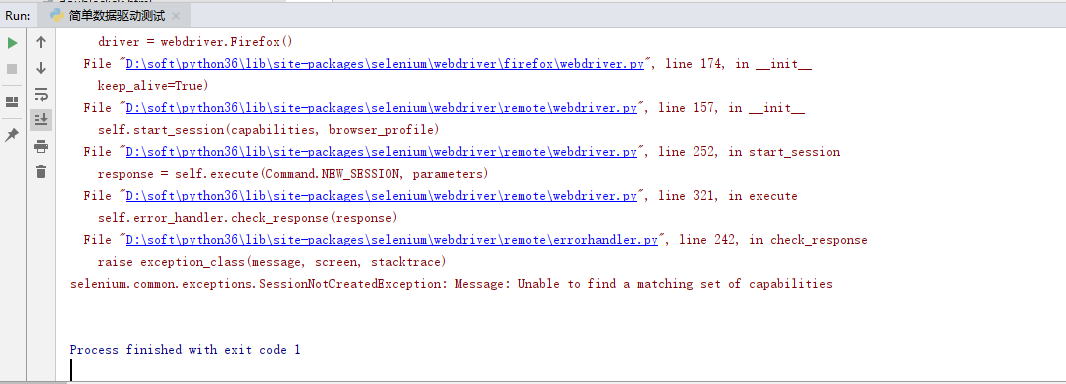
原因:firefox浏览器版本和浏览器驱动版本不匹配
解决办法:卸载高版本浏览器,安装低版本浏览器
下载地址:http://ftp.mozilla.org/pub/firefox/releases/
比如http://ftp.mozilla.org/pub/firefox/releases/58.0/win64/zh-CN/
58.0指版本,win64指64位,zh-CN指简体中文
目前我能成功的环境为:
驱动:geckodriver-v0.24.0-win64.zip 浏览器:v58.0
“selenium.common.exceptions.SessionNotCreatedException: Message: Unable to find a matching set of capabilities“解决办法的更多相关文章
- 错误:selenium.common.exceptions.SessionNotCreatedException: Message: Unable to find a matching set of capabilities
错误再现 原因:firefox浏览器版本和浏览器驱动版本不匹配 解决办法:卸载高版本浏览器,安装低版本浏览器
- python无法启动火狐浏览器且报错“selenium.common.exceptions.WebDriverException: Message: Unable to find a matching set of capabilities”
安装了python2,使用pip安装了selenium,但是在使用时,报了“selenium.common.exceptions.WebDriverException: Message: 'gecko ...
- 运行selenium脚本,报seleneium common exception.SessionNotCreatedException:Message:Unable to find a matching set of capabilities错误
- 如何解决错误【selenium.common.exceptions.SessionNotCreatedException】
如何解决错误[selenium.common.exceptions.SessionNotCreatedException] [问题起因] 2018年12月26日晚,启动我的pycharm准备学习s ...
- selenium使用报错“selenium.common.exceptions.WebDriverException: Message: 'geckodriver' executable needs to be in PATH.”
安装了python3,使用pip安装了selenium,但是在使用时,报了“selenium.common.exceptions.WebDriverException: Message: 'gecko ...
- 更新浏览器,导致编写脚本报错Message: Unable to find a matching set of capabilities
卸载更新浏览器后,所编写的脚本无法运行,报如下的错误:selenium.common.exceptions.WebDriverException: Message: Unable to find a ...
- python2.7运行selenium webdriver api报错Unable to find a matching set of capabilities
在火狐浏览器33版本,python2.7运行selenium webdriver api报错:SessionNotCreatedException: Message: Unable to find a ...
- selenium.common.exceptions.TimeoutException: Message: Screenshot: available via screen
在使用selenium+phantomjs的时候在Windows平台下能够正常工作,在Linux下却不能,并得到错误信息: selenium.common.exceptions.TimeoutExce ...
- selenium使用遇到的问题(selenium.common.exceptions.WebDriverException: Message: 'chromedriver' executable needs to be in PATH.)
1.安装pip3 install selenium 2.使用browser=webdriver.Chrome()时报错 :selenium.common.exceptions.WebDriverExc ...
随机推荐
- Sublime Text 3 中实现编译C语言程序
这个是真坑,感觉用devc++写c程序特别的不爽,所以就用了sublime,但是,编译的时候又有不少问题, 下面就把我踩的坑记录下来 tools>Build System>New Buil ...
- 译 .NET Core 3.0 发布
原文:<Announcing .NET Core 3.0> 宣布.NET Core 3.0 发布 很高兴宣布.NET Core 3.0的发布.它包括许多改进,包括添加Windows窗体和W ...
- 【pymongo.errors】Cursor not found
pymongo.errors.CursorNotFound: Cursor not found 故事背景:先从数据库中取得所有数据 db['test'].find(),然后对结果进行for循环,但是当 ...
- 【linux】【FastDFS】FastDFS安装
前言 FastDFS是一个开源的轻量级分布式文件系统,由跟踪服务器(tracker server).存储服务器(storage server)和客户端(client)三个部分组成,主要解决了海量数据存 ...
- scrapy框架来爬取壁纸网站并将图片下载到本地文件中
首先需要确定要爬取的内容,所以第一步就应该是要确定要爬的字段: 首先去items中确定要爬的内容 class MeizhuoItem(scrapy.Item): # define the fields ...
- Vagrant定制个性化CentOS7虚拟机模板
关于虚拟机模板 想用vagrant搭建hadoop集群,要完成以下准备工作: 三个虚拟机实例操作系统都是CentOS7的server版: 每个实例都要安装同样的应用.关闭防火墙.关闭swap等: 今天 ...
- Jetpack系列:应用内导航的正确使用方法
今天小编要分享的还是Android Jetpack库的基本使用方法,本篇介绍的内容是Jetpack Navigation组件,让我们一起学习,为完成年初制定的计划而努力吧! *** 组件介绍 导航,是 ...
- 基于 HTML5 WebGL 的垃圾分类系统
前言 垃圾分类,一般是指按一定规定或标准将垃圾分类储存.分类投放和分类搬运,从而转变成公共资源的一系列活动的总称.分类的目的是提高垃圾的资源价值和经济价值,力争物尽其用.垃圾在分类储存阶段属于公众的私 ...
- 使用Ingress来负载分发微服务
目录 使用Ingress来负载分发微服务 Demo规划 准备Demo并完成部署 创建部署(Deployment)资源 创建服务(Service)资源 创建Ingress资源并配置转发规则 ...
- [UWP] 解决FlipView图片放大的诡异bug
想要实现图片的放大缩小可以通过在Image外面套一个ScrollViewer,然后设置ScrollViewer的ZoomMode="Enabled" <FlipView It ...