
Web开发相关笔记 #04# WebSocket
本文的主要内容:
- HTTP VS. WebSocket
- WebSocket 的客户端实现(JavaScript)
- WebSocket 的服务端实现(Java & apache WebSocketAPI)
- WebSocket 深入学习
HTTP VS. WebSocket
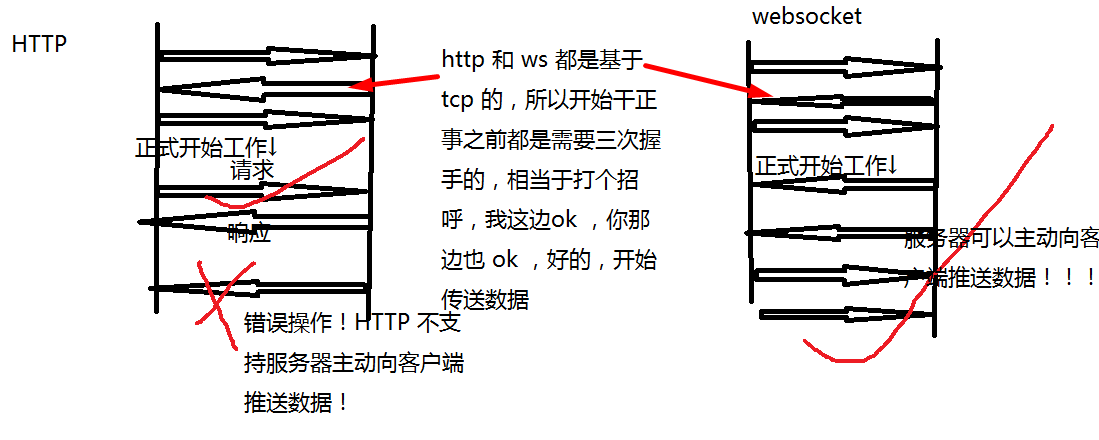
简单来讲, WebSocket 就是一种允许服务端主动向客户端 PUSH 数据的技术。
传统的 HTTP 只能是客户端先主动向服务器发起请求然后获得服务器响应。
WebSocket是HTML5开始提供的一种在单个 TCP 连接上进行全双工通讯的协议。

在WebSocket API中,浏览器和服务器只需要做一个握手的动作,然后,浏览器和服务器之间就形成了一条快速通道。两者之间就直接可以数据互相传送。

浏览器通过 JavaScript 向服务器发出建立 WebSocket 连接的请求,连接建立以后,客户端和服务器端就可以通过 TCP 连接直接交换数据。

当你获取 Web Socket 连接后,你可以通过 send() 方法来向服务器发送数据,并通过 onmessage 事件来接收服务器返回的数据。
上面是网络上对于 websocket 的一段简短介绍。
值得一提的是,有不少人认为 websocket (于2011年被IETF定为标准RFC 6455)是一项可以取代 AJAX (约 1998 年前后得到应用)的技术。
简单的草图(。。自己画的不太极不严谨,例如说ws最开始有个 HTTP 验证漏掉了。。但是可以表达大概意思吧):
然后是我收集的一些关于 websocket 的资料:
1、WebSocket - Wikipedia 比较权威、全面
2、An Introduction to WebSockets - Treehouse Blog 生动的个人博客
3、websocket.org - Powered by Kaazing 以 websocket 为主题的网站!(websocket.org - WebSocket technology, demos, articles, and products.)
4、菜鸟教程之 websocket 赶时间的看这个。
总而言之,websocket 非常强大,应用也非常多,例如说可以用来构建基于浏览器的网页游戏、即时聊天工具之类的。
顺便收藏(主题无关 ~ ):
What's the difference between getRequestURI and getPathInfo methods in HttpServletRequest?
WebSocket 的客户端实现(JavaScript)
客户端代码完全拷贝自上面列出来的资料二:
index.html
<!DOCTYPE html>

<html lang="en">

<head>

    <meta charset="utf-8">

    <title>WebSockets Demo</title>

    <link rel="stylesheet" href="style.css">

</head>

<body>

<div id="page-wrapper">

    <h1>WebSockets Demo</h1>

    <div id="status">Connecting...</div>

    <ul id="messages"></ul>

    <form id="message-form" action="#" method="post">

        <textarea id="message" placeholder="Write your message here..." required></textarea>

        <button type="submit">Send Message</button>

        <button type="button" id="close">Close Connection</button>

    </form>

</div>

<script src="app.js"></script>

</body>

</html>
/
style.css
*, *:before, *:after {

    -moz-box-sizing: border-box;

    -webkit-box-sizing: border-box;

    box-sizing: border-box;

}

html {

    font-family: Helvetica, Arial, sans-serif;

    font-size: 100%;

    background: #333;

}

#page-wrapper {

    width: 650px;

    background: #FFF;

    padding: 1em;

    margin: 1em auto;

    border-top: 5px solid #69c773;

    box-shadow: 0 2px 10px rgba(0,0,0,0.8);

}

h1 {

    margin-top:;

}

#status {

    font-size: 0.9rem;

    margin-bottom: 1rem;

}

.open {

    color: green;

}

.closed {

    color: red;

}

ul {

    list-style: none;

    margin:;

    padding:;

    font-size: 0.95rem;

}

ul li {

    padding: 0.5rem 0.75rem;

    border-bottom: 1px solid #EEE;

}

ul li:first-child {

    border-top: 1px solid #EEE;

}

ul li span {

    display: inline-block;

    width: 90px;

    font-weight: bold;

    color: #999;

    font-size: 0.7rem;

    text-transform: uppercase;

    letter-spacing: 1px;

}

.sent {

    background-color: #F7F7F7;

}

.received {}

#message-form {

    margin-top: 1.5rem;

}

textarea {

    width: 100%;

    padding: 0.5rem;

    font-size: 1rem;

    border: 1px solid #D9D9D9;

    border-radius: 3px;

    box-shadow: inset 0 1px 1px rgba(0, 0, 0, 0.1);

    min-height: 100px;

    margin-bottom: 1rem;

}

button {

    display: inline-block;

    border-radius: 3px;

    border: none;

    font-size: 0.9rem;

    padding: 0.6rem 1em;

    color: white;

    margin: 0 0.25rem;

    text-align: center;

    background: #BABABA;

    border-bottom: 1px solid #999;

}

button[type="submit"] {

    background: #86b32d;

    border-bottom: 1px solid #5d7d1f;

}

button:hover {

    opacity: 0.75;

    cursor: pointer;

}
/
app.js
window.onload = function() {

    // Get references to elements on the page.

    var form = document.getElementById('message-form');

    var messageField = document.getElementById('message');

    var messagesList = document.getElementById('messages');

    var socketStatus = document.getElementById('status');

    var closeBtn = document.getElementById('close');

    // The rest of the code in this tutorial will go here...

    // Create a new WebSocket.

    var socket = new WebSocket('ws://echo.websocket.org');

    // Show a connected message when the WebSocket is opened.

    socket.onopen = function(event) {

        socketStatus.innerHTML = 'Connected to: ' + event.currentTarget.url;

        socketStatus.className = 'open';

    };

    // Handle any errors that occur.

    socket.onerror = function(error) {

        console.log('WebSocket Error: ' + error);

    };

    // Send a message when the form is submitted.

    form.onsubmit = function(e) {

        e.preventDefault();

        // Retrieve the message from the textarea.

        var message = messageField.value;

        // Send the message through the WebSocket.

        socket.send(message);

        // Add the message to the messages list.

        messagesList.innerHTML += '<li class="sent"><span>Sent:</span>' + message +

            '</li>';

        // Clear out the message field.

        messageField.value = '';

        return false;

    };

    // Handle messages sent by the server.

    socket.onmessage = function(event) {

        var message = event.data;

        messagesList.innerHTML += '<li class="received"><span>Received:</span>' +

            message + '</li>';

    };

    // Show a disconnected message when the WebSocket is closed.

    socket.onclose = function(event) {

        socketStatus.innerHTML = 'Disconnected from WebSocket.';

        socketStatus.className = 'closed';

    };

    // Close the WebSocket connection when the close button is clicked.

    closeBtn.onclick = function(e) {

        e.preventDefault();

        // Close the WebSocket.

        socket.close();

        return false;

    };

};
/
直接把 三个文件放在同一个目录下,用浏览器打开 index.html 就可以用了。连接的是代码原作者的 websocket 服务器。
WebSocket 的服务端实现(Java & apache WebSocketAPI)
构建WebSocket 服务器的方式有很多,不过我只会用 tomcat 的 API,代码即是Tomcat 的 websocket example 相比自己写的肯定要规范些。↓

/*

 *  Licensed to the Apache Software Foundation (ASF) under one or more

 *  contributor license agreements.  See the NOTICE file distributed with

 *  this work for additional information regarding copyright ownership.

 *  The ASF licenses this file to You under the Apache License, Version 2.0

 *  (the "License"); you may not use this file except in compliance with

 *  the License.  You may obtain a copy of the License at

 *

 *      http://www.apache.org/licenses/LICENSE-2.0

 *

 *  Unless required by applicable law or agreed to in writing, software

 *  distributed under the License is distributed on an "AS IS" BASIS,

 *  WITHOUT WARRANTIES OR CONDITIONS OF ANY KIND, either express or implied.

 *  See the License for the specific language governing permissions and

 *  limitations under the License.

 */

package org.sample.web;

import java.io.IOException;

import java.util.Set;

import java.util.concurrent.CopyOnWriteArraySet;

import java.util.concurrent.atomic.AtomicInteger;

import javax.websocket.OnClose;

import javax.websocket.OnError;

import javax.websocket.OnMessage;

import javax.websocket.OnOpen;

import javax.websocket.Session;

import javax.websocket.server.ServerEndpoint;

@ServerEndpoint(value = "/websocket")

public class ChatAnnotation {

    private static final String GUEST_PREFIX = "Guest";

    private static final AtomicInteger connectionIds = new AtomicInteger();

    private static final Set<ChatAnnotation> connections =

            new CopyOnWriteArraySet<>();

    private final String nickname;

    private Session session;

    public ChatAnnotation() {

        nickname = GUEST_PREFIX + connectionIds.getAndIncrement();

    }

    @OnOpen

    public void start(Session session) {

        this.session = session;

        connections.add(this);

        String message = String.format("* %s %s", nickname, "has joined.");

        broadcast(message);

    }

    @OnClose

    public void end() {

        connections.remove(this);

        String message = String.format("* %s %s",

                nickname, "has disconnected.");

        broadcast(message);

    }

    @OnMessage

    public void incoming(String message) {

        // Never trust the client

        String filteredMessage = String.format("%s: %s",

                nickname, message.toString());

        broadcast(filteredMessage);

    }

    @OnError

    public void onError(Throwable t) throws Throwable {

    }

    private static void broadcast(String msg) {

        for (ChatAnnotation client : connections) {

            try {

                synchronized (client) {

                    client.session.getBasicRemote().sendText(msg);

                }

            } catch (IOException e) {

                connections.remove(client);

                try {

                    client.session.close();

                } catch (IOException e1) {

                    // Ignore

                }

                String message = String.format("* %s %s",

                        client.nickname, "has been disconnected.");

                broadcast(message);

            }

        }

    }

}
在运行之前需要修改 app.js 中的地址:
    // The rest of the code in this tutorial will go here...

    // Create a new WebSocket.

    var socket = new WebSocket('ws://localhost:8080/websocket');
WebSocket 深入学习
当然,上面仅用到了 WebSocket API 的一个小子集,要想真正用好这些 API 并没那么简单。下面是我找到的一些学习资料(基本上看 URL 就知道什么内容了):
1、https://docs.oracle.com/javaee/7/api/javax/websocket/package-summary.html
2、https://docs.oracle.com/javaee/7/tutorial/websocket.htm
3、http://www.oracle.com/technetwork/articles/java/jsr356-1937161.html
4、https://developer.mozilla.org/en-US/docs/Web/API/WebSockets_API/Writing_a_WebSocket_server_in_Java
5、http://www.oracle.com/webfolder/technetwork/tutorials/obe/java/HomeWebsocket/WebsocketHome.html
6、http://www.baeldung.com/java-websockets
7、https://tomcat.apache.org/tomcat-9.0-doc/websocketapi/index.html
8、https://benas.github.io/2016/02/21/using-the-java-api-for-webSocket-to-create-a-chat-server.html
Web开发相关笔记 #04# WebSocket的更多相关文章
- Web开发相关笔记 #03#
HTTP Status 500 ※ jsp 放在 WEB-INF 外面 ※ 使用 JDBC 时需要 close 什么 ※ execute 和 executeUpdate ※ How can I ...
- Web开发相关笔记 #01#
前端学习纲要 ※jQuery 参考 ※ 整理 Chrome 收藏夹的小技巧 ※ 解决 AJAX 跨域获取 cookie ※ 记一次 MyBatis 相关的 debug [1] 前端学习纲要: ♦ 第一 ...
- Web开发相关笔记 #05# MySQL中文无法匹配
2018-06-02 在 Class.forName 的时候记得先尝试 import 一下. 2018-06-04 1.JDBC SELECT 查询,中文条件查不出东西,可能是字符编码问题: Stri ...
- Web开发相关笔记 #02#
[1] HTML 插入第三方. [2] [3] JavaScript 回调函数 & 模块化 --> 用变量封装数据.方法 --> 类比 Java 中的 package var fe ...
- Web开发相关笔记
1.MySQL命令行下执行.sql脚本详解http://database.51cto.com/art/201107/277687.htm 在可视化工具里导出.sql脚本 --> 放命令行里运行 ...
- 【前端】移动端Web开发学习笔记【2】 & flex布局
上一篇:移动端Web开发学习笔记[1] meta标签 width设置的是layout viewport 的宽度 initial-scale=1.0 自带 width=device-width 最佳实践 ...
- 【前端】移动端Web开发学习笔记【1】
下一篇:移动端Web开发学习笔记[2] Part 1: 两篇重要的博客 有两篇翻译过来的博客值得一看: 两个viewport的故事(第一部分) 两个viewport的故事(第二部分) 这两篇博客探讨了 ...
- ASP.NET Core Web开发学习笔记-1介绍篇
ASP.NET Core Web开发学习笔记-1介绍篇 给大家说声报歉,从2012年个人情感破裂的那一天,本人的51CTO,CnBlogs,Csdn,QQ,Weboo就再也没有更新过.踏实的生活(曾辞 ...
- Django Web开发指南笔记
Django Web开发指南笔记 语句VS表达式 python代码由表达式和语句组成,由解释器负责执行. 主要区别:表达式是一个值,它的结果一定是一个python对象:如:12,1+2,int('12 ...
随机推荐
- GlusterFS 配置及使用
GlusterFS集群创建 一.简介 GlusterFS概述 Glusterfs是一个开源的分布式文件系统,是Scale存储的核心,能够处理千数量级的客户端.在传统的解决 方案中Glusterfs能够 ...
- js贪心算法---钱币找零问题
function MinCoinChange(coins){ var coins = coins.sort(function(a,b){ return b - a; }); this.makeChan ...
- NodeJs--HTTP源码分析
在github上按下按键t,就可以呼出仓库搜索的面板(在大型项目中方便检索文件),检索出http.js文件检索出来,通过ctrl+F来搜索某个方法. _http_outgoing 带下划线的是私有模块 ...
- Node.JS 项目打包 JXCore
哈哈,又回来了 当你开发完成了Node.JS项目,你应该需要打包发行吧 好,JXCore就是干这个的啦! 嗯,可能你会这样来安装 1. curl http://jxcore.com/xil.sh | ...
- cocos2dx 3.13 在Mac平台下配置安卓环境变量
终端下输入:vi .bash_profile 编辑环境变量: export COCOS_CONSOLE_ROOT=/Users/jiazedong/Cocos2d-x/cocos2d-x-3.2/co ...
- sqli-labs(三)
第五关:这关的重点是有联合查询的注入漏洞,但是页面不会显示查询信息,但是会有报错信息显示在页面上 这关是双查询注入,其实用报错注入和盲注都是可以注入的,但是我觉得这个双查询注入还是很有意思的,所以这关 ...
- Hibernate.基础篇《二》. getOpenSession() 和 getCurrentSession() - 1
Hibernate.基础篇<二>. getOpenSession() 和 getCurrentSession() - 1 说明: 在Hibernate应用中,Session接口的使用最为广 ...
- python--教你做个最简单的tcp通信。。
TCP协议:建立在IP协议之上的,TCP协议,传输控制协议(英语:Transmission Control Protocol,缩写为 TCP)是一种面向连接的.可靠的.基于字节流的传输层通信协议,由I ...
- javaweb + tomcat + 部署 + 域名绑定 + 默认首页
①:把javaweb项目打包成war(不会的自行百度) ②:把war拷贝到服务器的tomcat里面的webapps下 ③:到bin文件夹下.bat文件启动tomcat,启动后会解压war包 ⑤:解压后 ...
- activiti_change_ok
package com.xinwei.process.controller; import java.util.Calendar; import java.util.HashMap; import j ...