
c# datagridview绑定数据源(BindingList<class>)中的现象 待查
现象1:
using System;

using System.Collections.Generic;

using System.ComponentModel;

using System.Data;

using System.Drawing;

using System.Linq;

using System.Text;

using System.Threading.Tasks;

using System.Windows.Forms;

namespace datagridview

{

    public partial class Form1 : Form

    {

        public Int32 count = 0;

        public string str = "test!";

        BindingList<Item> items = new BindingList<Item>();

        public Form1()

        {

            InitializeComponent();

            //禁止自动创建列

            this.dataGridView1.AutoGenerateColumns = false;

            //将左边的一栏去掉

            this.dataGridView1.RowHeadersVisible = false;

            //允许用户交换列

            this.dataGridView1.AllowUserToOrderColumns = true;

            this.dataGridView1.DataSource = items;

            //创建“序号”列

            DataGridViewTextBoxColumn serial = new DataGridViewTextBoxColumn();

            serial.HeaderText = "序号";

            serial.DataPropertyName = "Serial";

            this.dataGridView1.Columns.Add(serial);

            //创建“文本”列

            DataGridViewTextBoxColumn text = new DataGridViewTextBoxColumn();

            text.HeaderText = "文本";

            text.DataPropertyName = "Text";

            this.dataGridView1.Columns.Add(text);

        }

        private void button1_Click(object sender, EventArgs e)

        {

        }

        private void button2_Click(object sender, EventArgs e)

        {

            items.Add(new Item(str, count++));

            //items.Add(new Item(0) { Text = str, Serial = count++ });

            //有时候使用DataGridView难免会在最后插入一条数据,如果插入的数据超过滚动条显示的行数,

            //那么默认情况下不会显示到最后一行。增加以下代码一直将滚动条拉倒最低。

            this.dataGridView1.FirstDisplayedScrollingRowIndex = this.dataGridView1.Rows.Count - 1;

        }

    }

    class Item

    {

        private string _text;

        private int _serial;

        public string Text

        {

            get { return _text; }

        }

        public int Serial

        {

            get { return _serial; }

        }

        public Item(string text, int serial)

        {

            this._text = text;

            this._serial = serial;

        }

        //public string Text { get; set; }

        //public int Serial { get; set; }

        //public Item(int serial)

        //{

        //    int a = 0;

        //}

    }

}
运行结果:
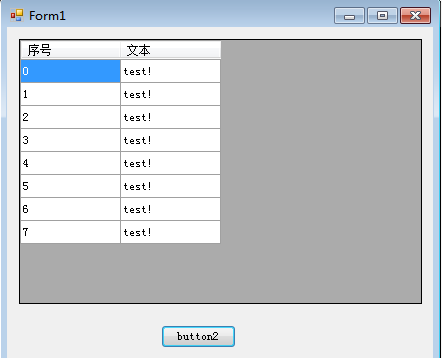
当在Item类中增加默认构造函数后:
    class Item

    {

        private string _text;

        private int _serial;

        public string Text

        {

            get { return _text; }

        }

        public int Serial

        {

            get { return _serial; }

        }

        public Item(string text, int serial)

        {

            this._text = text;

            this._serial = serial;

        }

        public Item()

        {

            int a = 0;

        }
运行结果:
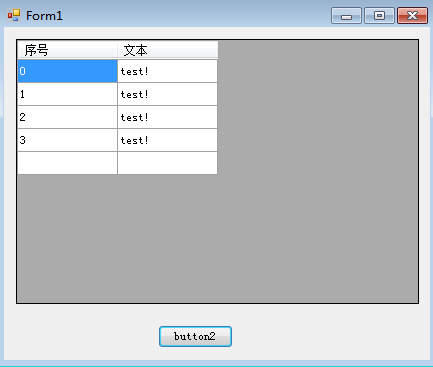
显示最后一栏空白,原因未知待查!
c# datagridview绑定数据源(BindingList<class>)中的现象 待查的更多相关文章
- C# DataGridView绑定数据源的几种常见方式
开始以前,先认识一下WinForm控件数据绑定的两种形式,简单数据绑定和复杂数据绑定. 1. 简单的数据绑定 例1 using (SqlConnection conn = new SqlConnect ...
- DataGridView绑定数据源
给DataGridView绑定数据源比較简单,方法主要有两种: 1.直接在控件属性中绑定数据源,这样的方法最简单,但它是直接连接数据库的,这样就和传DataTable的后果差点儿相同了,所以还是尽量避 ...
- DataGridView绑定数据源的几种方式
使用DataGridView控件,可以显示和编辑来自多种不同类型的数据源的表格数据. 将数据绑定到DataGridView控件非常简单和直观,在大多数情况下,只需设置DataSource属性即可.在绑 ...
- 章鱼哥出品—VB.NET DataGridView绑定数据源 "与货币管理器的位置关联的行不能设置为不可见" 问题的解决
DtaGridView绑定数据源后.假设想让数据条件显示的话,直接使用 My_Row.Visible = False就会出错.错误类型是 "与货币管理器的位置关联的行不能设置为不可见&qu ...
- DataGridView绑定数据源后添加行
本文链接:https://blog.csdn.net/u012386475/article/details/88639799 在已经绑定数据源时,无法以Add的方式方式添加行,会报错 解决方法一: D ...
- 【转】DataGridView绑定数据源的几种方式
第一种:DataSet ds=new DataSet (); this.dataGridView1.DataSource=ds.Table[0]; 第二种:DataTable dt=new DataT ...
- C# 关于DataGridView 绑定数据源时列名窜位置 的处理
只需要写一句话:dataGridView1.AutoGenerateColumns = false; 代码提示中的解释:获取或设置一个值,该值指示在设置System.Windows.Forms.Dat ...
- C# DataGridView绑定数据源
第一种: DataSet ds=new DataSet (); ]; 第二种: DataTable dt=new DataTable(); this.dataGridView1.DataSource= ...
- winfrom中DataGridView绑定数据控件中DataGridViewCheckBoxColumn怎么选中
; i < this.dataGridView1.Rows.Count; i++) { this.dataGridView1.Rows[i].Cells["CheckBoxCulums ...
随机推荐
- 【题解】Luogu CF86D Powerful array
原题传送门 裸的莫队啊,我博客里有对莫队较详细的介绍 这道题很简单,可以说是裸的模板 但是如何在已有的值上进行操作? 小学生应该都知道 那么转移就超级简单了qaq inline void add(re ...
- python,pycharm安装
下载python地址:https://www.python.org/downloads/release/python-371/ 安装python ***python安装目录下的scripts加入环境变 ...
- noip模拟题 2017.10.28 -kmp -Tarjan -鬼畜的优化
题目大意 给定A串,选择A串的前lB个字符作为B串,再在B串后增加一个字符,问最长的相等的A串前缀和B串的后缀. Solution 1(KMP) 用1个奇怪的字符连接A串和B串,再用KMP求最长公共前 ...
- c++map用法
#include<iostream> #include<algorithm> #include<map> using namespace std; void fun ...
- A>B等CSS选择器
这些是CSS3特有的选择器,A>B 表示选择A元素的所有子B元素.与A B的区别在于,A B选择所有后代元素,而A>B只选择一代.另外:没有<的用法. A+B表示HTML中紧随A的B ...
- iis6-0 cve-2017-7269 批量验证脚本
代码地址 import subprocess f = open('ips.txt', 'r') flines = f.readlines() vulnsrvs = 0 i = 1 for line i ...
- SQL中的字母的大小写转换
http://blog.csdn.net/dxb601/article/details/52086830 update 表名 set 字段名a= Lower(字段a) 2.将小写字母转化成大写字母 ...
- 题解——P1108低价购买(DP)
第一问是最长下降子序列,n很小,n^2可过,注意最长下降子序列的枚举顺序即可 ;i<=n;i++)//不要写错 ;j<i;j++)//不要打成<= ) b[i]=b[j]+; 第二问 ...
- 【转载】ASP.NET页面之间传值的方式之QueryString(个人整理)
转自: https://www.cnblogs.com/kudsu/p/7694637.html QueryString Querystring也叫查询字符串,这种页面间传递数据是利用网页地址URL. ...
- Termux 一款安卓终端模拟器
Termux官网 https://termux.com/ 用处 提供了一个类似于Linux终端的界面,可以使用apt安装程序.目前我在上面跑了我以前写的一些爬虫脚本,运行完全没有问题. 玩法 玩法还是 ...