
c# datagridview绑定数据源(BindingList<class>)中的现象 待查
现象1:
using System;

using System.Collections.Generic;

using System.ComponentModel;

using System.Data;

using System.Drawing;

using System.Linq;

using System.Text;

using System.Threading.Tasks;

using System.Windows.Forms;

namespace datagridview

{

    public partial class Form1 : Form

    {

        public Int32 count = 0;

        public string str = "test!";

        BindingList<Item> items = new BindingList<Item>();

        public Form1()

        {

            InitializeComponent();

            //禁止自动创建列

            this.dataGridView1.AutoGenerateColumns = false;

            //将左边的一栏去掉

            this.dataGridView1.RowHeadersVisible = false;

            //允许用户交换列

            this.dataGridView1.AllowUserToOrderColumns = true;

            this.dataGridView1.DataSource = items;

            //创建“序号”列

            DataGridViewTextBoxColumn serial = new DataGridViewTextBoxColumn();

            serial.HeaderText = "序号";

            serial.DataPropertyName = "Serial";

            this.dataGridView1.Columns.Add(serial);

            //创建“文本”列

            DataGridViewTextBoxColumn text = new DataGridViewTextBoxColumn();

            text.HeaderText = "文本";

            text.DataPropertyName = "Text";

            this.dataGridView1.Columns.Add(text);

        }

        private void button1_Click(object sender, EventArgs e)

        {

        }

        private void button2_Click(object sender, EventArgs e)

        {

            items.Add(new Item(str, count++));

            //items.Add(new Item(0) { Text = str, Serial = count++ });

            //有时候使用DataGridView难免会在最后插入一条数据,如果插入的数据超过滚动条显示的行数,

            //那么默认情况下不会显示到最后一行。增加以下代码一直将滚动条拉倒最低。

            this.dataGridView1.FirstDisplayedScrollingRowIndex = this.dataGridView1.Rows.Count - 1;

        }

    }

    class Item

    {

        private string _text;

        private int _serial;

        public string Text

        {

            get { return _text; }

        }

        public int Serial

        {

            get { return _serial; }

        }

        public Item(string text, int serial)

        {

            this._text = text;

            this._serial = serial;

        }

        //public string Text { get; set; }

        //public int Serial { get; set; }

        //public Item(int serial)

        //{

        //    int a = 0;

        //}

    }

}
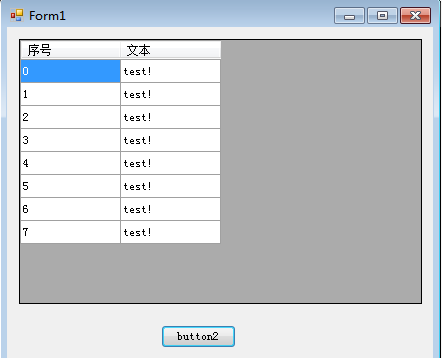
运行结果:
当在Item类中增加默认构造函数后:
    class Item

    {

        private string _text;

        private int _serial;

        public string Text

        {

            get { return _text; }

        }

        public int Serial

        {

            get { return _serial; }

        }

        public Item(string text, int serial)

        {

            this._text = text;

            this._serial = serial;

        }

        public Item()

        {

            int a = 0;

        }
运行结果:
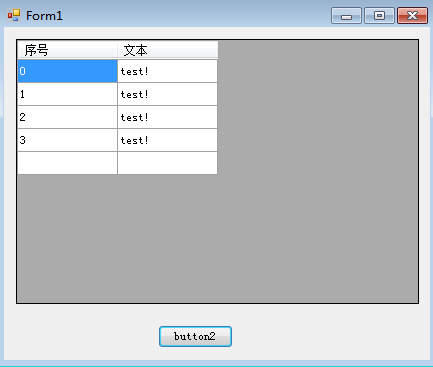
显示最后一栏空白,原因未知待查!
c# datagridview绑定数据源(BindingList<class>)中的现象 待查的更多相关文章
- C# DataGridView绑定数据源的几种常见方式
开始以前,先认识一下WinForm控件数据绑定的两种形式,简单数据绑定和复杂数据绑定. 1. 简单的数据绑定 例1 using (SqlConnection conn = new SqlConnect ...
- DataGridView绑定数据源
给DataGridView绑定数据源比較简单,方法主要有两种: 1.直接在控件属性中绑定数据源,这样的方法最简单,但它是直接连接数据库的,这样就和传DataTable的后果差点儿相同了,所以还是尽量避 ...
- DataGridView绑定数据源的几种方式
使用DataGridView控件,可以显示和编辑来自多种不同类型的数据源的表格数据. 将数据绑定到DataGridView控件非常简单和直观,在大多数情况下,只需设置DataSource属性即可.在绑 ...
- 章鱼哥出品—VB.NET DataGridView绑定数据源 "与货币管理器的位置关联的行不能设置为不可见" 问题的解决
DtaGridView绑定数据源后.假设想让数据条件显示的话,直接使用 My_Row.Visible = False就会出错.错误类型是 "与货币管理器的位置关联的行不能设置为不可见&qu ...
- DataGridView绑定数据源后添加行
本文链接:https://blog.csdn.net/u012386475/article/details/88639799 在已经绑定数据源时,无法以Add的方式方式添加行,会报错 解决方法一: D ...
- 【转】DataGridView绑定数据源的几种方式
第一种:DataSet ds=new DataSet (); this.dataGridView1.DataSource=ds.Table[0]; 第二种:DataTable dt=new DataT ...
- C# 关于DataGridView 绑定数据源时列名窜位置 的处理
只需要写一句话:dataGridView1.AutoGenerateColumns = false; 代码提示中的解释:获取或设置一个值,该值指示在设置System.Windows.Forms.Dat ...
- C# DataGridView绑定数据源
第一种: DataSet ds=new DataSet (); ]; 第二种: DataTable dt=new DataTable(); this.dataGridView1.DataSource= ...
- winfrom中DataGridView绑定数据控件中DataGridViewCheckBoxColumn怎么选中
; i < this.dataGridView1.Rows.Count; i++) { this.dataGridView1.Rows[i].Cells["CheckBoxCulums ...
随机推荐
- left join加上where条件的困惑
eft join的困惑:一旦加上where条件,则显示的结果等于inner join将where 换成 and 用where 是先连接然后再筛选 用and 是先筛选再连接 数据库在通过连接两张或多 ...
- vS+QT生成.pro文件
- Eclipse java项目将普通文件转化为Source文件的操作
前提:该项目中已经将原有的Source folder删除掉. 右键单击普通文件>Build path>Use as Source Folder.
- strerror函数的总结【转】
本文转载自:https://www.cnblogs.com/xrcun/p/3210889.html 定义函数:char * strerror(int errnum); 函数说明:strerror() ...
- 【系列教程1】Gradle入门系列二:第一个Java项目
这篇教程的主要内容是讲解如何用Gradle编译和打包一个简单的Java项目. 该Java项目只有一个需求:我们的构建脚本必须创建一个可执行的Jar文件,换句话说,我们必须能够使用命令java -jar ...
- Java 多线程案例
同步代码块 SynchronizedTest类,用来表示取票功能 package concurency.chapter6; public class SynchronizedTest implemen ...
- dp专题练习
顺便开另外一篇放一些学过的各种dp dp总结:https://www.cnblogs.com/henry-1202/p/9194066.html 开坑先放15道题,后面慢慢补 目标50道题啦~~,目前 ...
- P2473 [SCOI2008]奖励关
思路 n<=15,所以状压 因为求期望,所以采用逆推的思路,设\(f[i][S]\)表示1~i的宝物获得情况是S,i+1~k的期望 状态转移是当k可以取时,\(f[i][S]+=max(f[i+ ...
- P2163 [SHOI2007]园丁的烦恼(cdq分治)
思路 其实是cdq的板子 题目要求询问对于每个给出的xi,yi,xj,yj形如xi<=x<=xj.yi<=y<=yj的x,y对数有多少组 改成四个询问,拆成四个前缀和的形式后就 ...
- shiro 前后端分离 seseeionId 问题
http://www.cnblogs.com/cshhs/p/9269411.html https://www.w3cschool.cn/shiro/rmvk1if1.html http://www. ...