
转:web.xml 配置中classpath: 与classpath*:的区别
原文链接:web.xml 配置中classpath: 与classpath*:的区别
引用自:http://blog.csdn.net/wxwzy738/article/details/16983935
首先 classpath是指 WEB-INF文件夹下的classes目录
classpath 和 classpath* 区别:
classpath:只会到你指定的class路径中查找文件;
classpath*:不仅包含class路径,还包括jar文件中(class路径)进行查找.
举个简单的例子,在我的web.xml中是这么定义的:classpath*:META-INF/spring/application-context.xml
那么在META-INF/spring这个文件夹底下的所有application-context.xml都会被加载到上下文中,这些包括 META-INF/spring文件夹底下的 application-context.xml,META-INF/spring的子文件夹的application-context.xml以及 jar中的application-context.xml。
如果我在web.xml中定义的是:classpath:META-INF/spring/application-context.xml
那么只有META-INF/spring底下的application-context.xml会被加载到上下文中。
项目实践中用的比较多就是在web.xml文件中配置spring监听器,让它读取*.xml文件,加载其中的bean.
举例如下
首先:在ssh框架搭建好之后,在web.xml文件中进行如下配置
<!--系统自动加载文件 -->
这里使用的是classpath*:的形式
<context-param>
<param-name>contextConfigLocation</param-name>
<param-value>classpath*:ssh2-*.xml</param-value>
</context-param>
<!--配置spring的context监听器 -->
<listener>
<listener-class>org.springframework.web.context.ContextLoaderListener
</listener-class>
</listener>
在项目的.classpath文件中有如下的配置
补充:
1.)关于.classpath文件的查看可以去项目存放的位置(workplace)下查看,也可以在eclipse中navigator视图中进行查看
2.)navigator视图是在window---->show view----->other------>navigator中可以找到.
<?xml version="1.0" encoding="UTF-8"?>
<classpath>
<!--系统默认的class文件加载路径,不能够删除-->
<classpathentry kind="src" path="src"/>
<!--自己新添加的class文件加载路径-->
<!--<classpathentry kind="src" path="config"/>-->
这里可以添加classpath的路径,例如我的配置文件路径时放在了与src同级的目录下,你也可以指定自己的文件存放路径.
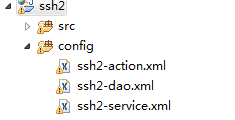
项目启动时候,系统会依据.classpath文件中指定的src的路径依次查找所要加载的配置文件。并加载其中的bean.
转:web.xml 配置中classpath: 与classpath*:的区别的更多相关文章
- web.xml配置参数context-param和init-param的区别
web.xml配置参数context-param和init-param的区别 (2009-04-13 10:29:01) 转载▼ 标签: 杂谈 分类: JavaEE web.xml里面可以定义两种参数 ...
- web.xml 配置中classpath: 与classpath*:的区别
首先 classpath是指 WEB-INF文件夹下的classes目录 解释classes含义: 1.存放各种资源配置文件 eg.init.properties log4j.properties s ...
- web.xml 配置中classpath: 与classpath*:的区别——(十一)
首先 classpath是指 WEB-INF文件夹下的classes目录 解释classes含义: 1.存放各种资源配置文件 eg.init.properties log4j.properties s ...
- web.xml配置中的log4jRefreshInterval讲解
采用spring框架的项目如何使用log4j在spring中使用log4j,有些方便的地方, 1.动态的改变记录级别和策略,即修改log4j.properties,不需要重启web应用,这需要在web ...
- web.xml配置中的log4jRefreshInterval
采用spring框架的项目如何使用log4j在spring中使用log4j,有些方便的地方, 1.动态的改变记录级别和策略,即修改log4j.properties,不需要重启web应用,这需要在web ...
- 关于web.xml配置中的<url-pattern>
标签<url-pattern> <url-pattern>是我们用Servlet做Web项目时需要经常配置的标签,例: <servlet><servlet-n ...
- web.xml配置中的 文件类型<mime-mapping>
<mime-mapping> <extension>doc</extension> <mime-type>application/msword</ ...
- WEB项目web.xml文件中classpath: 跟classpath*:使用的区别
引用一篇很不错的文章:http://blog.csdn.net/wxwzy738/article/details/16983935 首先 classpath是指 WEB-INF文件夹下的classes ...
- ssm框架中,项目启动过程以及web.xml配置详解
原文:https://blog.csdn.net/qq_35571554/article/details/82385838 本篇主要在基于SSM的框架,深入讲解web.xml的配置 web.xml ...
随机推荐
- Approx Analytic Arealight
试着实现的基于分析方法的近似面积光源.
- 11款最轻量级的CSS框架
日子一去不复返了HTML用于造型的网页.今天,CSS规则,很难想象没有它的任何网页设计.CSS在最近非常先进,用于创建复杂的Web设计和风格.那么,我们为什么要使用CSS框架?答案很简单.CSS框架主 ...
- 10个对Web开发者最有用的Python包
Python最近成为了开发人员最喜欢的语言之一.无论你是专业的,业余的,还是一个初学者,你都可以从Python语言及其程序包中受益.Python已经被证明是当今最具活力的面向对象的编程语言之一.这就是 ...
- 比Screen更好用的神器:tmux
安装并启动 tmux tmux 应用程序的名称来源于终端(terminal)复用器(muxer)或多路复用器(multiplexer).换句话说,它可以将您的单终端会话分成多个会话. 它管理窗口和窗格 ...
- MT7601 WG209模块驱动移植,并连接路由器
驱动位置: https://github.com/Aplexchenfl/WG209_MT7601 下载之后,查看 Makefile 在这里,我修改了 kernel的位置以及编译器的版本 执行 mak ...
- BitSet的用法
1,BitSet类 大小可动态改变, 取值为true或false的位集合.用于表示一组布尔标志. 此类实现了一个按需增长的位向量.位 set 的每个组件都有一个 boolean 值.用非负的整数 ...
- Python中的get和set方法
众所周知,像Java,C++这些语言中都有private这种修饰符,一般声明类的时候,我们都用private声明一个属性,然后给它写一个get方法和一个set方法,可能有人有疑问,为啥不直接写成pub ...
- opencv 无法使用 dll 动态链接库 UnsatisfiedLinkError java.library.path Can't find dependent libraries
System.loadLibrary(Core.NATIVE_LIBRARY_NAME) 使用如上方法加载本地 dll文件. 一般会出现两种错误: 1. UnsatisfiedLinkError ja ...
- Linux+树莓派3开发总结——树莓派远程文件共享winows
http://blog.csdn.net/xqf1528399071/article/details/52192134 ———————————————————————————————————————— ...
- Go语言实践_实现一(客户端)对一(服务器端)聊天室
一.目的 使用Go语言实现一个服务器端与客户端的聊天室. 软件:Goland,Go1.9 代码仓库地址 二.思路 1,首先启动服务器端,使用listen_socket函数监听IP地址上的客户端连接: ...