
步步为营-66-Socket通信
1.0 版本
1.1 服务器端
using System;

using System.Collections.Generic;

using System.Linq;

using System.Net;

using System.Net.Sockets;

using System.Text;

using System.Threading.Tasks;

namespace Server_1._0

{

    class Program

    {

        static void Main(string[] args)

        {

            //01 创建对象 关键字new

            Socket stk = new Socket(AddressFamily.InterNetwork,//设置IP地址的类型 为ip4

                SocketType.Stream, //设置传输方式 为流式传输

                ProtocolType.Tcp//设置传输协议 为Tcp

            );

            //02 绑定对象 关键字bind()

            stk.Bind(new IPEndPoint(IPAddress.Parse("127.0.0.1"), ));

            //03 监听对象 关键字Listen()

            stk.Listen();

            Console.WriteLine("服务器启动成功!");

            //04 接受客户端 关键字Accept()     {证明Accept会阻塞线程}

            Socket client = stk.Accept();

            Console.WriteLine("服务器接受到客户端请求!");

            //05 接受报文 关键字receive

            //05-01 通过字节流传递  定义一个字节数组    {证明Receive也会阻塞线程}

            byte[] bys = new byte[];

            int len = client.Receive(bys);

            Console.WriteLine("服务器接收到报文");

            //06 显示接收到的字节数组

            string str = Encoding.UTF8.GetString(bys, , len);

            Console.WriteLine(str);

            //07 发送消息 关键字 send

            string mes = "已成功接收到你发的消息:<" + str + ">";

            client.Send(Encoding.UTF8.GetBytes(mes));

            Console.ReadKey();

        }

    }

}
Server
1.2 客户端
using System;

using System.Collections.Generic;

using System.Linq;

using System.Net;

using System.Net.Sockets;

using System.Text;

using System.Threading.Tasks;

namespace Client_1._0

{

    class Program

    {

        static void Main(string[] args)

        {

            //01 创建socket 关键字new

            Socket client = new Socket(AddressFamily.InterNetwork, SocketType.Stream, ProtocolType.Tcp);

            //02 创建连接 关键字connect

            client.Connect(IPAddress.Parse("127.0.0.1"),);

            Console.WriteLine("与服务器创建连接");

            //03 发送消息 关键字Send

            //03-01 定义字节数组

            byte[] bys = new byte[];

            if (Console.ReadLine() == "")

            {

                bys = Encoding.UTF8.GetBytes("逍遥小天狼");

                client.Send(bys);

                Console.WriteLine("向服务器发送消息!");

            }

           //04 接受消息

            //int len = 0;

            //while ((len = client.Receive(bys))>0)

            //{

            //    string s2 = Encoding.UTF8.GetString(bys, 0, len);

            //    Console.Write(s2);

            //}

            byte [] by = new byte[];

            int len = client.Receive(by);

            Console.WriteLine(Encoding.UTF8.GetString(by,,len));

            Console.ReadKey();

        }

    }

}
Client

2.0 版本
2.1 服务器
using System;

using System.Collections.Generic;

using System.Linq;

using System.Net;

using System.Net.Sockets;

using System.Runtime.Remoting.Contexts;

using System.Text;

using System.Threading;

using System.Threading.Tasks;

namespace Server_1._0

{

    class Program

    {

        static void Main(string[] args)

        {

            //01 创建对象 关键字new

            Socket stk = new Socket(AddressFamily.InterNetwork,//设置IP地址的类型 为ip4

                SocketType.Stream, //设置传输方式 为流式传输

                ProtocolType.Tcp//设置传输协议 为Tcp

            );

            //02 绑定对象 关键字bind()

            stk.Bind(new IPEndPoint(IPAddress.Parse("127.0.0.1"), ));

            //03 监听对象 关键字Listen()

            stk.Listen();

            Console.WriteLine("服务器启动成功!");

            #region 旧的代码

            ////04 接受客户端 关键字Accept()     {证明Accept会阻塞线程}

            //Socket client = stk.Accept();

            //Console.WriteLine("服务器接受到客户端请求!");

            ////05 接受报文 关键字receive

            ////05-01 通过字节流传递  定义一个字节数组    {证明Receive也会阻塞线程}

            //byte[] bys = new byte[1024];

            //int len = client.Receive(bys);

            //Console.WriteLine("服务器接收到报文");

            ////06 显示接收到的字节数组

            //string str = Encoding.UTF8.GetString(bys, 0, len);

            //Console.WriteLine(str);

            #endregion

            #region 新的代码 -- 通过 线程解决阻塞问题

            Thread thClient = new Thread((s) =>

            {

                while (true)

                {

                    //04 接受客户端 关键字Accept

                    Socket server = s as Socket;

                    Socket client = server.Accept();

                    //04-01 输出具体连接的客户端

                    Console.WriteLine("---客户端" + client.RemoteEndPoint + "连接");

                    //05 获取报文

                    Thread thReceive = new Thread((c) =>

                    {

                        Socket cClient = c as Socket;

                        byte[] bs = new byte[];

                        int len;

                        while ((len = cClient.Receive(bs)) > )

                        {

                            Console.WriteLine(Encoding.UTF8.GetString(bs, , len));

                        }

                    });

                    thReceive.IsBackground = true;

                    thReceive.Start(client);

                }

            });

            thClient.IsBackground = true;

            thClient.Start(stk);

            #endregion

            //07 发送消息 关键字 send

            //string mes = "已成功接收到你发的消息:<" + str + ">";

           // client.Send(Encoding.UTF8.GetBytes(mes));

            Console.ReadKey();

        }

    }

}
2.2 客户端
using System;

using System.Collections.Generic;

using System.Linq;

using System.Net;

using System.Net.Sockets;

using System.Text;

using System.Threading.Tasks;

namespace Client_1._0

{

    class Program

    {

        static void Main(string[] args)

        {

            //01 创建socket 关键字new

            Socket client = new Socket(AddressFamily.InterNetwork, SocketType.Stream, ProtocolType.Tcp);

            //02 创建连接 关键字connect

            client.Connect(IPAddress.Parse("127.0.0.1"),);

            Console.WriteLine("与服务器创建连接");

            //03 发送消息 关键字Send

            //03-01 定义字节数组

            byte[] bys = new byte[];

            string str = string.Empty;

            while ((str = Console.ReadLine()) != "")

            {

                bys = Encoding.UTF8.GetBytes(str);

                client.Send(bys);

                Console.WriteLine("向服务器发送消息!");

            }

           //04 接受消息

            #region 04-01 接受消息01

            //int len = 0;

            //while ((len = client.Receive(bys))>0)

            //{

            //    string s2 = Encoding.UTF8.GetString(bys, 0, len);

            //    Console.Write(s2);

            //}

            #endregion

            #region 04-02 接受消息2

            //byte[] by = new byte[1024];

            //int len = client.Receive(by);

            //Console.WriteLine(Encoding.UTF8.GetString(by, 0, len));

            #endregion

            Console.ReadKey();

        }

    }

}
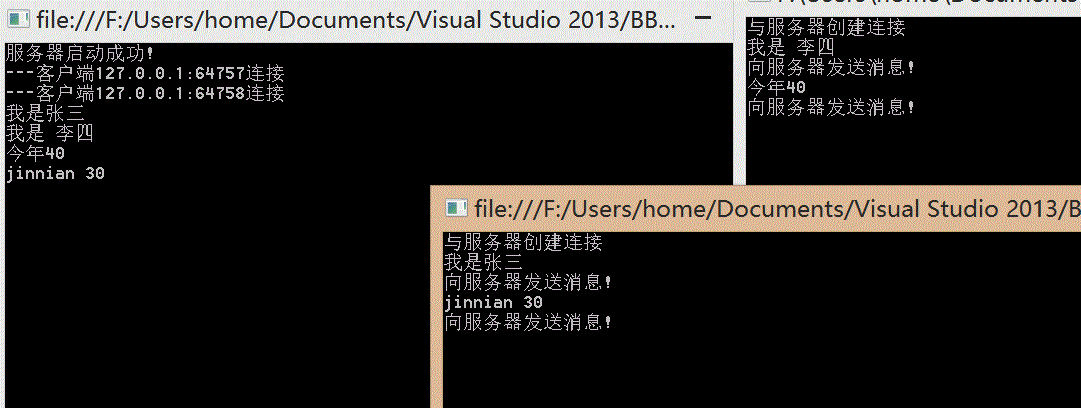
3.0 版本 Winfrom程序
using System;

using System.Collections.Generic;

using System.ComponentModel;

using System.Data;

using System.Drawing;

using System.Linq;

using System.Net;

using System.Net.Sockets;

using System.Text;

using System.Threading;

using System.Threading.Tasks;

using System.Windows.Forms;

namespace Server_Form

{

    public partial class frmServer : Form

    {

        public frmServer()

        {

            InitializeComponent();

        }

        #region 00 客户端字典

        private Dictionary<string,Socket> dicClient = new Dictionary<string, Socket>( );

        #endregion

        #region 01 启动服务器

        private void button1_Click(object sender, EventArgs e)

        {

            //01 创建连接对象

            Socket serverSCK = new Socket(AddressFamily.InterNetwork, SocketType.Stream, ProtocolType.Tcp);

            //02 绑定

            serverSCK.Bind(new IPEndPoint(IPAddress.Parse("127.0.0.1"),));

            //03 监听

            serverSCK.Listen();

            txtMsg.Text = "服务器启动成功!\r\n";

            //04 接受客户端的线程

            Thread thClient = new Thread((server) =>

            {

                Socket serverSocket = server as Socket;

                //05 接受客户端

                while (true)

                {

                    Socket clientSCK = serverSocket.Accept();

                    txtMsg.Invoke(new Action<string> ( (s) =>

                    {

                        //01 提示连接成功

                        txtMsg.Text += s + "连接成功!\r\n";

                        //02 将客户信息显示到列表中

                        clientList.Invoke(new Action<string>((ip) =>

                        {

                            clientList.Items.Add(ip);

                        }),s);

                        //03 将客户端放入到字典中

                        dicClient.Add(s, clientSCK);

                    }),clientSCK.RemoteEndPoint.ToString());

                    //06 接受客户端传来的报文的线程

                    Thread thReceive = new Thread((clientSocket) =>

                    {

                        Socket concentSocket = clientSocket as Socket;

                        byte[] bys = new byte[];

                        int len = ;

                        while ((len = concentSocket.Receive(bys))>)

                        {

                           //处理请求信息

                            txtMsg.Invoke(new Action<string>((s) =>

                            {

                                txtMsg.Text += s + "\r\n";

                            }),concentSocket.RemoteEndPoint.ToString()+":"+Encoding.UTF8.GetString(bys,,len));

                        }

                    });

                    thReceive.IsBackground = true;

                    thReceive.Start(clientSCK);

                }

            });

            thClient.IsBackground = true;

            thClient.Start(serverSCK);

        }

        #endregion

        #region 06 发送消息

        private void btnSend_Click(object sender, EventArgs e)

        {

            //01 获得连接的客户端的字符串

            string clientKey = clientList.SelectedItem.ToString();

            //02 根据字符串获得客户端

            Socket clientSCK = dicClient[clientKey];

            //03 发送消息

            clientSCK.Send(Encoding.UTF8.GetBytes(txtSendMsg.Text));

        }

        #endregion

    }

}
Server
using System;

using System.Collections.Generic;

using System.ComponentModel;

using System.Data;

using System.Drawing;

using System.Linq;

using System.Net;

using System.Net.Sockets;

using System.Text;

using System.Threading;

using System.Threading.Tasks;

using System.Windows.Forms;

namespace Client_Form

{

    public partial class FtmClient : Form

    {

        public FtmClient()

        {

            InitializeComponent();

        }

        #region 00 声明全局变量

        private Socket client;

        #endregion

        #region 01 连接服务器

        private void btnConnect_Click(object sender, EventArgs e)

        {

            //01 创建连接对象

              client = new Socket(AddressFamily.InterNetwork, SocketType.Stream, ProtocolType.Tcp);

            //02 连接

            client.Connect(IPAddress.Parse(txtIP.Text),int.Parse(txtPort.Text));

            txtSendMsg.Text += "与服务器连接成功!\r\n";

            //03 接受响应消息

            Thread thReceive = new Thread((clientSck) =>

            {

                Socket clientRecive = clientSck as Socket;

                byte[] bys = new byte[];

                int len = ;

                while ((len = clientRecive.Receive(bys))>)

                {

                    txtRecMsg.Invoke(new Action<string>(s =>

                    {

                        txtRecMsg.Text += s + "\r\n";

                    }),Encoding.UTF8.GetString(bys,,len));

                }

            });

            thReceive.IsBackground = true;

            thReceive.Start(client);

        }

        #endregion

        #region 02 关闭窗体时清空socket 否则连接会出错

        private void FtmClient_FormClosed(object sender, FormClosedEventArgs e)

        {

            client.Shutdown(SocketShutdown.Both);

            client.Close();

            client.Dispose();

        }

        #endregion

        #region 03 发送消息

        private void btnSend_Click(object sender, EventArgs e)

        {

            //01 判断是否为空

            if (client!= null)

            {

                client.Send(Encoding.UTF8.GetBytes(txtSendMsg.Text));

            }

        }

        #endregion

    }

}
Client

步步为营-66-Socket通信的更多相关文章
- AgileEAS.NET SOA 中间件平台.Net Socket通信框架-介绍
一.前言 AgileEAS.NET SOA 中间件平台是一款基于基于敏捷并行开发思想和Microsoft .Net构件(组件)开发技术而构建的一个快速开发应用平台.用于帮助中小型软件企业建立一条适合市 ...
- iOS开发之Socket通信实战--Request请求数据包编码模块
实际上在iOS很多应用开发中,大部分用的网络通信都是http/https协议,除非有特殊的需求会用到Socket网络协议进行网络数 据传输,这时候在iOS客户端就需要很好的第三方CocoaAsyncS ...
- AgileEAS.NET SOA 中间件平台.Net Socket通信框架-简单例子-实现简单的服务端客户端消息应答
一.AgileEAS.NET SOA中间件Socket/Tcp框架介绍 在文章AgileEAS.NET SOA 中间件平台Socket/Tcp通信框架介绍一文之中我们对AgileEAS.NET SOA ...
- C# socket通信
最近在研究socket,今天看到很好的一篇关于socket通信的文章,故收藏了,慢慢琢磨. 我们在讲解Socket编程前,先看几个和Socket编程紧密相关的概念: 1.TCP/IP层次模型 当然这里 ...
- 深入浅出讲解:php的socket通信
对TCP/IP.UDP.Socket编程这些词你不会很陌生吧?随着网络技术的发展,这些词充斥着我们的耳朵.那么我想问:1. 什么是TCP/IP.UDP?2. Socke ...
- Java和C#的socket通信相关(转)
这几天在博客园上看到好几个写Java和C#的socket通信的帖子.但是都为指出其中关键点. C# socket通信组件有很多,在vs 使用nuget搜索socket组件有很多类似的.本人使用的是自己 ...
- 深入浅出讲解:php的socket通信[转]
对TCP/IP.UDP.Socket编程这些词你不会很陌生吧?随着网络技术的发展,这些词充斥着我们的耳朵.那么我想问: 1. 什么是TCP/IP.UDP?2. Sock ...
- 【转】C# Socket通信编程
https://www.cnblogs.com/dotnet261010/p/6211900.html#undefined 一:什么是SOCKET socket的英文原义是“孔”或“插座”.作为进程通 ...
- PHP的socket通信原理及实现
对TCP/IP.UDP.Socket编程这些词你不会很陌生吧?随着网络技术的发展,这些词充斥着我们的耳朵.那么我想问: 1. 什么是TCP/IP.UDP?2. Sock ...
- 浅出讲解:php的socket通信
原文地址:https://www.cnblogs.com/aipiaoborensheng/p/6708963.html 对TCP/IP.UDP.Socket编程这些词你不会很陌生吧?随着网络技术的发 ...
随机推荐
- loadrunner controller如何执行测试
使用Virtual User Generator编写需要测试的脚本 打开controller,在左侧的available scripts里选择需要测试的脚本添加(Add)到scripts in s ...
- Linux 命令详解(七)Systemd 入门教程:命令篇
Systemd 入门教程:命令篇http://www.ruanyifeng.com/blog/2016/03/systemd-tutorial-commands.html
- delimiter 与 存储过程
1.如此执行语句不行,需要在 delimiter IF not EXISTS ( SELECT * FROM information_schema. COLUMNS WHERE table_schem ...
- aircrack-ng套件学习笔记
Aircrack-ng套件 1.airdecap-ng 该工具主要用于对加密无线数据报文的解码. 1.当无线网络启用了WEP或者WPA-PASK加密,可以使用wireshark过滤,过滤条件为:IEE ...
- Linux 查看文件编码
查看某个文件的编码格式:使用 vi 编辑器 打开文件: 按 Esc 输入 ” : set fileencoding “ 就会显示出来 文件的编码格式 : set fileencoding
- JavaScript之this,call,apply
this:被调用的上下文对象: apply与call:切换被调用的上下文对象,即 调用时,this被临时性地切换 //demo 1 [call] function forEach(list,callb ...
- JavaScript之加载表格、表单行数据[插件]
/*** * name:加载表格或表单数据[通用] * name:load-table-or-form-data-common.js * * author:zengtai * date:2017-07 ...
- BackBone结合ASP.NET MVC实现页面路由操作
1. 问题的背景 什么是页面路由操作,就是通过浏览器地址栏的标记来实现页面内部的一些操作,这些操作具有异步性和持久性.应用场景主要有页面操作过程中的添加收藏夹的操作.后退操作等过程中能完全恢复界面. ...
- linux 下程序员专用搜索源码用来替代grep的软件ack(后来发现一个更快的: ag), 且有vim插件的
发现一个比ack更快更好用的: https://github.com/ggreer/the_silver_searcher , 使用时命令为ag,它是基于ack的代码二次开发的,所有使用方法基本 ...
- 关于MySQL 8.0的几个重点【转】
转自 关于MySQL .0的几个重点,都在这里 https://mp.weixin.qq.com/s/QUpk9uuS2JTli1GT6HuORA 一.关于MySQL Server的改进 1.1 re ...