
bootstrapValidator常用验证规则总结
bootstrapValidator常用验证规则总结

一 、bootstrapValidator引入

在使用bootstrapValidator前我们需要引入bootstrap和bootstrapValidator对应的js和css文件。

    <link rel="stylesheet" href="css/bootstrap.min.css" />

    <link rel="stylesheet"  th:href="@{bootstarp-validator/bootstrapValidator.css}"/>

    <!-- 1、Jquery组件引用  -->

    <script src="js/jquery-1.10.2.min.js"  th:src="@{/js/jquery-1.10.2.min.js}"></script>

    <!-- 2、bootstrap组件引用  -->

    <script src="js/bootstrap.min.js" th:src="@{/js/bootstrap.min.js}"></script>

    <!-- 3、引入bootstrapValidator的js  -->

    <script type="text/javascript"  th:src="@{bootstarp-validator/bootstrapValidator.js}"></script>

    <script type="text/javascript"  th:src="@{bootstarp-validator/bootstrapValidator-zh_CN.js}"></script>

二、绑定验证的js代码

在表单中,若对某一字段想添加验证规则,默认需要以<div class="form-group"></div>包裹(对应错误提示会根据该class值定位),内部<input class="form-control" />标签必须有name属性值,此值为验证匹配字段。

    <div class="modal-dialog">

    <div class="modal-content">

        <div class="modal-body">

        <form id="form-wizard" enctype="multipart/form-data"

                    name="form-wizard" class="form-horizontal">

            <div class="form-group">

                <label class="control-label col-lg-3" for="username">用户名</label>

                <div class="col-lg-6">

                    <input type="text"  class="form-control" name="username" id="username"                                 placeholder="username">

                </div>

            </div>

            <div class="form-group">

              <label class="control-label col-lg-3">密码</label>

                  <div class="col-lg-6">

                    <input type="password" class="form-control" name="password" />

          </div>

        </div>

          <div class="form-group">

                <label class="control-label col-lg-3" for="remark">备注</label>

                <div class="col-lg-6">

                    <input type="text"  class="form-control" name="remark" placeholder="remark">

                </div>

            </div>

         </form>

         </div>

        <div class="modal-footer">

            <button type="button" class="btn btn-default" data-dismiss="modal">关闭</button>

            <button type="button" class="btn btn-primary" id="saveButton">提交</button>

        </div>

        </div>

    </div>

    $(function() {

      $('#form-wizard').bootstrapValidator({

                excluded: [':disabled', ':hidden', ':not(:visible)'],//默认指定不验证的情况

                message : 'This value is not valid',

                feedbackIcons : {

                    valid : 'glyphicon glyphicon-ok',

                    invalid : 'glyphicon glyphicon-remove',

                    validating : 'glyphicon glyphicon-refresh'

                },

                fields : {

                     username: {  /*键名username和input name值对应*/

                        message: '用户名不能为空',

                        validators: {

                            notEmpty: { /*非空提示*/

                                message: '用户名必填不能为空'

                            },

                            stringLength: { /*长度提示*/

                                min: 6,

                                max: 30,

                                message: '用户名长度不能小于6位或超过30位'

                            },

                            regexp: { /*正则校验*/

                                regexp: /^[a-zA-Z0-9_\.]+$/,

                                message: '用户名只能由字母、数字、点和下划线组成。'

                            },

                        }

                    },

                   password: {

                      message:'密码无效',

                          validators: {

                            notEmpty: {

                                  message: '密码不能为空'

                                    },

                            stringLength: {

                                  min: 6,

                                 max: 30,

                              message: '密码长度必须在6到30之间'

                                }

                              }

                       },

                    remark : {

                        validators : {

                            notEmpty : {

                                message : '备注必填'

                            },

                         stringLength : {

                            min : 2,

                            max : 200,

                            message : '备注长度必须2-200字符'

                        }

                        }

                    },

                }

            });

      //提交按钮,所有验证通过方可提交

            $("#saveButton").click(

                    function() {

                                var flag = $('#form-wizard').bootstrapValidator(

                                        'validate').data('bootstrapValidator').isValid();

                                if (flag) {

                                    alert("校验通过");

                                }

                    });

    });

bootstrapValidator默认配置对于“隐藏域(:hidden)、禁用域(:disabled)、不可见域(:not (visible))”是不进行验证的。通过excluded: [':disabled']配置,表示只对于禁用域不进行验证,其他的表单元素都要验证 。

三.在validators中一些验证规则的总结

1.判断字段是否为空

     notEmpty: {

              message: '用户名必填不能为空'

                },

2.字段长度判断

    stringLength: {

              min: 6,

              max: 30,

              message: '长度不能小于6位或超过30位'

              },

3.通过正则表达式进行验证

    regexp: {

              regexp: /^[A-Z\s]+$/i,

              message: '只能由字母字符和空格组成。'

              },

4.大小写验证

    stringCase: {

              message: '姓氏必须只包含大写字符。',

              case: 'upper'//其他值或不填表示只能小写字符

                },

5.两个字段不相同的判断

    different: {

              field: 'password',

              message: '用户名和密码不能相同。'

            },

6.email验证

    emailAddress: {

             message: 'The input is not a valid email address'

           },

7.日期格式验证

    date: {

             format: 'YYYY/MM/DD',

             message: '日期无效'

           },

8.纯数字验证

     digits: {

             message: '该值只能包含数字。'

           },

9.ajax验证

    threshold :  6 , //有6字符以上才发送ajax请求,(input中输入一个字符,插件会向服务器发送一次,设置限制,6字符以上才开始)

    remote: {//ajax验证。server result:{"valid",true or false} 向服务发送当前input name值,获得一个json            数据。例表示正确:{"valid",true}

    url: 'exist2.do',//验证地址

    message: '用户已存在',//提示消息

    delay :  2000,//每输入一个字符,就发ajax请求,服务器压力还是太大,设置2秒发送一次ajax(默认输入一个字                    符,提交一次,服务器压力太大)

    type: 'POST'//请求方式

     },

10.复选框验证

    choice: {

               min: 2,

               max: 4,

               message: '请选择2-4项'

           },

11.密码确认

    identical: {

                 field: 'password',   //指定控件name

                 message: 'The password and its confirm are not the same'

              },

12.判断输入数字是否符合大于等于18并且小于等于65

    greaterThan: {

                    value: 18

                   },

    lessThan: {

                   value: 65

                 }

13.校验文件类型大小

    file: {

          extension: 'zip,doc,docx,pdf,txt',

          maxSize: 1024*5,

          minSize: 1024,

          message: '仅支持大小在1M~5M之间,类型是zip,doc,docx,pdf,txt的文件!'

          //  type: 'type'  支持MIME type

    },

14.callback回调函数验证文件类型大小

    <form id="form-wizard" enctype="multipart/form-data" name="form-wizard" class="form-horizontal">

    <div class="form-group">

            <label for="file" class="control-label col-lg-3">上传文件</label>

                <div class="col-lg-6">

                    <input id="fileuploadeId" type="file" name="file" class="upload" />

                    <input id="fileSizeId" type="hidden" name="fileSize" />

                </div>

        </div>

    </form>

    <script th:inline="javascript">

    $(function() {

        var test = document.getElementById('fileuploadeId');

        test.addEventListener('change', function() {

             var fileSizes=this.files[0].size;

            $('#fileSizeId').val(fileSizes);

         }, false);

    $('#form-wizard').bootstrapValidator(

                {

                    message : 'This value is not valid',

                    feedbackIcons : {

                        valid : 'glyphicon glyphicon-ok',

                        invalid : 'glyphicon glyphicon-remove',

                        validating : 'glyphicon glyphicon-refresh'

                    },

                fields : {

                        file: {  /*键名file和input name值对应*/

                            validators: {

                                notEmpty: {

                                    message: '文件上传为必填'

                                },

                                file: {

                                    extension: 'zip',

                                    message: '请选择zip类型附件'

                                },

                                 callback: {

                                     callback: function(value, validator,$filed) {

         var element = $("#form-wizard").data("bootstrapValidator").getFieldElements('fileSize');

                                         var size = element.val();

                                         if(size>10*1024){  //比较文件大小

                                             return {

                                                    valid: false,

                                                    message: '文件过大,请重新选择'

                                                }

                                             }

                                         return true;

                                     }

                                 }

                             }

                        }

                   }

         });

    </script>

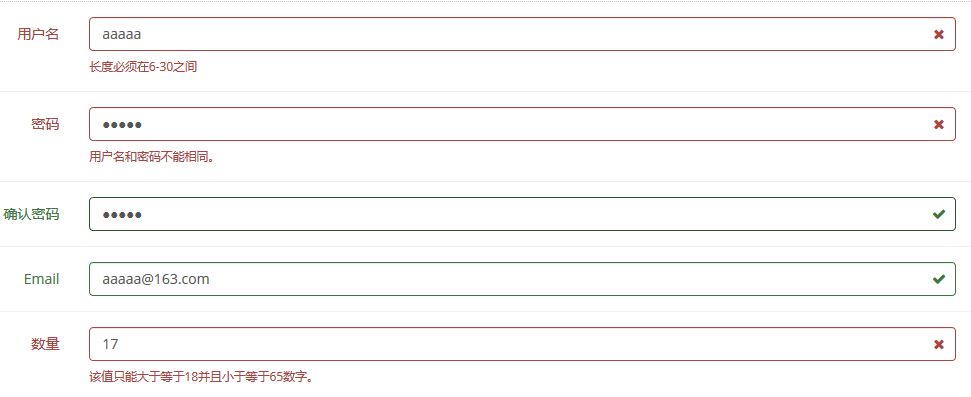
效果展示:  密码:aaaaa   确认密码:aaaaa
15.bootstrap 日期控件起始日期&结束日期相互约束

使用bootstrap的日期控件需要单独引入bootstrap-datetimepicker.min.css和bootstrap-datetimepicker.min.js

    <input size="20" type="text" id="datetimeStart" class="form_datetime" readonly/>

    <input size="20" type="text" id="datetimeEnd" class="form_datetime" readonly/>

    <script type="text/javascript">

        $("#datetimeStart").datetimepicker({

            format: 'yyyy-mm-dd',

            minView:'month',

            language: 'zh-CN',

            autoclose:true,

            startDate:new Date()

        }).on("click",function(){

            $("#datetimeStart").datetimepicker("setEndDate",$("#datetimeEnd").val());

        });

        $("#datetimeEnd").datetimepicker({

            format: 'yyyy-mm-dd',

            minView:'month',

            language: 'zh-CN',

            autoclose:true,

            startDate:new Date()

        }).on("click",function(){

            $("#datetimeEnd").datetimepicker("setStartDate",$("#datetimeStart").val());

        });

    </script>

四、常用事件

1、重置某一单一验证字段验证规则

    $(formName).data("bootstrapValidator").updateStatus("fieldName",  "NOT_VALIDATED",  null);

2、重置表单所有验证规则

    $(formName).data("bootstrapValidator").resetForm();

3、手动触发表单验证

    //触发全部验证

    $(formName).data("bootstrapValidator").validate();

    //触发指定字段的验证

    $(formName).data("bootstrapValidator").validateField('fieldName');

4、获取当前表单验证状态

    // flag = true/false

    var flag = $(formName).data("bootstrapValidator").isValid();

5、根据指定字段名称获取验证对象

    // element = jq对象

    var element = $(formName).data("bootstrapValidator").getFieldElements('fieldName');

五、相关文档和技术网站小结
https://github.com/wenzhixin/bootstrap-table

http://bootstrapvalidator.votintsev.ru/getting-started/

http://bootstrapvalidator.votintsev.ru/api/

http://www.bootcdn.cn/bootstrap-validator/

http://www.bootcss.com/p/bootstrap-datetimepicker/index.htm
bootstrapValidator常用验证规则总结的更多相关文章
- bootstrapvalidator常用验证解析和使用
学这个博主的:https://www.cnblogs.com/wang-kai-xuan/p/11031733.html BootStrapValidator表单验证插件的学习和使用 引入标签 ...
- js正则基础总结和工作中常用验证规则
知识是需要系统的.就像js正则用了那么多次,却还是浑浑噩噩,迫切需要来一次整理,那么来吧! 基本知识 元字符 \d 匹配数字等于[0-9] \w 匹配字母.数字.下划线.中文 \s 匹配任意空白字符 ...
- Yii2.0 rules常用验证规则
设置一个修改方法,但是save(),没有成功,数据修改失败,查了好久,一般情况就是不符合rules规则,而我没有设置rules规则,重新设置了一个不能为空,然后就修改成功,rules里面什么也不写,也 ...
- yii2 model常用验证规则
//字段必填[['username'],'required','message'=>'{attribute}不能为空!'][['username','password'], 'required' ...
- BootstrapValidator验证规则、BootStrap表格:列参数
BootstrapValidator验证规则 需引用组件 <script src="~/Scripts/jquery-1.10.2.js"></script> ...
- Struts2 验证框架 validation.xml 常用的验证规则
validation.xml 的命名规则和放置路径: 文件名:<ActionClassName>-validation.xml <ActionClassName>就是要验证的A ...
- php Laravel5.5 表单验证常用的验证规则,以及示例
namespace App\Http\Controllers; use App\Models\Users; use Illuminate\Support\Facades\Validator; use ...
- Jquery Validate 相关参数及常用的自定义验证规则
一.官网地址:http://bassistance.de/jquery-plugins/jquery-plugin-validation 二.默认校验规则 1 2 3 4 5 6 7 8 9 10 1 ...
- Thinkphp 1.验证规则 2.静态定义 3.动态验证
一.验证规则 数据验证可以对表单中的字段进行非法的验证操作.一般提供了两种验证方式: 静态定 义($_validate 属性)和动态验证(validate()方法). //验证规则 array( ar ...
随机推荐
- C# 读取配置文件方法
如 xml中写: <?xml version="1.0" encoding="utf-8" ?> <config> <serv_i ...
- liunx之用户管理
用户管理 ==============================================================groupadd,groupdeluseradd,usermod, ...
- Confluence 6 内容在空间中是如何组织的
你可以将空间考虑为一个容器,在这个容器中保持了有关你项目中所有重要的东西,包括小组,项目或者项目相关的工作.这些东西有很高的自主性,这表示的是每个空间都有自己的的页面,文件,评论以及 RSS 新闻源. ...
- Remove Element leetcode java
问题描述: Given an array and a value, remove all instances of that value in place and return the new len ...
- laravel App\Kernel.php中的middleware、middlewareGroups、routeMiddleware
万事万物总逃不出一个理字,程序尤其如此,你之所以活得轻松,是因为有人替你负重前行,帮你屏蔽掉了很多乱七八糟的事情,但总有一天你要直面这些事情.程序亦是如此,某个框架你用的很轻松,那是因为底层逻辑已经有 ...
- STL中的拷贝替换算法(so easy)
#include"vector" using namespace std; #include"string" #include"algorithm&q ...
- 向java高级工程师和项目经理的道路进发【转】
转自https://www.cnblogs.com/ahudyan-forever/p/5263296.html 宏观 一. JAVA.要想成为JAVA(高级)工程师肯定要学习JAVA.一般的程序员或 ...
- oracle分区表(附带按照月自动分区、按天自动分区)
--list_range 示例 drop table list_range_tab purge; create table list_range_tab(n1 number,n2 date)pa ...
- 784. Letter Case Permutation C++字母大小写全排列
网址:https://leetcode.com/problems/letter-case-permutation/ basic backtracking class Solution { public ...
- 数据结构与算法之PHP查找算法(二分查找)
二分查找又称折半查找,只对有序的数组有效. 优点是比较次数少,查找速度快,平均性能好,占用系统内存较少: 缺点是要求待查表为有序表,且插入删除困难. 因此,折半查找方法适用于不经常变动而查找频繁的有序 ...