
【问题】yum安装软件报错ERROR:dbus.proxies
环境:
[红帽企业Linux.6.4.服务器版].rhel-server-6.4-x86_64-dvd(ED2000.COM).iso
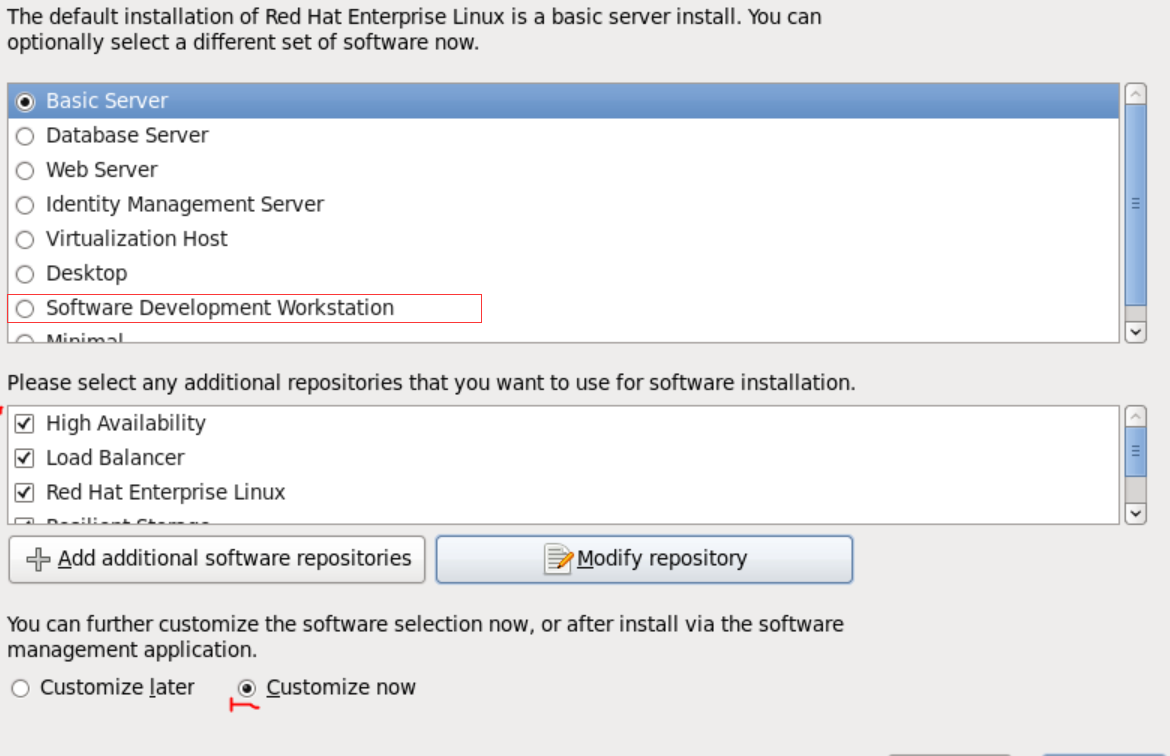
安装时选用Software Development Workstation
问题描述:
yum安装DHCP服务时输出
[root@localhost yum.repos.d]# yum list | grep dhcp

dhcp-common.x86_64                      :4.1.-.P1.el6                   @anaconda-RedHatEnterpriseLinux-.x86_64/6.4

dhcp.x86_64                             :4.1.-.P1.el6                   vcd

sblim-cmpi-dhcp.i686                    1.0-.el6                            vcd

sblim-cmpi-dhcp.x86_64                  1.0-.el6                            vcd

[root@localhost yum.repos.d]# yum -y install dhcp

Loaded plugins: product-id, refresh-packagekit, security, subscription-manager

This system is not registered to Red Hat Subscription Management. You can use subscription-manager to register.

Setting up Install Process

Resolving Dependencies

--> Running transaction check

---> Package dhcp.x86_64 :4.1.-.P1.el6 will be installed

--> Finished Dependency Resolution

Dependencies Resolved

===================================================================================================================================

 Package                    Arch                         Version                                   Repository                 Size

===================================================================================================================================

Installing:

 dhcp                       x86_64                       :4.1.-.P1.el6                        vcd                        k

Transaction Summary

===================================================================================================================================

Install        Package(s)

Total download size:  k

Installed size: 1.9 M

Downloading Packages:

Running rpm_check_debug

Running Transaction Test

Transaction Test Succeeded

Running Transaction

  Installing : :dhcp-4.1.-.P1.el6.x86_64                                                                                  /

vcd/productid                                                                                               | 1.7 kB     : ...

ERROR:dbus.proxies:Introspect error on :1.107:/org/freedesktop/PackageKit: dbus.exceptions.DBusException: org.freedesktop.DBus.Error.NoReply: Did not receive a reply. Possible causes include: the remote application did not send a reply, the message bus security policy blocked the reply, the reply timeout expired, or the network connection was broken.

Unable to send message to PackageKit

  Verifying  : :dhcp-4.1.-.P1.el6.x86_64                                                                                  /

Installed:

  dhcp.x86_64 :4.1.-.P1.el6

Complete!
yum卸载DHCP时
[root@localhost yum.repos.d]# yum -y remove dhcp

Loaded plugins: product-id, refresh-packagekit, security, subscription-manager

This system is not registered to Red Hat Subscription Management. You can use subscription-manager to register.

Setting up Remove Process

Resolving Dependencies

--> Running transaction check

---> Package dhcp.x86_64 :4.1.-.P1.el6 will be erased

--> Finished Dependency Resolution

Dependencies Resolved

===================================================================================================================================

 Package                    Arch                         Version                                  Repository                  Size

===================================================================================================================================

Removing:

 dhcp                       x86_64                       :4.1.-.P1.el6                       @vcd                       1.9 M

Transaction Summary

===================================================================================================================================

Remove         Package(s)

Installed size: 1.9 M

Downloading Packages:

Running rpm_check_debug

Running Transaction Test

Transaction Test Succeeded

Running Transaction

  Erasing    : :dhcp-4.1.-.P1.el6.x86_64                                                                                  /

ERROR:dbus.proxies:Introspect error on :1.107:/org/freedesktop/PackageKit: dbus.exceptions.DBusException: org.freedesktop.DBus.Error.NoReply: Did not receive a reply. Possible causes include: the remote application did not send a reply, the message bus security policy blocked the reply, the reply timeout expired, or the network connection was broken.

Unable to send message to PackageKit

  Verifying  : :dhcp-4.1.-.P1.el6.x86_64                                                                                  /

Removed:

  dhcp.x86_64 :4.1.-.P1.el6

Complete!
这两种情况下都有报错信息
ERROR:dbus.proxies:Introspect error on :1.107:/org/freedesktop/PackageKit: dbus.exceptions.DBusException: org.freedesktop.DBus.Error.NoReply: Did not receive a reply. Possible causes include: the remote application did not send a reply, the message bus security policy blocked the reply, the reply timeout expired, or the network connection was broken.

Unable to send message to PackageKit
原因分析:
因为是两台不同的机器同时指向同一个YUM源,其中一台机器已经通过yum install xx -y命令成功安装所需软件,而另外一台却不行,可以排除不是YUM源的问题,也不是网络的问题,那肯定是本机的问题了,
查看日志发现PackageKit这个词频繁出现,所以目标定位在这个PackageKit上面,查阅得知PackageKit是一款新的Linux包管理器,但是既然这边包这个错误,删除之是否可行?
解决办法:
yum remove PackageKit* -y //删除该管理器
【问题】yum安装软件报错ERROR:dbus.proxies的更多相关文章
- yum安装软件报错Error: Nothing to do
今天在一台新服务器上装一些常用软件,一开始安装ncdu(一个很好用的磁盘分析工具,用来查找大文件),报错如下: 在网上找了各种办法,什么更新yum啊,清理yum缓存啊的,统统没用 最后的找到的问题是, ...
- yum安装软件报错Segmentation fault处理
yum安装软件报错Segmentation fault处理 在使用yum 更新软件时提示:Segmentation fault 中文错误提示: 段错误 [root@CMS-BAK:/usr/local ...
- yum安装软件报错:curl#6 - "Could not resolve host: mirrorlist.centos.org; Temporary failure in name resolut
# yum install -y epel-release Loaded plugins: fastestmirror Repository base is listed more than once ...
- Centos7下yum安装软件报错解决办法
Traceback (most recent call last): File "/usr/bin/yum", line 29, in yummain.user_main(sys. ...
- 通过本地yum源安装软件报错[Errno 14] PYCURL ERROR 56 - "Failure when receiving data from the peer"
通过本地yum源安装软件报错 http://192.168.3.85/centos/6/os/x86_64/Packages/php-pdo-5.3.3-47.el6.x86_64.rpm: [Err ...
- 【转】解决yum安装软件报Couldn't resolve host 'mirrorlist.centos.org问题
转自:http://blog.51cto.com/oldcat1981/1719825 今天在linux环境通过yum安装软件报了以下错误: [root@multi-mysql yum.rep ...
- Centos下yum安装Nginx报错 No package nginx available.
在Centos6下使用yum安装Nginx报错 解决方案: yum install epel-release
- pip安装软件报错 utf-8 code can't decode byte 0xcf in position7
pip安装软件报错 utf-8 code can't decode byte 0xcf in position7 根据错误提示的路径找到__init__.py文件 根据错误提示的最后几句话找到对应的行 ...
- Linux 安装软件报错 Sub-process /usr/bin/dpkg returned an error code (1)
Linux 通过 apt-get 安装软件时报错,换一个软件安装也一样. Errors were encountered while processing: blueman E: Sub-proces ...
随机推荐
- Jackson解析自定义json到实体类
json文本 { "status": 0, "result": { "final": true, "hypotheses" ...
- chrome浏览器调试JS代码
是怎么调试 JavaScript 程序的?最原始的方法是用 alert() 在页面上打印内容,稍微改进一点的方法是用 console.log() 在 JavaScript 控制台上输出内容.嗯~,用这 ...
- js判断图片加载完成
<!DOCTYPE> <html> <head> <meta http-equiv="Content-Type" content=&quo ...
- element组件 MessageBox不能显示确认和取消按钮,记录正确使用方法!
这里是局部引入 调用方式:
- 配置MySQL,使其与PyCharm相关联
在配置MySQL和PyCharm时,经常出现这样的错误提示: Connection to base@localhost failed. [08001] Could not create connect ...
- C#、.NET、ASP.NET之间的关系
一.前言 这是个人的笔记,在博客园已经有不少大佬已经写过了.但我自己就想留点笔记在属于我自己的博客.所以大佬忽略就行,不喜勿碰.谢谢!!! 二.个人笔记 C# 全称(C sharp),它是微软公司发布 ...
- 洛谷 题解 P2540 【斗地主增强版】
[分析] 暴力搜顺子,贪心出散牌 为什么顺子要暴力? 玩过斗地主的都知道,并不是出越长的顺子越好,如果你有一组手牌,3,4,5,6,7,6,7,8,9,10,你一下把最长的出了去,你会单两张牌,不如出 ...
- PHP与Cookie
不管什么语言写的cookie,本质上没区别. cookie 常用于识别用户.cookie 是服务器留在用户计算机中的小文件.每当相同的计算机通过浏览器请求页面时,它同时会发送 cookie.通过 PH ...
- nmcli简单使用
nmcli connection 查看所有网卡信息 nmcli connection show ens33 查看网卡具体信息 nmcli connection reload 是配置文件生效
- 07 UML类图
移步: https://www.cnblogs.com/coolstream/p/9572846.html