
VUE-练习
作业一:有红黄蓝三个按钮,以及一个200*200矩形box,点击不同按钮,box的颜色会被切换为指定的颜色
<!DOCTYPE html>
<html lang="en">
<head>
    <meta charset="UTF-8">
    <title></title>
    <script src="https://cdn.bootcss.com/jquery/3.4.1/jquery.min.js"></script>
</head>
<body>
<div id="app">

    <div :style="div_style"></div>
    <div>
        <button v-on:click="changeColor('red')">{{ red }}</button>
        <button v-on:click="changeColor('yellow')">{{ yellow }}</button>
        <button v-on:click="changeColor('blue')">{{ blue }}</button>
    </div>
</div>

</body>
<script src="Vue/vue.js"></script>
<script>
    var app = new Vue({
        el: '#app',
        data: {
            div_style: {
                width: "200px",
                height: "200px",
                backgroundColor: "black"
            },
            red: '点击变红',
            yellow: '点击变黄',
            blue: '点击变蓝',
        },
        methods: {
            changeColor(c) {
                this.div_style.backgroundColor = c;
            }
        }
    })
</script>
</html>
作业二:有一个200*200的矩形wrap框,点击wrap本身,记录点击次数,如果是1次wrap为pink色,2次wrap为green,3次warp为cyan色,4次重新回到pink色,一次类推。
<!DOCTYPE html><html lang="en"><head>    <meta charset="UTF-8">    <title>Title</title>    <style>        .wrap{            width: 200px;            height: 200px;            color: white;            font: bold 50px/200px 'STSong';            text-align: center;            user-select: none;        }    </style></head><body><div id="app">    <div class="wrap" @click="actionFn" :style="{backgroundColor:bgColor}">{{content}}</div></div></body><script src="js/vue.js"></script><script>    new Vue({        el:'#app',        data:{            content:0,            bgColor:'black',            colorArr:['cyan','pink','green'],        },        methods:{            actionFn(){                this.content ++;                this.bgColor=this.colorArr[this.content % 3]            }        }    })

</script>

</html>
作业三:
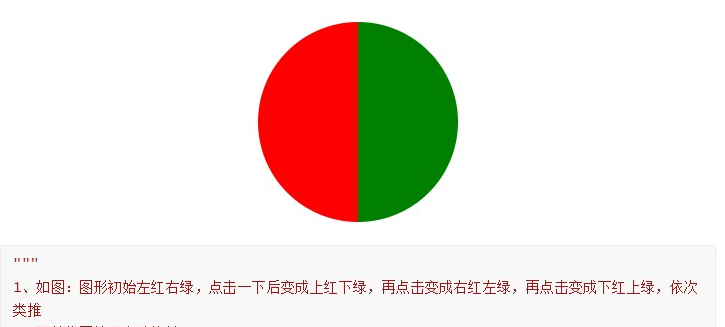
<!DOCTYPE html>
<html lang="en">
<head>
    <meta charset="UTF-8">
    <title>Title</title>
    <style>
        .wrap {
            border: 3px solid black;
            width: 200px;
            height: 200px;
            border-radius: 50%;
            overflow: hidden;
            margin: 50px auto 0;
            position: relative;
        }

        .red, .green {
            width: 100px;
            height: 200px;
            position: absolute;
        }

        .red {
            background-color: red;
        }

        .green {
            background-color: green;
        }

        .l {
            width: 100px;
            height: 200px;
            left: 0;
        }

        .t {
            width: 200px;
            height: 100px;
            top: 0;
        }

        .r {
            width: 100px;
            height: 200px;
            right: 0;
        }

        .b {
            width: 200px;
            height: 100px;
            bottom: 0;
        }
    </style>
</head>
<body>
<div id="app">
    <div class="wrap" @click="actionFn">
        <div class="red" :class="red_class"></div>
        <div class="green" :class="green_class"></div>
        <div></div>
    </div>
</div>
</body>
<script src="js/vue.js"></script>
<script>
    new Vue({
        el: '#app',
        data: {
            count: 0,
            red_class: 'l',
            green_class: 'r',
            red_attr: ['l', 't', 'r', 'b'],
            green_attr: ['r', 'b', 'l', 't'],
        },
        methods: {
            actionFn() {
                this.count ++;
                this.red_class = this.red_attr[this.count % 4];
                this.green_class = this.green_attr[this.count % 4];
            }
        }
    })

</script>
</html>
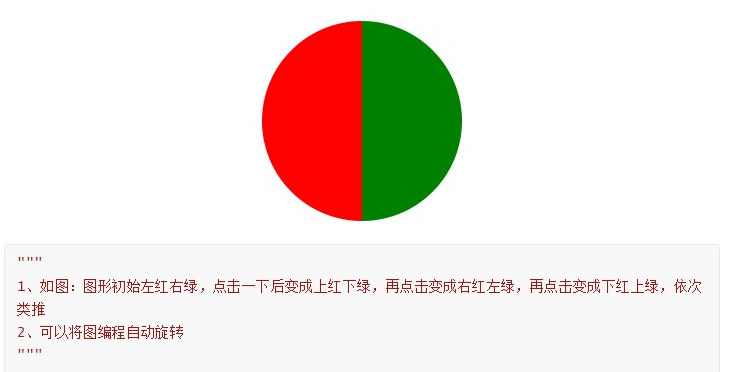
第三题的第二问:
<!DOCTYPE html>
<html lang="en">
<head>
    <meta charset="UTF-8">
    <title>Title</title>
</head>
<body>

<div id="app">
    <form action="" style="margin: 20px;">
        <p @click="tag" :style="{width: w,height: h, background: bgc, borderRadius:rad}"></p>
    </form>
</div>

</body>
<script src="Vue/vue.js"></script>
<script>
    let num = 0;
    let app = new Vue({
        el:'#app',
        data:{
            h: '200px',
            w: '200px',
            bgc: 'linear-gradient(to top, red 50%, green 50%)',  //实现页面的过度(颜色)
            rad: '50%'
            },
        methods:{
            tag () {
                num += 1;
                if (num==1){
                    this.bgc = 'linear-gradient(to top, red 50%, green 50%)' // 控制方向
                }else {if (num==2){
                    this.bgc = 'linear-gradient(to left, red 50%, green 50%)'
                }else {if (num==3) {
                    this.bgc = 'linear-gradient(to bottom,red  50%, green 50%)'
                }else {
                    this.bgc = 'linear-gradient(to right, red 50%, green 50%)';
                    num = 0
                }
                }}
            }
        }
    });
    function funcTest(){
    window.setInterval(app.tag,500);  // 按照指定的周期(以毫秒计)来调用函数
}
    window.onload = funcTest;  // 页面加载完直接调用 该方法
</script>
</html>
VUE-练习的更多相关文章
- Vue.js 和 MVVM 小细节
MVVM 是Model-View-ViewModel 的缩写,它是一种基于前端开发的架构模式,其核心是提供对View 和 ViewModel 的双向数据绑定,这使得ViewModel 的状态改变可以自 ...
- wepack+sass+vue 入门教程(三)
十一.安装sass文件转换为css需要的相关依赖包 npm install --save-dev sass-loader style-loader css-loader loader的作用是辅助web ...
- wepack+sass+vue 入门教程(二)
六.新建webpack配置文件 webpack.config.js 文件整体框架内容如下,后续会详细说明每个配置项的配置 webpack.config.js直接放在项目demo目录下 module.e ...
- wepack+sass+vue 入门教程(一)
一.安装node.js node.js是基础,必须先安装.而且最新版的node.js,已经集成了npm. 下载地址 node安装,一路按默认即可. 二.全局安装webpack npm install ...
- Vue + Webpack + Vue-loader 系列教程(2)相关配置篇
原文地址:https://lvyongbo.gitbooks.io/vue-loader/content/ 使用预处理器 在 Webpack 中,所有的预处理器需要和一个相应的加载器一同使用.vue- ...
- Vue + Webpack + Vue-loader 系列教程(1)功能介绍篇
原文地址:https://lvyongbo.gitbooks.io/vue-loader/content/ Vue-loader 是什么? vue-loader 是一个加载器,能把如下格式的 Vue ...
- 关于Vue.js 2.0 的 Vuex 2.0,你需要更新的知识库
应用结构 实际上,Vuex 在怎么组织你的代码结构上面没有任何限制,相反,它强制规定了一系列高级的原则: 应用级的状态集中放在 store 中. 改变状态的唯一方式是提交mutations,这是个同步 ...
- Vue.js 2.0 和 React、Augular等其他框架的全方位对比
引言 这个页面无疑是最难编写的,但也是非常重要的.或许你遇到了一些问题并且先前用其他的框架解决了.来这里的目的是看看Vue是否有更好的解决方案.那么你就来对了. 客观来说,作为核心团队成员,显然我们会 ...
- 窥探Vue.js 2.0 - Virtual DOM到底是个什么鬼?
引言 你可能听说在Vue.js 2.0已经发布,并且在其中新添加如了一些新功能.其中一个功能就是"Virtual DOM". Virtual DOM是什么 在之前,React和Em ...
- 初探Vue
Vue.js(读音/vju:/,类似于view),是近来比较火的前端框架,但一直没有怎么具体了解.实现过,就知道个啥的MVVM啦,数据驱动啦,等这些关于Vue的虚概念. 由于最近,小生在公司中,负责开 ...
随机推荐
- SpringMVC 零配置 无web.xml
对SpringMVC启动流程的讲解 https://www.cnblogs.com/beiyan/p/5942741.html 与SpringMVC的整合 https://hanqunfeng.ite ...
- Oracle数据库弱口令解密
1.首先我们先看下Oracle加密的格式. 接下来我们把他头和尾部删除,中间加: 通过py脚本来进行完成 转换完成后输出成这种格式 之后直接丢进kali里面,用john --w=字典文件 + 转换文件 ...
- memcached命令行、Memcached数据导出和导入
1.memcached命令行 telnet 127.0.0.1 11211set key2 0 30 2abSTOREDget key2VALUE key2 0 2abEND 如: set key3 ...
- spring-boot 连接数据库(六)
环境 jdk 6 tomcat 6.0.53 sts 4.4.2 maven 3.2.5 mysql 5.7 准备 接下来的数据库操作基于 mysql,所以需要一套可用的 mysql 环境. 引入 j ...
- DP大大大大大赏
还是前置: 动态规划的三种实现方法: 递推,递归,记忆化搜索 然后还是从斐波那契数列开始引入: 两种求斐波那契数列的方法: 1.用其他位置的结果得到自己的结果: 2.用自己的结果算其他的结果: 以上两 ...
- luogu P3959(2017noipTG D2T2
luogu P3959(2017noipTG D2T2 不知道为什么,这两天见了好多伪装成图的dp题,这道也是. 最短路只有40分,实际上可以从数据范围n<=12看出来是状压dp. soluti ...
- drf的三大认证
目录 三大认证任务分析 auth组件的认证权限六表 自定义User表分析 源码分析 认证与权限工作原理 源码分析 认证模块工作原理 权限模块工作原理 admin关联自定义用户表 自定义认证.权限类 用 ...
- Web开发Flask框架学习笔记
Python 是一种跨平台的[计算机程序设计语言],是一种面向对象的动态类型语言,Python是纯粹的自由软件,源代码和解释器CPython遵循 GPL(GNU General Public Lice ...
- C语言写郑州大学校友通讯录
#include <stdio.h> #include <string.h> #include <stdlib.h> #define LEN sizeof(stru ...
- C#面向对象22 委托事件反射
1.委托的定义:声明委托类型(返回值和参数,命名空间中):定义委托对象 (把委托想象成函数中的占位符~因为你并不确定调用哪个函数~) using System; using System.Collec ...