
解决virtualbox 虚拟机不能ping通win7
凭经验猜测是由于防火墙引起的,关闭防火墙再ping,果然可行。
google说这是由于“win7 防火墙默认的禁ping策略”引起的。
但是关闭防火墙很不安全,可以按照以下步骤为防火墙添加入站规则来解决问题。
原文地址:http://www.sysprobs.com/enable-ping-reply-windows-7
How to Enable Windows 7 Ping Response in Firewall
This post explains to enable windows 7 ping response firewall, so it can respond to all ping ICMP echo requests from other network resources.
 Indication: ‘Request Time Out’ message from Windows 7 Computer and it’s not responding to ICMP echo requests from other network devices. All network sharings are working but ping reply is not working , so how to enable ping reply in Windows 7?
Reasons: By default ICMP echo requests, used for ping command is blocked in Windows 7 firewall default settings.
Solutions:
1) Disable the firewall completely in windows 7, which is not recommended.
2) Create an exceptional rule for ICMP echo request to reply ping commands in existing firewall, without disabling it completely.
ICMP Rule in Windows 7 Firewall
Follow the steps steps to create a rule. These steps are similar to enable ping in Windows Vista
Also Check how to enable ping in Windows XP
1) Go to Windows Firewall in Control panel
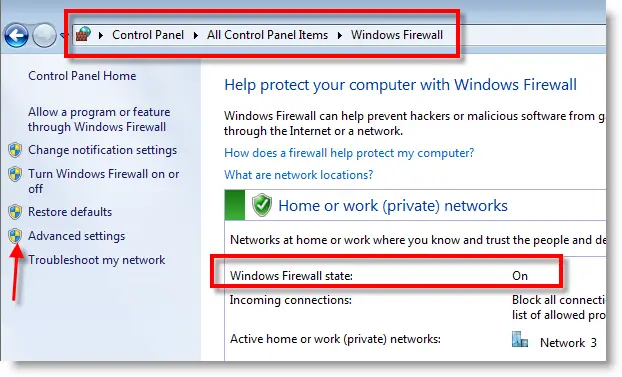
You can see, Windows Firewall status is On. Click on Advanced settings in left side as mentioned above.
2) Select Inbound Rule, Right clink on it and select New Rule…
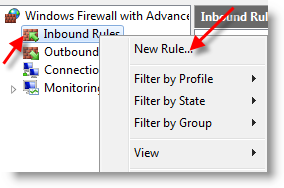
3) Select Custom (Custom Rule) at last and press Next.
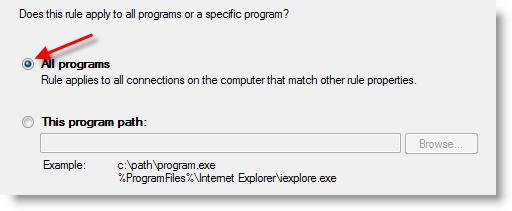
4) Leave All programs and go to Next.
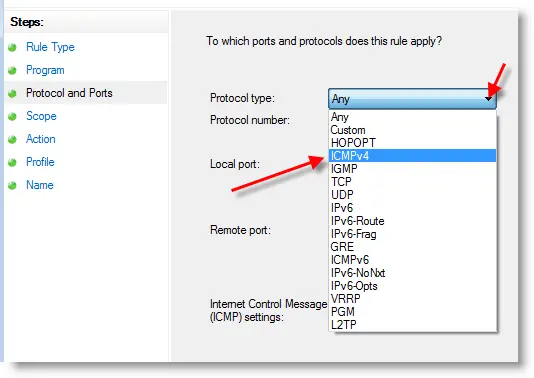
5) Click on Protocol type and select ICMP4 as shown below. ICMP4 is the protocol used in ping command when your network is communicating with IPv4.
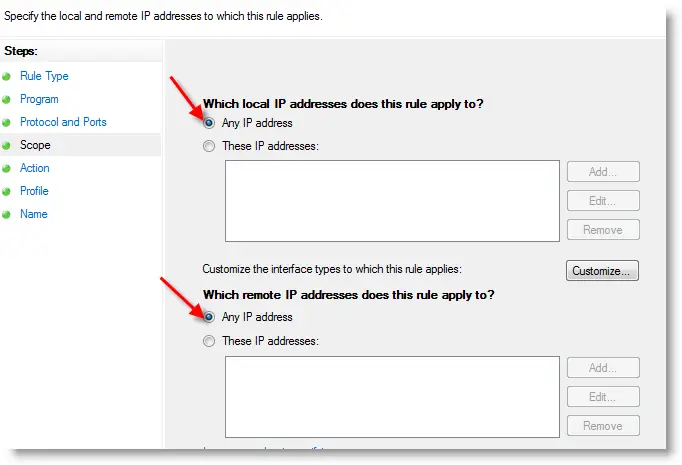
6) Since we are going to apply this rule for any IP, means responds to any IP addresses coming with echo request, select ‘Any IP addresses’ in next screen. You can add specific IP addresses also, if you want your windows 7 computer to respond to them only for ICMP echo request (ping )
7) Allow the connection in next screen, press Next.
8.) Keep the all three check boxes checked in the next screen, to apply this rule any type of network you connected.
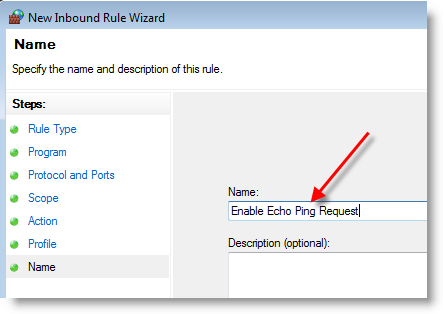
9) Give a name to this rule. This name will be showing under Inbound Rules in Windows Firewall. In future you can delete the rule by this name.
Click Finish.
10) That’s it; these are easy steps to enable ping in windows 7 and the rule will be immediately applied and appeared in inbound rules. Now, Windows 7 computer will be responding to ICMP echo ping requests without disabling or stopping the windows firewall.
解决virtualbox 虚拟机不能ping通win7的更多相关文章
- [转]virtualBox实现主机和虚拟机相互ping通,配置静态IP地址
本文转自:https://blog.csdn.net/u010486658/article/details/70871940 背景: 需要在linux上安装软件用来练习,但是需要将安装包发送到linu ...
- 本机ping不通虚拟机,但虚拟机可以ping通本机时怎么解决
在各自网络都连接的情况下,本机ping不通虚拟机,但虚拟机可以ping通本机时解决方案: 1.linux虚拟机中连接方式选择NAT模式 2.本地启动VMnet8,然后选择VMnet8的属性,手动输入和 ...
- VMWare之——宿主机与虚拟机互相ping通,宿主机ping通另一台机器的虚拟机
版权声明:本文为博主原创文章,未经博主允许不得转载. 转载请注明出处:http://blog.csdn.NET/l1028386804/article/details/52267554 今天给大家带来 ...
- Centos7.5虚拟机无法ping通网关、外网IP地址
问题:前两天Centos7.5虚拟机关机,第二天重启后使用Xshell发现无法连接虚拟机,经检测发现虚拟机无法ping通192.168.1.1.无法ping通192.168.1.118(客户机)和ww ...
- 如何在VirtualBox虚拟机软件上安装Win7虚拟系统
在Windows系统中安装VirtualBox 双击从官网上下载的VirtualBox-4.3.12-93733-Win.exe安装程序,默认下一步,下一步完成基础安装. 在VirtualBox虚拟机 ...
- 本机ping不通虚拟机,但虚拟机可以ping通本机
在各自网络都连接的情况下,本机ping不通虚拟机,但虚拟机可以ping通本机时解决方案: 1.linux虚拟机中连接方式选择NAT模式 2.本地启动VMnet8,然后选择VMnet8的属性,手动输入和 ...
- 解决:虚拟机能ping通主机,主机ping不通虚拟机
问题:虚拟机能ping通主机,主机ping不通虚拟机 解决方法: 1. 使用桥接. 2. 关闭防火墙.
- 物理机(真实机)能ping通虚拟机,但是虚拟机无法ping通真实机(可能是防火墙问题)
物理机IP地址:192.168.1.209 虚拟机IP地址:192.168.1.5.192.168.1.7.192.168.1.10 物理机设置:
- 解决CentOS下可以ping通ip ping不通域名
现象:1. ping不通域名,比如 www.qq.com 2. 可以ping通ip,比如 61.135.157.156 分析:1. 查看DNS配置文件 /etc/resolve.conf, 里面的服务 ...
随机推荐
- 【转】MyEclipse快捷键大全(绝对全)
ref:http://www.douban.com/note/254195820/?type=like# ctrl+w 关闭单个窗口 F3 跳转到类.变量的声明 F11 运行上次程序 Ctrl + F ...
- UINavigationController 与 UITabBarController
http://www.cnblogs.com/YouXianMing/p/3756904.html // index start from 1. UITabBarItem *newsItem = [[ ...
- Mongodb地理空间索引
1.索引: 建立索引既耗时也费力,还需要消耗很多资源.使用{"bakckground":true}选项可以使这个过程在后台完成,同时正常处理请求.如果不包括background 这 ...
- [大牛翻译系列]Hadoop(8)MapReduce 性能调优:性能测量(Measuring)
6.1 测量MapReduce和环境的性能指标 性能调优的基础系统的性能指标和实验数据.依据这些指标和数据,才能找到系统的性能瓶颈.性能指标和实验数据要通过一系列的工具和过程才能得到. 这部分里,将介 ...
- CSS content内容生成技术以及应用
content属性早在CSS2.1的时候就被引入了,可以使用:before以及:after伪元素生成内容.此特性目前已被大部分的浏览器支持:(Firefox 1.5+, Safari 3.5+, IE ...
- RTC搭建android下三层应用程序访问服务器MsSql-客户端
android下stringgrid已知问题: 通过点击时获取对应行的值有问题,在win下调试正常,在android下出现定位不准 二.客户端开发 1,新建工程 2,添加相关客户端控件TRtcHttp ...
- pyQuery
pyquery – PyQuery complete API 选择器基本支持jQuery用法 class pyquery.pyquery.PyQuery(*args, **kwargs) The ma ...
- 关于C语言指针中的p++与p+i
先看一组代码: #include <stdio.h> void main() { int i,*p,a[7]; p=a; for(i=0;i<7;i++) scanf("% ...
- Azure Bill
MSDN的本月订阅的被用完了,所有的付费订阅均变成了不可用的状态. 信用额度为0元,还有2天能恢复 点击上方的MSDN订阅名会进入更加详细的账单,账单以月的形式提供. 邮件中也会通知您到了限定额度所停 ...
- Mininet安装及使用
最简单的方法是开始 下载一个预包装Mininet / Ubuntu VM . 这个虚拟机包括Mininet本身,所有预装OpenFlow二进制文件和工具,调整内核配置,以支持更大的Mininet网络. ...