
[WPF]为什么使用SaveFileDialog创建文件需要删除权限?
1. 问题
好像很少人会遇到这种需求。假设有一个文件夹,用户有几乎所有权限,但没有删除的权限,如下图所示:
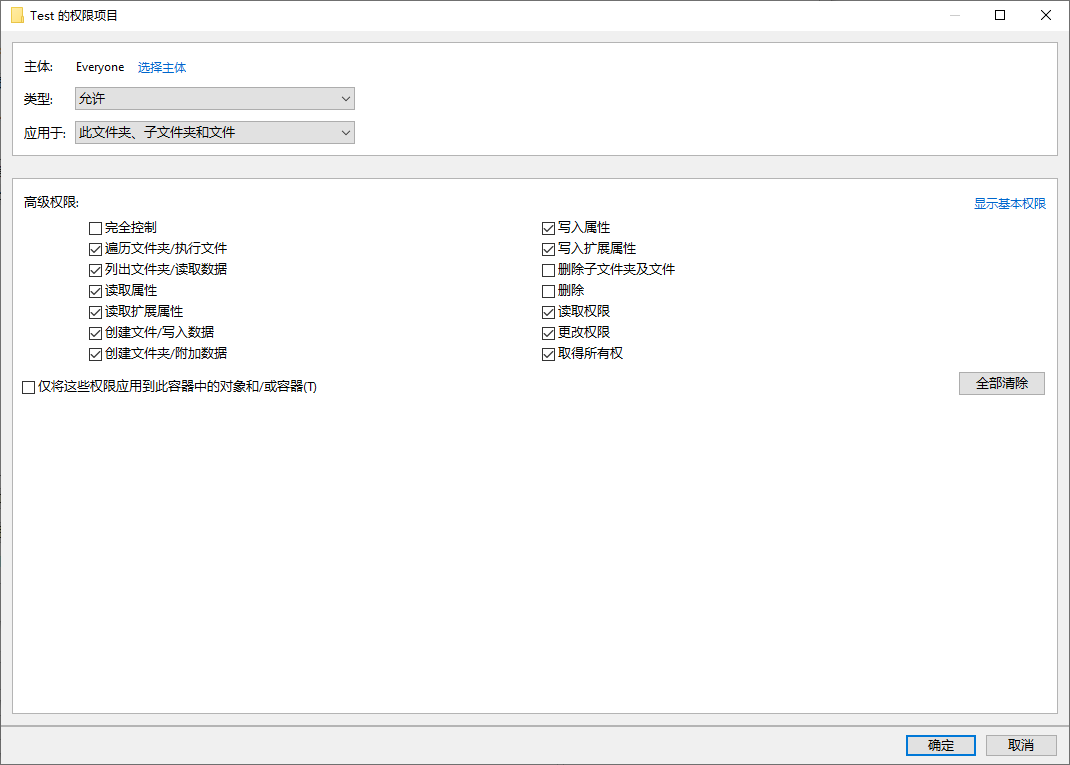
这时候使用SaveFileDialog在这个文件夹里创建文件居然会报如下错误:
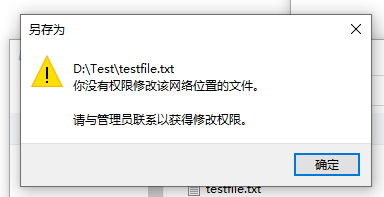
这哪里是网络位置了,我又哪里去找个管理员?更奇怪的是,虽然报错了,但文件还是会创建出来,不过这是个空文件。不仅WPF,普通的记事本也会有这个问题,SaveFileDialog会创建一个空文件,记事本则没有被保存。具体可以看以下GIF:

2. 问题原因
其实当SaveFileDialog关闭前,对话框会创建一个测试文件,用于检查文件名、文件权限等,然后又删除它。所以如果有文件的创建权限,而没有文件的删除权限,在创建测试文件后就没办法删除这个测试文件,这时候就会报错,而测试文件留了下来。
有没有发现SaveFileDialog中有一个属性Options?
//

// 摘要:

//     获取 Win32 通用文件对话框标志,文件对话框使用这些标志来进行初始化。

//

// 返回结果:

//     一个包含 Win32 通用文件对话框标志的 System.Int32,文件对话框使用这些标志来进行初始化。

protected int Options { get; }
本来应该可以设置一个NOTESTFILECREATE的标志位,但WPF中这个属性是只读的,所以WPF的SaveFileDialog肯定会创建测试文件。
3. 解决方案
SaveFileDialog本身只是Win32 API的封装,我们可以参考SaveFileDialog的源码,伪装一个调用方法差不多的MySaveFileDialog,然后自己封装GetSaveFileName这个API。代码大致如下:
internal class FOS

{

    public const int OVERWRITEPROMPT = 0x00000002;

    public const int STRICTFILETYPES = 0x00000004;

    public const int NOCHANGEDIR = 0x00000008;

    public const int PICKFOLDERS = 0x00000020;

    public const int FORCEFILESYSTEM = 0x00000040;

    public const int ALLNONSTORAGEITEMS = 0x00000080;

    public const int NOVALIDATE = 0x00000100;

    public const int ALLOWMULTISELECT = 0x00000200;

    public const int PATHMUSTEXIST = 0x00000800;

    public const int FILEMUSTEXIST = 0x00001000;

    public const int CREATEPROMPT = 0x00002000;

    public const int SHAREAWARE = 0x00004000;

    public const int NOREADONLYRETURN = 0x00008000;

    public const int NOTESTFILECREATE = 0x00010000;

    public const int HIDEMRUPLACES = 0x00020000;

    public const int HIDEPINNEDPLACES = 0x00040000;

    public const int NODEREFERENCELINKS = 0x00100000;

    public const int DONTADDTORECENT = 0x02000000;

    public const int FORCESHOWHIDDEN = 0x10000000;

    public const int DEFAULTNOMINIMODE = 0x20000000;

    public const int FORCEPREVIEWPANEON = 0x40000000;

}

[StructLayout(LayoutKind.Sequential, CharSet = CharSet.Auto)]

public class OpenFileName

{

    internal int structSize = 0;

    internal IntPtr hwndOwner = IntPtr.Zero;

    internal IntPtr hInstance = IntPtr.Zero;

    internal string filter = null;

    internal string custFilter = null;

    internal int custFilterMax = 0;

    internal int filterIndex = 0;

    internal string file = null;

    internal int maxFile = 0;

    internal string fileTitle = null;

    internal int maxFileTitle = 0;

    internal string initialDir = null;

    internal string title = null;

    internal int flags = 0;

    internal short fileOffset = 0;

    internal short fileExtMax = 0;

    internal string defExt = null;

    internal int custData = 0;

    internal IntPtr pHook = IntPtr.Zero;

    internal string template = null;

}

public class LibWrap

{

    // Declare a managed prototype for the unmanaged function.

    [DllImport("Comdlg32.dll", SetLastError = true, ThrowOnUnmappableChar = true, CharSet = CharSet.Auto)]

    public static extern bool GetSaveFileName([In, Out] OpenFileName ofn);

}

public bool? ShowDialog()

{

    var openFileName = new OpenFileName();

    Window window = Application.Current.Windows.OfType<Window>().Where(w => w.IsActive).FirstOrDefault();

    if (window != null)

    {

        var wih = new WindowInteropHelper(window);

        IntPtr hWnd = wih.Handle;

        openFileName.hwndOwner = hWnd;

    }

    openFileName.structSize = Marshal.SizeOf(openFileName);

    openFileName.filter = MakeFilterString(Filter);

    openFileName.filterIndex = FilterIndex;

    openFileName.fileTitle = new string(new char[64]);

    openFileName.maxFileTitle = openFileName.fileTitle.Length;

    openFileName.initialDir = InitialDirectory;

    openFileName.title = Title;

    openFileName.defExt = DefaultExt;

    openFileName.structSize = Marshal.SizeOf(openFileName);

    openFileName.flags |= FOS.NOTESTFILECREATE | FOS.OVERWRITEPROMPT;

    if (RestoreDirectory)

        openFileName.flags |= FOS.NOCHANGEDIR;

    // lpstrFile

    // Pointer to a buffer used to store filenames.  When initializing the

    // dialog, this name is used as an initial value in the File Name edit

    // control.  When files are selected and the function returns, the buffer

    // contains the full path to every file selected.

    char[] chars = new char[FILEBUFSIZE];

    for (int i = 0; i < FileName.Length; i++)

    {

        chars[i] = FileName[i];

    }

    openFileName.file = new string(chars);

    // nMaxFile

    // Size of the lpstrFile buffer in number of Unicode characters.

    openFileName.maxFile = FILEBUFSIZE;

    if (LibWrap.GetSaveFileName(openFileName))

    {

        FileName = openFileName.file;

        return true;

    }

    return false;

}

/// <summary>

///     Converts the given filter string to the format required in an OPENFILENAME_I

///     structure.

/// </summary>

private static string MakeFilterString(string s, bool dereferenceLinks = true)

{

    if (string.IsNullOrEmpty(s))

    {

        // Workaround for VSWhidbey bug #95338 (carried over from Microsoft implementation)

        // Apparently, when filter is null, the common dialogs in Windows XP will not dereference

        // links properly.  The work around is to provide a default filter;  " |*.*" is used to

        // avoid localization issues from description text.

        //

        // This behavior is now documented in MSDN on the OPENFILENAME structure, so I don't

        // expect it to change anytime soon.

        if (dereferenceLinks && System.Environment.OSVersion.Version.Major >= 5)

        {

            s = " |*.*";

        }

        else

        {

            // Even if we don't need the bug workaround, change empty

            // strings into null strings.

            return null;

        }

    }

    StringBuilder nullSeparatedFilter = new StringBuilder(s);

    // Replace the vertical bar with a null to conform to the Windows

    // filter string format requirements

    nullSeparatedFilter.Replace('|', '\0');

    // Append two nulls at the end

    nullSeparatedFilter.Append('\0');

    nullSeparatedFilter.Append('\0');

    // Return the results as a string.

    return nullSeparatedFilter.ToString();

}
注意其中的这句:
openFileName.flags |= FOS.NOTESTFILECREATE | FOS.OVERWRITEPROMPT;
因为我的需求就是不创建TestFile,所以我直接这么写而不是提供可选项。一个更好的方法是给WPF提ISSUE,我已经这么做了:
Make SaveFileDialog support NOTESTFILECREATE.
但看来我等不到有人处理的这天,如果再有这种需求,还是将就着用我的这个自创的SaveFileDialog吧:
4. 参考
Common Item Dialog (Windows) Microsoft Docs
GetSaveFileNameA function (commdlg.h) - Win32 apps Microsoft Docs
OPENFILENAMEW (commdlg.h) - Win32 apps Microsoft Docs
[WPF]为什么使用SaveFileDialog创建文件需要删除权限?的更多相关文章
- java使用io创建文件与删除文件的工具类
java中对于文件的操作,是再常见不过了.以下代码是自己代码中所用到的工具类,仅供参考. import java.io.File; import java.io.IOException; /** * ...
- Linux常用命令,查看树形结构、删除目录(文件夹)、创建文件、删除文件或目录、复制文件或目录(文件夹)、移动、查看文件内容、权限操作
5.查看树结构(tree) 通常情况下系统未安装该命令,需要yum install -y tree安装 直接使⽤tree显示深度太多,⼀般会使⽤ -L选项⼿⼯设定⽬录深度 格式:tree -L n [ ...
- PHP调用Linux的命令行执行文件压缩命令&&创建文件夹修改权限
一开始,我和普通青年一样,想到用PHP内置的 ZipArchive纠结的是环境上没安装zip扩展,想采用用PHP调用Linux的命令行 ,执行压缩命令,感兴趣的朋友可以了解下,希望本文对你有所帮助 前 ...
- ubuntu下无法在目录下创建文件夹,权限不足解决办法
问题详情:偶然在根目录创建文件夹的时候,突然显示错误,当时很惊讶,以前没遇见过这样的问题.当时界面是这样的. 用了一个 cd / 命令从用户磁盘跳到了根目录 使用 mkdir 命令准备创建一个文件夹, ...
- WPF使用Microsoft.VisualBasic创建单例模式引起的权限降低问题
在进行WPF开发时,总是在找更加优雅去写单例模式的代码. 很多人都喜欢用Mutex,一个App.cs下很多的Mutex,我也喜欢用. 看完<WPF编程宝典>的第七章Applicaton类后 ...
- php创建文件夹后设置文件夹权限(转)
原文链接:http://www.phpstudy.net/b.php/69873.html PHP mkdir()无写权限的问题解决方法 使用mkdir创建文件夹时,发现这个函数有两个参数,第二个参数 ...
- centos中,tomcat项目创建文件的权限
参考文章:https://cloud.tencent.com/info/5f02caa932fd6dbfc46a3bb01af135e0.html 我们在centos中输入umask,会看到输出002 ...
- mac环境下java项目无创建文件的权限
1.问题: 先抛问题,由于刚刚换用mac环境,之前windows上开发的代码调试完毕,还未上线.之后上线部署之前,tl直连测试本地环境(mac)环境,功能无法使用,显示java.io.IOExcept ...
- umask计算创建文件、目录的默认权限
很多人以为 创建文件默认权限就是 666-umask=创建文件的默认权限 创建目录的默认权限就是 777-umask=创建目录的默认权限 这种计算其实是不严谨的 为什么我们创建的文件的权限是 64 ...
随机推荐
- 【Amaple教程】5. 插件
Amaple 拥有非常强大插件功能,这也是它的突出功能之一,Amaple插件一般表现为功能块(函数)或功能块(包含一系列函数和属性的Object对象),它除了支持Amaple规范定义的插件外,还支持所 ...
- Python学习笔记--迭代
在Python中,迭代是通过for ... in来实现.只要是可迭代的对象都可以用for ... in来进行历遍. 常用的有list.tuple.dict等.举例如下: 列表的迭代: L=[1,2,3 ...
- C#桌面开发的未来WebWindow
目录 WebWindow 源码 作者博客 基于Chromium的Edge 体验 体验方式一: 体验方式二: 遗留的问题 WebWindow WebWindow是跨平台的库. Web Window的当前 ...
- vue中数据请求的三种方法
注意请求可能存在跨域问题,需要去配置好 这三种建议使用axios 1.resource Vue 要实现异步加载需要使用到 vue-resource 库. Vue.js 2.0 版本推荐使用 axios ...
- 修改js文件,引发的404问题
记录一个bug,本地测不出来,客户后台却404,web测试可参考.(不知道是不是通用的) 先介绍下背景 我们是web产品,存在发布机.管理机.js文件,页面会引用到这些js文件.出于安全考虑,规定js ...
- ESLint {} 内部强制有空格 .eslintrc.js 配置文件 'object-curly-spacing': ["error", "always"],
module.exports = { root: true, 'extends': [ 'plugin:vue/essential', '@vue/standard' ], rules: { 'obj ...
- Python入门到放弃
前传:计算机基础 01-计算机基础1 02-计算机基础2 第一章:Python入门 01-python入门之解释器环境安装 02-python入门之变量和基本数据类型 03-python内存管理之垃圾 ...
- Python专题——详解enumerate和zip
本文始发于个人公众号:TechFlow,原创不易,求个关注 今天是Python专题的第7篇文章,我们继续介绍迭代相关. enumerate 首先介绍的是enumerate函数. 在我们日常编程的过程当 ...
- Frist
大家好,这是我开通博客的第一天,开通博客呢原因是在于想提升自己.我现在是一名大一的计算机科学与技术的学生,自己本来就对计算机感兴趣,现在想通过博客园这个平台写一些自己感兴趣的文章.现在主要在学java ...
- Jsp el表达式无解析 解决
需要开启 el isELIgnored="false" 这时已经可以正常访问了