
netty权威指南学习笔记五——分隔符和定长解码器的应用
TCP以流的方式进行数据传输,上层应用协议为了对消息进行区分,通常采用以下4中方式:
- 消息长度固定,累计读取到长度综合为定长LEN的报文后,就认为读取到了一个完整的消息,将计数器置位,重新开始读取下一个数据报;
- 将回车换行符作为消息结束符,例如FTP协议,这种方式在文本协议中应用比较广泛;
- 将特殊的分隔符作为消息的结束标志,回车换行符就是一种特殊的分隔符;
- 通过在消息头中定义长度字段来标识消息的总长度。
DelimiterBaseFrameDecoder——分隔符解码器,FixedLengthFrameDecoder——定长解码器
下面我们采用#为分隔符进行代码练习运行。
EchoServer服务端代码
 package com.decoder;

 import io.netty.bootstrap.ServerBootstrap;

 import io.netty.buffer.ByteBuf;

 import io.netty.buffer.Unpooled;

 import io.netty.channel.ChannelFuture;

 import io.netty.channel.ChannelInitializer;

 import io.netty.channel.ChannelOption;

 import io.netty.channel.nio.NioEventLoopGroup;

 import io.netty.channel.socket.SocketChannel;

 import io.netty.channel.socket.nio.NioServerSocketChannel;

 import io.netty.handler.codec.DelimiterBasedFrameDecoder;

 import io.netty.handler.codec.string.StringDecoder;

 import io.netty.handler.logging.LogLevel;

 import io.netty.handler.logging.LoggingHandler;

 public class EchoServer {

     public void bind(int port) throws InterruptedException {

         NioEventLoopGroup bossGroup = new NioEventLoopGroup();

         NioEventLoopGroup workGroup = new NioEventLoopGroup();

         try {

             ServerBootstrap b = new ServerBootstrap();

             b.group(bossGroup,workGroup)

                     .channel(NioServerSocketChannel.class)

                     .option(ChannelOption.SO_BACKLOG,100)

                     .childHandler(new LoggingHandler(LogLevel.INFO))

                     .childHandler(new ChannelInitializer<SocketChannel>() {

                         @Override

                         protected void initChannel(SocketChannel socketChannel) throws Exception {

                             ByteBuf delimiter = Unpooled.copiedBuffer("#".getBytes());//创建一个分隔符,确定为结束标志

                             socketChannel.pipeline().addLast(new DelimiterBasedFrameDecoder(1024,delimiter))

                                     .addLast(new StringDecoder())

                                     .addLast(new EchoServerHandler());

                         }

                     });

 //          绑定端口,同步等待成功

             ChannelFuture f = b.bind(port).sync();

 //          等待服务端监听端口关闭

             f.channel().closeFuture().sync();

         } finally {

             bossGroup.shutdownGracefully();

             workGroup.shutdownGracefully();

         }

     }

     public static void main(String[] args) throws InterruptedException {

         int port = 8080;

         if(args.length>0&&args!=null){

             port = Integer.parseInt(args[0]);

         }

         new EchoServer().bind(port);

     }

 }
服务端处理IO代码
 package com.decoder;

 import io.netty.buffer.ByteBuf;

 import io.netty.buffer.Unpooled;

 import io.netty.channel.ChannelHandlerContext;

 import io.netty.channel.ChannelInboundHandlerAdapter;

 public class EchoServerHandler extends ChannelInboundHandlerAdapter {

     int count;

     @Override

     public void channelRead(ChannelHandlerContext ctx, Object msg) throws Exception {

         String body = (String) msg;

         System.out.println("This is"+ ++count +" times server receive client request.");

         body += "#";

         ByteBuf echo = Unpooled.copiedBuffer(body.getBytes());

         ctx.writeAndFlush(echo);

     }

     @Override

     public void channelReadComplete(ChannelHandlerContext ctx) throws Exception {

         ctx.flush();

     }

     @Override

     public void exceptionCaught(ChannelHandlerContext ctx, Throwable cause) throws Exception {

         ctx.close();

     }

 }
客户端发送消息代码
 package com.decoder;

 import io.netty.bootstrap.Bootstrap;

 import io.netty.buffer.ByteBuf;

 import io.netty.buffer.Unpooled;

 import io.netty.channel.ChannelFuture;

 import io.netty.channel.ChannelInitializer;

 import io.netty.channel.ChannelOption;

 import io.netty.channel.nio.NioEventLoopGroup;

 import io.netty.channel.socket.SocketChannel;

 import io.netty.channel.socket.nio.NioSocketChannel;

 import io.netty.handler.codec.DelimiterBasedFrameDecoder;

 import io.netty.handler.codec.string.StringDecoder;

 public class EchoClient {

     public void connection(int port,String host) throws InterruptedException {

         NioEventLoopGroup workGroup = new NioEventLoopGroup();

         try {

             Bootstrap b = new Bootstrap();

             b.group(workGroup)

                     .channel(NioSocketChannel.class)

                     .option(ChannelOption.TCP_NODELAY,true)

                     .handler(new ChannelInitializer<SocketChannel>() {

                         @Override

                         protected void initChannel(SocketChannel socketChannel) throws Exception {

                             ByteBuf delimiter = Unpooled.copiedBuffer("#".getBytes());

                             socketChannel.pipeline().addLast(new DelimiterBasedFrameDecoder(1024,delimiter))

                                     .addLast(new StringDecoder())

                                     .addLast(new EchoClientHandler());

 //

                         }

                     });

 //            发起异步连接操作

             ChannelFuture f = b.connect(host,port).sync();

 //                          等待客户端链路关闭

             f.channel().closeFuture().sync();

         } finally {

             workGroup.shutdownGracefully();

         }

     }

     public static void main(String[] args) throws InterruptedException {

         int port = 8080;

         if(args.length>0&&args!=null){

             System.out.println(args[0]);

             port = Integer.parseInt(args[0]);

         }

         new EchoClient().connection(port,"127.0.0.1");

     }

 }
客户端处理IO代码
 package com.decoder;

 import io.netty.buffer.Unpooled;

 import io.netty.channel.ChannelHandlerContext;

 import io.netty.channel.ChannelInboundHandlerAdapter;

 public class EchoClientHandler extends ChannelInboundHandlerAdapter {

     private int count;

     static final String ECHO_REQ = "hello,zuixiaoyao,welcome here!#";

     @Override

     public void channelActive(ChannelHandlerContext ctx) throws Exception {

         for(int i=0;i<10;i++){

             ctx.writeAndFlush(Unpooled.copiedBuffer(ECHO_REQ.getBytes()));

         }

     }

     @Override

     public void channelRead(ChannelHandlerContext ctx, Object msg) throws Exception {

         String body = (String) msg;

         System.out.println("this is client receive msg"+ ++count +"times:【"+body+"】");

     }

     @Override

     public void channelReadComplete(ChannelHandlerContext ctx) throws Exception {

         super.channelReadComplete(ctx);

     }

     @Override

     public void exceptionCaught(ChannelHandlerContext ctx, Throwable cause) throws Exception {

         super.exceptionCaught(ctx, cause);

     }

 }
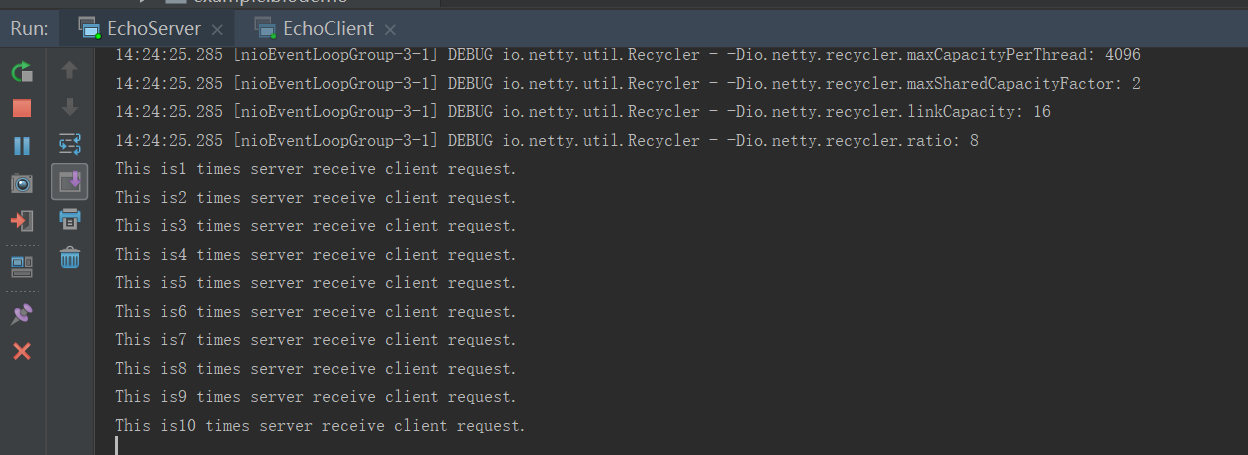
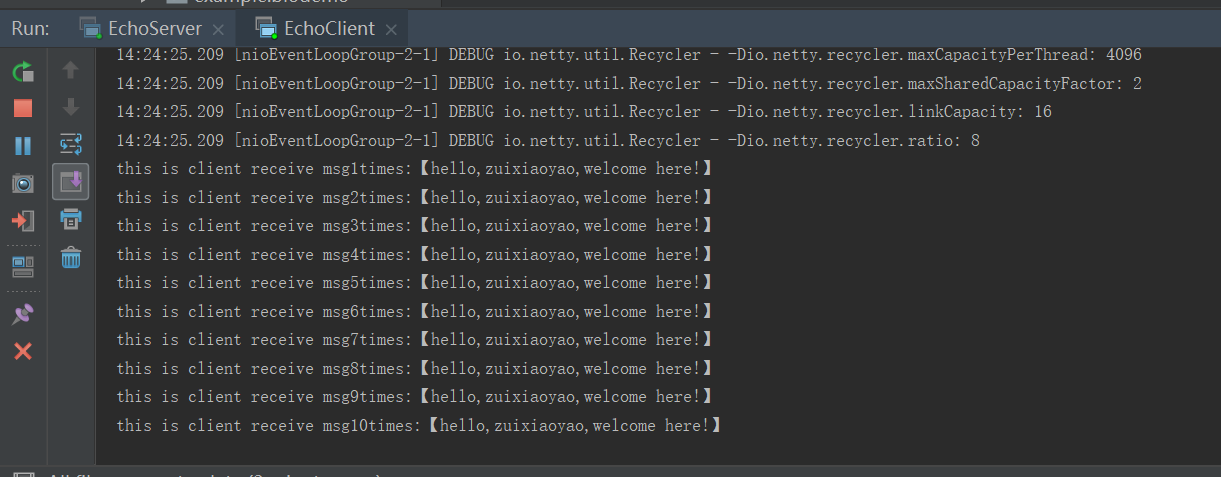
运行结果
服务端
客户端
若采用定长解码器,运行上面代码看看会发生什么,我们只需要对上面服务器中解码器换为定长解码器即可,解码器最大长度设置为20,看看
修改的服务端代码如下:
  @Override

                         protected void initChannel(SocketChannel socketChannel) throws Exception {

                             ByteBuf delimiter = Unpooled.copiedBuffer("#".getBytes());//创建一个分隔符,确定为结束标志

                             socketChannel.pipeline()

 //                                    .addLast(new DelimiterBasedFrameDecoder(1024,delimiter))

 //                                    修改为定长解码器

                                     .addLast(new FixedLengthFrameDecoder(20))

                                     .addLast(new StringDecoder())

                                     .addLast(new EchoServerHandler());

                         }
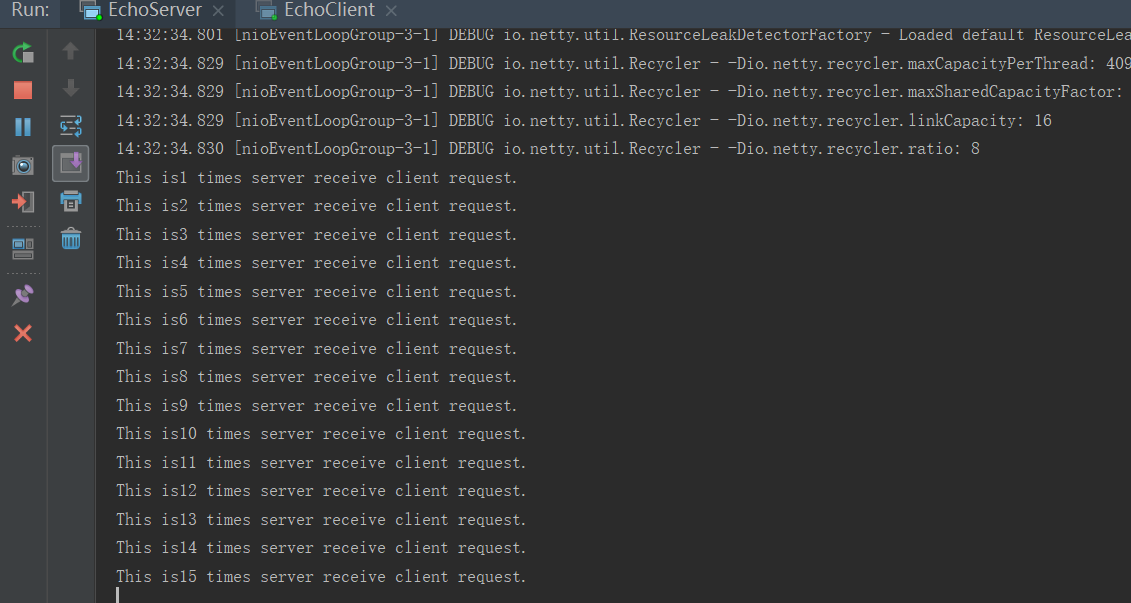
运行后如下:
服务端结果
客户端结果
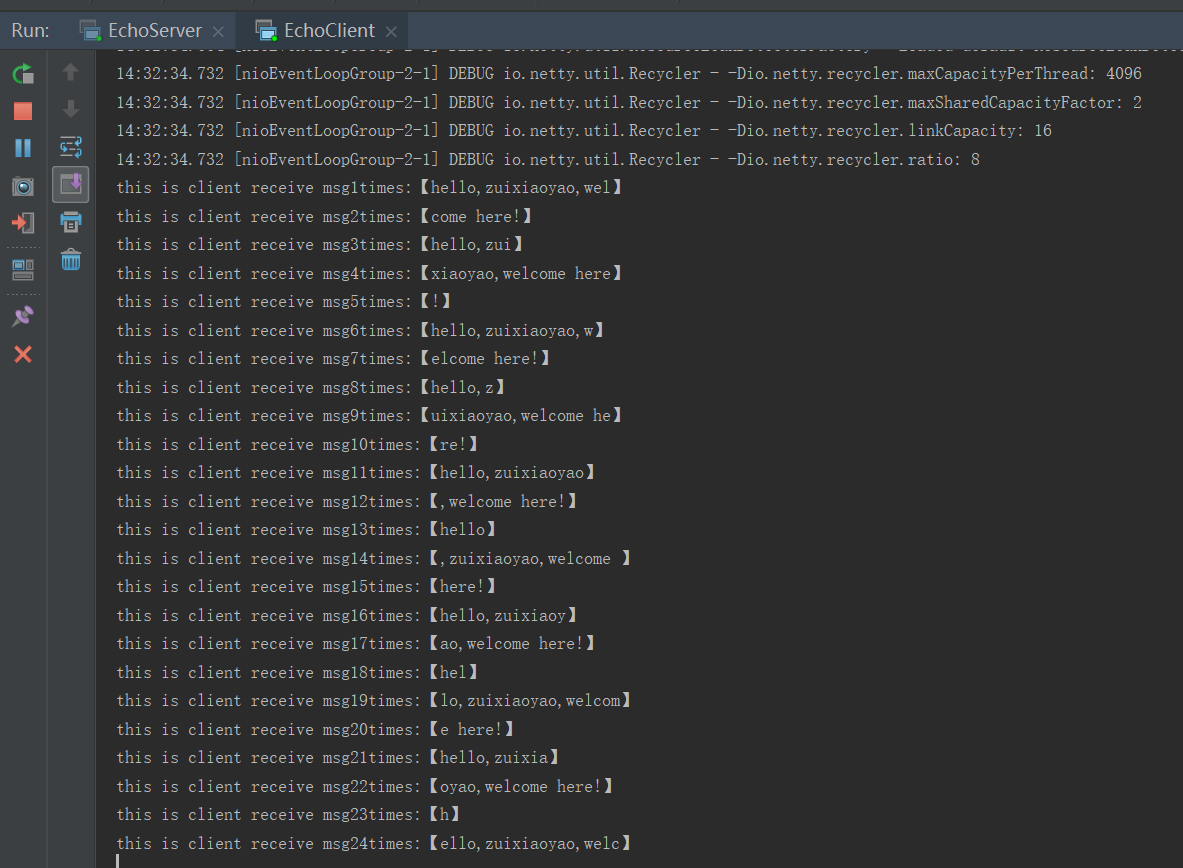
我们发现所有运行返回的代码都不超过20字符。这就是按照定长解析的,但是解析的比较乱,具体的原理还需深入学习后才知道,暂时不表。
按书上的操作,输入一行超过20字符的命令请求时,只返回一个20字符定长的数据显示。
netty权威指南学习笔记五——分隔符和定长解码器的应用的更多相关文章
- netty权威指南学习笔记六——编解码技术之MessagePack
编解码技术主要应用在网络传输中,将对象比如BOJO进行编解码以利于网络中进行传输.平常我们也会将编解码说成是序列化/反序列化 定义:当进行远程跨进程服务调用时,需要把被传输的java对象编码为字节数组 ...
- netty权威指南学习笔记三——TCP粘包/拆包之粘包现象
TCP是个流协议,流没有一定界限.TCP底层不了解业务,他会根据TCP缓冲区的实际情况进行包划分,在业务上,一个业务完整的包,可能会被TCP底层拆分为多个包进行发送,也可能多个小包组合成一个大的数据包 ...
- netty权威指南学习笔记二——netty入门应用
经过了前面的NIO基础知识准备,我们已经对NIO有了较大了解,现在就进入netty的实际应用中来看看吧.重点体会整个过程. 按照权威指南写程序的过程中,发现一些问题:当我们在定义handler继承Ch ...
- netty权威指南学习笔记八——编解码技术之JBoss Marshalling
JBoss Marshalling 是一个java序列化包,对JDK默认的序列化框架进行了优化,但又保持跟java.io.Serializable接口的兼容,同时增加了一些可调参数和附加特性,这些参数 ...
- netty权威指南学习笔记一——NIO入门(1)BIO
公司的一些项目采用了netty框架,为了加速适应公司开发,本博主认真学习netty框架,前一段时间主要看了看书,发现编程这东西,不上手还是觉得差点什么,于是为了加深理解,深入学习,本博主还是决定多动手 ...
- netty权威指南学习笔记七——编解码技术之GoogleProtobuf
首先我们来看一下protobuf的优点: 谷歌长期使用成熟度高: 跨语言支持多种语言如:C++,java,Python: 编码后消息更小,更利于存储传输: 编解码性能高: 支持不同协议版本的兼容性: ...
- netty权威指南学习笔记四——TCP粘包/拆包之粘包问题解决
发生了粘包,我们需要将其清晰的进行拆包处理,这里采用LineBasedFrameDecoder来解决 LineBasedFrameDecoder的工作原理是它依次遍历ByteBuf中的可读字节,判断看 ...
- netty权威指南学习笔记一——NIO入门(3)NIO
经过前面的铺垫,在这一节我们进入NIO编程,NIO弥补了原来同步阻塞IO的不足,他提供了高速的.面向块的I/O,NIO中加入的Buffer缓冲区,体现了与原I/O的一个重要区别.在面向流的I/O中,可 ...
- IDA Pro 权威指南学习笔记(五) - IDA 主要的数据显示窗口
在默认配置下,IDA(从 6.1 版开始)会在对新二进制文件的初始加载和分析阶段创建 7 个显示窗口 3 个立即可见的窗口分别为 IDA-View 窗口.函数窗口和消息输出窗口 可以通过 View - ...
随机推荐
- CSS垂直居中的8种方法
CSS垂直居中的8种方法 1.通过verticle-align:middle实现CSS垂直居中. 通过vertical-align:middle实现CSS垂直居中是最常使用的方法,但是有一点需要格外注 ...
- 把PHP大牛记下来,方便以后关注
本帖最后由 fish_study 于 2014-12-31 00:18 编辑 五四陈科学院博主54chen(陈臻),哥学社创始人,前人人网分布式存储nuclear研发人员,现关注erlang.hado ...
- SpringMVC:自定义视图及其执行过程
一:自定义视图 1.自定义一个实现View接口的类,添加@Component注解,将其放入SpringIOC容器 package com.zzj.view; import java.io.PrintW ...
- 吴裕雄 Bootstrap 前端框架开发——Bootstrap 辅助类:显示下拉式功能
<!DOCTYPE html> <html> <head> <meta charset="utf-8"> <title> ...
- 回文串[APIO2014](回文树)
题目描述 给你一个由小写拉丁字母组成的字符串 s.我们定义 s 的一个子串的存在值为这个子串在 s中出现的次数乘以这个子串的长度.对于给你的这个字符串 s,求所有回文子串中的最大存在值. 输入格式 一 ...
- oracle数据库时间是毫秒值,创建function,直接SQL取值。
首先创建一个function: create or replace function num_to_date(in_number NUMBER) return date is begin return ...
- 、第1节 kafka消息队列:8、9、kafka的配置文件server.properties的说明
10.kafka的配置文件说明 Server.properties配置文件说明 #broker的全局唯一编号,不能重复 broker.id=0 #用来监听链接的端口,producer或consumer ...
- 关于fpga的后仿真重要性
也许你天天做些fpga,写完代码就直接编译成功,锁定引脚后,马上使用signaltaII软件. 也许你一天,你发现signaltapII看信号的痛苦,一个源代码文件修改一点,要花个20分钟编译一次. ...
- spingboot中使用scheduled设置定时任务注意事项
在spring开发过程中经常会遇到需要定时执行的任务,如定时生成报表,定时推送消息等任务. springboot 提供了简单的 @Scheduled 表达式来配置定时任务.该方式默认是单线程的,任务在 ...
- Git如何合并Commit
如果你在 push 你的修改之前想要将本地多次修改后的 commit 合并一下变得更好看,可以使用下面的方法. 指定你要合并的 commit 相关的命令有两种 你可以通过指定修改过去的几个 commi ...