
BGP2

1) 按照拓扑搭建网络,在所有AS间使用直连接口建立EBGP邻居关系;
2) 在公司总部AS400中,R4与R5,R5与R7,R7与R6,R6与R4间使用环回接口建立IBGP邻居关系,IGP协议使用OSPF;
3) 所有业务网段,与所有设备上的Loopback 0所在网段都能通过BGP路由实现互相访问;
4) 为了使网络资源能充分得到利用,要求业务网段A的流量通过运营商设备转发,业务网段B的流量通过专线转发;
5) 网络管理员进行定期线路检查,现通过适当调整IGP的链路开销值,使得所有经过总部AS的流量都沿着R4-R5-R7-R6路径转发;
6) 网络管理员在检查中发现业务网段B的流量非常大,决定将业务网段B的流量单独沿着R4-R6路径转发(要求BGP路由选路与实际转发路径一致);
7) 公司总部网络将进行改造,在不改变原有配置的基础上,通过增加少量配置实现,R5与R7不参与BGP路径选择。
1) 按照拓扑搭建网络,在所有AS间使用直连接口建立EBGP邻居关系;
R1:(为例)R1R2R3R4R6都做
bgp 100
peer 12.1.1.2 as-number 200
peer 14.1.1.4 as-number 400
2) 在公司总部AS400中,R4与R5,R5与R7,R7与R6,R6与R4间使用环回接口建立IBGP邻居关系,IGP协议使用OSPF;
R4为例(R4R5R6R7都做)bgp 400
peer 5.5.5.5 as-number 400
peer 5.5.5.5 connect-interface LoopBack0
peer 6.6.6.6 as-number 400
peer 6.6.6.6 connect-interface LoopBack0
peer 7.7.7.7 as-number 400
peer 7.7.7.7 connect-interface LoopBack0
peer 14.1.1.1 as-number 100
import-route ospf 1
ospf 1 router-id 4.4.4.4
area 0.0.0.0
network 4.4.4.0 0.0.0.255
network 5.5.5.0 0.0.0.255
network 45.1.1.0 0.0.0.255
network 46.1.1.0 0.0.0.255
3) 所有业务网段,与所有设备上的Loopback 0所在网段都能通过BGP路由实现互相访问;
前3问之前R1到R7的所有命令:
R1:
interface GigabitEthernet0/0/0
ip address 12.1.1.1 255.255.255.0
#
interface GigabitEthernet0/0/1
ip address 14.1.1.1 255.255.255.0
#
interface GigabitEthernet0/0/2
#
interface NULL0
#
interface LoopBack0
ip address 1.1.1.1 255.255.255.0
#
interface LoopBack1
ip address 11.11.11.11 255.255.255.0
#
bgp 100
peer 12.1.1.2 as-number 200
peer 14.1.1.4 as-number 400
#
ipv4-family unicast
undo synchronization
network 1.1.1.0 255.255.255.0
network 11.11.11.0 255.255.255.0
peer 12.1.1.2 enable
peer 14.1.1.4 enable
#
ip route-static 2.2.2.0 255.255.255.0 12.1.1.2
ip route-static 4.4.4.0 255.255.255.0 14.1.1.4
#
user-interface con 0
authentication-mode password
user-interface vty 0 4
user-interface vty 16 20
#
wlan ac
#
return
R2:
interface GigabitEthernet0/0/0
ip address 12.1.1.2 255.255.255.0
#
interface GigabitEthernet0/0/1
ip address 23.1.1.2 255.255.255.0
#
interface GigabitEthernet0/0/2
#
interface NULL0
#
interface LoopBack0
ip address 2.2.2.2 255.255.255.0
#
interface LoopBack1
ip address 22.22.22.22 255.255.255.0
#
bgp 200
peer 12.1.1.1 as-number 100
peer 23.1.1.3 as-number 300
#
ipv4-family unicast
undo synchronization
network 2.2.2.0 255.255.255.0
network 22.22.22.0 255.255.255.0
peer 12.1.1.1 enable
peer 23.1.1.3 enable
#
ip route-static 1.1.1.0 255.255.255.0 12.1.1.1
ip route-static 3.3.3.0 255.255.255.0 23.1.1.3
#
user-interface con 0
authentication-mode password
user-interface vty 0 4
user-interface vty 16 20
#
wlan ac
#
return
R3:
interface GigabitEthernet0/0/0
ip address 23.1.1.3 255.255.255.0
#
interface GigabitEthernet0/0/1
ip address 36.1.1.3 255.255.255.0
#
interface GigabitEthernet0/0/2
#
interface NULL0
#
interface LoopBack0
ip address 3.3.3.3 255.255.255.0
#
interface LoopBack1
ip address 33.33.33.33 255.255.255.0
#
bgp 300
peer 23.1.1.2 as-number 200
peer 36.1.1.6 as-number 400
#
ipv4-family unicast
undo synchronization
network 3.3.3.0 255.255.255.0
network 33.33.33.0 255.255.255.0
peer 23.1.1.2 enable
peer 36.1.1.6 enable
#
ip route-static 2.2.2.0 255.255.255.0 23.1.1.2
ip route-static 6.6.6.0 255.255.255.0 36.1.1.6
#
user-interface con 0
authentication-mode password
user-interface vty 0 4
user-interface vty 16 20
#
wlan ac
#
R4:
interface GigabitEthernet0/0/0
ip address 14.1.1.4 255.255.255.0
#
interface GigabitEthernet0/0/1
ip address 46.1.1.4 255.255.255.0
#
interface GigabitEthernet0/0/2
ip address 45.1.1.4 255.255.255.0
#
interface NULL0
#
interface LoopBack0
ip address 4.4.4.4 255.255.255.0
#
interface LoopBack1
ip address 44.44.44.44 255.255.255.0
#
bgp 400
peer 5.5.5.5 as-number 400
peer 5.5.5.5 connect-interface LoopBack0
peer 6.6.6.6 as-number 400
peer 6.6.6.6 connect-interface LoopBack0
peer 7.7.7.7 as-number 400
peer 7.7.7.7 connect-interface LoopBack0
peer 14.1.1.1 as-number 100
#
ipv4-family unicast
undo synchronization
network 4.4.4.0 255.255.255.0
network 44.44.44.0 255.255.255.0
import-route ospf 1
peer 5.5.5.5 enable
peer 5.5.5.5 next-hop-local
peer 6.6.6.6 enable
peer 6.6.6.6 next-hop-local
peer 7.7.7.7 enable
peer 7.7.7.7 next-hop-local
peer 14.1.1.1 enable
#
ospf 1 router-id 4.4.4.4
area 0.0.0.0
network 4.4.4.0 0.0.0.255
network 5.5.5.0 0.0.0.255
network 45.1.1.0 0.0.0.255
network 46.1.1.0 0.0.0.255
#
ip route-static 1.1.1.0 255.255.255.0 14.1.1.1
#
user-interface con 0
authentication-mode password
user-interface vty 0 4
user-interface vty 16 20
#
wlan ac
#
R5:
interface GigabitEthernet0/0/0
ip address 45.1.1.5 255.255.255.0
#
interface GigabitEthernet0/0/1
ip address 57.1.1.5 255.255.255.0
#
interface GigabitEthernet0/0/2
#
interface NULL0
#
interface LoopBack0
ip address 5.5.5.5 255.255.255.0
#
bgp 400
peer 4.4.4.4 as-number 400
peer 4.4.4.4 connect-interface LoopBack0
peer 6.6.6.6 as-number 400
peer 6.6.6.6 connect-interface LoopBack0
peer 7.7.7.7 as-number 400
peer 7.7.7.7 connect-interface LoopBack0
#
ipv4-family unicast
undo synchronization
peer 4.4.4.4 enable
peer 4.4.4.4 next-hop-local
peer 6.6.6.6 enable
peer 6.6.6.6 next-hop-local
peer 7.7.7.7 enable
peer 7.7.7.7 next-hop-local
#
ospf 1 router-id 5.5.5.5
area 0.0.0.0
network 4.4.4.0 0.0.0.255
network 5.5.5.0 0.0.0.255
network 7.7.7.0 0.0.0.255
network 45.1.1.0 0.0.0.255
network 57.1.1.0 0.0.0.255
#
user-interface con 0
authentication-mode password
user-interface vty 0 4
user-interface vty 16 20
#
wlan ac
R6:
interface GigabitEthernet0/0/0
ip address 36.1.1.6 255.255.255.0
#
interface GigabitEthernet0/0/1
ip address 46.1.1.6 255.255.255.0
#
interface GigabitEthernet0/0/2
ip address 67.1.1.6 255.255.255.0
#
interface NULL0
#
interface LoopBack0
ip address 6.6.6.6 255.255.255.0
#
interface LoopBack1
ip address 66.66.66.66 255.255.255.0
#
bgp 400
peer 4.4.4.4 as-number 400
peer 4.4.4.4 connect-interface LoopBack0
peer 5.5.5.5 as-number 400
peer 5.5.5.5 connect-interface LoopBack0
peer 7.7.7.7 as-number 400
peer 7.7.7.7 connect-interface LoopBack0
peer 36.1.1.3 as-number 300
#
ipv4-family unicast
undo synchronization
network 6.6.6.0 255.255.255.0
network 66.66.66.0 255.255.255.0
import-route ospf 1
peer 4.4.4.4 enable
peer 4.4.4.4 next-hop-local
peer 5.5.5.5 enable
peer 5.5.5.5 next-hop-local
peer 7.7.7.7 enable
peer 7.7.7.7 next-hop-local
peer 36.1.1.3 enable
#
ospf 1 router-id 6.6.6.6
area 0.0.0.0
network 6.6.6.0 0.0.0.255
network 7.7.7.0 0.0.0.255
network 46.1.1.0 0.0.0.255
network 67.1.1.0 0.0.0.255
#
ip route-static 3.3.3.0 255.255.255.0 36.1.1.3
#
user-interface con 0
authentication-mode password
user-interface vty 0 4
user-interface vty 16 20
#
wlan ac
#
return
R7:
#
interface GigabitEthernet0/0/0
ip address 57.1.1.7 255.255.255.0
#
interface GigabitEthernet0/0/1
ip address 67.1.1.7 255.255.255.0
#
interface GigabitEthernet0/0/2
#
interface NULL0
#
interface LoopBack0
ip address 7.7.7.7 255.255.255.0
#
bgp 400
peer 4.4.4.4 as-number 400
peer 4.4.4.4 connect-interface LoopBack0
peer 5.5.5.5 as-number 400
peer 5.5.5.5 connect-interface LoopBack0
peer 6.6.6.6 as-number 400
peer 6.6.6.6 connect-interface LoopBack0
#
ipv4-family unicast
undo synchronization
peer 4.4.4.4 enable
peer 4.4.4.4 next-hop-local
peer 5.5.5.5 enable
peer 5.5.5.5 next-hop-local
peer 6.6.6.6 enable
peer 6.6.6.6 next-hop-local
#
ospf 1 router-id 7.7.7.7
area 0.0.0.0
network 5.5.5.0 0.0.0.255
network 6.6.6.0 0.0.0.255
network 7.7.7.0 0.0.0.255
network 57.1.1.0 0.0.0.255
network 67.1.1.0 0.0.0.255
#
user-interface con 0
authentication-mode password
user-interface vty 0 4
user-interface vty 16 20
#
wlan ac
注意:用物理口做EBGP时,不用做静态
4) 为了使网络资源能充分得到利用,要求业务网段A的流量通过运营商设备转发,业务网段B的流量通过专线转发;
都在R2上做,在192.168.20.0和172.16.20.0增加一条as-path路径
acl number 2000
rule 5 permit source 172.16.20.0 0
acl number 2001
rule 5 permit source 192.168.20.0 0
route-policy 1 permit node 5
if-match acl 2000
apply as-path 500 additive
#
route-policy 1 permit node 10
#
route-policy 2 permit node 15
if-match acl 2001
apply as-path 600 additive
#
route-policy 2 permit node 20
peer 12.1.1.1 enable
peer 12.1.1.1 route-policy 1 export
peer 23.1.1.3 enable
peer 23.1.1.3 route-policy 2 export
在R1:

在R3:

方法二(有可能还是不对):
修改MED值:
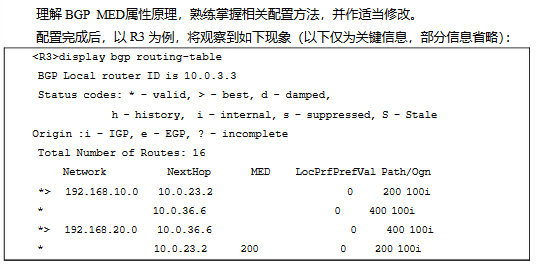
在R2做,修改MED值。
在R3写入强制引入才可生效:
[Huawei-bgp]compare-different-as-med
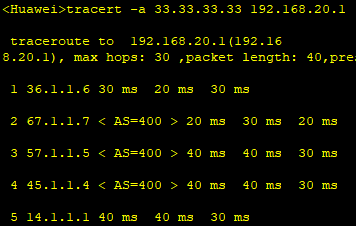
5. 网络管理员进行定期线路检查,现通过适当调整IGP的链路开销值,使得所有经过总部AS的流量都沿着R4-R5-R7-R6路径转发
注意:注入时,不要把bgp注入到ospf中,在第6步有影响
让192.168.20.0/24和172.16.20.0/24沿着R4-R5-R7-R6路径转发
原本都是走R4 R6
修改R4和R6的cost值,不用acl列表,进端口配置就可以
在R4:
interface GigabitEthernet0/0/1
ospf cost 200
在R6:
interface GigabitEthernet0/0/1
ospf cost 200
在R1:

在R3:
6. 网络管理员在检查中发现业务网段B的流量非常大,决定将业务网段B的流量单独沿着R4-R6路径转发(要求BGP路由选路与实际转发路径一致)
方法一:
R4:
acl number 2001
rule 5 permit source 192.168.20.0 0.0.0.255
peer 6.6.6.6 route-policy local export
route-policy local permit node 10
if-match acl 2001
apply ip-address next-hop 46.1.1.4
#
route-policy local permit node 20
R6:
acl number 2001
rule 5 permit source 172.16.20.0 0.0.0.255
#
peer 4.4.4.4 route-policy local export
route-policy local permit node 15
if-match acl 2001
apply ip-address next-hop 46.1.1.6
#
route-policy local permit node 20
方法二(此方法貌似不太可行):
R4和R6都做
bgp 400
preference 100 100 100
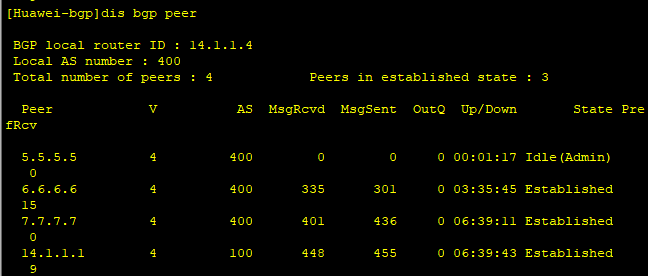
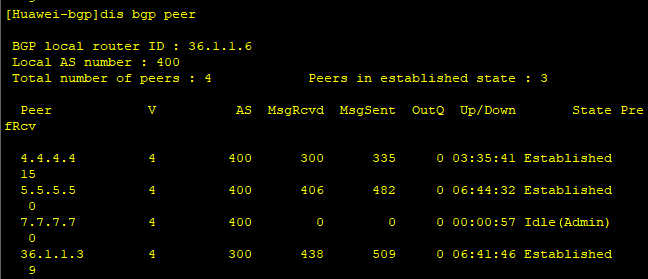
7. 公司总部网络将进行改造,在不改变原有配置的基础上,通过增加少量配置实现,R5与R7不参与BGP路径选择
在R4和R6上配置:
R4:
[Huawei-bgp]peer 5.5.5.5 ignore
R6:
[Huawei-bgp]peer 7.7.7.7 ignore
9. 假设172.16.10.0/24该业务网段状态不稳定,时而出现网络中断现象,通过适当配置以减小其对整网的影响

R3做:
bgp 300
dampening route-policy damp
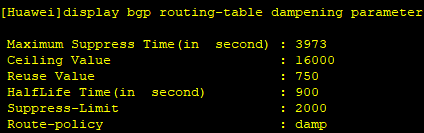
10. 为了提高BGP网络安全性,在EBGP邻居间配置认证
simple是明文认证
cipher是MD5认证
R1和R2做MD5认证:
R1:
[Huawei]bgp 100
[Huawei-bgp]peer 12.1.1.2 password cipher 123
R2:
bgp 200
[Huawei-bgp]peer 12.1.1.1 password cipher 123
11. 修改R2上BGP的存活时间为30s,同时适当调整保持时间
BGP的保持激活时间Keepalive默认是60s一次,而保持时间Holdtime则是3倍的激活时间。
在R2:
[Huawei-bgp]timer keepalive 30 hold 90
在R1上:
Type: EBGP link
BGP version 4, Remote router ID 12.1.1.2
Update-group ID: 1
BGP current state: Established, Up for 00h04m38s
BGP current event: KATimerExpired
BGP last state: OpenConfirm
BGP Peer Up count: 2
Received total routes: 6
Received active routes total: 5
Advertised total routes: 22
Port: Local - 49458 Remote - 179
Configured: Connect-retry Time: 32 sec
Configured: Active Hold Time: 180 sec Keepalive Time:60 sec
Received : Active Hold Time: 90 sec
Negotiated: Active Hold Time: 90 sec Keepalive Time:30 sec
Peer optional capabilities:
Peer supports bgp multi-protocol extension
Peer supports bgp route refresh capability
Peer supports bgp 4-byte-as capability
Address family IPv4 Unicast: advertised and received
BGP2的更多相关文章
- 最全的linux命令大全,shell运维手册
shell实例手册 0 说明{ 手册制作: 雪松} 1 文件{ ls -rtl # 按时间倒叙列出所有目录和文件 ll -rt touch file ...
- (转)shell实例手册
原文地址:http://hi.baidu.com/quanzhou722/item/f4a4f3c9eb37f02d46d5c0d9 实在是太好的资料了,不得不转 shell实例手册 0说明{ 手册制 ...
- 从汇编看c++成员函数指针(三)
前面的从汇编看c++中成员函数指针(一)和从汇编看c++成员函数指针(二)讨论的要么是单一类,要么是普通的多重继承,没有讨论虚拟继承,下面就来看一看,当引入虚拟继承之后,成员函数指针会有什么变化. 下 ...
- 干货!一篇文章集合所有Linux基础命令
1 文件{ls -rtl # 按时间倒叙列出所有目录和文件 ll -rttouch file # 创建空白文件rm -rf 目录名 # 不提示删除非空目录(-r:递归删除 -f强制)dos2unix ...
- shell 实例
转载自:https://github.com/liquanzhou/ops_doc 这里只作为笔记使用,不做他用 shell实例手册 0 说明{ 手册制作: 雪松 更新日期: 2018-09-1 ...
- linux - 流量切分线路
流量切分线路方式 # 程序判断进入IP线路,设置服务器路由规则控制返回 vi /etc/iproute2/rt_tables #添加一条策略 bgp2 #注意策略的序号顺序 ip route add ...
- 【转载】shell实例手册
原文地址:shell实例手册 作者:没头脑的土豆 shell实例手册 0说明{ 手册制作: 雪松 更新日期: -- 欢迎系统运维加入Q群: 请使用"notepad++"打开此文档 ...
- (转) shell实例手册
shell实例手册 1文件{ touch file # 创建空白文件rm -rf 目录名 # 不提示删除非空目录(-r:递归删除 -f强制)dos2uni ...
- 干货!一篇文章集合所有Linux基础命令,适合所有菜鸟学习和老手回顾!
1 文件{ ls -rtl # 按时间倒叙列出所有目录和文件 ll -rt touch file # 创建空白文件 rm -rf 目录名 # 不提示删除非空目录(-r:递归删除 -f强制) dos2u ...
随机推荐
- dp--P1439 最长公共子序列(LCS)
题目描述 给出1-n的两个排列P1和P2,求它们的最长公共子序列. 输入格式 第一行是一个数n, 接下来两行,每行为n个数,为自然数1-n的一个排列. 输出格式 一个数,即最长公共子序列的长度 找出两 ...
- git子模块使用
如下项目有多个标红的子模块 1.首先进入每个子模块目录,init初始化子模块仓库,然后提交远程. 2.在每个子目录都初始化好仓库后,进入lv-qggz主目录,只初始化该仓库,然后依次添加子模块的仓库地 ...
- 简单的Vue计算属性
倒转字符串 <!DOCTYPE html> <html lang="en"> <head> <meta charset="UTF ...
- 吴裕雄--天生自然 JAVASCRIPT开发学习:RegExp 对象
<!DOCTYPE html> <html> <head> <meta charset="utf-8"> <title> ...
- 201771010123汪慧和《面向对象程序设计JAVA》第六周实验总结
一.理论部分: 1.继承 用已有类来构建新类的一种机制.当定义了一个新类继承了一个类时,这个新类就继承了这个类的方法和域,同时在新类中添加新的方法和域以适应新的情况. 2.类.超类.子类 (1)类继承 ...
- 简单模拟B1001
#include<iostream> using namespace std; int main() { int n; ; cin >> n; ) { == ) { n = ( ...
- Res-net 标准版本源码差异-官方源码示例
# resnet https://github.com/tensorflow/models/blob/master/research/slim/nets/resnet_v1.py https://gi ...
- 华为荣耀magic book(锐龙版)安装ubuntu系统
荣耀magic book锐龙版性价比很高,前段时间在朋友推荐下我自己也入手了一台.机器整体感觉不错,续航时间长(办公.无线上网5-6小时吧),速度快,买的时候4300,现在已经降到4000以下了,也算 ...
- JavaScript学习总结(四)
这一部分我们继续介绍JavaScript的常用对象. Number对象 创建Number对象 方式1: var 变量= new Number(数字) 方式2: var 变量 = 数字; 常用的方法 t ...
- shell 实现war包的配置更新和自动发布
此脚本主要用来实现非maven tomcat项目的war包手动发布, 1.将测试war包上传至指定目录 2.备份目前生产代码 3.自动配置文件替换 4.新版本代码的发布 #!/bin/bash ### ...