
jsp页面展示更加商品的分类,控制商品的显示
我的大概思路是这样的,第一后果获取所有的商品分类 保存在list集合里面,第二从后台获取所有的商品 第三在JSP页面遍历商品分类集合放在页面的左边,然后jsp页面商品详细信息这块,也得先遍历商品分类,然后里面嵌套遍历商品详细信集合
并且带条件<c:if> 判断语句 条件为,分类对象的ID 要等于商品对象里面的分类ID 大概是这样,看下面JSP代码明白了
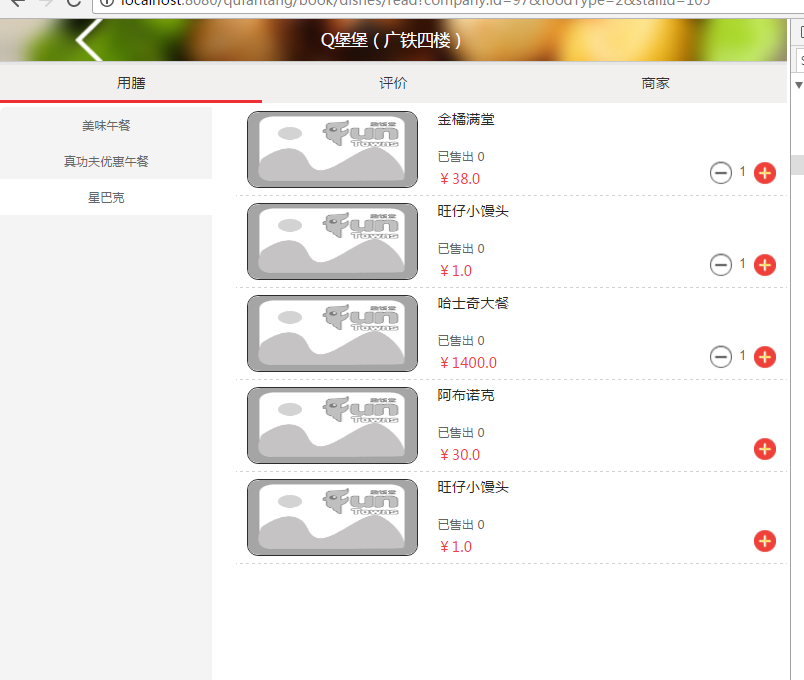
1:jsp 页面如下图
 <div class="secti-con">

            <!-- 菜品分类 -->

               <div class="secti-conl" >

                  <ul class="secti-conla">

                     <c:forEach items="${classificationList }" var="classification">

                      <li style="border-top:0;" data-id="${classification.id }">${classification.className }</li>

                      </c:forEach>

                  </ul>

              </div>

              <!-- 菜品详细 -->

              <div class="secti-conr" >

              <c:forEach items="${classificationList }" var="classification">

                  <ul id="${classification.id }" style="display: none;">

                    <s:iterator value="list" var="dishes" status="st">

                    <c:if test="${classification.id eq dishes.classification.id }">

                       <li>

                          <div class="sect-box">

                              <div class="sect-img">

                            <%-- <a href="javascript:goToDetail(${dishes.id})"><img src="<%=basePath %>${dishes.imageUrl}"></a> --%>

                            <img src="<%=basePath %>${dishes.imageUrl}" onerror="javascript:this.src='<%=basePath %>res/funcanteen/images/Place-order-3.0/noimg.png';"/>

                              </div>

                              <div class="sect-name">

                                  <div class="sect-name1">

                                     <%--  <a href="javascript:goToDetail(${dishes.id})">

                                         <span >${dishes.name }</span>

                                     </a> --%>

                                     <span >${dishes.name }</span>

                                   </div>

                                  <div class="sect-name2">已售出 <span id="dishes_${dishes.id }" class="salesShow">加载中</span></div>

                                  <div class="sect-name3">¥<span class="priceded">${dishes.price }</span></div>

                                  <div class="caidan_jg_y">${p.oldPrice != null ? '¥' : ''}${p.oldPrice }</div>

                              </div>

                              <div class="sect-add">

                                  <div class="sect-adda">

                                      <div class="sect-added">

                                          <button type="button" class="dellNum delled" id="dellNum_${dishes.id }">-</button>

                                          <input name="dell_dishesId" type="hidden" value="${dishes.id}" id="dell_dishesId"/>

                                          <input id="numberinst_${dishes.id }" class="numberinst" readonly="" value="0" type="text" name="number" maxlength="2">

                                          <button type="button" class="addedNum addedl">+</button>

                                          <input name="dishesId" class="dishesIdInput" type="hidden" value="${dishes.id }"/>

                                      </div>

                                   </div>

                              </div>

                          </div>

                      </li>

                      </c:if>

                    </s:iterator>

                  </ul>

                   </c:forEach>

              </div>

          </div>
2:页面加载时候默认给选中第一个分类
js代码如下页面第一次加载时候js控制选中一个商品分类
$(document).ready(function(){

    var conla =  $(".secti-conla li:first-child");

    conla.addClass("sectidea");

    var conlaId = conla.data("id");

    $("#"+conlaId).show();

});
3:js控制点击商品分类时候显示商品详细信息
//点击菜品分类名称

      $(".secti-conla li").click(function(e) {

	     $(this).addClass("sectidea").siblings().removeClass("sectidea");

	     var conlaId = $(this).data("id");

    	     $("#"+conlaId).show().siblings().hide();

	});
具体后台数据怎么封装的,这个根据个人需求决定了,这里就不说了。
jsp页面展示更加商品的分类,控制商品的显示的更多相关文章
- jsp页面往mysql里插入中文后数据库里显示乱码
1.JSP页面乱码 这种乱码的原因是应为没有在页面里指定使用的字符集编码,解决方法:只要在页面开始地方用下面代码指定字符集编码即可,<%@ page contentType="text ...
- springmvc 返回json数据给前台jsp页面展示
spring mvc返回json字符串的方式 方案一:使用@ResponseBody 注解返回响应体 直接将返回值序列化json 优点:不需要自己再处理 步骤一:在spring- ...
- JSP页面数据展示:分组数据展示
一.描述: 页面上要展示的数据只要写好sql从数据库查出来即可,但是展示有时候不是太好处理.比如工作中遇到的这种情况:有一个问题处理的流程,其中需要选择下一处理人,这些处理人要以部门的形式分组展示,实 ...
- 关于html5与jsp页面同样的html代码展示的页面效果不一样的问题
原文:关于html5与jsp页面同样的html代码展示的页面效果不一样的问题 html5默认的声明为 <!DOCTYPE html> jsp默认的声明头部为 <%@ page con ...
- 通用分页jsp页面显示
注:本章内容都是在上一篇文章 通用分页后台显示:https://www.cnblogs.com/ly-0919/p/11058942.html 的基础上进行改进,所以有许多的类都在上一篇, 带来不便 ...
- 【SpringBoot】转载 springboot使用thymeleaf完成数据的页面展示
版权声明:本文为博主原创文章,遵循 CC 4.0 BY-SA 版权协议,转载请附上原文出处链接和本声明.本文链接:https://blog.csdn.net/weixin_36380516/artic ...
- app——分享wap站,数据处理页面展示
无意中接到了一个小的工作任务:配合手机app端的分享功能做一个wap站,简言之:将手机app端分享的文章id传过来,利用此id再进行一系列的操作,由于文章分为纯文本,图文以及图集的三种类型的文章,因此 ...
- Saiku控制页面展示的数据过长自动换行(二十四)
Saiku控制页面展示的数据过长自动换行 目前用到saiku来展示数据,发现数据文本过长也不会自动换行,然而用户那边又需要换行(会好看些),所以就来改一改源码啦 首先我们使用谷歌浏览器 inspect ...
- Jsp页面跳转和js控制页面跳转的几种方法
Jsp 页面跳转的几种方法 1. RequestDispatcher.forward() 在服务器端起作用,当使用forward()时,Servlet engine传递HTTP请求从当前的Servle ...
随机推荐
- Dart语言学习(八) dynamic
dynamic 表示是动态的,数据类型是指任意类型 var a; a = ; a = "Dart"; print(a); dynamic b = ; b = "JavaS ...
- 03-书城bean类中的id缺少get属性
错误:id属性不可读 解决方法: 测试了删除的整个流程,dao-service-servlet ,数据库也能正常测试 想不出来为什么会bean类报错 后来仔细一看id的get属性不知道什么时候被误删了 ...
- 3、高级方法(Advanced Recipes)
学习目录:树莓派学习之路-GPIO Zero 官网地址:https://gpiozero.readthedocs.io/en/stable/recipes_advanced.html 环境:Ubunt ...
- 微信HTTP公告
- pip install cv2 安装报错
pip install cv2 安装报错是一个常见现象: ERROR: Could not find a version that satisfies the requirement cv2 (fro ...
- IE浏览器清浮动
.cfx:after,.cfx:before{content:" ";display:table;}.cfx:after{clear:both;}.cfx{*zoom:1;} 今天 ...
- SQL语句优化分析
分析比较执行时间计划读取情况 select * from dbo.Product 执行上面语句一般情况下只给你返回结果和执行行数,那么你怎么分析呢,怎么知道优化之后跟没有优化的区别呢. 下面几种方法: ...
- 正则表达式regex回溯分析
正则表达式的回溯 现在我们来正式认识一下回溯.以字符串“abbc”为例,正则表达式为“ab{1,3}c”,再匹配的时候,a.b.b,匹配完成,这时候,正则表达式会继续用c和b进行比较,发现不符合,这时 ...
- scala基础API
1.对象和json转换 1.1 json取值 val json:JSONObject = JSON.parseObject(jsonMsg:String)val message:String = js ...
- web.xml中的welcome-file-list标签作用
welcome-file-list是一个配置在web.xml中的一个欢迎页,用于当用户在url中输入项目名称或者输入web容器url(如http://localhost:8080/)时直接跳转的页面. ...