
峰哥说技术:10-Spring Boot静态资源处理
Spring Boot深度课程系列
峰哥说技术—2020庚子年重磅推出、战胜病毒、我们在行动

10 峰哥说技术:Spring Boot静态资源处理
今天我们聊聊关于 Spring Boot 中关于静态资源的问题,这样,峰哥还是带着大家回顾一下SSM中是怎么处理静资源的。我们得先回到 SSM 环境中,一般来说,我们可以通过 <mvc:resources/> 节点来配置不拦截静态资源,如下所示
|
<mvc:resources mapping="/js/**" location="/js/"/> <mvc:resources mapping="/css/**" location="/css/"/> <mvc:resources mapping="/html/**" location="/html/"/> |
由于这是一种Ant风格的路径匹配符, /** 表示可以匹配任意层级的路径,因此上面的代码也可以像下面这样简写:
<mvc:resources mapping="/**" location="/"/>
Spring boot对于Spring MVC的自动化配置都在WebMvcAutoConfiguration,因此对于静态资源的过滤策略我们只要在这里看一下应该就一目了然了。当我们打开改配置类后发现该类有一个静态的内部类WebMvcAutoConfigurationAdapter。
|
@Configuration( public WebMvcAutoConfigurationAdapter(ResourceProperties resourceProperties, WebMvcProperties mvcProperties, ListableBeanFactory beanFactory, ObjectProvider<HttpMessageConverters> messageConvertersProvider, ObjectProvider<WebMvcAutoConfiguration.ResourceHandlerRegistrationCustomizer> resourceHandlerRegistrationCustomizerProvider) { //其他省略... public void addResourceHandlers(ResourceHandlerRegistry registry) { String staticPathPattern = this.mvcProperties.getStaticPathPattern(); //其他省略.... } |
在这里重点考察staticPathPattern和resouruceProperties,这里肯定需要到WebMvcProperties 和ResourceProperties 去查看。
|
public class WebMvcProperties { public WebMvcProperties() { //其他省略.... |
|
@ConfigurationProperties( //其他省略.... } |
然后再看标红的地方,在加上WebMvcAutoConfiguration中的SERVLET_LOCATIONS = new String[]{"/"};我们需要的答案就呼之欲出了。最后的结论如下:
Spring Boot 中支持5个静态资源位置,分别是:"classpath:/META-INF/resources/", "classpath:/resources/","classpath:/static/", "classpath:/public/",然后在getResourceLocations方法中,又添加了“/”,因此这里返回值一共有5个。其中,/表示webapp目录,即webapp中的静态文件也可以直接访问。静态资源的匹配路径按照定义路径优先级依次降低。我们可以通过一个案例来说明这里的优先级。
案例:分别在静态资源的5个位置放置名称相同但是内容不同的图片,启动后访问,依次删除,验证规则。
步骤:
1)创建Spring boot工程,按下图构建。

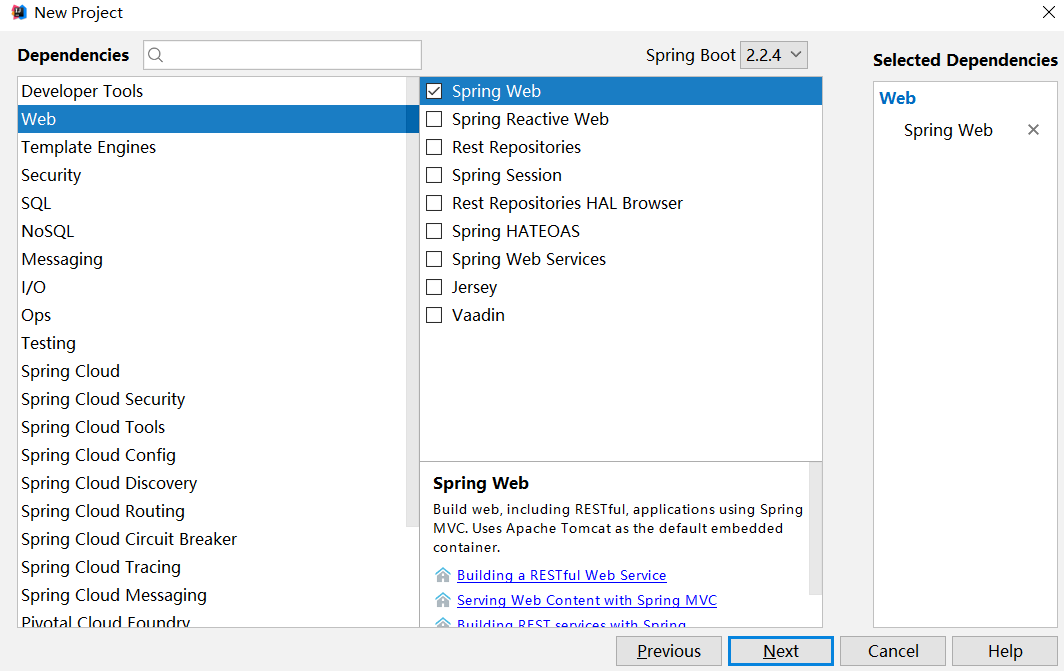
特别说明:pom.xml中添加web依赖,除此之外,不需要任何的配置。配置大家已经很熟悉,这里省略。
2)补全工程文件夹,如下图所示。并添加图片到文件夹中。
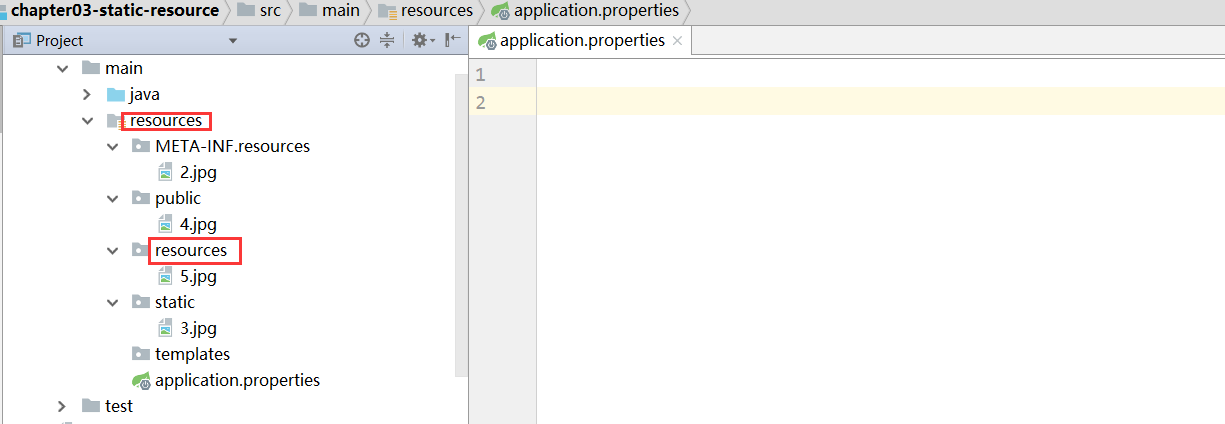
3)启动项目,任何进行访问。依次删除进行测试。省略过程,大家自己可以试试。
以上所讲的是系统的默认配置,如果我们想自己进行自定义该怎么进行呢?其实也非常简单。有两种方式可以进行,一种是在application.properties中进行配置。另外一种是配置Java类,也可以。下面分别进行举例说明。
1)在application.properties中进行自定义的配置静态资源
|
spring.resources.static-locations=classpath:/ |
第一行配置表示定义资源位置,第二行配置表示定义请求 URL 规则。以上文的配置为例,如果我们这样定义了,表示可以将静态资源放在 resources目录下的任意地方,我们访问的时候当然也需要写完整的路径,例如在resources/static目录下有一张名为1.png 的图片,那么访问路径就是 http://localhost:8080/static/1.png ,注意此时的static不能省略。
2)通过Java配置类自定义静态资源
|
package com.java.chapter02jsp.config; import org.springframework.context.annotation.Configuration; @Configuration |
工程截图如下:
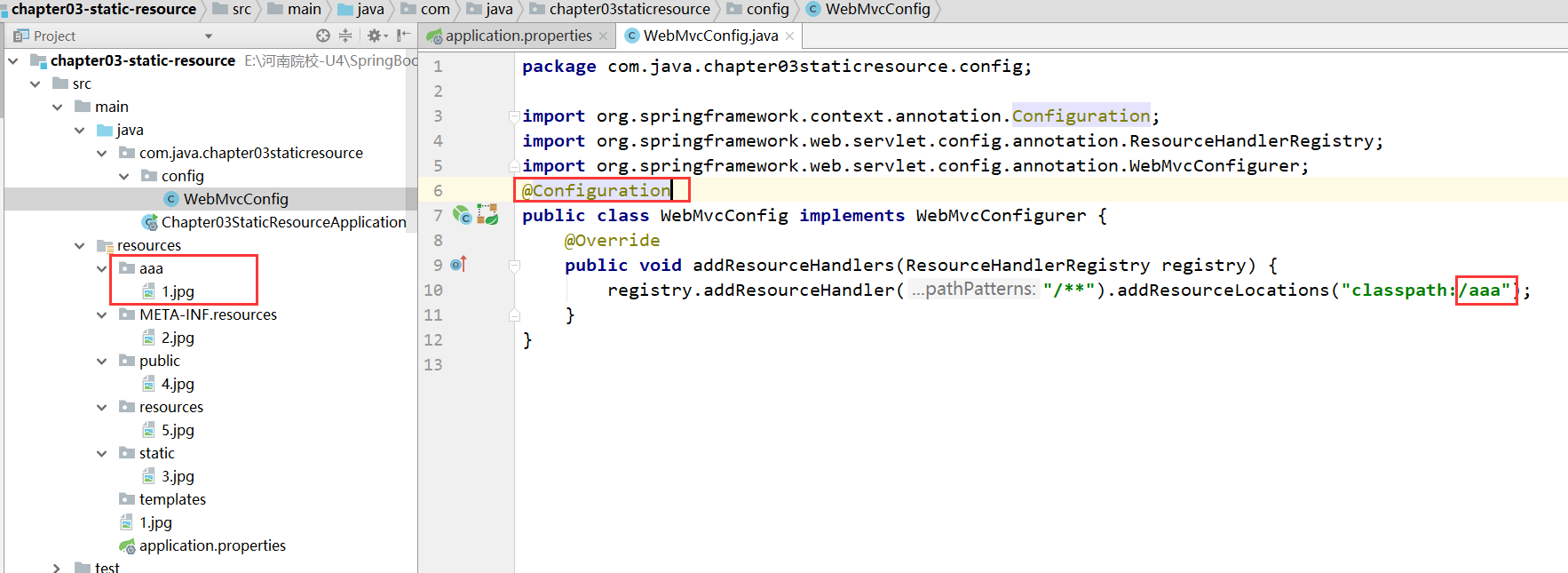
在浏览器中输入:http://localhost:8080/aaa/1.jpg。可以看到图片,这里要说明的是必须带上aaa,否则报错,大家需要特别关注。
很多人用了 Thymeleaf 之后,会将静态资源也放在 resources/templates 目录下,注意,templates 目录并不是静态资源目录,它是一个放页面模板的位置(你看到的 Thymeleaf 模板虽然后缀为 .html,其实并不是静态资源)
峰哥说技术:10-Spring Boot静态资源处理的更多相关文章
- 峰哥说技术:09-Spring Boot整合JSP视图
Spring Boot深度课程系列 峰哥说技术—2020庚子年重磅推出.战胜病毒.我们在行动 09 峰哥说技术:Spring Boot整合JSP视图 一般来说我们很少推荐大家在Spring boot ...
- 峰哥说技术:08-Spring Boot整合FreeMarker视图
Spring Boot深度课程系列 峰哥说技术—2020庚子年重磅推出.战胜病毒.我们在行动 08 峰哥说技术:Spring Boot整合FreeMarker视图 前面带着大家整合了Thymelea ...
- 峰哥说技术:04-Spring Boot基本配置
Spring Boot深度课程系列 峰哥说技术—2020庚子年重磅推出.战胜病毒.我们在行动 04 Spring Boot基本配置 1)容器的相关配置 在Spring Boot中可以内置Tomcat. ...
- Spring Boot 静态资源处理
spring Boot 默认的处理方式就已经足够了,默认情况下Spring Boot 使用WebMvcAutoConfiguration中配置的各种属性. 建议使用Spring Boot 默认处理方式 ...
- 从零开始的Spring Boot(3、Spring Boot静态资源和文件上传)
Spring Boot静态资源和文件上传 写在前面 从零开始的Spring Boot(2.在Spring Boot中整合Servlet.Filter.Listener的方式) https://www. ...
- Spring Boot静态资源处理
Spring Boot静态资源处理 8.8 Spring Boot静态资源处理 当使用Spring Boot来开发一个完整的系统时,我们往往需要用到前端页面,这就不可或缺地需要访问到静态资源,比如图片 ...
- Spring Boot 静态资源处理(转)
Spring Boot 静态资源处理 Spring Boot 系列 Spring Boot 入门 Spring Boot 属性配置和使用 Spring Boot 集成MyBatis Spring Bo ...
- 峰哥说技术:03-Spring Boot常用注解解读
Spring Boot深度课程系列 峰哥说技术—2020庚子年重磅推出.战胜病毒.我们在行动 03 Spring Boot常用注解解读 在Spring Boot中使用了大量的注解,我们下面对一些常用的 ...
- 峰哥说技术:01-Spring Boot介绍
Spring Boot深度课程系列 峰哥说技术—2020庚子年重磅推出.战胜病毒.我们在行动 Spring Boot介绍 A.Spring Boot是什么? 由于Spring是一个轻量级的企业开发框架 ...
随机推荐
- spring cloud解决eureka的client注册时默认使用hostname而不是ip
eureka的client注册到server时默认是使用hostname而不是ip.这样的话使用feign client通过eureka进行服务间相互调用时也会使用hostname进行调用,从而调用失 ...
- intel windows caffe加速
网址: https://github.com/BeFreeRoad/intel_caffe_windows 将intel caffe从linux平台移植到windows平台. 性能: 在虚拟机上测试可 ...
- BBuBBBlesort!
题目描述 Snuke got an integer sequence of length N from his mother, as a birthday present. The i-th (1≦i ...
- python-django框架-电商项目-项目部署_20191127
python-django框架-电商项目-项目部署: uwsgi作为web服务器: 在pycharm中启动项目:使用python manage.py runserver 这个runserver是dja ...
- Ribosome profiling|N-terminomics|蛋白质基因组学
生物医学大数据-蛋白质基因组学:质谱注释 蛋白质组与其他组学的关系便是互为印证:蛋白质基因组学原本用于基因组注释,后面扩展到蛋白质与转录组或可变剪接之间关系,同时,蛋白质组依赖于基因组注释作为验证.许 ...
- elasticsearch5.4安装
1.从官网下载ES 安装包: elasticsearch-.tar.gz 2.解压到要安装的目录 注意:一定要切换用户,不能用root用户解压,不能用root用户启动 tar -zxvf elasti ...
- Visual Studio 2017部署方法
1.打开官网下载链接 https://www.visualstudio.com/zh-hans/downloads/ 2.选择适合的版本,选择下载,进入下载界面 如果无反应,点击请单击此处重试,开始下 ...
- mysql挖掘与探索------第一章(简介)
一.数据库简介: 1按照数据库发展时间,主要出现下面几个类型的数据库系统: a 网状型数据库 b 层次型数据库 c 关系型数据库 d 面向对象数据库 上面4中数据库系统中,关系型数据库使用最为广泛.面 ...
- Markdown 内嵌 HTML 语法
Markdown是一种可以使用普通文本编辑器编写的标记语言,通过简单的标记语法,它可以使普通文本内容具有一定的格式.Markdown内嵌HTML,本文总结了一些常用的HTML标记用于扩展Markdow ...
- fiddler导出请求返回的响应数据
或者右键 选择response导出