
vue+element 表单封成组件(2)
今天我们继续把时间选择器,多选框和单选框加上
父组件(在昨天的基础上增加):
<template>

  <el-form :model="ruleForm" ref="ruleForm" label-width="100px"  class="demo-ruleForm">

      <commonformtext

      prop="biao"

      placeholder="这个是测试的"

      label="活动区域"

      v-model="ruleForm.biao"

      :rules="[{ required: true, message: '请输入活动名称', trigger: 'blur' }]"

      >

      </commonformtext>

      <commonformselect

      prop="select"

      placeholder="这个是测试的下拉框"

      label="下拉框"

      v-model="ruleForm.select"

      :rules="{ required: true, message: '请选择活动区域', trigger: 'change' }"

      :selectdata='selectdata'

      >

      </commonformselect>

      <commonformtimeb>

        <template slot="date">

          <commonformdate

          v-model="ruleForm.date1"

          placeholder="请选择日期"

          prop="date1"

          :rules="{ type: 'date', required: true, message: '请选择日期', trigger: 'change' }"

          >

          </commonformdate>

          <el-col class="line" :span="0.5">--</el-col>

          <commonformtime

          v-model="ruleForm.date2"

          placeholder="请选择时间"

          prop="date2"

          :rules="{ type: 'date', required: true, message: '请选择时间', trigger: 'change' }"

          >

          </commonformtime>

        </template>

      </commonformtimeb>

      <commonformcheckbox

      prop="type"

      label="活动性质"

      v-model="ruleForm.type"

      :rules=" { type: 'array', required: true, message: '请至少选择一个活动性质', trigger: 'change' }"

      :checkboxdata='checkboxdata'

      >

      </commonformcheckbox>

      <commonformradio

      prop="radio"

      label="活动性质"

      v-model="ruleForm.radio"

      :rules=" { required: true, message: '请选择活动资源', trigger: 'change' }"

      :radiodata='radiodata'

      >

      </commonformradio>

      <el-form-item>

        <el-button type="primary" @click="submitForm('ruleForm')">立即创建</el-button>

      </el-form-item>

</el-form>

</template>

<script>

import commonformtext from "@/components/common/formtext.vue";

import commonformselect from "@/components/common/formselect.vue";

import commonformtime from "@/components/common/formtime.vue";

import commonformtimeb from "@/components/common/formtimeb.vue";

import commonformdate from "@/components/common/formdate.vue";

import commonformcheckbox from "@/components/common/formcheckbox.vue";

import commonformradio from "@/components/common/formradio.vue";

export default {

  data() {

    return {

      ruleForm: {

        date1: "",

        date2: "",

        biao: "",

        type: new Array(),

        select: "",

        radio: ""

      },

      selectdata: [

        { label: "区域1", value: "1", id: 1 },

        { label: "区域2", value: "2", id: 2 },

        { label: "区域3", value: "3", id: 3 },

        { label: "区域4", value: "4", id: 4 },

        { label: "区域5", value: "5", id: 5 }

      ],

      checkboxdata: [

        { label: "美食/餐厅线上活动", value: "1", id: 1 },

        { label: "地推活动", value: "2", id: 2 },

        { label: "线下主题活动", value: "3", id: 3 },

        { label: "单纯品牌曝光", value: "4", id: 4 }

      ],

      radiodata: [

        { label: "线上品牌商赞助", value: "1", id: 1 },

        { label: "线下场地免费", value: "2", id: 2 },

        { label: "线下主题活动", value: "3", id: 3 }

      ]

    };

  },

  components: {

    commonformtext,

    commonformselect,

    commonformtime,

    commonformtimeb,

    commonformdate,

    commonformcheckbox,

    commonformradio

  },

  methods: {

    submitForm(formName) {

      this.$refs[formName].validate(valid => {

        if (valid) {

          alert("submit!");

        } else {

          console.log("error submit!!");

          return false;

        }

      });

    }

  }

};

</script>
时间选择器(一共两个,都差不多只粘一个了)
<template>

    <el-col :span="11">

        <el-form-item :prop="prop" :rules="rules" >

            <el-date-picker type="date" :placeholder="placeholder" v-model="myValue" style="width: 100%;"></el-date-picker>

        </el-form-item>

    </el-col>

</template>

<script>

export default {

  props: {

    type: {

      type: Array

    },

    prop: {

      type: String

    },

    placeholder: {

      type: String

    },

    label: {

      type: String

    },

    value: [String, Number, Date],

    rules: [Object, Array],

    name: {

      type: String

    }

  },

  data() {

    return {

      myValue: ""

    };

  },

  mounted() {

    this.myValue = this.value;

  },

  watch:{

      myValue(val){

        this.$emit("input", this.myValue);

      }

    }

};

</script>
多选
<template>

        <el-form-item :label="label" :prop="prop" :rules="rules">

          <el-checkbox-group v-model="myValue">

            <el-checkbox v-for="item in checkboxdata" :key="item.id" :label="item.label" :name="name"></el-checkbox>

          </el-checkbox-group>

        </el-form-item>

</template>

<script>

    export default {

        props: {

            type: {

                type: Array

            },

            prop: {

                type: String

            },

            placeholder:{

                type: String

            },

            label:{

                type: String

            },

            value:{

                type: Array

            },

            rules:[Object,Array],

            name:{

                type:String

            },

            checkboxdata:{

                type:Array

            }

        },

    data(){

        return {

            myValue:[]

        };

    },

    watch:{

        myValue(val){

             this.$emit("input",this.myValue)

            console.log(val,"aaa")

        }

    }

    }

</script>
单选和多选几乎一样就不发了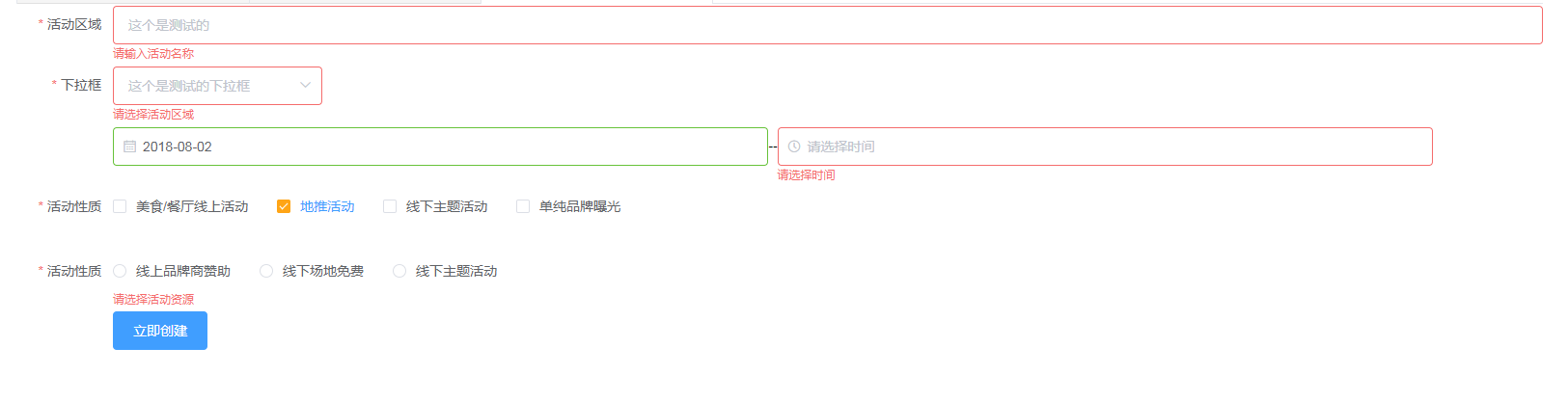
接下来聊聊今天遇到的问题
父组件中的 ruleForm.type 值为new Array()这是多选所以要传数组过去子组件用数组接再传回来就ok
和昨天一样就结果来看我们发现只有下拉栏使用了change事件 传回父组件而其他的子组件全都使用了watch监听,如果其他组件也使用change会发生什么后果呢?按照昨天的结论应该是change比watch快所以更没问题了~
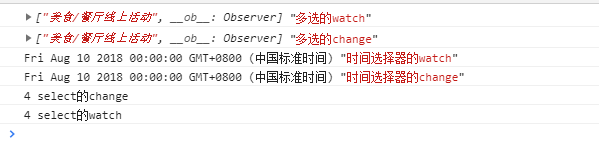
这是什么情况?为什么只有下拉栏的change比watch快而其余的都是watch快???
经过一下午的冥思苦想和询问大佬,得到了不确定的答案,因为下拉栏的change事件是原生事件而时间选择器,多选框的change事件是element封装的事件,所以当然是原生的跑得快了。。
仔细一想好像挺有道理的啊!
vue+element 表单封成组件(2)的更多相关文章
- vue+element 表单封成组件(1)
作为一名刚接触vue不到一个月的菜鸟,思想还没有从操作DOM转变为数据驱动,看vue的代码处处别扭.组里为了让我熟悉vue交给了我一个将element 表单封装成组件的练手任务.由于开发过程中遇到的表 ...
- vue element 表单验证不通过,滚动到固对应位置
我们在使用elementIUI实现表单验证,内容比较多的时候,提示内容会被遮挡,这时候用户不清楚什么情况,还会连续点击提交按钮.这个时候需求来啦:我们需要在表单验证不通过的时候,页面滚动到对应的位置. ...
- vue+element表单校验功能
要实现这个功能其实并不难,element组件直接用就可以, 但是我在使用过程中碰到了几个坑,就记录下来,分享给大家,避免落坑,话不多说,直接上过程...... 表单校验功能: 实现这个功能,总共分 ...
- vue+element 表单验证
效果图 <template> <div class="formValidator"> <div v-for="(item,index) in ...
- vue element 表单多个验证时,滚动到验证提示的位置
最近项目有个下单的过程,需要输入很多信息,每次提交都要往下滑,还要去验证,测试后发现体验也不好,element框架也没提供这种滚动方法, 不过提供了一个验证的方法 validate (两个参数:是否校 ...
- 第四节:Vue表单标签和组件的基本用法,父子组件间的通信
vue表单标签和组件的基本用法,父子组件间的通信,直接看例子吧. <!DOCTYPE html> <html> <head> <meta charset=&q ...
- 表单配置项写法,表单写成JSON数组套对象,一行是一个数组单位,一列是一个对象单位,然后再写一个公共组件读取这个配置,循环加载slot,外层载入slot的自定义部分,比如input select等,这种写法就是把组件嵌套改为配置方式
表单配置项写法,表单写成JSON数组套对象,一行是一个数组单位,一列是一个对象单位,然后再写一个公共组件读取这个配置,循环加载slot,外层载入slot的自定义部分,比如input select等,这 ...
- Vue Element-ui表单校验规则,你掌握了哪些?
1.前言 Element-ui表单校验规则,使得错误提示可以直接在form-item下面显示,无需弹出框,因此还是很好用的. 我在做了登录页面的表单校验后,一度以为我已经很了解表单的校验规则. ...
- vue的表单编辑删除,保存取消功能
过年回来第一篇博客,可能说的不是很清楚,而且心情可能也不是特别的high,虽然今天是元宵,我还在办公室11.30在加班,但就是想把写过的代码记下来,怕以后可能真的忘了.(心将塞未塞,欲塞未满) VUE ...
随机推荐
- fastjon案例
--json为json串JSONObject obj = JSON.parseObject(json);String x = obj.getString("cropId");JSO ...
- 网络流dinic板子
bool bfs(){ memset(deep,0,sizeof(deep)); queue<int>que; que.push(s); deep[s]=1; while(!que.emp ...
- 绿洲作业第一周 - Y3每日中文学习任务清单
尽量每天完成一首古诗. 如果孩子另有学习安排,可在周日(2.16)23:59前,完成任务.有兴趣.学有余力的孩子可以自我拓展其中的“寒假读诗”.
- 向通用自动驾驶部门Cruise投资22.5亿美元,软银打得什么主意?
5月29日,加利福尼亚州的一辆特斯拉Model S撞上停在路边的警车.据透露,当时这辆特斯拉正处于自动辅助驾驶即Autopilot模式.而在今年,这已经不是第一次特斯拉自动驾驶模式出问题了.此外,Ub ...
- jeesite 去掉 /a
1.修改 jeesite.properties文件 adminPath=/a为 adminPath= 2.修改 web.xml文件找到如下设置 <filter-mapping> <f ...
- UML Learning
在建筑业中,建模是一项经过检验并被广泛接受的工程技术,建立房屋和大厦的建筑模型,能帮助用户得到实际建筑物的印象.在软件建模中也具有同样的作用,建模提供了系统的蓝图. 建模是为了能够更好地理解正在开发的 ...
- python-django-fastdfs+Nginx的安装和配置_20191122
python-django-fastdfs+Nginx的安装和配置 FastDFS文件系统 FastDFS文件系统简介: 是c语言编写的,是淘宝的架构师写的,存储淘宝的图片,后来开源了, fastDF ...
- [LC] 70. Climbing Stairs
You are climbing a stair case. It takes n steps to reach to the top. Each time you can either climb ...
- idea常见需求
1.给class加注释模板 /** *@ClassName ${NAME} *@Description TODO *@Author xxx *@Date ${DATE} ${TIME} *@Versi ...
- ffmpeg android移植
CMake语法简介(androidstudio中利用CMake开发NDK): http://blog.csdn.net/u013718120/article/details/62883711FFmpe ...