
[原创][开源] SunnyUI.Net 开发日志:ListBox 增加跟随鼠标滑过高亮
SunnyUI.Net, 基于 C# .Net WinForm 开源控件库、工具类库、扩展类库、多页面开发框架

- Blog: https://www.cnblogs.com/yhuse
- Gitee: https://gitee.com/yhuse/SunnyUI
- GitHub: https://github.com/yhuse/SunnyUI
- SunnyUI.Net 系列文章目录
- 欢迎交流,QQ群:56829229 (SunnyUI技术交流群)
SunnyUI.Net 开发日志:ListBox 增加跟随鼠标滑过高亮
QQ群里,寸木说,ListBox鼠标移动时,当前行需要焦点,我想了想,不难实现啊
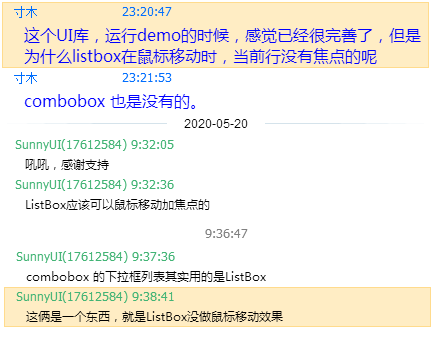
不就是在鼠标移动时重绘Item嘛,何况选中的Item已经改了颜色了。
见UIListBox代码:
protected override void OnDrawItem(DrawItemEventArgs e)

        {

            base.OnDrawItem(e);

            BeforeDrawItem?.Invoke(this, Items, e);

            if (Items.Count == 0)

            {

                return;

            }

            e.DrawBackground();

            if (e.Index < 0 || e.Index >= Items.Count)

            {

                return;

            }

            StringFormat sStringFormat = new StringFormat();

            sStringFormat.LineAlignment = StringAlignment.Center;

            Color backColor = (e.State & DrawItemState.Selected) == DrawItemState.Selected ? ItemSelectBackColor : BackColor;

            Color foreColor = (e.State & DrawItemState.Selected) == DrawItemState.Selected ? ItemSelectForeColor : ForeColor;

            Rectangle rect = new Rectangle(e.Bounds.X, e.Bounds.Y, e.Bounds.Width - 1, e.Bounds.Height - 1);

            e.Graphics.FillRectangle(BackColor, e.Bounds);

            e.Graphics.FillRoundRectangle(backColor, rect, 5);

            e.Graphics.DrawString(Items[e.Index].ToString(), e.Font, foreColor, e.Bounds, sStringFormat);

        }
看:(e.State & DrawItemState.Selected) == DrawItemState.Selected 选中行状态嘛
看了e.State有e.State == DrawItemState.HotLight,不就是高亮的么,于是开始撸代码,加状态判断
Run
晕。。。没变,这HotLight不起作用,好吧,问度娘。。。
翻山越岭,跋山涉水。。。
找到这篇:https://www.jb51.cc/csharp/101121.html
其中提到:
我在我的WinForms应用程序中使用OwnerDrawFixed作为DrawMode用于自定义ListBox控件.当用户将鼠标悬停在列表框项目上时,我希望重新绘制ListBoxItem的背景(或执行其他操作),即在MouseMove …DrawItemState.HotLight永远不适用于ListBox,所以我想知道如何模拟它,如何解决这个问题.
DrawItemState.HotLight永远不适用于ListBox,是永远。。。怎么这么远。。。
继续往下看:
解决方法
DrawItemState.HotLight仅适用于所有者绘制的菜单,而不适用于列表框.对于ListBox,您必须自己跟踪项目:
public partial class Form1 : Form

{

  private int _MouseIndex = -1;

  public Form1()

  { InitializeComponent(); }

  private void listBox1_DrawItem(object sender,DrawItemEventArgs e)

  {

    Brush textBrush = SystemBrushes.WindowText;

    if (e.Index > -1)

    {

      if (e.Index == _MouseIndex)

      {

        e.Graphics.FillRectangle(SystemBrushes.HotTrack,e.Bounds);

        textBrush = SystemBrushes.HighlightText;

      }

      else

      {

        if ((e.State & DrawItemState.Selected) == DrawItemState.Selected)

        {

          e.Graphics.FillRectangle(SystemBrushes.Highlight,e.Bounds);

          textBrush = SystemBrushes.HighlightText;

        }

        else

          e.Graphics.FillRectangle(SystemBrushes.Window,e.Bounds);

      }

      e.Graphics.DrawString(listBox1.Items[e.Index].ToString(),e.Font,textBrush,e.Bounds.Left + 2,e.Bounds.Top);

    }

  }

  private void listBox1_MouseMove(object sender,MouseEventArgs e)

  {

    int index = listBox1.IndexFromPoint(e.Location);

    if (index != _MouseIndex)

    {

      _MouseIndex = index;

      listBox1.Invalidate();

    }

  }

  private void listBox1_MouseLeave(object sender,EventArgs e)

  {

    if (_MouseIndex > -1)

    {

      _MouseIndex = -1;

      listBox1.Invalidate();

    }

  }

}
兄弟们,人家这花两年时间解决的,应该有用,继续再找找,又找到一篇洋文的:
https://stackoverflow.com/questions/1316027/listbox-drawitem-hotlight-state-in-the-ownerdraw-mode
It took me only two years to find the answer for you, but here it is:
The DrawItemState.HotLight only applies to owner drawn menus, not the listbox.
For the ListBox, you have to keep track of the item yourself:
看看,也是两年,估计上面中文的从这个翻译过来。
除了这俩,还真没找到。
继续撸代码,果真管用。不过还是有问题,鼠标滑快了,ListBox闪烁的厉害。
分析代码 listBox1.Invalidate(); 这是刷新全部的。鼠标滑过也就和本次选中和上次选中的有关系。
就刷这两个Item就行,有了思路,撸代码三连发:
        private int lastIndex = -1;

        private int mouseIndex = -1;

        [Browsable(false)]

        public int MouseIndex

        {

            get => mouseIndex;

            set

            {

                if (mouseIndex != value)

                {

                    if (lastIndex >= 0 && lastIndex != SelectedIndex)

                    {

                        OnDrawItem(new DrawItemEventArgs(this.CreateGraphics(), Font, GetItemRectangle(lastIndex), lastIndex, DrawItemState.Grayed));

                    }

                    mouseIndex = value;

                    if (mouseIndex >= 0 && mouseIndex != SelectedIndex)

                    {

                        OnDrawItem(new DrawItemEventArgs(this.CreateGraphics(), Font, GetItemRectangle(value), value, DrawItemState.HotLight));

                    }

                    lastIndex = mouseIndex;

                }

            }

        }

        protected override void OnMouseMove(MouseEventArgs e)

        {

            base.OnMouseMove(e);

            MouseIndex = IndexFromPoint(e.Location);

        }

        protected override void OnMouseLeave(EventArgs e)

        {

            base.OnMouseLeave(e);

            MouseIndex = -1;

        }
其中 new DrawItemEventArgs(this.CreateGraphics(), Font, GetItemRectangle(value), value, DrawItemState.HotLight)
第一个参数Graphics,也找了一会儿,后来看这篇:
https://www.cnblogs.com/yuanyeguhong/archive/2013/09/20/3330606.html
其实就是Graphics对象的DrawString方法,而参数e中的Graphics是如何来的呢。
我们接着分析DrawItemEventArgs这个类,他既然是对listBox1某一项的属性的打包,
那么我估计其中的Graphics对象就是由listBox1.creatgraphics而来的。
好了,到此我们就可以自定义重绘listbox某项的函数了,可任意调用的哦!
好了,至此,问题都已找到答案,再捋一下思路,把逻辑理顺。撸代码,调试,OK!!!
主要代码如下:
protected override void OnDrawItem(DrawItemEventArgs e)

        {

            base.OnDrawItem(e);

            BeforeDrawItem?.Invoke(this, Items, e);

            if (Items.Count == 0)

            {

                return;

            }

            bool otherState = e.State == DrawItemState.Grayed || e.State == DrawItemState.HotLight;

            if (!otherState)

            {

                e.DrawBackground();

            }

            if (e.Index < 0 || e.Index >= Items.Count)

            {

                return;

            }

            StringFormat sStringFormat = new StringFormat();

            sStringFormat.LineAlignment = StringAlignment.Center;

            bool isSelected = (e.State & DrawItemState.Selected) == DrawItemState.Selected;

            Color backColor = isSelected ? ItemSelectBackColor : BackColor;

            Color foreColor = isSelected ? ItemSelectForeColor : ForeColor;

            Rectangle rect = new Rectangle(e.Bounds.X, e.Bounds.Y, e.Bounds.Width - 1, e.Bounds.Height - 1);

            if (!otherState)

            {

                e.Graphics.FillRectangle(BackColor, e.Bounds);

                e.Graphics.FillRoundRectangle(backColor, rect, 5);

                e.Graphics.DrawString(Items[e.Index].ToString(), e.Font, foreColor, e.Bounds, sStringFormat);

            }

            else

            {

                if (e.State == DrawItemState.Grayed)

                {

                    backColor = BackColor;

                    foreColor = ForeColor;

                }

                if (e.State == DrawItemState.HotLight)

                {

                    backColor = HoverColor;

                    foreColor = ForeColor;

                }

                e.Graphics.FillRectangle(BackColor, e.Bounds);

                e.Graphics.FillRoundRectangle(backColor, rect, 5);

                e.Graphics.DrawString(Items[e.Index].ToString(), e.Font, foreColor, e.Bounds, sStringFormat);

            }

            AfterDrawItem?.Invoke(this, Items, e);

        }
看,DrawItemState.HotLight咱也给实现了,DrawItemState.Grayed 我是随便选的状态,区别于其他。
想看全部代码,看我的开源项目吧,https://gitee.com/yhuse/SunnyUI ,哎,客官别走嘛,点个Star先。
原创文章,转载请保留链接 Sunny's blog
[原创][开源] SunnyUI.Net 开发日志:ListBox 增加跟随鼠标滑过高亮的更多相关文章
- [原创][开源] SunnyUI.Net 开发日志:UIBarChart 坐标轴刻度取值算法
_ 在开发UIBarChart的过程中,需要绘制Y轴的刻度,数据作图时,纵横坐标轴刻度范围及刻度值的取法,很大程度上取决于数据的分布.对某一组数据,我们很容易就能知道如何选取这些值才能使图画得漂亮.但 ...
- [原创][开源] SunnyUI.Net 更新日志
SunnyUI.Net, 基于 C# .Net WinForm 开源控件库.工具类库.扩展类库.多页面开发框架 Blog: https://www.cnblogs.com/yhuse Gitee: h ...
- [原创][开源] SunnyUI.Net 系列文章目录
SunnyUI.Net, 基于 C# .Net WinForm 开源控件库.工具类库.扩展类库.多页面开发框架 Blog: https://www.cnblogs.com/yhuse Gitee: h ...
- [原创][开源]SunnyUI.Net, C# .Net WinForm开源控件库、工具类库、扩展类库、多页面开发框架
SunnyUI.Net, 基于 C# .Net WinForm 开源控件库.工具类库.扩展类库.多页面开发框架 Blog: https://www.cnblogs.com/yhuse Gitee: h ...
- [原创][开源] SunnyUI.Net 安装
SunnyUI.Net, 基于 C# .Net WinForm 开源控件库.工具类库.扩展类库.多页面开发框架 Blog: https://www.cnblogs.com/yhuse Gitee: h ...
- [原创][开源] SunnyUI.Net 字体图标
SunnyUI.Net, 基于 C# .Net WinForm 开源控件库.工具类库.扩展类库.多页面开发框架 Blog: https://www.cnblogs.com/yhuse Gitee: h ...
- [原创][开源] SunnyUI.Net 主题
SunnyUI.Net, 基于 C# .Net WinForm 开源控件库.工具类库.扩展类库.多页面开发框架 Blog: https://www.cnblogs.com/yhuse Gitee: h ...
- [原创][开源] SunnyUI.Net 国际化
SunnyUI.Net, 基于 C# .Net WinForm 开源控件库.工具类库.扩展类库.多页面开发框架 Blog: https://www.cnblogs.com/yhuse Gitee: h ...
- C#实现多级子目录Zip压缩解压实例 NET4.6下的UTC时间转换 [译]ASP.NET Core Web API 中使用Oracle数据库和Dapper看这篇就够了 asp.Net Core免费开源分布式异常日志收集框架Exceptionless安装配置以及简单使用图文教程 asp.net core异步进行新增操作并且需要判断某些字段是否重复的三种解决方案 .NET Core开发日志
C#实现多级子目录Zip压缩解压实例 参考 https://blog.csdn.net/lki_suidongdong/article/details/20942977 重点: 实现多级子目录的压缩, ...
随机推荐
- 2019-2020-1 20199308《Linux内核原理与分析》第三周作业
<Linux内核分析> 第二章 操作系统是如何工作的 2.1 函数调用堆栈 3个关键性的方法机制(3个法宝) 存储程序计算机 函数调用堆栈机制 中断 堆栈相关的寄存器 ESP:堆栈指针(s ...
- Linux下解压rar压缩包
wget http://www.rarlab.com/rar/rarlinux-x64-4.2.0.tar.gz rar软件不需要安装,直接解压到/usr/local下,以下操作需要有root权限. ...
- docker-compose简介及安装
一.简介 Compose是用于定义和运行多容器Docker应用程序的工具,是docker的服务编排工具,主要应用于构建基于Docker的复杂应用,compose通过一个配置文件来管理多个docker容 ...
- 【JAVA基础】04 Java语言基础:方法
1. 方法概述和格式说明 为什么要有方法 提高代码的复用性 什么是方法 完成特定功能的代码块. 方法的格式 修饰符 返回值类型 方法名(参数类型 参数名1,参数类型 参数名2...) { 方法 ...
- PHP的闭包和匿名函数
闭包函数是创建时,封装周围状态的函数,而匿名函数是没有名称的函数,匿名函数可以被赋值给变量,也就是所谓的函数式编程,也可以传递参数,经常作为回调函数.(理论上讲:匿名函数和闭包不算是一个概念,php却 ...
- SocksCap64应用程序通过SOCKS代理
一.下载SocksCap64 https://pan.baidu.com/s/1B671kT9R6Zb6ch1mc4Kb2Q 提取码:hai3 一个是免安装版本,一个是安装版本,选一个即可. 下面以免 ...
- Codeforces Round #623 (Div. 2, based on VK Cup 2019-2020 - Elimination Round, Engine) C. Restoring
C. Restoring Permutation time limit per test1 second memory limit per test256 megabytes inputstandar ...
- 数学--数论--HDU 12151七夕节
七夕节 Problem Description 七夕节那天,月老来到数字王国,他在城门上贴了一张告示,并且和数字王国的人们说:"你们想知道你们的另一半是谁吗?那就按照告示上的方法去找吧!&q ...
- P4370 [Code+#4]组合数问题2
题目要求当\(0\leq a\leq b\leq n\)时,\(k\)个\(\tbinom{b}{a}\)的和的最大值 观察杨辉三角形,可以发现,最大的\(\tbinom{b}{a}\),为\(\tb ...
- Python爬虫(一)爬百度贴吧
简单的GET请求: # python2 import urllib2 response = urllib2.urlopen('http://www.baidu.com') html = respons ...