
flask之response
     import os

     from flask import Flask,render_template,redirect,jsonify,send_file

     app=Flask(__name__)

     #开发中开启debug模式,也可以直接在app.run()中设置参数

     # app.debug=True

     # app.config['DEBUG']=True

     #(1)flask中的return类似django中的return HttpResponse()

     #return直接返回文本内容,在1.1.1版本之后可以返回字符串、字典、元组等,

     # The return type must be a string, dict, tuple, Response instance, or WSGI callable

     @app.route('/')

     def home():

         return  'first_flask'

     # @app.route('/')

     # def home():

     #     return  {'key':'first_flask' }

     #(2)flask中的return render_template() 类似django中的return render()

     #return render_teplate()返回静态文件页面

     @app.route('/index')

     def index():

         return render_template('index.html')

     #(3)flask中的return redirect()类似django中的return redirect()重定向302临时

     #return redirect()重定向请求

     @app.route('/reback')

     def reback():

         return redirect('/index')

     #(4)flask中的jsonify()支持直接发送json数据类型,response-headers中的content-type:applicaiton/json

     @app.route('/flask_json')

     def flask_json():

         return jsonify(['a',2])

     #(5)flask中的return send_file()直接可以返回文件

     #后端会对send_file返回的文件进行自动识别,类未识别或者浏览器不能解析的就会直接下载

     @app.route('/flask_file')

     def flask_file():

         filepath=os.path.join(os.path.dirname(os.path.abspath(__file__)),'file')

         filename='1.png'      #Content-Type: image/png

         #filename='1.mp3'      #Content-Type: audio/mpeg

         #filename='1.mp4'       #Content-Type: video/mp4

         # filename = '1.pdf'    #Content-Type: application/pdf

         # filename = '1.pptx'   #Content-Type: application/vnd.openxmlformats-officedocument.presentationml.presentation

         # filename = '1.docx'   #Content-Type: application/vnd.openxmlformats-officedocument.wordprocessingml.document

         # filename='1.zip'      #Content-Type: application/x-zip-compressed

         # filename='1.rar'      #Content-Type: application/octet-stream

         file=os.path.join(filepath,filename)

         return send_file(file)

     if __name__ == '__main__':

         #flak服务默认端口是5000,可以通过参数指定

         # app.run()

         app.run(host='192.168.16.14',port=8888,debug=True)
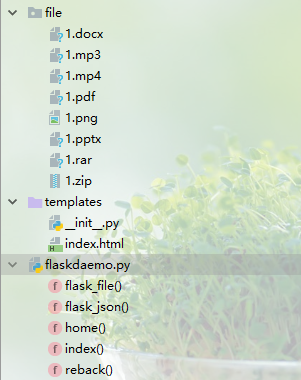
templates模板文件中的页面index.html:
 <!DOCTYPE html>

 <html lang="en">

 <head>

     <meta charset="UTF-8">

     <title>Title</title>

 </head>

 <body>

 <h1>登陆成功,欢迎来到index页面</h1>

 <a href="">点击查看数据信息</a>

 </body>

 </html>
flask之response的更多相关文章
- python web开发-flask中response,cookies,session对象使用详解
Response响应对象: 当一个web请求被服务器处理完后,会返回用户请求的响应,这时候就要用到响应对象,根据响应给用户的形式不同,响应对象有以下几种处理方式 如果返回的是一个合法的响应对象,它会从 ...
- 第二篇 Flask的Response三剑客及两个小儿子
一.Response三剑客 (一)Flask中的HTTPResponse @app.route("/") #app中的route装饰器 def index(): #视图函数 ret ...
- 通过flask中的Response返回json数据
使用flask的过程中,发现有时需要生成一个Response并返回.网上查了查,看了看源码,找到了两种办法: from flask import Response, json Response(jso ...
- flask中的response
1.Response 在flask中你想向前端返回数据,必须是Response的对象,这里和django必须是HttpResponse 对象一样, 主要将返回数据的几种方式 视图函数中return 字 ...
- Flask初学者:视图函数/方法返回值(HTML模板/Response对象)
返回HTML模板:使用“from flask import render_template”,在函数中传入相对于文件夹“templates”HTML模板路径名称字符串即可(默认模板路径),flask会 ...
- Flask中request与response参数
目录 request response request from flask import Flask from flask import request app = Flask(__name__) ...
- flask返回自定义的Response
from json import dumps from flask import Response from flask_api import status from protocol.errors_ ...
- web框架--flask
flask介绍 Flask是一个基于Python开发并且依赖jinja2模板和Werkzeug WSGI服务的一个微型框架,对于Werkzeug本质是Socket服务端,其用于接收http请求并对请求 ...
- Inside Flask - flask.__init__.py 和核心组件
Inside Flask - flask.__init__.py 和核心组件 简单的示例 首先看看一个简单的示例.使用 Flask ,通常是从 flask 模块导入 Flask . request 等 ...
随机推荐
- ajax---post跨域思路
ajax跨域需要加的代码 header("Access-Control-Allow-Methods:GET,POST");
- 2019-2020-1 20199310《Linux内核原理与分析》第四周作业
1.问题描述 在前面的文章中,已经接触过一些Linux内核的知识,本文将进一步从Linux内核源代码的目录结构入手,在Oracle VM VirtualBox的Linux环境中构造一个简单的操作系统M ...
- 微软的 Sysinternals 系统管理工具包,例如可找出自动启动的流氓软件
作者:Kenny链接:https://www.zhihu.com/question/52157612/answer/153886419来源:知乎著作权归作者所有.商业转载请联系作者获得授权,非商业转载 ...
- if __name__ == '__main__'到底是什么?
引子 要搞清楚这个问题,可以先听一个故事~~~ 像我们做事一样,都需要一个起始点,终点存在与否无关紧要.编程也是一样,任何程序都有一个入口,在所谓的静态编译语言中,如Java的入口是一个名字叫做Mai ...
- JavaScript面向对象的作用域链(转载)
JavaScript的作用域一直以来是前端开发中比较难以理解的知识点,对于JavaScript的作用域主要记住几句话,走遍天下都不怕... 一.“JavaScript中无块级作用域” 在Java或C# ...
- Linux / mac OS Shell常用命令
一.文件.目录操作命令 1.ls命令 功能:显示文件和目录的信息 ls 以默认方式显示当前目录文件列表 ls -a 显示所有文件包括隐藏文件 ls -l 显示文件属性,包括大小,日期,符号连接,是否可 ...
- 在okhttp的callback回调中加Toast出现Cant create handler inside hread that has not called Looper.prepare()...
2019独角兽企业重金招聘Python工程师标准>>> 分析:callback中回调的response方法中还是在子线程中运行的,所以要调取Toast必须回到主线程中更新ui 解决方 ...
- 深入实践Spring Boot1.4 运行与发布
1.4 运行与发布 本章实例工程的完整代码可以使用IDEA直接从GitHub的https://github.com/chen-fromsz/spring-boot-hello.git中检出,如图1-1 ...
- Get史上最优雅的加密方式!没有之一!
你的配置文件是不是还在使用下面这种落后的配置暴露一些密码: jdbc.url=jdbc:mysql://127.0.0.1:3305/afei jdbc.username=afei 如果是,那么继续往 ...
- GPTL—练习集—006树的遍历
#include<bits/stdc++.h> using namespace std; typedef int daTp;//datatype typedef struct BTNode ...