
分享知识-快乐自己:Spring中的(三种)异常处理机制
案例目录结构:
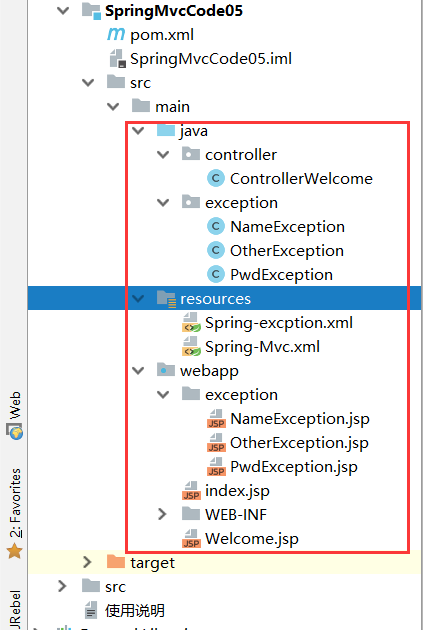
Web.xml 配置:
<!DOCTYPE web-app PUBLIC

 "-//Sun Microsystems, Inc.//DTD Web Application 2.3//EN"

 "http://java.sun.com/dtd/web-app_2_3.dtd" >

<web-app>

  <display-name>Archetype Created Web Application</display-name>

  <!--设置乱码-->

  <filter>

    <filter-name>encodingFilter</filter-name>

    <filter-class>org.springframework.web.filter.CharacterEncodingFilter</filter-class>

    <init-param>

      <param-name>encoding</param-name>

      <param-value>UTF-8</param-value>

    </init-param>

    <init-param>

      <param-name>forceEncoding</param-name>

      <param-value>true</param-value>

    </init-param>

  </filter>

  <filter-mapping>

    <filter-name>encodingFilter</filter-name>

    <url-pattern>/*</url-pattern>

  </filter-mapping>

  <!--设置核心控制器-->

  <servlet>

    <servlet-name>mvc</servlet-name>

    <servlet-class>org.springframework.web.servlet.DispatcherServlet</servlet-class>

    <init-param>

      <param-name>contextConfigLocation</param-name>

      <param-value>classpath*:Spring-*.xml</param-value>

    </init-param>

    <!--优先加载-->

    <load-on-startup>1</load-on-startup>

  </servlet>

  <servlet-mapping>

    <servlet-name>mvc</servlet-name>

    <url-pattern>/</url-pattern>

  </servlet-mapping>

</web-app>
第一种:使用Spring自带的异常处理机制:
ControllerWelcome:控制层:
package controller;

import exception.NameException;

import exception.PwdException;

import org.springframework.stereotype.Controller;

import org.springframework.web.bind.annotation.RequestMapping;

/**

 * @author asus

 */

@Controller

@RequestMapping("/user")

public class ControllerWelcome{

    @RequestMapping("/name")

    public String nameException() {

        System.out.println("用户名异常!!!");

        if (true) {

            throw new NameException("用户名异常");

        }

        return "Welcome";

    }

    @RequestMapping("/pwd")

    public String pwdException() {

        System.out.println("密码异常!!!");

        if (true) {

            throw new PwdException("密码异常");

        }

        return "Welcome";

    }

    @RequestMapping("/other")

    public String otherException() {

        System.out.println(5 / 0);

        return "Welcome";

    }

}
定义的异常类:NameException (OtherException、PwdException;结构都一样 都继承 RuntimeException 实现三个方法)这里列举一个
package exception;

/**

 * 密码异常

 * @author asus

 */

public class PwdException extends RuntimeException{

    public PwdException() {

        super();

    }

    public PwdException(String message) {

        super(message);

    }

    public PwdException(String message, Throwable cause) {

        super(message, cause);

    }

}
定义的 exception下的 jsp 页面同样这里列举一个:(其他两个只是换了一下 h1的内容做了一下区分而已)
NameException.jsp:
<%@ page contentType="text/html;charset=UTF-8" language="java" isELIgnored="false" %>

<html>

<head>

    <title>Title</title>

</head>

<body>

<h1>用户名异常</h1>

</body>

</html>
Spring-Mvc.xml 配置:
<?xml version="1.0" encoding="UTF-8"?>

<beans xmlns="http://www.springframework.org/schema/beans"

       xmlns:xsi="http://www.w3.org/2001/XMLSchema-instance"

       xmlns:context="http://www.springframework.org/schema/context"

       xmlns:aop="http://www.springframework.org/schema/aop"

       xmlns:tx="http://www.springframework.org/schema/tx"

       xmlns:mvc="http://www.springframework.org/schema/mvc"

       xsi:schemaLocation="

        http://www.springframework.org/schema/beans

        http://www.springframework.org/schema/beans/spring-beans.xsd

        http://www.springframework.org/schema/context

        http://www.springframework.org/schema/context/spring-context.xsd

        http://www.springframework.org/schema/tx

        http://www.springframework.org/schema/tx/spring-tx.xsd

        http://www.springframework.org/schema/aop

        http://www.springframework.org/schema/aop/spring-aop.xsd

        http://www.springframework.org/schema/mvc

        http://www.springframework.org/schema/mvc/spring-mvc.xsd">

    <!--指定Controller扫描器-->

    <context:component-scan base-package="controller"/>

    <!--配置试图解析器-->

    <bean class="org.springframework.web.servlet.view.InternalResourceViewResolver">

        <property name="prefix" value="/"></property>

        <property name="suffix" value=".jsp"></property>

    </bean>

</beans>
Spring-excption.xml 配置:
<?xml version="1.0" encoding="UTF-8"?>

<beans xmlns="http://www.springframework.org/schema/beans"

       xmlns:xsi="http://www.w3.org/2001/XMLSchema-instance"

       xmlns:context="http://www.springframework.org/schema/context"

       xmlns:aop="http://www.springframework.org/schema/aop"

       xmlns:tx="http://www.springframework.org/schema/tx"

       xmlns:mvc="http://www.springframework.org/schema/mvc"

       xsi:schemaLocation="

        http://www.springframework.org/schema/beans

        http://www.springframework.org/schema/beans/spring-beans.xsd

        http://www.springframework.org/schema/context

        http://www.springframework.org/schema/context/spring-context.xsd

        http://www.springframework.org/schema/tx

        http://www.springframework.org/schema/tx/spring-tx.xsd

        http://www.springframework.org/schema/aop

        http://www.springframework.org/schema/aop/spring-aop.xsd

        http://www.springframework.org/schema/mvc

        http://www.springframework.org/schema/mvc/spring-mvc.xsd">

    <!--系统自带异常机制映射配置-->

    <bean class="org.springframework.web.servlet.handler.SimpleMappingExceptionResolver">

        <property name="exceptionMappings">

            <props>

                <prop key="exception.NameException">exception/NameException</prop>

                <prop key="exception.PwdException">exception/PwdException</prop>

            </props>

        </property>

        <!--默认异常页面-->

        <property name="defaultErrorView" value="exception/OtherException"/>

    </bean>

</beans>
提示:按住 SimpleMappingExceptionResolver 进来我们的底层查看,发现有个一常量值,就是用来获取我们编写的错误信息的(存放在了request作用域下)。如下所示

Welcome.jsp :
<%@ page contentType="text/html;charset=UTF-8" language="java" isELIgnored="false" %>

<html>

<head>

    <title>Title</title>

</head>

<body>

<%--获取错误信息--%>

${exception}

</body>

</html>
例如要访问:localhost:8080/user/name:这时页面就会跳转 Welcome.jsp 并且显示 用户名异常
第二种:自定义异常处理机制:
在上述中的 exception 包下添加我们的自定义的类:MyExceptionResolve 并且继承 AbstractHandlerExceptionResolver
MyExceptionResolve :
package exception;

import org.springframework.web.servlet.ModelAndView;

import org.springframework.web.servlet.handler.AbstractHandlerExceptionResolver;

import javax.servlet.http.HttpServletRequest;

import javax.servlet.http.HttpServletResponse;

/**

 * 自定义异常处理机制

 * @author asus

 */

public class MyExceptionResolve extends AbstractHandlerExceptionResolver {

    /**

     * @param request:请求

     * @param response:响应

     * @param handler:执行的某一Controller 控制器

     * @param ex:异常信息

     * @return

     */

    @Override

    protected ModelAndView doResolveException(HttpServletRequest request, HttpServletResponse response, Object handler, Exception ex) {

        //默认为其他异常页面

        ModelAndView modelAndView=new ModelAndView("exception/OtherException");

        //判断是什么类型的异常

        if(ex instanceof NameException)

        {

            modelAndView.setViewName("exception/NameException");

        }else if(ex instanceof PwdException)

        {

            modelAndView.setViewName("exception/PwdException");

        }

        modelAndView.addObject("exception",ex);

        return modelAndView;

    }

}
修改我们的配置文件:Spring-excption.xml 配置:
<?xml version="1.0" encoding="UTF-8"?>

<beans xmlns="http://www.springframework.org/schema/beans"

       xmlns:xsi="http://www.w3.org/2001/XMLSchema-instance"

       xmlns:context="http://www.springframework.org/schema/context"

       xmlns:aop="http://www.springframework.org/schema/aop"

       xmlns:tx="http://www.springframework.org/schema/tx"

       xmlns:mvc="http://www.springframework.org/schema/mvc"

       xsi:schemaLocation="

        http://www.springframework.org/schema/beans

        http://www.springframework.org/schema/beans/spring-beans.xsd

        http://www.springframework.org/schema/context

        http://www.springframework.org/schema/context/spring-context.xsd

        http://www.springframework.org/schema/tx

        http://www.springframework.org/schema/tx/spring-tx.xsd

        http://www.springframework.org/schema/aop

        http://www.springframework.org/schema/aop/spring-aop.xsd

        http://www.springframework.org/schema/mvc

        http://www.springframework.org/schema/mvc/spring-mvc.xsd">

    <!--自定义的异常类:-->

    <bean class="exception.MyExceptionResolve"/>

</beans>
还是按照上述的 方式运行页面即可 查看效果......
第三种:使用注解实现异常处理机制:
为了方便阅读:专门提升了一个编写注解方式的类:BaseControllerEx
package exception;

import org.springframework.stereotype.Controller;

import org.springframework.web.bind.annotation.ExceptionHandler;

import org.springframework.web.servlet.ModelAndView;

/**

 * 使用注解实现异常处理机制

 * @author asus

 */

@Controller

public class BaseControllerEx {

    @ExceptionHandler(NameException.class)

    public ModelAndView nameEx(NameException ex)

    {

        ModelAndView modelAndView=new ModelAndView("exception/NameException");

        modelAndView.addObject("exception",ex.getMessage());

        return modelAndView;

    }

    @ExceptionHandler(PwdException.class)

    public ModelAndView nameEx(PwdException ex)

    {

        ModelAndView modelAndView=new ModelAndView("exception/PwdException");

        modelAndView.addObject("exception",ex.getMessage());

        return modelAndView;

    }

}
注解的方式就不需要 Spring-excption.xml 配置了,所以直接干掉就可以或者注释掉配置
这时我们只需要稍微改动一下我们的 ControllerWelcome 类去继承我们的注解类:

运行方式同上述一致......
分享知识-快乐自己:Spring中的(三种)异常处理机制的更多相关文章
- Spring 中如何自动创建代理(spring中的三种自动代理创建器)
Spring 提供了自动代理机制,可以让容器自动生成代理,从而把开发人员从繁琐的配置中解脱出来 . 具体是使用 BeanPostProcessor 来实现这项功能. 这三种自动代理创建器 为:Bean ...
- java中存在三种调用机制
1:同步调用:一种阻塞式调用,调用方要等待对方执行完毕才返回,它是一种单向调用 2:回调:一种双向调用模式,也就是说,被调用方在接口被调用时也会调用对方的接口: 3:异步调用:一种类似消息或事件的机制 ...
- spring配置datasource三种方式
详见:http://blog.yemou.net/article/query/info/tytfjhfascvhzxcytp34 spring配置datasource三种方式 1.使用org.spri ...
- SuperDiamond在JAVA项目中的三种应用方法实践总结
SuperDiamond在JAVA项目中的三种应用方法实践总结 1.直接读取如下: @Test public static void test_simple(){ PropertiesConfigur ...
- js oop中的三种继承方法
JS OOP 中的三种继承方法: 很多读者关于js opp的继承比较模糊,本文总结了oop中的三种继承方法,以助于读者进行区分. <继承使用一个子类继承另一个父类,子类可以自动拥有父类的属性和方 ...
- spring Bean的三种配置方式
Spring Bean有三种配置方式: 传统的XML配置方式 基于注解的配置 基于类的Java Config 添加spring的maven repository <dependency> ...
- Java三大框架之——Hibernate中的三种数据持久状态和缓存机制
Hibernate中的三种状态 瞬时状态:刚创建的对象还没有被Session持久化.缓存中不存在这个对象的数据并且数据库中没有这个对象对应的数据为瞬时状态这个时候是没有OID. 持久状态:对象经过 ...
- spring与mybatis三种整合方法
spring与mybatis三种整合方法 本文主要介绍Spring与Mybatis三种常用整合方法,需要的整合架包是mybatis-spring.jar,可通过链接 http://code.googl ...
- Asp.Net中的三种分页方式
Asp.Net中的三种分页方式 通常分页有3种方法,分别是asp.net自带的数据显示空间如GridView等自带的分页,第三方分页控件如aspnetpager,存储过程分页等. 第一种:使用Grid ...
- httpClient中的三种超时设置小结
httpClient中的三种超时设置小结 本文章给大家介绍一下关于Java中httpClient中的三种超时设置小结,希望此教程能给各位朋友带来帮助. ConnectTimeoutExceptio ...
随机推荐
- odoo图片显示
如果在odoo客户端展示图片, 可以用 url( data:image/png;base64, 图片base64编码过的内容) 展示, 例如 url(data:image/png;ba ...
- Java设计模式(九)责任链模式 命令模式
(十七)责任链模式 责任链模式的目的是通过给予多个对象处理请求的机会,已解除请求发送者与接受者之间的耦合关系.面对对象的开发力求对象之前保持松散耦合,确保对象各自的责任最小化.这种设计能够使得系统更加 ...
- Failed to fetch URL https://dl-ssl.google.com/android/repository/addons_list-2.xml, reason: Connect
Failed to fetch URL https://dl-ssl.google.com/android/repository/addons_list-2.xml, reason: Connect ...
- 摩托罗拉SE955 One Discrete Length,Two Discrete Lengths,Length Within Range 相关解释
motorola scanner datasheet相关解释(下面通过Simple Serial Interface(SSI)进行设置,非扫描官方datasheet的设置条码): One Discre ...
- 【puppeteer+Node.js安装环境】之WebStorm编辑器运行失败问题:Error: Cannot find module 'puppeteer'并且代码出不来“asnyc”标识以及有红色波浪线解决办法
现象一: module.js:557 throw err; ^ Error: Cannot find module 'puppeteer' at Function.Module._r ...
- PHP基础函数手记
PHP常用函数总结(180多个):http://www.jb51.net/article/101179.htm PHP常用函数归类总结[大全]:http://blog.csdn.net/ty_hf/a ...
- nagios-plugins安装报错--with-mysql: no
--with-mysql: no 解决方法 yum安装mysql-devel yum install mysql-devel
- Software-defined networking
Software-defined networking administrators to programmatically initialize, control, change, and mana ...
- Django框架创建数据库表时setting文件配置_模型层
若想将模型转为mysql数据库中的表,需要在settings中配置: 一. 确保配置文件中的INSTALLED_APPS中写入我们创建的app名称-->bms INSTALLED_APPS = ...
- PHP接口中的静态变量、常量与类中静态变量、常量的区别
接口: 1 不能够定义静态变量(常量除外) 2 定义的常量 const YOUCONST = VALUE,不能在子类中覆盖,在子类中以 interfaceName::YOUCONST的方式调用 3 不 ...