
springboot开启远程调试
The run goal forks a process for the boot application. It is possible to specify jvm arguments to that forked process. The following configuration suspend the process until a debugger has joined on port 5005
<project>

  ...

  <build>

    ...

    <plugins>

      ...

      <plugin>

        <groupId>org.springframework.boot</groupId>

        <artifactId>spring-boot-maven-plugin</artifactId>

        <version>1.1.12.RELEASE</version>

        <configuration>

          <jvmArguments>

            -Xdebug -Xrunjdwp:transport=dt_socket,server=y,suspend=y,address=5005

          </jvmArguments>

        </configuration>

        ...

      </plugin>

      ...

    </plugins>

    ...

  </build>

  ...

</project>- 1
- 2
- 3
- 4
- 5
- 6
- 7
- 8
- 9
- 10
- 11
- 12
- 13
- 14
- 15
- 16
- 17
- 18
- 19
- 20
- 21
- 22
- 23
These arguments can be specified on the command line as well, make sure to wrap that properly, that is:
mvn spring-boot:run -Drun.jvmArguments="-Xdebug -Xrunjdwp:transport=dt_socket,server=y,suspend=y,address=5005"- 1
jar 命令开启远程调试
在执行jar的时候,添加上参数。如下:
java -Xdebug -Xrunjdwp:server=y,transport=dt_socket,address=8000,suspend=n -jar demo.jar- 1
如果想深入了解Java调试,那么去看一下这个吧。深入Java调试体系
问题
如果出现Connection refused。
首先检查一下端口8000的使用情况:
use:~/tomcat/logs # netstat -an|grep 8000

cp 0 0 127.0.0.1:8000 0.0.0.0:* LISTEN- 1
- 2
可见当前16808端口服务被绑定了回环地址,外部无法访问。即本地调试。
办法:
修改catalina.sh中一个参数。
if [ -z "$JPDA_TRANSPORT" ]; then

    JPDA_TRANSPORT="dt_socket"

  fi

  if [ -z "$JPDA_ADDRESS" ]; then

    JPDA_ADDRESS="0.0.0.0:8000"

  fi

  if [ -z "$JPDA_SUSPEND" ]; then

    JPDA_SUSPEND="n"

fi- 1
- 2
- 3
- 4
- 5
- 6
- 7
- 8
- 9
对JPDA_ADDRESS="localhost:8000" 把默认值(localhost:8000)改成0.0.0.0:8000。默认是本地ip调试也就是无法远程调试,0.0.0.0表示所有ip地址都能调试。
远程连上后再看端口情况:
root@VM-198-217-ubuntu:/opt/apache-tomcat-8.5.16/bin# netstat -an | grep 8000

tcp 0 0 10.133.198.217:8000 60.177.99.27:49998 ESTABLISHED- 1
- 2
断开后是这样的:
root@VM-198-217-ubuntu:/opt/apache-tomcat-8.5.16/bin# netstat -an | grep 8000

tcp        0      0 0.0.0.0:8000            0.0.0.0:*               LISTEN

tcp 0 0 10.133.198.217:8000 60.177.99.27:49998 TIME_WAIT- 1
- 2
- 3
idea连接远程端口进行远程debug
我已经在服务器上开启了远程调试,idea连接的步骤,直接上图。
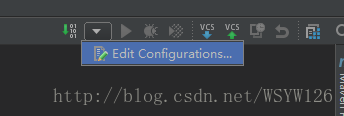
edit configurations
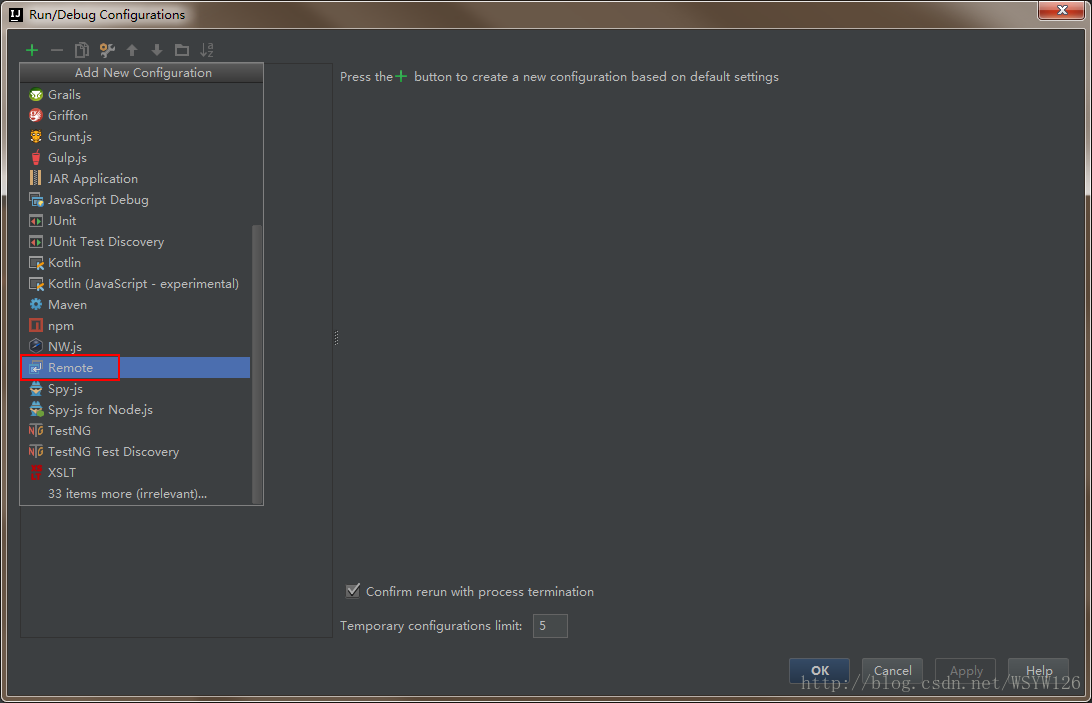
远程调试配置
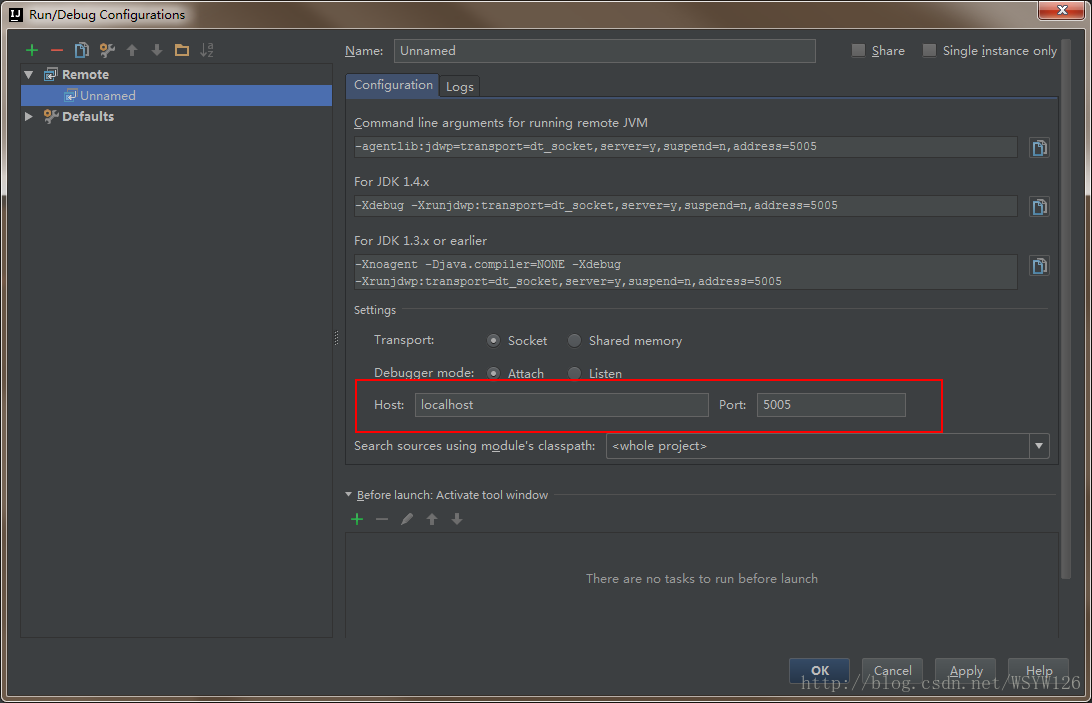
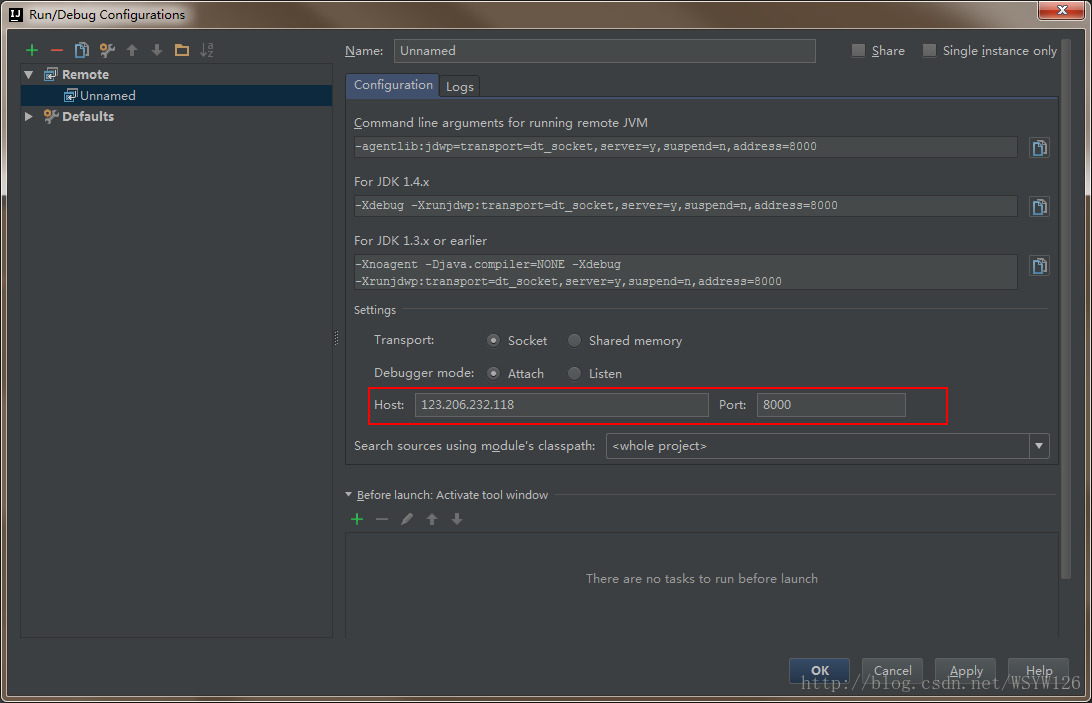
参数配置
将红框内的地址和端口号改成自己的。
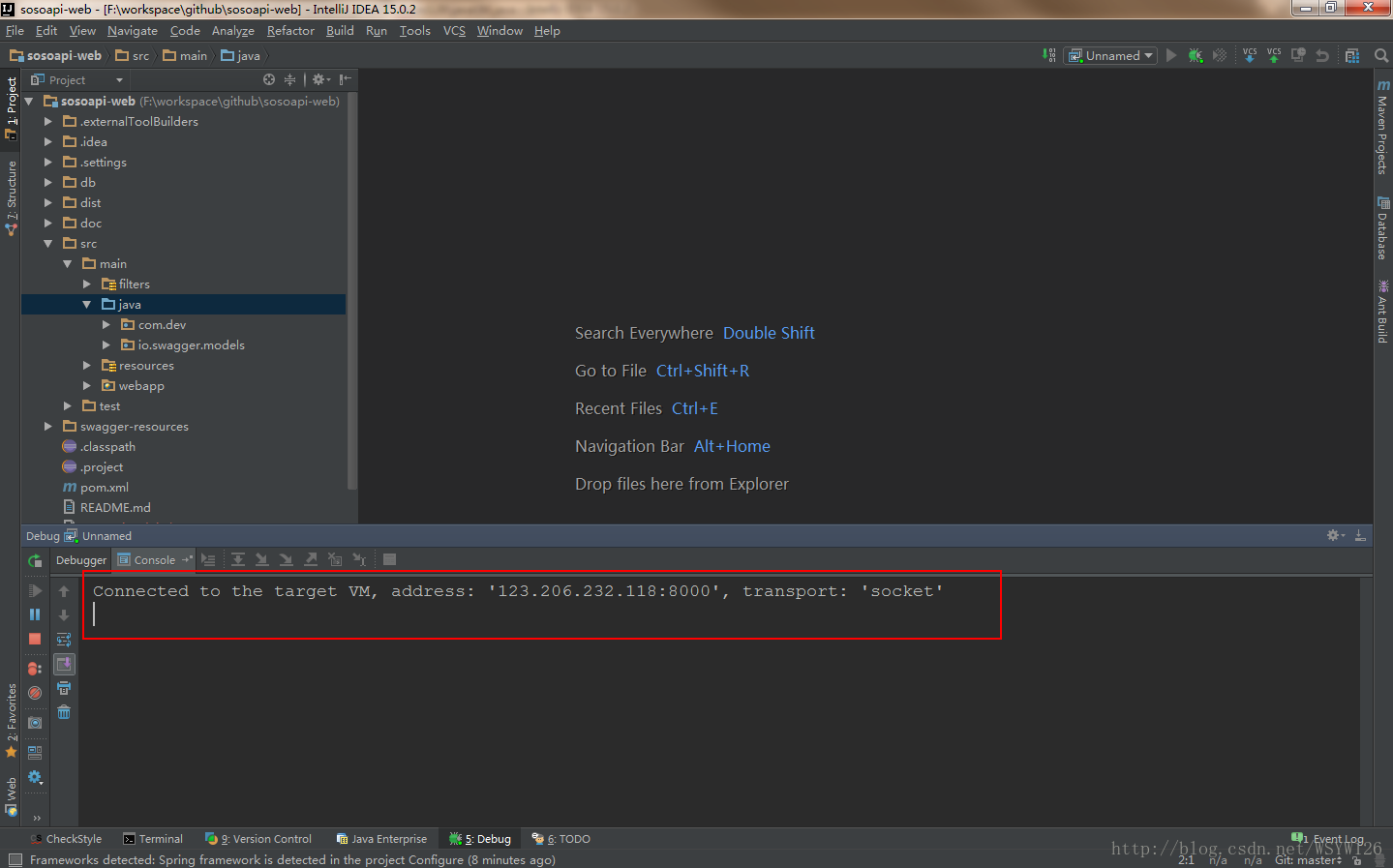
启动远程调试
成功界面
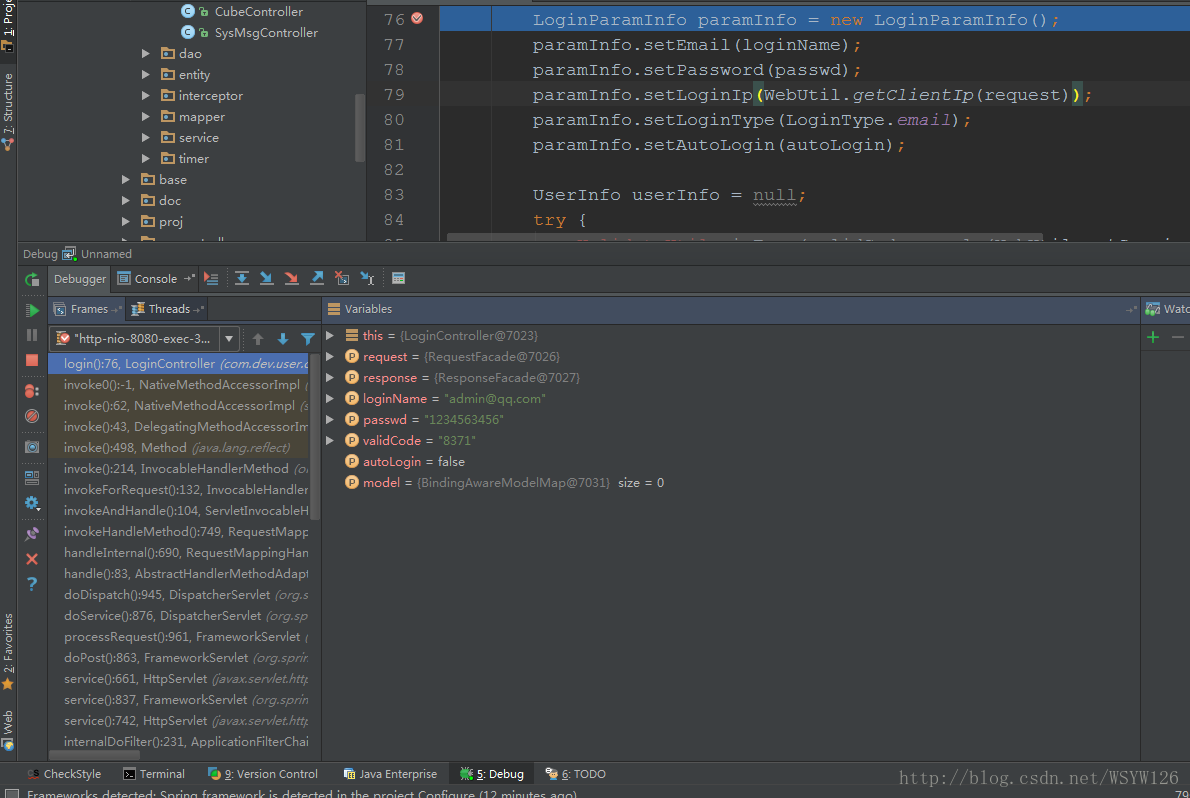
请求一下试试

转自:https://blog.csdn.net/wsyw126/article/details/74853680
springboot开启远程调试的更多相关文章
- Java项目开启远程调试(tomcat、springboot)
当我们运行一个项目的时候,一般都是在本地进行debug.但是如果是一个分布式的微服务,这时候我们选择远程debug是我们开发的利器. 环境apache-tomcat-8.5.16 Linux 如何启用 ...
- springboot项目使用idea开启远程调试
远程调试是调试服务器的有效手段,远程服务器运行的应用可以在本地代码中打断点调试,能让开发人员准确定位服务器上的问题. 一.开启远程调试前提:本地代码与服务器代码一致, 二.开启远程调试步骤 1.开发工 ...
- tomcat如何正确的开启远程调试功能
在日常开发中,有时需要对远程服务器上的应用进行远程调试,对于tomcat,要进行远程调试其实很简单,只需要在启动tomcat时开启jpda服务即可. 什么是JPDA呢? JPDA(JavaPlatfo ...
- tomcat开启远程调试
tomcat开启远程调试模式: 需要在启动脚本中的 JAVA_OPTS='-server -Xms1024m -Xmx1024m -Xmn384m -Xss256k -XX:PermSize=128m ...
- tomcat如何正确的开启远程调试功能(转)
转自:http://blog.csdn.net/mhmyqn/article/details/49209541 版权声明:本文为博主原创文章,未经博主允许不得转载. 在日常开发中,有时需要对远程服务器 ...
- 【IDEA】【SpringBoot】基于idea对springboot程序远程调试
一.开启远程调试前提:本地代码与服务器代码一致(实测:不关键的代码稍微有点不一样好像也不会有多大问题). 二.开启远程调试步骤 1.开发工具配置 idea端打开Edit configurations, ...
- 惊呆了!Spring Boot 还能开启远程调试?
持续原创输出,点击上方蓝字关注我 目录 前言 什么是远程调试? 为什么要远程调试? 什么是JPDA? 如何开启调试? transport server suspend address onthrow ...
- eclipse 在weblogic部署的工程项目开启远程调试remote config eclipse远程调试配置
确认你的工程在weblogic中跑的起来,然后再结合eclipse debug配置+java debug运行模式搞个调试. 工程能跑起来没问题后,先在eclipse中,点击debug图标 然后点击De ...
- Intellij IDEA基于Springboot的远程调试
简介 本篇博客介绍一下在Intellij IDEA下对Springboot类型的项目的远程调试功能.所谓的远程调试就是服务端程序运行在一台远程服务器上,我们可以在本地服务端的代码(前提是本地的代码必须 ...
随机推荐
- 以面试官的角度看strcpy函数
一:笔试或者面试的总结 之 一 (1)在笔试或者面试中常常会被问道,strcpy memmove memcpy 函数的实现.有时也会问你STL 中string的 split 和 trim的实现.有的 ...
- PHP计算两个时间差的方法
<?php //PHP计算两个时间差的方法 $startdate="2010-12-11 11:40:00"; $enddate="2012-12-12 11:45 ...
- 为公司做crm资产管理
一.实现会议室预定 二.实现调查问卷 三.项目背景初始化分析 四.简单的登陆注册 五.学生管理 六.老师管理 七.销售管理 八.客户关系管理 九.抢单管理 十.微信发消息发邮件管理 补充:数据表设计. ...
- JavaScript读书笔记(4)-变量、作用域和内存问题
1.ECMAScript数据类型分为:基本类型值和引用类型值: ECMAScript中所有函数的参数都是按值传递的: 检查对象的类型:varible instanceof constructor Al ...
- HDU 4622 Reincarnation 后缀自动机 // BKDRHash(最优hash)
Reincarnation Time Limit: 6000/3000 MS (Java/Others) Memory Limit: 131072/65536 K (Java/Others) P ...
- 【BZOJ1528】[POI2005]sam-Toy Cars 贪心
[BZOJ1528][POI2005]sam-Toy Cars Description Jasio 是一个三岁的小男孩,他最喜欢玩玩具了,他有n 个不同的玩具,它们都被放在了很高的架子上所以Jasio ...
- Spring mvc接受集合类型参数的方法
public String xxxxx(String xxxx, String xxxxx, @RequestParam("parameterList[]") List<St ...
- linux socket send和recv、write和read
1 recv和read ssize_t recv(int sockfd, void *buf, size_t len, int flags); ssize_t read(int fd, void *b ...
- 如何分析和提高大型项目(C/C++)的编译速度?(VS2015特有的:/LTCG:incremental选项)
常见的有几个:1. Precompile header2. 多线程编译3. 分布式编译4. 改code,减少依赖性 另外还有一个VS2015特有的:/LTCG:incremental选项.以前为了执行 ...
- asp概述
asp的理解 今天才知道,Asp原来不是一种语言,也不是一种开发工具,而是一种技术框架, 主要功能是把脚本语言,HTML,组件和Web数据库访问功能有机的结合在一起, 形成一个能在服务器端运行的应用程 ...