
Bootstrap关于表单控件(Radio,CheckBox)
表单控件(复选框checkbox和单选择按钮radio)
Bootstrap框架中checkbox和radio有点特殊,Bootstrap针对他们做了一些特殊化处理,主要是checkbox和radio与label标签配合使用会出现一些小问题(最头痛的是对齐问题)。使用Bootstrap框架,开发人员无需考虑太多,只需要按照下面的方法使用即可。
<form role="form">

<div class="checkbox">

<label>

<input type="checkbox" value="">

记住密码

</label>

</div>

<div class="radio">

<label>

<input type="radio" name="optionsRadios" id="optionsRadios1" value="love" checked>

喜欢

</label>

</div>

<div class="radio">

<label>

<input type="radio" name="optionsRadios" id="optionsRadios2" value="hate">

不喜欢

</label>

</div>

</form>
运行效果如下或查看右侧结果窗口(案例1):

从上面的示例,我们可以得知: 1、不管是checkbox还是radio都使用label包起来了 2、checkbox连同label标签放置在一个名为“.checkbox”的容器内 3、radio连同label标签放置在一个名为“.radio”的容器内 在Bootstrap框架中,主要借助“.checkbox”和“.radio”样式,来处理复选框、单选按钮与标签的对齐方式。
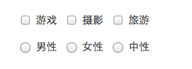
有时候,为了布局的需要,将复选框和单选按钮需要水平排列。Bootstrap框架也做了这方面的考虑: 1、如果checkbox需要水平排列,只需要在label标签上添加类名“checkbox-inline” 2、如果radio需要水平排列,只需要在label标签上添加类名“radio-inline” 如下所示:
<form role="form">

  <div class="form-group">

    <label class="checkbox-inline">

      <input type="checkbox"  value="option1">游戏

    </label>

    <label class="checkbox-inline">

      <input type="checkbox"  value="option2">摄影

    </label>

    <label class="checkbox-inline">

    <input type="checkbox"  value="option3">旅游

    </label>

  </div>

  <div class="form-group">

    <label class="radio-inline">

      <input type="radio"  value="option1" name="sex">男性

    </label>

    <label class="radio-inline">

      <input type="radio"  value="option2" name="sex">女性

    </label>

    <label class="radio-inline">

      <input type="radio"  value="option3" name="sex">中性

    </label>

  </div>

</form>
运行效果如下或查看右侧结果窗口:
Bootstrap关于表单控件(Radio,CheckBox)的更多相关文章
- Bootstrap的表单控件
支持的表单控件 Bootstrap 支持最常见的表单控件,主要是 input.textarea.checkbox.radio 和 select. 输入框(Input) 最常见的表单文本字段是输入框 i ...
- bootstrap -- css -- 表单控件
若干css样式 .form-control { display: block; width: 100%; height: 34px; padding: 6px 12px; font-size: 14p ...
- Bootstrap关于表单控件(按扭)
按钮也是表单重要控件之一,制作按钮通常使用下面代码来实现: ☑ input[type=“submit”] ☑ input[type=“button”] ☑ input[type=“r ...
- 吴裕雄 Bootstrap 前端框架开发——Bootstrap 表单:表单控件大小
<!DOCTYPE html> <html> <head> <meta charset="utf-8"> <title> ...
- bootstrap 表单控件 控件状态 控件大小 help-block
bootstrap 表单控件 控件状态 控件大小 help-block <!DOCTYPE html> <html lang="en"> <head& ...
- Bootstrap系列 -- 18. 表单控件大小
前面看到的表单控件都正常的大小.可以通过设置控件的height,line-height,padding和font-size等属性来实现控件的高度设置.不过Bootstrap框架还提供了两个不同的类名, ...
- Bootstrap系列 -- 14. 表单控件输入框input
每一个表单都是由表单控件组成.离开了控件,表单就失去了意义.接下来的我们简单的来了解Bootstrap框架中表单控件的相关知识. 单行输入框,常见的文本输入框,也就是input的type属性值为tex ...
- Bootstrap历练实例:表单控件大小
表单控件大小 您可以分别使用 class .input-lg 和 .col-lg-* 来设置表单的高度和宽度. 实例: <!DOCTYPE html><html><hea ...
- Bootstrap 表单控件一(单行输入框input,下拉选择框select ,文本域textarea)
单行输入框,常见的文本输入框,也就是input的type属性值为text.在Bootstrap中使用input时也必须添加type类型,如果没有指定type类型,将无法得到正确的样式,因为Bootst ...
随机推荐
- 《Google 软件测试之道》摘录
最近刚刚看完<Google 软件测试之道>,受益颇多,遂记录下: 只有在软件产品变得重要的时候质量才显得重要 第一章:谷歌软件测试介绍 角色介绍 SWE(Software Engineer ...
- "Hello World " —— 深入理解程序从编译到执行
对于C语言编写的Hello World程序(例如以下).对于程序猿来说肯定如雷贯耳,就是这样一个简单的程序,你真的了解她吗? #include <stdio.h> int main() { ...
- 编程算法 - 和为s的连续正整数序列 代码(C)
和为s的连续正整数序列 代码(C) 本文地址: http://blog.csdn.net/caroline_wendy 题目: 输入一个正数s, 打印出全部和为s的连续正数序列(至少含有两个数). 起 ...
- 实现泛型IEnumerable接口
用C#实现一个类的IEnumerable接口时有两种方法:1)实现非泛型IEnumerable接口:2)实现泛型IEnumerable(T)接口.如果采用方法1,当集合元素T是值类型时,将涉及到巨多的 ...
- java.util.concurrent常用类(CountDownLatch,Semaphore,CyclicBarrier,Future)
CyclicBarrier CyclicBarrier是用来一个关卡来阻挡住所有线程,等所有线程全部执行到关卡处时,再统一执行下一步操作.假设一个场景:每个线程代表一个跑步运动员,当运动员都准备好后, ...
- struts2框架搭建(一)
struts2是一个基于mvc的web应用框架.struts2本质上相当于一个servlet,在MVC设计模式中,Struts2作为控制器层(Controller)来建立模型与视图的数据交互. str ...
- SQLServer2008 有用的判断函数
ISNULL(参数1,参数2) 若参数1为空,则返回参数2 NULLIF(参数1,参数2) 若参数1和参数2不等,则返回参数1 若参数1和参数2相等,则返回NULL 例子:ISNULL(NULLIF( ...
- 利用ProgressBar实现旋转loading动画
1.res\anim.loading.xml <?xml version="1.0" encoding="utf-8"?> <LinearLa ...
- 简单的UIButton按钮动画效果iOS源码
这个是简单的UIButton按钮动画效果案例,源码,简单的UIButton按钮动画,可以自定义button属性. 效果图: <ignore_js_op> 使用方法: 使用时把ButtonA ...
- Deutsch lernen (03)
1. das Gewerbe, - 行业 Was ist Ihr Gewerbe? Welches Gewerbe treibt er? treiben - trieb - getrieben 从事 ...