
dropzone上传文件
先上张效果图吧

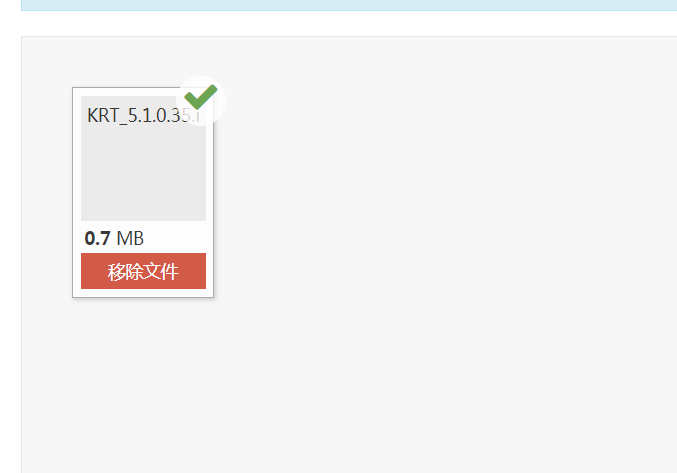
1.引入dropzone的js和css文件
2.html这里我用了一个form,当然你也可以直接用一个div,无论你用什么都要加上class="dropzone"

3.js
             var fileArr = new Array();

             jQuery(function($){

                 Dropzone.autoDiscover = false;

                 Dropzone.options.myAwesomeDropzone = false;

             try {

               $(".dropzone").dropzone({

                 url:"${pageContext.request.contextPath}/uploadController/upload.action",

                 method:"post",

                 paramName:"file",

                 autoProcessQueue:true,//自动上传

                 maxFilesize:1024, // MB

                 uploadMultiple:false,

                 parallelUploads:10,

                 acceptedFiles:".rar,.zip,.7z",

                 dictInvalidFileType:"支持的文件类型是.rar,.zip,.7z",

                 addRemoveLinks:true,

             //    maxFiles:   //指的是上传目录下的最大文件数

                 dictRemoveFile:"移除文件",

                 dictUploadCanceled:"取消",

                 dictCancelUploadConfirmation:"取消上传该文件?",

                 dictDefaultMessage:

                 "<span class='bigger-150 bolder'><i class='icon-caret-right red'></i>拖动文件</span>上传\

                 <span class='smaller-80 gre'>(或者点击上传)</span> <br /> \

                 <i class='upload-icon icon-cloud-upload blue icon-3x'></i>",

                 dictResponseError:"文件上传失败!",

                 dictFileTooBig:"文件过大,上传失败!",

                 //change the previewTemplate to use Bootstrap progress bars

                 previewTemplate: "<div class=\"dz-preview dz-file-preview\">\n  <div class=\"dz-details\">\n    <div class=\"dz-filename\"><span data-dz-name></span></div>\n    <div class=\"dz-size\" data-dz-size></div>\n    <img data-dz-thumbnail />\n  </div>\n  <div class=\"progress progress-small progress-striped active\"><div class=\"progress-bar progress-bar-success\" data-dz-uploadprogress></div></div>\n  <div class=\"dz-success-mark\"><span></span></div>\n  <div class=\"dz-error-mark\"><span></span></div>\n  <div class=\"dz-error-message\"><span data-dz-errormessage></span></div>\n</div>",

                 init:function(){

                     this.on("addedfile",function(file,data) {

                         fileArr.push(file.upload.uuid);

                         //解决点击时重复发送请求

                         $(".dz-remove").each(function(index) {

                               if(!$(".dz-remove:eq(" + index + ")").attr("id")) {

                                   $(".dz-remove:eq(" + index + ")").attr("id",fileArr[index]);

                               }

                          })

                     })

                     this.on("success",function(file,data){

                         //var myDropzone = this;

                          $("#" + file.upload.uuid).click(function() {

                                 var fileName = $(this).parent().find(".dz-filename").text();

                                     if(window.confirm("确定要删除吗?")) {

                                          $.ajax({

                                              type:"POST",

                                              url:"${pageContext.request.contextPath}/uploadController/delete.action",

                                              data:{"fileName":fileName},

                                              dataType:"json",

                                              success:function(data){

                                                     // this.removeFile(file);

                                              }

                                          })

                                   }

                         })

                     });

                     this.on("sending",function(file,data){

                     })

                     this.on("removedfile",function(file,data){

                     })

                       this.on("canceled",function(file,data) {

                          // alert("canceled");

                          this.removeFile(file);

                       });

                     this.on("error",function(file,data){

                     });

                     this.on("complete",function(file) {

                             if(file.status == "canceled" || file.status == "error") {

                                 var fileName = $("#" + file.upload.uuid).parent().find(".dz-filename").text();

                                 setTimeout(function() {

                                       $.ajax({

                                          type:"POST",

                                          url:"${pageContext.request.contextPath}/uploadController/delete.action",

                                          data:{"fileName":fileName},

                                          dataType:"json",

                                          success:function(data){

                                              if(data == "success") {

                                                 // alert("删除成功");

                                             }

                                          },

                                          error:function(ajax) {

                                              alert(ajax.status);

                                          }

                                     })

                                 },2000);

                         }

                     })

                 }

               });

             } catch(e) {

               alert('Dropzone.js does not support older browsers!');

             }

         });
注意事项:
1.关于parallelUploads,这个参数我看了很多博客,都没有介绍,于是我去官网查了下,发现这个参数是文件上传队列数量的意思,
什么意思呢?如果你设置为1,但你上传的时候选择了多个文件,那么这些文件只会1个1个的上传而不是多个同时上传
3.后台
如果你做的时候后台报了异常org.springframework.beans.BeanInstantiationException: Could not instantiate bean class [org.springframework.web.multipart.MultipartFile]: Specified class is an interface,
请在MultipartFile参数前加上@RequestParam,关于这个注解是起什么作用,自行百度
接收文件
 @RequestMapping("/upload")

     public String upload(@RequestParam MultipartFile file,HttpSession session){

         if(file == null) {

             return "";

         }

         File newFile = null;

         InputStream is = null;

         BufferedOutputStream bos = null;

         BufferedInputStream  bis = null;

         try {

             String originalFilename = file.getOriginalFilename();

             byte[] buffer = new byte[1024];

             String dirPath = session.getServletContext().getRealPath("/") + "upload";

             File dir  = new File(dirPath);

             if(!dir.exists()) {

                 dir.getParentFile().mkdirs();

             }

             if(originalFilename != null && originalFilename.trim().length() > 0) {

                 newFile = new File(dirPath + "/" + originalFilename);

             }

             bos = new BufferedOutputStream(new FileOutputStream(newFile));

             is  = file.getInputStream();

             bis = new BufferedInputStream(is);

             int count = 0;

             while((count = bis.read(buffer)) != -1){

                 bos.write(buffer, 0,count);

             }

             bos.flush();

             String createTime = df.format(System.currentTimeMillis());

             FileBean fileBean = fileBeanService.findByName(originalFilename);

             if(fileBean == null) {

                 fileBean = new FileBean();

                 fileBean.setName(originalFilename);

             }

             fileBean.setCreateTime(df.parse(createTime));

             fileBeanService.add(fileBean);

         } catch (FileNotFoundException e1) {

             e1.printStackTrace();

         } catch (IOException e) {

             e.printStackTrace();

         } catch (ParseException e) {

             // TODO Auto-generated catch block

             e.printStackTrace();

         }finally{

             if(bis != null){

                 try {

                     bis.close();

                 } catch (IOException e) {

                     e.printStackTrace();

                 }

             }

             if(bos != null) {

                 try {

                     bos.close();

                 } catch (IOException e) {

                     e.printStackTrace();

                 }

             }

         }

         return "redirect:/uploadController/dropzone.action";

     }
2.关于移除和取消上传文件
如果你用了数据库,直接把对应的字段改成0就表示此文件不存在,可以不删除如果你打算真的删除时,执行delete方法前后尽量先让线程睡眠一段时间,否则容易引起IOException,事实上文件上传过程中点击取消,实现的思路是先把文件上传上来,然后再删除,直接执行删除也有可能引起IOException
ps:这也是3月初的时候用的插件,至今过了一个月了才抽出时间写写总结,在此记录下来给自己一个参考
dropzone上传文件的更多相关文章
- django + dropzone.js 上传文件
1.dropzone.js http://www.dropzonejs.com/ dropzone.js是一个可预览\可定制化的文件拖拽上传,实现AJAX异步上传文件的工具 2.dropzone.js ...
- 上传文件插件dropzone的实例
html: <div class="field"> <div id="file" class="dropzone"> ...
- FTP上传文件到服务器
一.初始化上传控件. 1.我们这里用dropzone.js作为上传控件,下载地址http://www.dropzonejs.com/ 2.这里我们使用一个div元素作为dropzone载体. < ...
- dropzone 上传插件
dropzone dropzone.js是一个可预览的上传文件工具,不依赖任何框架(如jQuery),且具有可定制化.实现文件拖拽上传,提供AJAX异步上传功能. 1. html文件 dropzone ...
- IE8/9 JQuery.Ajax 上传文件无效
IE8/9 JQuery.Ajax 上传文件有两个限制: 使用 JQuery.Ajax 无法上传文件(因为无法使用 FormData,FormData 是 HTML5 的一个特性,IE8/9 不支持) ...
- 三种上传文件不刷新页面的方法讨论:iframe/FormData/FileReader
发请求有两种方式,一种是用ajax,另一种是用form提交,默认的form提交如果不做处理的话,会使页面重定向.以一个简单的demo做说明: html如下所示,请求的路径action为"up ...
- asp.net mvc 上传文件
转至:http://www.cnblogs.com/fonour/p/ajaxFileUpload.html 0.下载 http://files.cnblogs.com/files/fonour/aj ...
- app端上传文件至服务器后台,web端上传文件存储到服务器
1.android前端发送服务器请求 在spring-mvc.xml 将过滤屏蔽(如果不屏蔽 ,文件流为空) <!-- <bean id="multipartResolver&q ...
- .net FTP上传文件
FTP上传文件代码实现: private void UploadFileByWebClient() { WebClient webClient = new WebClient(); webClient ...
随机推荐
- css使文本保留多个空格
css属性: white-space: pre-wrap
- (转)RMAN-06054: media recovery requesting unknown archived log for thread...
转自:http://blog.itpub.net/29800581/viewspace-1307267/ 使用rman执行recover database 的时候出现RMAN-06054的错误提示: ...
- dinic算法学习(以poj1273为例)
Dinic 算法模板 Dinic算法是一种比較easy实现的.相对照较快的最大流算法. 求最大流的本质,就是不停的寻找增广路径.直到找不到增广路径为止. 对于这个一般性的过程,Dinic算法的优化例 ...
- POJ 3132 & ZOJ 2822 Sum of Different Primes(dp)
题目链接: POJ:id=3132">http://poj.org/problem?id=3132 ZOJ:http://acm.zju.edu.cn/onlinejudge/show ...
- [GraphQL] Create an Input Object Type for Complex Mutations
When we have certain mutations that require more complex input parameters, we can leverage the Input ...
- [Compose] 13. Lift into a Pointed Functor with of
We examine the of function we've seen on a few types and discover it's the Pointed interface. Instea ...
- QT学习记录之控件布局
作者:朱金灿 来源:http://blog.csdn.net/clever101 想到控件布局就会想到Windows编程中要实现对话框上的控件的合理布局是一件多么艰难的事情.对此QT提出了一个很方便的 ...
- 编辑器vim简介
vi简介 vi是"Visual interface"的简称,它在Linux上的地位就仿佛Edit程序在DOS上一样.它可以执行输出.删除.查找.替换.块操作等众多文本操作,而且用户 ...
- 常用服务器ftp、ssh
1. Linux常用服务器构建-ftp服务器 ftp服务器 FTP 是File Transfer Protocol(文件传输协议)的英文简称,而中文简称为"文传协议". 用于Int ...
- 基于 Android NDK 的学习之旅----- Java 方法映射到C中的签名
刚接触JNI 的 兄弟在看一些demo的时候 发现有类似与“([Ljava/lang/String;)V”的东西的时候肯定会很“蛋疼”,完全不懂这是啥东西,怎么来的,有啥用处? 今天就讲讲这个“蛋疼” ...