
AngularJS:一行JS代码实现控件验证效果
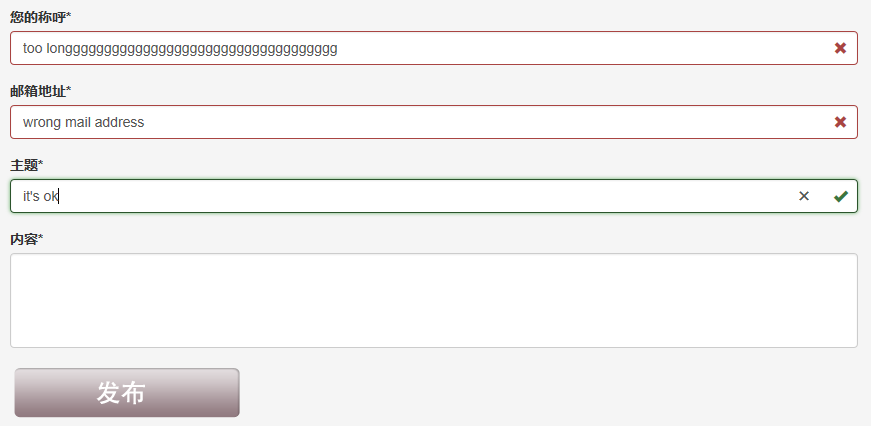
如上图所示,我们需要实现如下这些验证功能:
- 控件都是必输控件
- 都需要控制最大长度
- 第一次打开页面,控件不能显示为错误状态
- 输入内容再清空后,必输控件需要显示为错误状态
- 只有所有输入合法后,发布按钮才能变为可用状态
通过AngularJS,我们可以很轻松的实现这些要求,只需要1行JS代码。UI样式这里采用的是Bootstrap。先上示例代码:
HTML
 <!DOCTYPE html>

 <html lang="zh-cn" ng-app="ftitApp">

 <head>

     <meta charset="utf-8" />

     <title>Demo</title>

     <link href="/Content/bootstrap.css" rel="stylesheet"/>

     <script src="/Scripts/angular.js"></script>

 </head>

 <body>

     <div class="container body-content">

         <!-- 主要内容区域 -->

         <div class="row main-content">

             <div class="col-md-9">

                 <!-- 联系我们表单区域 -->

                 <form action="/Contact/Create" method="post" role="form" name="createContactForm" ng-controller="ContactCreateController">

                     <!-- UserName 您的称呼 -->

                     <div class="form-group has-feedback" ng-class="{'has-success' : !createContactForm.UserName.$pristine && createContactForm.UserName.$valid, 'has-error' : !createContactForm.UserName.$pristine && createContactForm.UserName.$invalid }">

                         <label for="UserName">您的称呼*</label>

                         <input type="text" class="form-control" ng-model="userName" name="UserName" autofocus="" required ng-maxlength=30>

                         <div ng-show="!createContactForm.UserName.$pristine && createContactForm.UserName.$valid">

                             <span class="glyphicon glyphicon-ok form-control-feedback"></span>

                         </div>

                         <div ng-show="!createContactForm.UserName.$pristine && createContactForm.UserName.$invalid">

                             <span class="glyphicon glyphicon-remove form-control-feedback"></span>

                         </div>

                     </div>

                     <!-- UserMail 邮箱地址 -->

                     <div class="form-group has-feedback" ng-class="{'has-success' : !createContactForm.UserMail.$pristine && createContactForm.UserMail.$valid, 'has-error' : !createContactForm.UserMail.$pristine && createContactForm.UserMail.$invalid }">

                         <label for="UserMail">邮箱地址*</label>

                         <input type="email" class="form-control" ng-model="userMail" name="UserMail" required ng-maxlength=30>

                         <div ng-show="!createContactForm.UserMail.$pristine && createContactForm.UserMail.$valid">

                             <span class="glyphicon glyphicon-ok form-control-feedback"></span>

                         </div>

                         <div ng-show="!createContactForm.UserMail.$pristine && createContactForm.UserMail.$invalid">

                             <span class="glyphicon glyphicon-remove form-control-feedback"></span>

                         </div>

                     </div>

                     <!-- Subject 主题 -->

                     <div class="form-group has-feedback" ng-class="{'has-success' : !createContactForm.Subject.$pristine && createContactForm.Subject.$valid, 'has-error' : !createContactForm.Subject.$pristine && createContactForm.Subject.$invalid }">

                         <label for="Subject">主题*</label>

                         <input type="text" class="form-control" ng-model="subject" name="Subject" required ng-maxlength=100>

                         <div ng-show="!createContactForm.Subject.$pristine && createContactForm.Subject.$valid">

                             <span class="glyphicon glyphicon-ok form-control-feedback"></span>

                         </div>

                         <div ng-show="!createContactForm.Subject.$pristine && createContactForm.Subject.$invalid">

                             <span class="glyphicon glyphicon-remove form-control-feedback"></span>

                         </div>

                     </div>

                     <!-- Content 内容 -->

                     <div class="form-group has-feedback" ng-class="{'has-success' : !createContactForm.Content.$pristine && createContactForm.Content.$valid, 'has-error' : !createContactForm.Content.$pristine && createContactForm.Content.$invalid }">

                         <label for="Content">内容*</label>

                         <textarea cols="4" rows="5" class="form-control" ng-model="content" name="Content" required ng-maxlength=1000></textarea>

                         <div ng-show="!createContactForm.Content.$pristine && createContactForm.Content.$valid">

                             <span class="glyphicon glyphicon-ok form-control-feedback"></span>

                         </div>

                         <div ng-show="!createContactForm.Content.$pristine && createContactForm.Content.$invalid">

                             <span class="glyphicon glyphicon-remove form-control-feedback"></span>

                         </div>

                     </div>

                     <!-- 提交按钮 -->

                     <div class="form-group">

                         <div ng-show="createContactForm.$valid">

                             <input type="image" src="/Content/images/comment_publish_button.png" onsubmit="submit();" value="发布" ng-disabled='!createContactForm.$valid' />

                         </div>

                         <div ng-show="!createContactForm.$valid">

                             <img src="/Content/images/invalid_publish_button.png" />

                         </div>

                     </div>

                 </form>

             </div>

         </div>

     </div>

     <script src="/Scripts/ftit/ContactCreateController.js"></script>

 </body>

 </html>
JS代码(真的只有一行哟)
ContractCreateController.js
var ftitAppModule = angular.module('ftitApp', []);
这样就好啦。几个关键的地方解释一下:
- ng-class:这个标签用来控制class的值。例如ng-class="{'has-success' : !createContactForm.Content.$pristine}的意思就是,如果!createContactForm.Content.$pristine的值为true,class的值就为has-success。
- ng-show:控制是否显示该控件。
- createContactForm.$valid:全部验证通过后,值为true,否则为false
- createContactForm.Content.$valid:标识Content控件是否通过验证,通过为true,否则为false
- createContactForm.Content.$pristine:标识Content控件是否从未输入过。从未输入为true,否则为false
更细节的技术问题请查看AngularJS的技术文档。
AngularJS:一行JS代码实现控件验证效果的更多相关文章
- 每日学习心得:CustomValidator验证控件验证用户输入的字符长度、Linq 多字段分组统计、ASP.NET后台弹出confirm对话框,然后点击确定,执行一段代码
2013-9-15 1. CustomValidator验证控件验证用户输入的字符长度 在实际的开发中通常会遇到验证用户输入的字符长度的问题,通常的情况下,可以写一个js的脚本或者函数,在ASP ...
- 2.23 js处理日历控件(修改readonly属性)
2.23 js处理日历控件(修改readonly属性) 前言 日历控件是web网站上经常会遇到的一个场景,有些输入框是可以直接输入日期的,有些不能,以我们经常抢票的12306网站为例,详细讲解如 ...
- JS数量输入控件
JS数量输入控件 很早看到kissy首页 有数量输入控件,就随便看了下功能 感觉也不怎么难 所以也就试着自己也做了一个, 当然基本的功能和他们的一样,只是用了自己的编码思想来解决这么一个问题.特此给大 ...
- offline页面开发常用方法及页面控件验证
offline页面开发常用方法及页面控件验证,对一些CheckBoxList操作进行封装,新人可以直接使用该代码. 1.返回上一页网址 /// <summary> /// Descript ...
- vs2010开发activex(MFC)控件/ie插件(三),js调用ocx控件的接口函数
原文:http://blog.csdn.net/yhhyhhyhhyhh/article/details/50802280 js调用ocx控件的接口函数,先看demo效果: 简单测试过程 ...
- js操作select控件大全(包含新增、修改、删除、选中、清空、判断存在等)
原文:js操作select控件大全(包含新增.修改.删除.选中.清空.判断存在等) js操作select控件大全(包含新增.修改.删除.选中.清空.判断存在等) js 代码// 1.判断select选 ...
- 基于MFC的网页ActiveX控件开发全程实录2(js向ActiveX控件传递参数)
原文转自 https://blog.csdn.net/qianbin3200896/article/details/81452822 1.ActiveX控件部分(JS到ActiveX控件)继续上一篇博 ...
- Auto.js 特殊定位控件方法 不能在ui线程执行阻塞操作,请使用setTimeout代替
本文所有教程及源码.软件仅为技术研究.不涉及计算机信息系统功能的删除.修改.增加.干扰,更不会影响计算机信息系统的正常运行.不得将代码用于非法用途,如侵立删! Auto.js 特殊定位控件方法 操作环 ...
- 轻量、强大的代码编辑器控件-WinForm完美版
前段时间做个小项目需要用到一个代码编辑器控件,但网上搜了半天,居然没发现一个完全满意的编辑器.现有的一些编辑器有: FastedTextBox 优点:1. 轻量. 2. 样式美观. 3. DEMO完 ...
随机推荐
- 使用 typescript 开发 Vue
基础配置: 1. 准备一个使用 vue-cli 生成的项目 2. 使用 npm 一建安装基础配置 npm i -S @types/node typescript vue-class-component ...
- 多个@bean无法通过@resource注入对应的bean(org.springframework.beans.factory.NoUniqueBeanDefinitionException: No qualifying bean of type 'javax.sql.DataSource' available: expected single matching bean but found )
一.异常 org.springframework.beans.factory.NoUniqueBeanDefinitionException: No qualifying bean of type ' ...
- 面试说熟练掌握各种MQ?那你先看看这道题,面试官必问!
写在前面 我们知道,目前市面上的MQ包括Kafka.RabbitMQ.ZeroMQ.RocketMQ等等. 那么他们之间究竟有什么本质区别,分别适用于什么场景呢? 上述抛出的问题,同样在不少公司的Ja ...
- NS2学习笔记(二)
Tcl语言 变量和变量赋值 set a "Hello World!" #将字符串赋值给变量a puts "NS2 say $a" #输出字符串的内容,其中$a表 ...
- JavaScript--引用JS外部文件
通过前面知识学习,我们知道使用<script>标签在HTML文件中添加JavaScript代码,如图: JavaScript代码只能写在HTML文件中吗?当然不是,我们可以把HTML文件和 ...
- [Luogu 1052] noip 05 过河
[Luogu 1052] noip 05 过河 题目描述 在河上有一座独木桥,一只青蛙想沿着独木桥从河的一侧跳到另一侧.在桥上有一些石子,青蛙很讨厌踩在这些石子上.由于桥的长度和青蛙一次跳过的距离都是 ...
- 多重背包(MultPack = ZeroOnePack + CompletePack)
HiHoCoder_offer6_04 题目4 : 奖券兑换 时间限制:20000ms 单点时限:1000ms 内存限制:256MB 描述 小Hi在游乐园中获得了M张奖券,这些奖券可以用来兑换奖品. ...
- [转]linux之pr命令
转自:http://www.bitscn.com/plus/view.php?aid=6638 本文介绍如何使用Linux的pr命令将大文件分割成多个页面进行打印,并在每个页面上加上标题. Linux ...
- IIS Express配置多站点同时运行
环境:Win10 Pro.Visual Studio 2015 Community.IIS Express 10 VS2015集成IIS Express,所以无需单独下载, 默认安装位置:C:\Pro ...
- FFmpeg编译Android版本
FFmpeg是很好用的一个音视频库,功能强大,但是用起来并不是很方便.之前一直不想用FFmpeg,因为感觉编译太麻烦,但是到了不得不用的时候了,没办法,参考了网上大神的方法,在这里自己也记录一下方便以 ...