
Android开发笔记(11)——DialogFragment & 点击监听
转载请注明:http://www.cnblogs.com/igoslly/p/6931519.html
DialogFragment使用 & 点击监听
/* DialogFragment是用于Activity上展示一个界面的弹出框,如输入框、警告框、确认框等
* DialogFragment单独设置layout XML文件
* 使用DialogFragment至少需要实现onCreateView或者onCreateDIalog方法;
* onCreateView即使用定义的xml布局文件展示Dialog
* onCreateDialog即利用AlertDialog或者Dialog创建出Dialog。
*/
下面给出我自己写的几个实例:
1、修改姓名的输入框
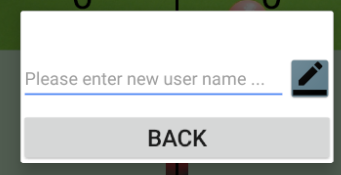
布局文件:
1、输入的EditBox控件,用于输入新用户名
2、确认的ImageView,点击监控并获取输入字符
3、退出的Button按钮,不做任何修改
<LinearLayout xmlns:android="http://schemas.android.com/apk/res/android"

    android:layout_width="match_parent"

    android:layout_height="wrap_content"

    android:orientation="vertical">

    <LinearLayout

        android:layout_width="match_parent"

        android:layout_height="wrap_content"

        android:orientation="horizontal">

        <EditText

            android:layout_width="0dp"

            android:layout_weight="1"

            android:layout_height="match_parent"

            android:hint="Please enter new user name ..."

            android:inputType="text"

            android:id="@+id/opponent_name_edit"/>

        <ImageView

            android:layout_width="wrap_content"

            android:layout_height="wrap_content"

            android:background="@drawable/ic_edit"

            android:id="@+id/opponent_name_confirm"/>

    </LinearLayout>

    <Button

        android:layout_width="match_parent"

        android:layout_height="wrap_content"

        android:text="BACK"

        android:textSize="24sp"

        android:layout_marginTop="10dp"

        android:id="@+id/edit_dialog_back"/>

</LinearLayout>
2、选择内容的点击框
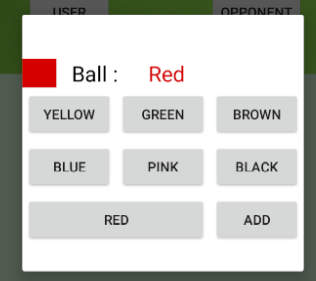
/* DialogFragment活动设置和一般Fragment相同
* 我一般采用onCreateView方法
*/
public class EditDialogue extends DialogFragment {

    private EditText mNewNameEditText;

    private ImageView mNewNameConfirm;

    private String player;

    @Override

    public View onCreateView(LayoutInflater inflater, ViewGroup container, Bundle savedInstanceState){

        View rootView =inflater.inflate(R.layout.opponent_name_edit,container);

        mNewNameEditText = (EditText) rootView.findViewById(R.id.opponent_name_edit);

        mNewNameConfirm = (ImageView) rootView.findViewById(R.id.opponent_name_confirm);

        Button backButton = (Button) rootView.findViewById(R.id.edit_dialog_back);

        backButton.setOnClickListener(new View.OnClickListener() {

            @Override

            public void onClick(View v) {

                player="";

                dismiss();

            }

        });
    mNewNameConfirm.setOnClickListener(new View.OnClickListener() {
        @Override
        public void onClick(View v) {
            player = mNewNameEditText.getText().toString();
            setData();dismiss();
        }});

    return rootView;

    }

}
/* 点击检测
* 通常的按钮点击可以在XML文件设置Onclick属性,直接调用MainActivity方法
*/
anroid:OnClick="RecordName"
//Activity中设置函数
public void RecordName(View view){

    EditBox editbox = findViewById(R.id.name_edit);

    String newName = editbox.getText().toString();  // 此处getText()获取为Editable类型,toString()转换

}
/* 点击检测
* Fragment里则采用OnclickLisener而进行监听
* OnclickLisener是View类的函数,故而不仅对Button,对继承于View的控件均可采用
* 输入框中同时也对ImageView进行了监听,并发送数据关闭Dialog
*/
mNewNameConfirm.setOnClickListener(new View.OnClickListener() {

        @Override

        public void onClick(View v) {

            player = mNewNameEditText.getText().toString();

            setData();dismiss();

        }});
本笔记内容均为个人学习整理,转载请注明博客园-igoslly
Android开发笔记(11)——DialogFragment & 点击监听的更多相关文章
- Android开发 ---基本UI组件5:监听下拉选项,动态绑定下拉选项、全选/反选,取多选按钮的值,长按事件,长按删除,适配器的使用,提示查询数据,activity控制多按钮
效果图: 效果描述: 1.当点击 1 按钮后,进入选择城市的页面,会监听到你选中的城市名称:动态为Spinner绑定数据 2.当点击 2 按钮后,进入自动查询数据页面,只要输入首字母,就会动态查找以该 ...
- [置顶] Android开发笔记(成长轨迹)
分类: 开发学习笔记2013-06-21 09:44 26043人阅读 评论(5) 收藏 Android开发笔记 1.控制台输出:called unimplemented OpenGL ES API ...
- 【转】Android开发笔记(序)写在前面的目录
原文:http://blog.csdn.net/aqi00/article/details/50012511 知识点分类 一方面写写自己走过的弯路掉进去的坑,避免以后再犯:另一方面希望通过分享自己的经 ...
- Android开发笔记(一百三十四)协调布局CoordinatorLayout
协调布局CoordinatorLayout Android自5.0之后对UI做了较大的提升.一个重大的改进是推出了MaterialDesign库,而该库的基础即为协调布局CoordinatorLayo ...
- 《ArcGIS Runtime SDK for Android开发笔记》
开发笔记之基础教程 ArcGIS Runtime SDK for Android 各版本下载地址 <ArcGIS Runtime SDK for Android开发笔记>——(1).And ...
- 《ArcGIS Runtime SDK for Android开发笔记》——离在线一体化技术:离线矢量数据同步
1.前言 上一篇文章中我们实现了离线要素的编辑操作,这一篇中主要介绍离在线一体化技术中最后一个环节离线数据的同步功能,通过对数据的上传,服务器端的版本化管理,实现数据生产管理的整个流程. 转载请注明出 ...
- 《ArcGIS Runtime SDK for Android开发笔记》——(7)、示例代码arcgis-runtime-samples-android的使用
1.前言 学习ArcGIS Runtime SDK开发,其实最推荐的学习方式是直接看官方的教程.示例代码和帮助文档,因为官方的示例一般来说都是目前技术最新,也是最详尽的.对于ArcGIS Runtim ...
- Android开发笔记:打包数据库
对于数据比较多的控制一般会加入SQLite数据库进行数据存储,在打包时这些数据库是不自动打包到apk中的,如何创建数据库呢 方法1:将创建数据库的sql语句在SQLiteHelper继承类中实现,在第 ...
- Android开发笔记--hello world 和目录结构
原文:Android开发笔记--hello world 和目录结构 每接触一个新东西 都有一个hello world的例子. 1.新建项目 2.配置AVD AVD 没有要新建个,如果不能创建 运行SD ...
随机推荐
- 5.terms搜索多个值以及多值搜索结果优化
主要知识点 terms搜索多个值,并和term的比较 一.term和terms terms是在这个字段中搜索多个值,相当于sql中的in语法 (select * from tbl where ...
- img标签和background-image的区别和具体使用时机
最近在使用图片过程中,纠结到底使用img标签还是使用background-image属性,翻阅资料和百度后作出下列理解. 简单来说img是内容部分的东西,background-image是修饰性的东西 ...
- 第十节:pandas之loc()、iloc()与ix()索引
- ZOJ 3199 Longest Repeated Substring
Longest Repeated Substring Time Limit: 5000ms Memory Limit: 32768KB This problem will be judged on Z ...
- 20180828Zabbix3使用percona-zabbix-templates监控MySQL
引用网址: http://blog.chinaunix.net/uid-16844903-id-3535535.html http://www.ywnds.com/?p=6199 https://ww ...
- HDU 4514
真是神奇,G++TLE,C++500MS... 判环有一个图论知识就是,m>=n时必有环.如果以m的范围建图,会MLE. 然后,利用拓扑排序再来判定是否有环,因为有些景点可能是孤立的.同时,在拓 ...
- 微信推送给服务器的XML消息解析-springmvc 解析xml数据流
微信推送给服务器的XML消息解析: 可以使用request.getInputStream(); 获取输入的消息流:但是需要自己解析流: spring mvc自带解析功能: controller中: @ ...
- springmvc 处理lsit类型的请求參数映射成实体属性
<table align="center" cellspacing="10"> <tr> <td> 母码数目:<inp ...
- 2014年辛星解读css第二节
第一节我们简单介绍了一下CSS的工作流程,我相信读者会有一个大体的认识,那么接下来我们将会深入的研究一下CSS的细节问题,这些问题的涉及将会使我们的工作更加完好. *************凝视*** ...
- linux下启动jekins报错
进入默认安装目录,执行java -jar jekins.war 启动使用端口号: java -jar jenkins.war --httpPort=8085,即启动完成 这个有个弊端,关闭后下次还得这 ...