
coreml之通过URL加载模型
在xcode中使用mlmodel模型,之前说的最简单的方法是将模型拖进工程中即可,xcode会自动生成有关模型的前向预测接口,这种方式非常简单,但是更新模型就很不方便。
今天说下另外一种通过URL加载mlmodel的方式。具体可以查阅apple开发者官方文档 https://developer.apple.com/documentation/coreml/mlmodel:
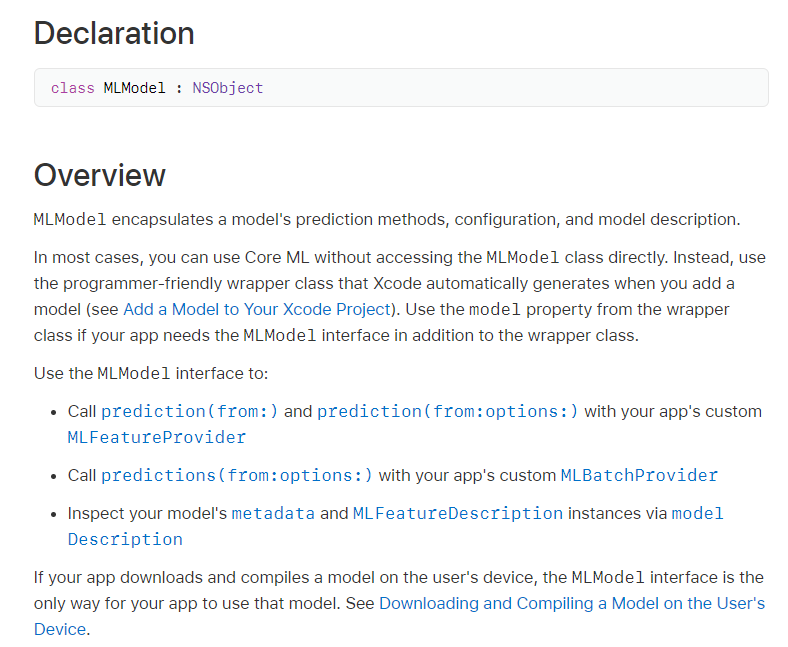
流程如下:
1.提供mlmodel的文件所在路径model_path
NSString *model_path = "path_to/.mlmodel"
2.将NSSting类型转换为NSURL,并根据路径对模型进行编译(编译出的为.mlmodelc 文件, 这是一个临时文件,如果需要,可以将其保存到一个固定位置:https://developer.apple.com/documentation/coreml/core_ml_api/downloading_and_compiling_a_model_on_the_user_s_device)
NSURL *url = [NSURL fileURLWithPath:model_path isDirectory:FALSE];

NSURL *compile_url = [MLModel compileModelAtURL:url error:&error];
3.根据编译后模型所在路径,加载模型,类型为MLModel
MLModel *compiled_model = [MLModel modelWithContentsOfURL:compile_url configuration:model_config error:&error];
4.需要注意的是采用动态编译方式,coreml只是提供了一种代理方式MLFeatureProvider,类似于C++中的虚函数。因此需要自己重写模型输入和获取模型输出的类接口(该类继承自MLFeatureProvider)。如下自己封装的MLModelInput和MLModelOutput类。MLModelInput类可以根据模型的输入名称InputName,传递data给模型。而MLModelOutput可以根据不同的输出名称featureName获取预测结果。
这个是头文件:
#import <Foundation/Foundation.h>

#import <CoreML/CoreML.h>

NS_ASSUME_NONNULL_BEGIN

/// Model Prediction Input Type

API_AVAILABLE(macos(10.13), ios(11.0), watchos(4.0), tvos(11.0))

@interface MLModelInput : NSObject<MLFeatureProvider>

//the input name,default is image

@property (nonatomic, strong) NSString *inputName;

//data as color (kCVPixelFormatType_32BGRA) image buffer

@property (readwrite, nonatomic) CVPixelBufferRef data;

- (instancetype)init NS_UNAVAILABLE;

- (instancetype)initWithData:(CVPixelBufferRef)data inputName:(NSString *)inputName;

@end

API_AVAILABLE(macos(10.13), ios(11.0), watchos(4.0), tvos(11.0))

@interface MLModelOutput : NSObject<MLFeatureProvider>

//the output name, defalut is feature

@property (nonatomic, strong) NSString *outputName;

// feature as multidimensional array of doubles

@property (readwrite, nonatomic) MLMultiArray *feature;

- (instancetype)init NS_UNAVAILABLE;

- (instancetype)initWithFeature:(MLMultiArray *)feature;

@end

NS_ASSUME_NONNULL_END
这个是类方法实现的文件:
@implementation MLModelInput

- (instancetype)initWithData:(CVPixelBufferRef)data inputName:(nonnull NSString *)inputName {

    if (self) {

        _data = data;

        _inputName = inputName;

    }

    return self;

}

- (NSSet<NSString *> *)featureNames {

    return [NSSet setWithArray:@[self.inputName]];

}

- (nullable MLFeatureValue *)featureValueForName:(nonnull NSString *)featureName {

    if ([featureName isEqualToString:self.inputName]) {

        return [MLFeatureValue featureValueWithPixelBuffer:_data];

    }

    return nil;

}

@end

@implementation MLModelOutput

- (instancetype)initWithFeature:(MLMultiArray *)feature{

    if (self) {

        _feature = feature;

        _outputName = DefalutOutputValueName;

    }

    return self;

}

- (NSSet<NSString *> *)featureNames{

    return [NSSet setWithArray:@[self.outputName]];

}

- (nullable MLFeatureValue *)featureValueForName:(nonnull NSString *)featureName {

    if ([featureName isEqualToString:self.outputName]) {

        return [MLFeatureValue featureValueWithMultiArray:_feature];

    }

    return nil;

}

@end
5. 模型预测,获取预测结果。上面这两个类接口写完后,就可以整理输入数据为CvPixelBuffer,然后通过获取模型描述MLModelDescription得到输入名称,根据输入名称创建MLModelInput,预测,然后再根据MLModelOutput中的featureNames获取对应的预测输出数据,类型为MLMultiArray:
MLModelDescription *model_description = compiled_model.modelDescription;

NSDictionary *dict = model_description.inputDescriptionsByName;

NSArray<NSString *> *feature_names = [dict allKeys];

NSString *input_feature_name = feature_names[];

NSError *error;

MLModelInput *model_input = [[MLModelInput alloc] initWithData:buffer inputName:input_feature_name];

id<MLFeatureProvider> model_output = [compiled_model predictionFromFeatures:model_input options:option error:&error];
NSSet<NSString *> *out_feature_names = [model_output featureNames];

NSArray<NSString *> *name_list = [out_feature_names allObjects];

NSUInteger size = [name_list count];

std::vector<MLMultiArray *> feature_list;

for (NSUInteger i = 0; i < size; i++) {

    NSString *name = [name_list objectAtIndex:i];

    MLMultiArray *feature = [model_output featureValueForName:name].multiArrayValue;

    feature_list.push_back(feature);
}
6.读取MLMultiArray中的预测结果数据做后续处理..
coreml之通过URL加载模型的更多相关文章
- tensorflowjs下载源文件到本地不能加载模型解决方案
大多数情况(非源文件错误)下载源文件到本地不能加载模型,那么你可能需要搭建一个本地WEB服务器. 1.安装apache或ngnix,可以参照这个博客 2.强烈推荐一个Chrome插件Web Serve ...
- C#开发BIMFACE系列37 网页集成开发1:审图系统中加载模型或图纸
系列目录 [已更新最新开发文章,点击查看详细] 在之前的<C#开发BIMFACE系列>中主要介绍了BIMFACE平台提供的服务端API接口的封装开发与测试过程. 服务端API测试通 ...
- C#开发BIMFACE系列50 Web网页中使用jQuery加载模型与图纸
BIMFACE二次开发系列目录 [已更新最新开发文章,点击查看详细] 在前一篇博客<C#开发BIMFACE系列49 Web网页集成BIMFACE应用的技术方案>中介绍了目前市场主流 ...
- C#开发BIMFACE系列53 WinForm程序中使用CefSharp加载模型图纸1 简单应用
BIMFACE二次开发系列目录 [已更新最新开发文章,点击查看详细] 在我的博客<C#开发BIMFACE系列52 CS客户端集成BIMFACE应用的技术方案>中介绍了多种集成BIM ...
- NeHe OpenGL教程 第三十一课:加载模型
转自[翻译]NeHe OpenGL 教程 前言 声明,此 NeHe OpenGL教程系列文章由51博客yarin翻译(2010-08-19),本博客为转载并稍加整理与修改.对NeHe的OpenGL管线 ...
- URL加载系统----iOS工程师必须熟练掌握
URL加载系统----iOS工程师必须熟练掌握 iOS根本离不开网络——不论是从服务端读写数据.向系统分发计算任务,还是从云端加载图片.音频.视频等. 当应用程序面临处理问题的抉择时,通常 ...
- tensorflow学习笔记2:c++程序静态链接tensorflow库加载模型文件
首先需要搞定tensorflow c++库,搜了一遍没有找到现成的包,于是下载tensorflow的源码开始编译: tensorflow的contrib中有一个makefile项目,极大的简化的接下来 ...
- 深度学习原理与框架-猫狗图像识别-卷积神经网络(代码) 1.cv2.resize(图片压缩) 2..get_shape()[1:4].num_elements(获得最后三维度之和) 3.saver.save(训练参数的保存) 4.tf.train.import_meta_graph(加载模型结构) 5.saver.restore(训练参数载入)
1.cv2.resize(image, (image_size, image_size), 0, 0, cv2.INTER_LINEAR) 参数说明:image表示输入图片,image_size表示变 ...
- PyTorch保存模型与加载模型+Finetune预训练模型使用
Pytorch 保存模型与加载模型 PyTorch之保存加载模型 参数初始化参 数的初始化其实就是对参数赋值.而我们需要学习的参数其实都是Variable,它其实是对Tensor的封装,同时提供了da ...
随机推荐
- Emgucv 4 下载、安装、配置
1.下载.安装 过程可查看之前Emgucv 3的说明:https://www.cnblogs.com/doget/p/7776377.html 安装完成后,安装目录下会生成如下文件及文件夹: 2.配置 ...
- 【Zabbix】zabora监控Oracle数据库
zabora监控Oracle数据库 它作为一个开源项目,通过shell脚本有效的监控Oracle基础指标.本文档旨在通过实战,在Zabbix 3.0版本之下,监控生产环境下的多台Oracle数据库. ...
- Mysql设置binlog过期时间并自动删除
问题: Mysql数据库由于业务原因,数据量增长迅速,binlog日志会增加较多,占用大部分磁盘空间. 解决方案: 出于节约空间考虑,可进行删除多余binary日志,并设置定期删除操作. .查看bin ...
- DVWA-CSRF学习笔记
DVWA-CSRF学习笔记 一.CSRF(跨站请求伪造) CSRF(跨站请求伪造),是指利用受害者尚未失效的身份认证信息(cookie.session会话等),诱骗其点击恶意链接或者访问包含攻击代码的 ...
- 利用 Symbol Type Viewer 工具实现将 pdb 文件 转换为 c\c++ 头文件
利用 Symbol Type Viewer 工具实现将 pdb 文件 转换为 c\c++ 头文件 一.得到符号 二.将符号转换为 .h 文件 三.得到 c\c++ 头文件,之后编程时直接导入这个文件即 ...
- 2019-9-2-win10-uwp-判断本地ip
原文:2019-9-2-win10-uwp-判断本地ip title author date CreateTime categories win10 uwp 判断本地ip lindexi 2019-0 ...
- QT+OpenGL(01)--实现三角形渲染
1.openglwidget.ui <ui version="4.0"> <author/> <comment/> <exportmacr ...
- HashHelper
在C#中,数据的Hash以MD5或SHA-1的方式实现,MD5与SHA1都是Hash算法,MD5输出是128位的,SHA1输出是160位的,MD5比SHA1快,SHA1比MD5强度高. MD5与SHA ...
- 最新整理的spring面试题从基础到高级,干货满满
最新整理的spring面试题从基础到高级,干货满满 前言: 收藏了一些关于Spring的面试题,一方面是为了准备找工作的时候看面试题,另一方面,通过面试题的方式加深一些自己的理论知识. spring ...
- Freemarker简单封装
Freemarker是曾经很流行的一个模板库,它是一种通用的模板库,不仅仅可以用来渲染html. 模板可以分为两类: 只能生成特殊类型文件的模板,如jinja.django.Thymeleaf.jad ...