
SpringCloud——eureka集群
目的:
第一种普通方式
第二种方式骚操作
Eureka自我保护机制
Eureka集群搭建
说的通俗易懂一点就是,同一个项目部署在多个服务器上。
当注册中心扛不住高并发的时候,这时候 要用集群来扛;
今天介绍搭建的两种方式:
第一种方式普通方式:
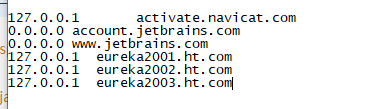
在上篇博客的基础上再构建两个项目,而这两个项目的配置又不能都是本地,开3个虚拟机又太麻烦,所以我们直接配置本机hosts来实现本机的域名映射
进入你的系统文件:C:\Windows\System32\drivers\etc 找到hosts文件,然后加上你的域名映射,后面在yml文件中配置
127.0.0.1  eureka2001.ht.com

127.0.0.1  eureka2002.ht.com

127.0.0.1  eureka2003.ht.com
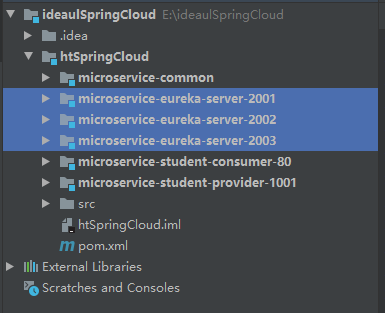
创建三个POM依赖相同的Springboot项目
microservice-eureka-server-2001
microservice-eureka-server-2002
microservice-eureka-server-2003
pom依赖
<?xml version="1.0" encoding="UTF-8"?>

<project xmlns="http://maven.apache.org/POM/4.0.0" xmlns:xsi="http://www.w3.org/2001/XMLSchema-instance"

         xsi:schemaLocation="http://maven.apache.org/POM/4.0.0 https://maven.apache.org/xsd/maven-4.0.0.xsd">

    <modelVersion>4.0.0</modelVersion>

    <parent>

        <groupId>com.ht</groupId>

        <artifactId>htSpringCloud</artifactId>

        <version>1.0-SNAPSHOT</version>

    </parent>

    <artifactId>microservice-eureka-server-2003</artifactId>

    <properties>

        <java.version>1.8</java.version>

    </properties>

    <dependencies>

        <dependency>

            <groupId>org.springframework.cloud</groupId>

            <artifactId>spring-cloud-starter-eureka-server</artifactId>

        </dependency>

        <dependency>

            <groupId>org.springframework.boot</groupId>

            <artifactId>spring-boot-starter-test</artifactId>

            <scope>test</scope>

        </dependency>

        <!--  修改后立即生效,热部署  -->

        <dependency>

            <groupId>org.springframework</groupId>

            <artifactId>springloaded</artifactId>

        </dependency>

        <dependency>

            <groupId>org.springframework.boot</groupId>

            <artifactId>spring-boot-devtools</artifactId>

        </dependency>

    </dependencies>

    <build>

        <plugins>

            <plugin>

                <groupId>org.springframework.boot</groupId>

                <artifactId>spring-boot-maven-plugin</artifactId>

            </plugin>

        </plugins>

    </build>

</project>
第二步配置yml文件
microservice-eureka-server-2001
server:

  port: 2001

  context-path: /

eureka:

  instance:

    # 单机 hostname: localhost #eureka注册中心实例名称

    hostname: eureka2001.ht.com # 集群

  client:

    register-with-eureka: false     #false 由于该应用为注册中心,所以设置为false,代表不向注册中心注册自己。

    fetch-registry: false     #false 由于注册中心的职责就是维护服务实例,它并不需要去检索服务,所以也设置为false

    service-url:

      defaultZone: http://eureka2002.ht.com:2002/eureka/,http://eureka2003.ht.com:2003/eureka/ # 集群
microservice-eureka-server-2002
server:

  port: 2002

  context-path: /

eureka:

  instance:

    # 单机 hostname: localhost #eureka注册中心实例名称

    hostname: eureka2002.ht.com # 集群

  client:

    register-with-eureka: false     #false 由于该应用为注册中心,所以设置为false,代表不向注册中心注册自己。

    fetch-registry: false     #false 由于注册中心的职责就是维护服务实例,它并不需要去检索服务,所以也设置为false

    service-url:

      defaultZone: http://eureka2001.ht.com:2001/eureka/,http://eureka2003.ht.com:2003/eureka/ # 集群

      #单机defaultZone: http://${eureka.instance.hostname}:${server.port}/eureka/       #设置与Eureka注册中心交互的地址,查询服务和注册服务用到
microservice-eureka-server-2003
server:

  port: 2003

  context-path: /

eureka:

  instance:

    # 单机 hostname: localhost #eureka注册中心实例名称

    hostname: eureka2003.ht.com # 集群

  client:

    register-with-eureka: false     #false 由于该应用为注册中心,所以设置为false,代表不向注册中心注册自己。

    fetch-registry: false     #false 由于注册中心的职责就是维护服务实例,它并不需要去检索服务,所以也设置为false

    service-url:

      defaultZone: http://eureka2001.ht.com:2001/eureka/,http://eureka2002.ht.com:2002/eureka/ # 集群

      #单机defaultZone: http://${eureka.instance.hostname}:${server.port}/eureka/       #设置与Eureka注册中心交互的地址,查询服务和注册服务用到
给服务提供者修改的application.yml重新配置eureka
server:

  port: 1001

  context-path: /

spring:

  datasource:

    type: com.alibaba.druid.pool.DruidDataSource

    driver-class-name: com.mysql.jdbc.Driver

    url: jdbc:mysql://localhost:3306/test?useUnicode=true&characterEncoding=utf8

    username: root

    password: root

  jpa:

    hibernate:

      ddl-auto: update

    show-sql: true

eureka:

  instance:

    #eureka客户端主机实例名称

    hostname: localhost

    #客户端服务名

    appname: microservice-student

    #客户端实例名称

    instance-id: microservice-student:1001

    #显示IP

    prefer-ip-address: true

  client:

    service-url:

      defaultZone: http://eureka2001.ht.com:2001/eureka/,http://eureka2002.ht.com:2002/eureka/,http://eureka2003.ht.com:2003/eureka/

info:

  groupId: com.ht.htSpringCloud

  artifactId: microservice-student-provider-1001

  version: 1.0-SNAPSHOT

  userName: http://ht.com

  phone: 123456
记得在每个启动类加上注解@EnableEurekaServer
运行你自己所配置的文件路径
127.0.0.1 eureka2001.ht.com
127.0.0.1 eureka2002.ht.com
127.0.0.1 eureka2003.ht.com
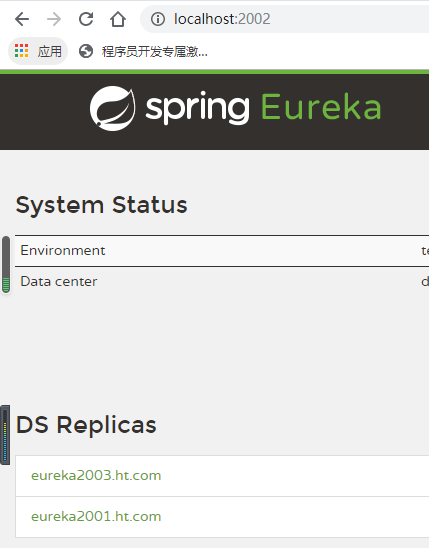
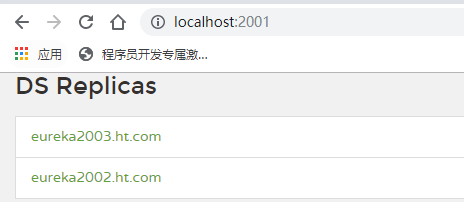
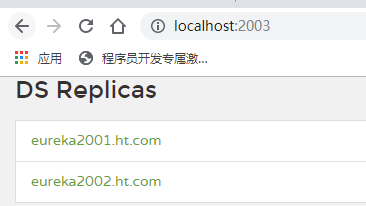
第二种方式骚操作
上面eureka服务搭建,除了yml文件不一样,其他文件都一样,那么我们有什么办法能够将多个eureka服务集合到一个工程中去呢?
创建一个microservice-eureka-server(三合一)子工程
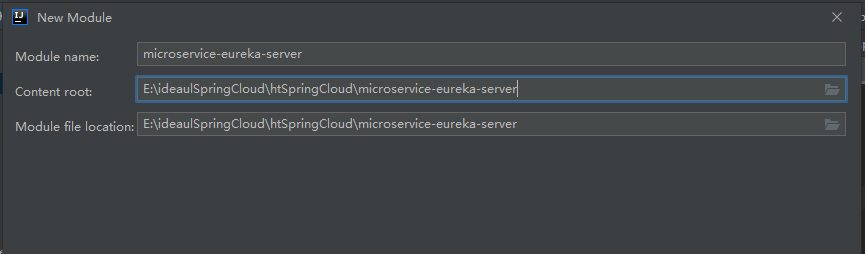
Pom依赖
<?xml version="1.0" encoding="UTF-8"?>

<project xmlns="http://maven.apache.org/POM/4.0.0" xmlns:xsi="http://www.w3.org/2001/XMLSchema-instance"

         xsi:schemaLocation="http://maven.apache.org/POM/4.0.0 https://maven.apache.org/xsd/maven-4.0.0.xsd">

    <modelVersion>4.0.0</modelVersion>

    <parent>

        <groupId>com.ht</groupId>

        <artifactId>htSpringCloud</artifactId>

        <version>1.0-SNAPSHOT</version>

    </parent>

    <artifactId>microservice-eureka-server</artifactId>

    <properties>

        <java.version>1.8</java.version>

    </properties>

    <dependencies>

        <dependency>

            <groupId>org.springframework.cloud</groupId>

            <artifactId>spring-cloud-starter-eureka-server</artifactId>

        </dependency>

        <dependency>

            <groupId>org.springframework.boot</groupId>

            <artifactId>spring-boot-starter-test</artifactId>

            <scope>test</scope>

        </dependency>

        <!-- 修改后立即生效,热部署 -->

        <dependency>

            <groupId>org.springframework</groupId>

            <artifactId>springloaded</artifactId>

        </dependency>

        <dependency>

            <groupId>org.springframework.boot</groupId>

            <artifactId>spring-boot-devtools</artifactId>

        </dependency>

    </dependencies>

    <build>

        <plugins>

            <plugin>

                <groupId>org.springframework.boot</groupId>

                <artifactId>spring-boot-maven-plugin</artifactId>

            </plugin>

        </plugins>

    </build>

</project>
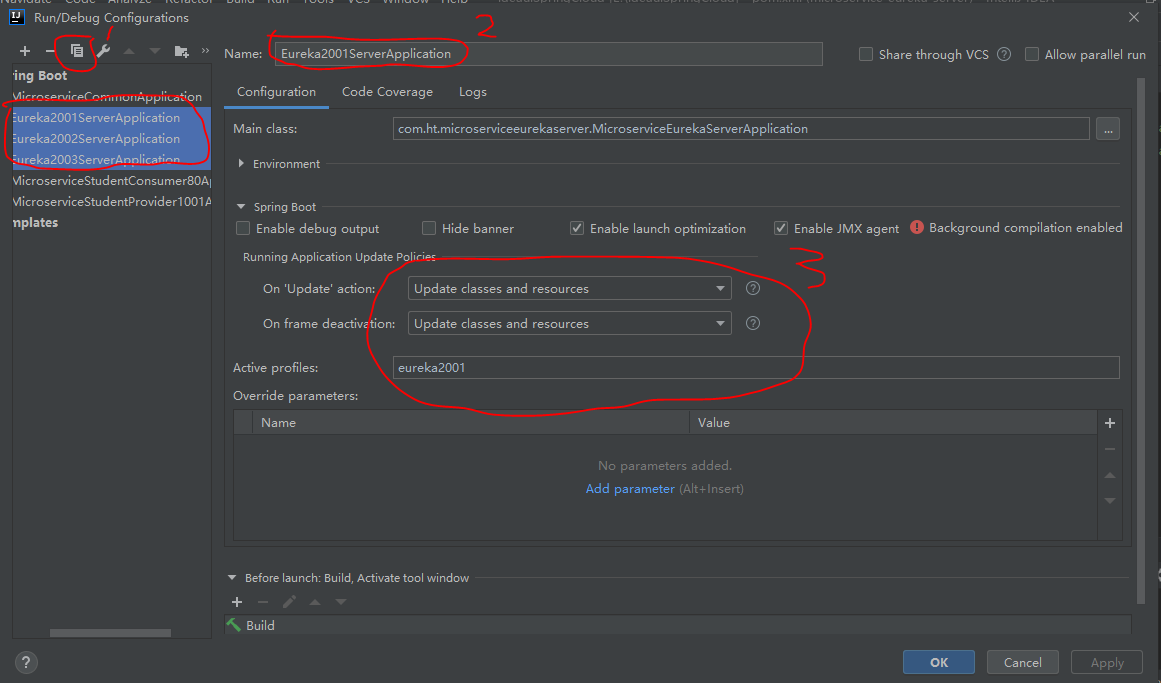
配置yml文件
---

server:

  port: 2001

  context-path: /

eureka:

  instance:

    hostname: eureka2001.ht.com

  client:

    register-with-eureka: false

    fetch-registry: false

    service-url:

      defaultZone: http://eureka2002.ht.com:2002/eureka/,http://eureka2003.ht.com:2003/eureka/

spring:

  profiles: eureka2001

---

server:

  port: 2002

  context-path: /

eureka:

  instance:

    hostname: eureka2002.ht.com

  client:

    register-with-eureka: false

    fetch-registry: false

    service-url:

      defaultZone: http://eureka2001.ht.com:2001/eureka/,http://eureka2003.ht.com:2003/eureka/

spring:

  profiles: eureka2002

---

server:

  port: 2003

  context-path: /

eureka:

  instance:

    hostname: eureka2003.ht.com

  client:

    register-with-eureka: false

    fetch-registry: false

    service-url:

      defaultZone: http://eureka2001.ht.com:2001/eureka/,http://eureka2002.ht.com:2002/eureka/

spring:

  profiles: eureka2003
记得在启动类上添加@EnableEurekaServer
package com.ht.microserviceeurekaserver;

import org.springframework.boot.SpringApplication;

import org.springframework.boot.autoconfigure.SpringBootApplication;

import org.springframework.cloud.netflix.eureka.server.EnableEurekaServer;

@EnableEurekaServer

@SpringBootApplication

public class MicroserviceEurekaServerApplication {

    public static void main(String[] args) {

        SpringApplication.run(MicroserviceEurekaServerApplication.class, args);

    }

}
效果:
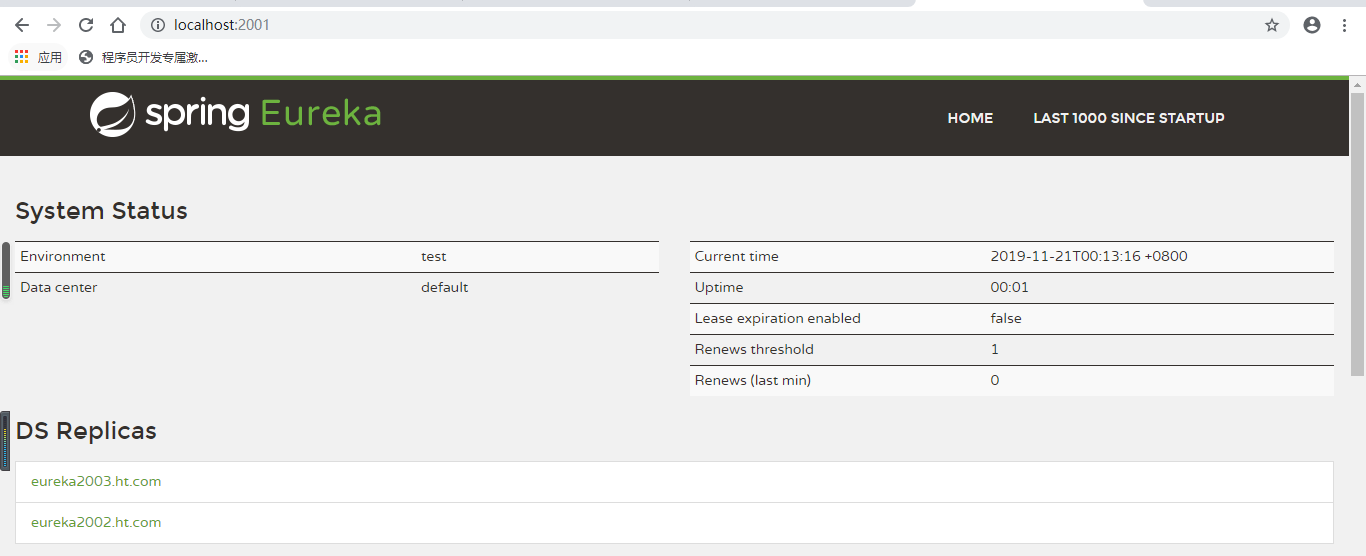
Eureka自我保护机制
如果在服务注册中心注册过的服务提供者突然失去了联系的话,服务注册中心不会立即注销掉该服务提供者的信息,而是会等个90秒再注销。
这样就使得Eureka集群更加的健壮和稳定

谢谢观看!
SpringCloud——eureka集群的更多相关文章
- SpringCloud之Eureka集群
前面我们介绍了SpringCloud注册中心Eureka,但是存在一个单点故障的问题,一个注册中心远远不能满足实际的生产环境,现在我们介绍一下如何搭建一个Eureka集群. 一:集群环境搭建 我们先建 ...
- springcloud费话之Eureka集群
目录: springcloud费话之Eureka基础 springcloud费话之Eureka集群 springcloud费话之Eureka服务访问(restTemplate) springcloud ...
- 三(2)、springcloud之Eureka集群配置
1)原理说明** 服务启动后向Eureka注册,Eureka Server会将注册信息向其他Eureka Server进行同步,当服务消费者要调用服务提供者,则向服务注册中心获取服务提供者地址,然后会 ...
- SpringCloud学习之—Eureka集群搭建
Eureka集群的搭建 上次说过了在SpringCloud应用中使用Eureka注册中心,用来对服务提供者进行服务注册与发现,但同时,它也是一个"微服务",单个应用使用空间有限,因 ...
- F版本SpringCloud 5—Eureka集群和自我保护机制
源码地址:https://gitee.com/bingqilinpeishenme/Java-Tutorials 前言 上篇文章中,通过代码搭建了Eureka注册中心和客户端,是Eureka的简单应用 ...
- SpringCloud学习之搭建eureka集群,手把手教学,新手教程
一.为什么需要集群 上一篇文章讲解了如何搭建单个节点的eureka,这篇讲解如何搭建eureka集群,这里的集群还是本地不同的端口执行三个eureka,因为条件不要允许,没有三台电脑,所以大家将就一下 ...
- 基于dns搭建eureka集群
eureka集群方案: 1.通常我们部署的eureka节点多于两个,根据实际需求,只需要将相邻节点进行相互注册(eureka节点形成环状),就达到了高可用性集群,任何一个eureka节点挂掉不会受到影 ...
- SpringCloud实现集群和负载均衡
Spring cloud是一个基于Spring Boot实现的服务治理工具包,在微服务架构中用于管理和协调服务的. 组成部分 spingcloud的五大神兽 服务发现——Netflix Eureka ...
- eureka集群高可用配置
譬如eureka.client.register-with-eureka和fetch-registry是否要配置,配不配区别在哪里:eureka的客户端添加service-url时,是不是需要把所有的 ...
随机推荐
- 3-STM32物联网开发WIFI(ESP8266)+GPRS(Air202)系统方案升级篇(HTTP介绍,TCP实现HTTP下载文件)
https://www.cnblogs.com/yangfengwu/p/10357564.html 看了好多文章.....唉,还是自己亲自动手用网络监控软件测试吧 先看这个节安装WEB服务器.... ...
- 洛谷 P3183 [HAOI2016]食物链 题解
P3183 [HAOI2016]食物链 题目描述 如图所示为某生态系统的食物网示意图,据图回答第1小题现在给你n个物种和m条能量流动关系,求其中的食物链条数.物种的名称为从1到n编号M条能量流动关系形 ...
- Beta冲刺(1/5)
队名:無駄無駄 组长博客 作业博客 组员情况 张越洋 过去两天完成了哪些任务 初步任务分配 提交记录(全组共用) 接下来的计划 完善接口文档 还剩下哪些任务 学习软工的理论课 学习代码评估.测试 燃尽 ...
- python3中Requests将verify设置为False后,取消警告的方式
import requests resp = requests.get('https://www.***.com', verify=False) 调用成功但是会有如下警告信息: InsecureReq ...
- 第06组 Alpha冲刺(1/4)
队名:福大帮 组长博客链接:https://www.cnblogs.com/mhq-mhq/p/11863075.html 作业博客 :https://edu.cnblogs.com/campus/f ...
- cocos creator策略类手游开发教程
目录 大小6.83GB,Mp4格式,语言:中文 扫码时备注或说明中留下邮箱 付款后如未回复请至https://shop135452397.taobao.com/ 联系店主
- Qt源码学习之路(2) QCoreApplication(1)
QCoreApplication最重要的函数便是exec(),我们便从这个函数开始分析QCoreApplication都干了什么. 先列出exec()函数的源码 static int exec();/ ...
- Maven在jar中生成重复的pom.xml和pom.properties文件
eclispe maven打包的时候总是出现"生成的jar的META-INF中,重复的pom.xml和pom.properties文件.",maven命令直接打包则没有这个问题. ...
- mysql查询列定义,是否自增等
SELECT ORDINAL_POSITION AS Colorder, Column_Name AS ColumnName, data_type AS TypeName, COLUMN_COMMEN ...
- 测量MySQL的表达式和函数的速度
测量MySQL的表达式和函数的速度,可以调用benchmark()函数.语法格式是benchmark(loop_count,expr).运行的返回值是0,但是mysql会打印一行显示语句大概要执行多长 ...