
Elasticsearch和Head插件安装(转)
环境:
CentOS7 Elasticsearch-6.3.2 JDK8
准备:
JDK8 下载地址:http://www.oracle.com/technetwork/java/javase/downloads/jdk8-downloads-2133151.html
Elasticsearch-6.3.2下载地址: https://www.elastic.co/downloads/elasticsearch
安装:
jdk安装
<1>删除open jdk,没有的话则不需要
rpm -qa|grep java

rpm -e nodeps <name>
<2>解压jdk包
mkdir /usr/jdk

tar -xvf jdk-8u112-linux-x64.tar.gz /usr/jdk
32的JDK需要安装 glibc.i686
yum install glibc.i686
<3>配置环境变量
vim /etc/profile
保存退出,使更改配置生效
source /etc/profile
<4>查看jdk安装是否成功
java-version
如下图则OK

Elasticsearch安装
<1>解压elasticsearch安装包 (安装在 /opt/elasticsearch/elasticsearch-6.3.2/)
unzip elasticsearch-6.3.2.zip
<2>创建elasticsearch用户,root用户启动elasticsearch会失败
groupadd elsearch

useradd elsearch -g elsearch

chown -R elsearch:elsearch /opt/elasticsearch/elasticsearch-6.3.2/
<3>创建elasticsearch数据文件和日志文件
mkdir /data

chown -R elsearch:elsearch /data/

su  elsearch

mkdir -p es/data

mkdir -p es/logs
<4>修改配置文件elasticsearch.yml
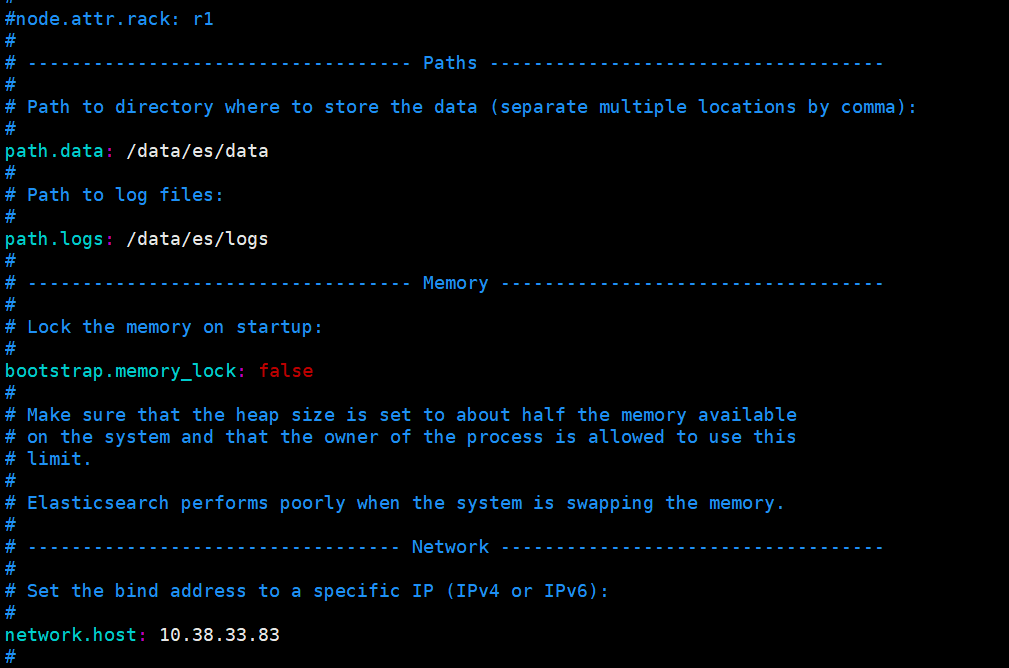
<5>启动并查看,需要使用非root用户启动
[elsearch@imok bin]$ ./elasticsearch -d
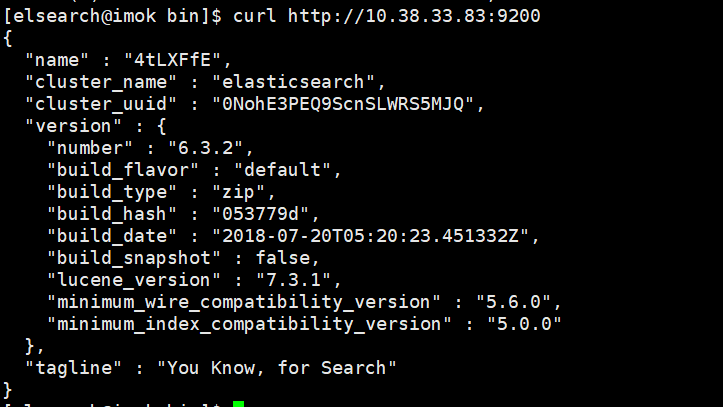
查看是否启动成功: curl http://自己配置的IP地址:9200/
如下图表示安装OK
安装Head插件
由于head插件本质上还是一个nodejs的工程,因此需要安装node,使用npm来安装依赖的包。
<1>安装Node.js
下载解压
wget https://nodejs.org/dist/v6.10.2/node-v6.10.2-linux-x64.tar.xz
xz –d node-v6.10.2-linux-x64.tar.xz

tar xvf node-v6.10.2-linux-x64.tar

mv node-v6.10.2-linux-x64 /usr/local/node
配置并生效
vim /etc/profile

export NODE_HOME=/usr/local/node

export PATH=$PATH:$NODE_HOME/bin

source /etc/profile
查看版本验证
[elsearch@imok bin]$ node -v

v6.10.2

[elsearch@imok bin]$ npm -v

3.10.
<2>下载head插件
如果未安装git ,则先安装git工具
yum install –y git

git clone https://github.com/mobz/elasticsearch-head.git
<3>安装grunt
cd elasticsearch-head

npm install -g grunt --registry=https://registry.npm.taobao.org
<4>安装插件
npm install
在elasticsearch-head目录下node_modules/grunt下如果没有grunt二进制程序,需要执行:
npm install grunt --save
<5>修改配置 elasticsearch-head下Gruntfile.js文件
修改connect配置节点
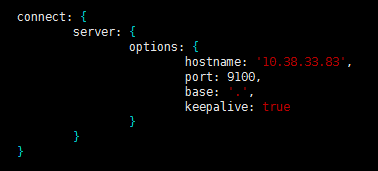
修改 _site/app.js 修改http://localhost:9200字段到本机ES端口与IP

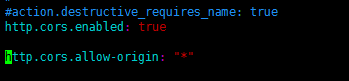
<6>修改 elasticsearch配置文件
修改elasticsearch.yml文件加入以下内容:
# 是否支持跨域

http.cors.enabled: true

# *表示支持所有域名

http.cors.allow-origin: "*"
<7>启动head插件服务(后台运行)
/elasticsearch-head/node_modules/grunt/bin/grunt server &

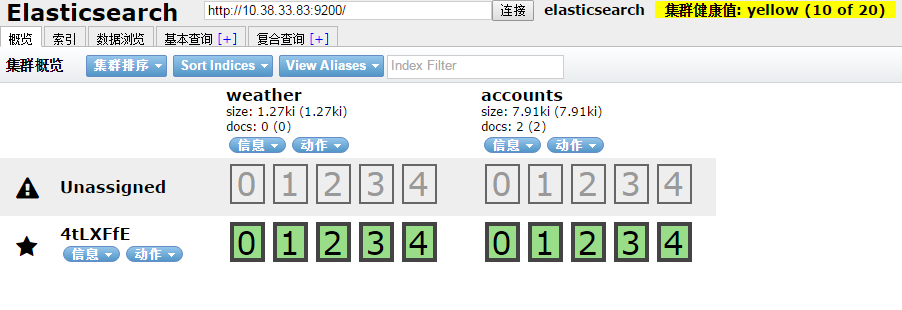
<8>查看
如下图说明安装OK
安装中文分词器
中文分词器的版本和elasticsearch的版本要一致。随笔中安装的是6.3.2版本
$ ./bin/elasticsearch-plugin install https://github.com/medcl/elasticsearch-analysis-ik/releases/download/v6.3.2/elasticsearch-analysis-ik-6.3.2.zip
安装OK后重启elasticsearch服务
安装过程遇到的问题:
[1]: max file descriptors [4096] for elasticsearch process is too low, increase to at least [65536]
解决:vim /etc/security/limits.conf ,在文件末尾添加以下参数 (* 要带上)
* soft nofile 65536

* hard nofile 131072

* soft nproc 2048

* hard nproc
ulimit -n查看进程数
[2]: max virtual memory areas vm.max_map_count [65530] is too low, increase to at least [262144]
解决:修改 /etc/sysclt.conf配置
vi /etc/sysctl.conf
添加一下配置参数
vm.max_map_count=
执行命令
sysctl -p
重启elasticsearch服务即可。
参考:
https://www.cnblogs.com/hunttown/p/6723286.html
https://www.cnblogs.com/lizichao1991/p/7809156.html
Elasticsearch和Head插件安装(转)的更多相关文章
- ElasticSearch 2 (6) - 插件安装Head、Kopf与Bigdesk
ElasticSearch 2 (6) - 插件安装Head.Kopf与Bigdesk 摘要 安装Elasticsearch插件Head.Kopf与Bigdesk 版本 elasticsearch版本 ...
- ElasticSearch之常用插件安装命令
#head监控安装,推荐 bin/plugin -install mobz/elasticsearch-head #bigdesk集群状态,推荐 bin/plugin -install lukas-v ...
- 分布式搜索引擎ElasticSearch+Kibana (Marvel插件安装详解)
在安装插件的过程中,尤其是安装Marvel插件遇到了很多问题,要下载license.Marvel-agent,又要下载安装Kibana 版本需求 Java 7 or later Elasticsear ...
- 【ElasticSearch】 elasticsearch-head插件安装
本章介绍elasticsearch-head插件安装,elasticsearch安装参考:[ElasticSearch] 安装 elasticsearch-head安装和学习可参照官方文档: http ...
- elasticsearch及head插件安装与配置
1. 环境软件版本说明 系统:ubuntu14.04.1 JDK:1.8 elasticsearch:5.5.2 node:9.11.1 elasticsearch:5.X 2. 环境软件下载说明 1 ...
- Elasticsearch之sense插件安装之后的浏览详解
前提博客是 Elasticsearch之sense插件的安装(图文详解) 立马,可以看到 http://192.168.80.145:5601/app/sense 以后更新
- Elasticsearch学习1--head插件安装
1.简要介绍 elasticsearch-head是一个elasticsearch的集群管理工具,它是完全由html5编写的独立网页程序. 2.最近尝试学习elasticsearch,查了一些资料,但 ...
- Elasticsearch之head插件安装之后的浏览详解
前提, Elasticsearch之插件介绍及安装 https://i.cnblogs.com/posts?categoryid=950999&page=2 (强烈建议,从头开始看) 比如, ...
- Elasticsearch之kopf插件安装之后的浏览详解
前提, Elasticsearch之插件介绍及安装 https://i.cnblogs.com/posts?categoryid=950999&page=2 (强烈建议,从头开始看) 比如, ...
- Elasticsearch和Head插件安装
环境: CentOS7 Elasticsearch-6.3.2 JDK8 准备: JDK8 下载地址:http://www.oracle.com/technetwork/java/javase/do ...
随机推荐
- Pandas进阶笔记 (0)为什么写这个系列
使用Pandas数年之久了,从最早的0.17版本开始接触Pandas,到现在0.25版本,踩过不少坑,面对各种稀奇古怪的bug抓耳挠腮.每每想要解决bug,或者想要实现一个特定的数据操作需求,首先想到 ...
- CentOS7怎样安装Nginx1.12.2
通过nginx官网的源码安装 yum -y install gcc* openssl* pcre* zlib* 安装相关依赖 这一步很重要 不然会报乱七八糟的错误 cd /usr/local进入/us ...
- readme.txt 为什么我们不重视
1.很多源码项目下面都有编译说明,readme 2.我们的电脑上每个目录都有很多文件,我们似乎可以建立一个readme.txt 知道是什么 节约一些时间
- springboot集成thymeleaf中遇到不能反悔页面,只能反悔字符串
错误:::::不能返回页面,只能返回字符串 原因::::在controller中使用了注解@RestController 修改注解为:@Controller 分析: RestController = ...
- 正确robots写法,解决百度搜索不显示缩略图问题
网站上线http://zhimo.yuanzhumuban.cc/有一年左右时间了,百度搜索显示略缩图少之又少,通过自己这几天的观察发现. 结合百度站长平台的 robots 工具和抓取诊断工具检查后, ...
- el-select remote 远程搜索 多个共享一个options,options改变时输入框值不显示名称的问题
原因:el-select remote 远程搜索 多个共享一个options,当使用 remote-method 请求数据后,options被改变,value的值不包含在options中,value的 ...
- Oracle 序号函数
Oracle提供的序号函数:以emp表为例:1: rownum 最简单的序号 但是在order by之前就确定值.select rownum,t.* from emp t order by ename ...
- 创建型模式(过渡模式) 简单工厂模式(Simple Factory)
简单工厂模式(Simple Factory Pattern)属于类的创建型模式,又叫静态工厂方法模式(Static FactoryMethod Pattern) 是通过专门定义一个类来负责创建其他类的 ...
- zip unzip tar 压缩相关
unzip 解压时,需要直接覆盖以解压的文件 -o 则不再进行询问,直接覆盖原文件解压缩 示例 unzip -o file_name.zip
- 021_Python3 OS 文件/目录方法
os 模块提供了非常丰富的方法用来处理文件和目录.常用的方法如下表所示: 序号 方法及描述 1 os.access(path, mode) 检验权限模式 2 os.chdir(path) 改变当前 ...