
SpringBoot测试Controller层
一、准备工作
1、导入测试依赖
        <dependency>

            <groupId>org.springframework.boot</groupId>

            <artifactId>spring-boot-starter-test</artifactId>

        </dependency>
2、Controller层:
@RestController("/")

public class UserController {

    @Autowired

    private UserService userService;

    @RequestMapping

    public String index(){

        return "Hello World!";

    }

    @GetMapping("/user")

    public ResponseEntity<List<User>> listUser(){

        List<User> list = new ArrayList<>();

        list.add(new User(1,"张三"));

        list.add(new User(2,"李四"));

        return new ResponseEntity(list,HttpStatus.OK);

    }

    @GetMapping("/user/{userId}")

    public ResponseEntity<User> getInfo(@PathVariable("userId") Integer userId){

        User user  = userService.findByUserId(userId);

        return new ResponseEntity(user,HttpStatus.OK);

    }

}
3、UserService实现如下:
@Service

public class UserServiceImpl implements UserService {

    @Override

    public User findByUserId(Integer userId) {

        return  new User(userId,"用户" + userId);

    }

}
二、测试
1、创建第一个测试用例:
在类上添加@RunWith和@SpringBootTest表示是一个可以启动容器的测试类
@RunWith(SpringRunner.class)

@SpringBootTest //告诉SpringBoot去寻找主配置类(例如使用@SpringBootApplication注解标注的类),并使用它来启动一个Spring application context;

public class UserController01Test {

    @Autowired

    private UserController userController;

    //测试@SpringBootTest是否会将@Component加载到Spring application context

    @Test

    public void testContexLoads(){

        Assert.assertThat(userController,notNullValue());

    }

}
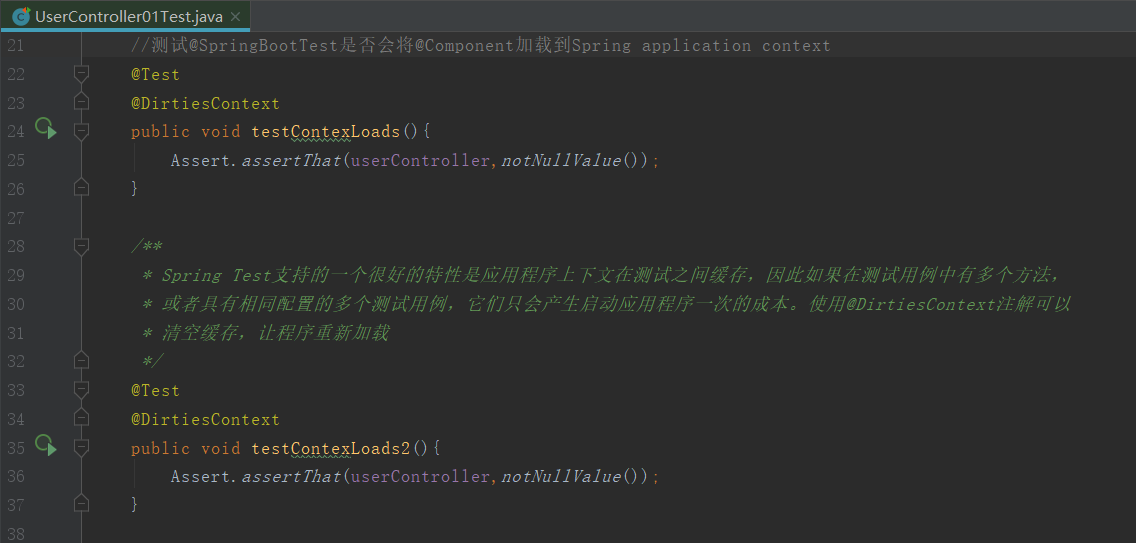
2、Spring Test支持的一个很好的特性是应用程序上下文在测试之间缓存,因此如果在测试用例中有多个方法,或者具有相同配置的多个测试用例,它们只会产生启动应用程序一次的成本。使用@DirtiesContext注解可以清空缓存,让程序重新加载。
将上面代码改造如下:在两个方法上都添加@DirtiesContext注解,运行整个测试类,会发现容器加载了两次。

3、启动服务器对Controller进行测试:
这种方式是通过将TestRestTemplate注入进来,进行发送请求测试,缺点是需要启动服务器。
@RunWith(SpringRunner.class)

//SpringBootTest.WebEnvironment.RANDOM_PORT设置随机端口启动服务器(有助于避免测试环境中的冲突)

@SpringBootTest(webEnvironment = SpringBootTest.WebEnvironment.RANDOM_PORT)

public class HttpRequestTest {

    //使用@LocalServerPort将端口注入进来

    @LocalServerPort

    private int port;

    @Autowired

    private TestRestTemplate restTemplate;

    @Test

    public void greetingShouldReturnDefaultMessage() throws Exception {

        Assert.assertThat(this.restTemplate.getForObject("http://localhost:" + port + "/",String.class),

                Matchers.containsString("Hello World"));

    }

}
4、使用@AutoConfigureMockMvc注解自动注入MockMvc:
@RunWith(SpringRunner.class)

@SpringBootTest

@AutoConfigureMockMvc //不启动服务器,使用mockMvc进行测试http请求。启动了完整的Spring应用程序上下文,但没有启动服务器

public class UserController02Test {

    @Autowired

    private MockMvc mockMvc;

    /**

     * .perform() : 执行一个MockMvcRequestBuilders的请求;MockMvcRequestBuilders有.get()、.post()、.put()、.delete()等请求。

     * .andDo() : 添加一个MockMvcResultHandlers结果处理器,可以用于打印结果输出(MockMvcResultHandlers.print())。

     * .andExpect : 添加MockMvcResultMatchers验证规则,验证执行结果是否正确。

     */

    @Test

    public void shouldReturnDefaultMessage() throws Exception {

        this.mockMvc.perform(get("/"))

                .andDo(print())

                .andExpect(status().isOk())

                .andExpect(content().string(containsString("Hello World")));

    }

}
5、使用@WebMvcTest只初始化Controller层
@RunWith(SpringRunner.class)

//使用@WebMvcTest只实例化Web层,而不是整个上下文。在具有多个Controller的应用程序中,

// 甚至可以要求仅使用一个实例化,例如@WebMvcTest(UserController.class)

@WebMvcTest(UserController.class)

public class UserController03Test {

    @Autowired

    private MockMvc mockMvc;

    @Test

    public void shouldReturnDefaultMessage() throws Exception {

        this.mockMvc.perform(get("/"))

                .andDo(print())

                .andExpect(status().isOk())

                .andExpect(content().string(containsString("Hello World")));

    }

}
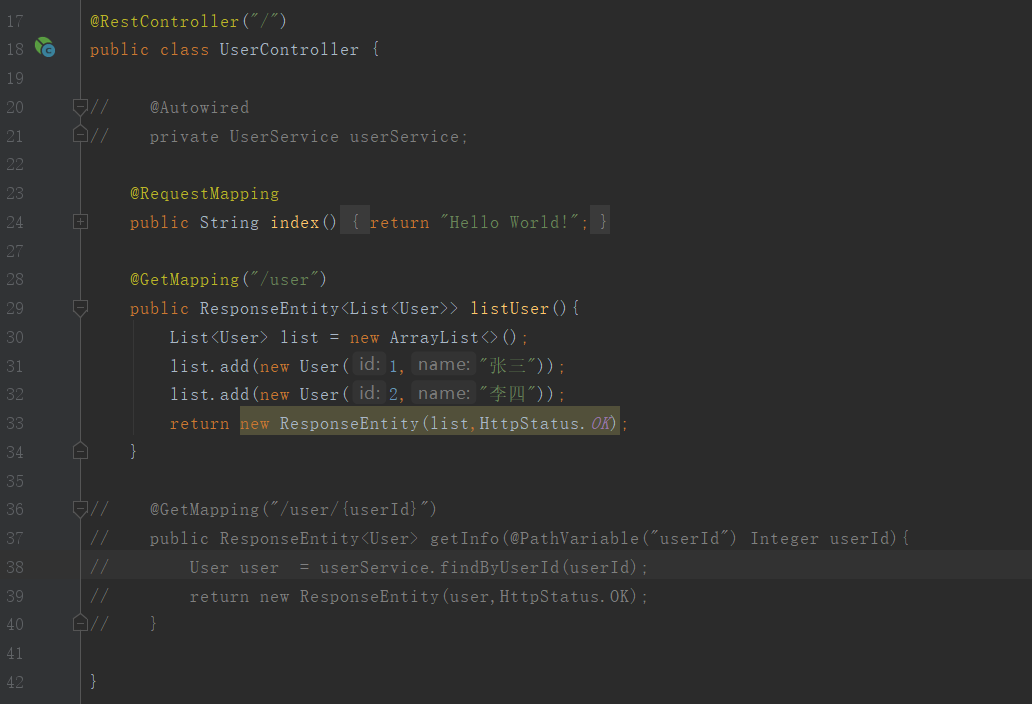
上面的代码会报错,因为我们使用@WebMvcTest只初始化Controller层,但是在UserController 中注入了UserService,所以报错。我们把代码注释如下,该测试就会成功了。
但是一般的Controller成都会引用到Service吧,怎么办呢,我们可以使用mockito框架的@MockBean注解进行模拟,改造后的代码如下:
@RunWith(SpringRunner.class)

//使用@WebMvcTest只实例化Web层,而不是整个上下文。在具有多个Controller的应用程序中,

// 甚至可以要求仅使用一个实例化,例如@WebMvcTest(UserController.class)

@WebMvcTest(UserController.class)

public class UserController03Test {

    @Autowired

    private MockMvc mockMvc;

    //模拟出一个userService

    @MockBean

    private UserService userService;

    @Test

    public void greetingShouldReturnMessageFromService() throws Exception {

        //模拟userService.findByUserId(1)的行为

        when(userService.findByUserId(1)).thenReturn(new User(1,"张三"));

        String result = this.mockMvc.perform(get("/user/1"))

                .andDo(print())

                .andExpect(status().isOk())

                .andExpect(content().contentType(MediaType.APPLICATION_JSON_UTF8))

                .andExpect(jsonPath("$.name").value("张三"))

                .andReturn().getResponse().getContentAsString();

        System.out.println("result : " + result);

    }

}
资料:
json-path : https://github.com/json-path/JsonPath
mockito官网:https://site.mockito.org/
spring官网用例:https://spring.io/guides/gs/testing-web/
spring mockMvc文档:https://docs.spring.io/spring-framework/docs/current/javadoc-api/org/springframework/test/web/servlet/MockMvc.html
SpringBoot测试Controller层的更多相关文章
- 【异常处理】Springboot对Controller层方法进行统一异常处理
Controller层方法,进行统一异常处理 提供两种不同的方案,如下: 方案1:使用 @@ControllerAdvice (或@RestControllerAdvice), @ExceptionH ...
- Springboot对Controller层方法进行统一异常处理
Controller层方法,进行统一异常处理 提供两种不同的方案,如下: 方案1:使用 @@ControllerAdvice (或@RestControllerAdvice), @ExceptionH ...
- PowerMock+SpringMVC整合并测试Controller层方法
PowerMock扩展自Mockito,实现了Mockito不支持的模拟形式的单元测试.PowerMock实现了对静态方法.构造函数.私有方法以及final方法的模拟支持,对静态初始化过程的移除等强大 ...
- Junit mockito 测试Controller层方法有Pageable异常
1.问题 在使用MockMVC+Mockito模拟Service层返回的时候,当我们在Controller层中参数方法调用有Pageable对象的时候,我们会发现,我们没办法生成一个Pageable的 ...
- junit基础学习之-测试controller层(2)
准备工作: eclipse本身带有junit4,可以直接build path,加入junit. 连接数据库的配置文件需要修改,之前的文件是采用properties+xml文件的形式,但是在测试的时候因 ...
- springboot测试service层的单元测试
package com.test.service; import com.task.Application;import com.task.model.po.TaskRecordDo;import o ...
- 使用Mock 测试 controller层
package action; import org.junit.Before;import org.junit.Test;import org.junit.runner.RunWith;import ...
- ssm框架中Controller层的junit测试_我改
Controller测试和一般其他层的junit测试可以共用一个BaseTest 一.BaseTest如下: @RunWith(SpringJUnit4ClassRunner.class) @WebA ...
- Spring MVC如何测试Controller(使用springmvc mock测试)
在springmvc中一般的测试用例都是测试service层,今天我来演示下如何使用springmvc mock直接测试controller层代码. 1.什么是mock测试? mock测试就是在测试过 ...
随机推荐
- scrapy服务化持久运行
如果要将scrapy做成服务持久运行,通常我们会尝试下面的方式,这样是不可行的: class myspider(scrapy.Spider): q = queue() #task qu ...
- SQL——JOIN(连接)
JOIN基于多个表之间的共同字段,把多个表的行结合起来. 一.INNER JOIN 关键字 INNER JOIN关键字:在表中存在至少一个匹配时返回行. 语法如下: SELECT 列名1,列名2... ...
- 环境配置--升级Python 3.6爬坑
升级到3.6之后,发现ctrl alt t呼不出命令台,找了半天发现update manager也打不开,而且没有错误报告.....查阅了一番资料看到有人有类似的问题(https://askubunt ...
- JPA、Hibernate、Spring data jpa之间的关系,以及和springboot的整合
什么么是JPA? 全称Java Persistence API,可以通过注解或者XML描述[对象-关系表]之间的映射关系,并将实体对象持久化到数据库中. 为我们提供了: 1)ORM映射元数据:JPA支 ...
- 使用jQuery开发tab选项卡插件
为了复习巩固jQuery的插件开发.HTML和CSS方面的知识,做了一个简单的tab选项卡插件,简单记录一下开发.使用的过程,以备日后使用. 一.插件效果 tab选项卡插件常用的功能均已实现,包括:动 ...
- 借助openpyxl处理excel
一次处理excel中,原计划是借助excel中自带的工具进行处理,然而看到需要处理的列要达到30+,后来放弃了,用Python处理或许是一个不错的选择. 需求: 表格中每一列数据都是一个随机值,但是已 ...
- MySql注释的写法
每一种语言都有它的注释方式,代码量少的时候还可以,随着代码量越来越多,代码注释的重要性也越发凸显. 在mysql中主要有三种方式: 1.常用的方式,跟在css中那些注释一样 :/* 内容 */ /* ...
- jQuery中的 AJAX
jQuery库中支持AJAX的操作,功能十分完善 详细请参考官方文档:https://www.jquery123.com/category/ajax/ 首先需要引入jquery文件!!! $.ajax ...
- 微信小程序组件通信入门及组件生命周期函数
组件生命周期函数链接地址:https://developers.weixin.qq.com/miniprogram/dev/framework/custom-component/lifetimes.h ...
- springboot学习入门简易版七---springboot2.0使用@Async异步执行方法(17)
1启动类开启异步调用注解 @SpringBootApplication @EnableAsync //开启异步调用 public class StartApplication { 不开启则异步调用无效 ...