
IOS UIScrollView + UIButton 实现segemet页面和顶部标签页水平滚动效果
很长一段时间没有写博客了,最近在学习iOS开发,看了不少的代码,自己用UIScrollView和UIButton实现了水平滚动的效果,有点类似于今日头条的主界面框架,效果如下:
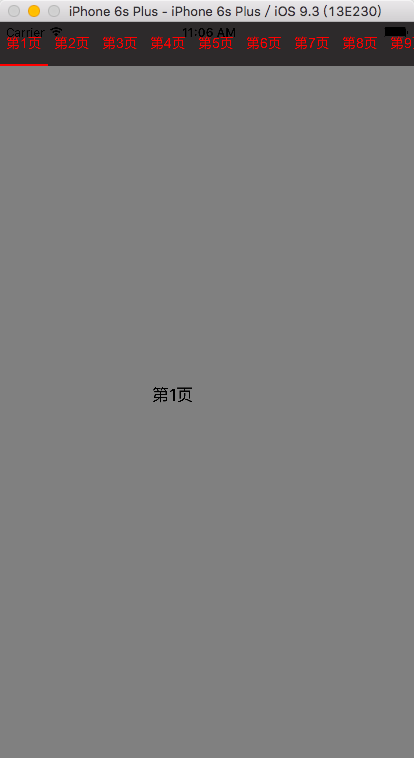 代码如下:
代码如下:
MyScrollView.h
#import <UIKit/UIKit.h>

#import "MySegementView.h"

@interface MyScrollView : UIView<UIScrollViewDelegate>

- (instancetype) initWithFrame:(CGRect)frame titleArray:(NSArray *)titleArray viewArray:(NSArray *)viewArray;

//滚动页面

@property (strong, nonatomic)UIScrollView *myScrollView;

//顶部标签按钮滚动视图

@property (strong, nonatomic)MySegementView *mySegementView;

@end
MyScrollView.m
#define SCROLLVIEW_WIDTH [UIScreen mainScreen].bounds.size.width

#define SCROLLVIEW_HEIGTH self.bounds.size.height

#define SEGEMENT_HEIGTHT 44

#import "MyScrollView.h"

@implementation MyScrollView

/*

// Only override drawRect: if you perform custom drawing.

// An empty implementation adversely affects performance during animation.

- (void)drawRect:(CGRect)rect {

    // Drawing code

}

*/

- (instancetype) initWithFrame:(CGRect)frame titleArray:(NSArray *)titleArray viewArray:(NSArray *)viewArray

{

    self = [super initWithFrame:frame];

    if (_mySegementView == nil) {

        _mySegementView = [[MySegementView alloc] initWithFrame:CGRectMake(, , SCROLLVIEW_WIDTH, SEGEMENT_HEIGTHT) titleArray:titleArray block:^void(int index){  //用block实现回调,顶部按钮点击的时候滚动到指定位置

            [_myScrollView setContentOffset:CGPointMake((index - ) * SCROLLVIEW_WIDTH, )];

        }];

    }

    [self addSubview:_mySegementView];

    [self addSubview:self.myScrollView];

    if (self) {

        for (int i = ; i < viewArray.count; i++) {

            UIViewController *viewController = viewArray[i];

            viewController.view.frame = CGRectMake(i * SCROLLVIEW_WIDTH, , SCROLLVIEW_WIDTH, self.myScrollView.frame.size.height);

            [self.myScrollView addSubview:viewController.view];

        }

        self.myScrollView.contentSize = CGSizeMake(viewArray.count * SCROLLVIEW_WIDTH, );

    }

    return self;

}

// 滚动页面视图懒加载

- (UIScrollView *)myScrollView

{

    if (_myScrollView == nil) {

        _myScrollView = [[UIScrollView alloc] initWithFrame:CGRectMake(, _mySegementView.frame.size.height, SCROLLVIEW_WIDTH, SCROLLVIEW_HEIGTH - _mySegementView.frame.size.height)];

        _myScrollView.backgroundColor = [UIColor clearColor];

        _myScrollView.delegate = self;

        _myScrollView.showsVerticalScrollIndicator = NO;

        _myScrollView.showsHorizontalScrollIndicator = NO;

        _myScrollView.bounces = NO;

        _myScrollView.scrollsToTop = NO;

        _myScrollView.pagingEnabled = YES;

    }

    return _myScrollView;

}

//滚动结束,更新按钮下方线条

-(void)scrollViewDidEndDecelerating:(UIScrollView *)scrollView

{

    if (scrollView==_myScrollView)

    {

        int p=_myScrollView.contentOffset.x / SCROLLVIEW_WIDTH;

        [_mySegementView setPageIndex:p + ];

    }

}

@end
MySegementView.h
#import <UIKit/UIKit.h>

typedef void (^btnClickedBlock)(int index);

@interface MySegementView : UIView<UIScrollViewDelegate>

{

    int nPageIndex;

    int titleCount;

    UIButton *currentBtn;

    NSMutableArray *btnArray;

}

- (void)setPageIndex:(int)nIndex;

- (instancetype) initWithFrame:(CGRect)frame titleArray : (NSArray *)titleArray block : (btnClickedBlock) clickedBlock;

@property (nonatomic, copy) btnClickedBlock block;

@property (strong, nonatomic) UIScrollView *segementScrollView;

@property (strong, nonatomic) UIView *selectedLine;

@end
MySegementView.m
#import "MySegementView.h"

#define SEGEMENT_BTN_WIDTH 48

@implementation MySegementView

/*

// Only override drawRect: if you perform custom drawing.

// An empty implementation adversely affects performance during animation.

- (void)drawRect:(CGRect)rect {

    // Drawing code

}

*/

- (instancetype) initWithFrame:(CGRect)frame titleArray : (NSArray *)titleArray block : (btnClickedBlock) clickedBlock

{

    self = [super initWithFrame:frame];

    [self addSubview:self.segementScrollView];

    if (self) {

        [self setBackgroundColor:[UIColor colorWithRed:0x2d/255.0 green:0x2a/255.0 blue:0x2b/255.0 alpha:]];

        self.block = clickedBlock;

        nPageIndex = ;

        titleCount = titleArray.count;

        btnArray = [NSMutableArray array];

        for (int i = ; i < titleCount; i++) {

            UIButton *btn = [[UIButton alloc] initWithFrame:CGRectMake(i * SEGEMENT_BTN_WIDTH, , SEGEMENT_BTN_WIDTH, )];

            [btn setTitle:titleArray[i] forState:UIControlStateNormal];

            btn.titleLabel.font = [UIFont fontWithName:@"Arial" size:];

            [btn setTitleColor:[UIColor redColor] forState:UIControlStateNormal];

            btn.tag = i + ;

            [btn addTarget:self action:@selector(btnClick:) forControlEvents:UIControlEventTouchDown];

            [self.segementScrollView addSubview:btn];

            [btnArray addObject:btn];

        }

        self.selectedLine.frame = CGRectMake(, , SEGEMENT_BTN_WIDTH, );

        [self.segementScrollView addSubview: self.selectedLine];

        self.segementScrollView.contentSize = CGSizeMake(titleCount * SEGEMENT_BTN_WIDTH, );

    }

    return self;

}

//懒加载

- (UIScrollView *)segementScrollView

{

    if (_segementScrollView == nil) {

        CGRect rect = self.frame;

        _segementScrollView = [[UIScrollView alloc] initWithFrame:rect];

        _segementScrollView.showsHorizontalScrollIndicator = NO;

        _segementScrollView.showsVerticalScrollIndicator = NO;

        _segementScrollView.bounces = NO;

        _segementScrollView.pagingEnabled = NO;

        _segementScrollView.delegate = self;

        _segementScrollView.scrollsToTop = NO;

    }

    return _segementScrollView;

}

//懒加载

- (UIView *)selectedLine

{

    if (_selectedLine == nil) {

        _selectedLine = [[UIView alloc] init];

        _selectedLine.backgroundColor = [UIColor redColor];

    }

    return _selectedLine;

}

//设置当前页面,并更新顶部标签页

- (void)setPageIndex:(int)nIndex

{

    if (nIndex != nPageIndex) {

        nPageIndex = nIndex;

        [self refreshSegement];

    }

}

- (void)refreshSegement

{

    //找到当前选中页面对应的顶部按钮

    for (UIButton *btn in btnArray) {

        if (btn.tag == nPageIndex) {

            currentBtn = btn;

        }

    }

    //如果选中页面对应按钮超出可视范围,顶部滚动视图滚动

    int x = currentBtn.frame.origin.x;

     if (currentBtn.frame.origin.x + SEGEMENT_BTN_WIDTH > self.frame.size.width + self.segementScrollView.contentOffset.x) {

     [self.segementScrollView setContentOffset:CGPointMake(self.segementScrollView.contentOffset.x + SEGEMENT_BTN_WIDTH, ) animated:YES];

     }

     else if (currentBtn.frame.origin.x < self.segementScrollView.contentOffset.x)

     {

     [self.segementScrollView setContentOffset:CGPointMake(currentBtn.frame.origin.x, ) animated:YES];

     }

    //下方选中标记线条滚动效果

    [UIView animateWithDuration:0.2 animations:^{

    _selectedLine.frame = CGRectMake(currentBtn.frame.origin.x, self.frame.size.height - , SEGEMENT_BTN_WIDTH, );

    }completion:^(BOOL finished) {

    }];

}

- (void)btnClick:(UIButton*)btn

{

    currentBtn = btn;

    if (nPageIndex != btn.tag) {

        nPageIndex = btn.tag;

        [self refreshSegement];

        self.block(nPageIndex);

    }

}

@end
使用方法:
- (void)viewDidLoad {

    [super viewDidLoad];

    NSMutableArray *array=[NSMutableArray array];//显示的标签页

    for (int i = ; i < ; i++) {

            MyViewController1 *viewController1 = [[MyViewController1 alloc] initWithIndex:i + ];//initWithIndex : 自定义的构造方法,用于显示页面编号

            [array addObject:viewController1];//滚动视图列表

    }

    myScrollView = [[MyScrollView alloc] initWithFrame:self.view.frame titleArray:@[@"第1页",@"第2页",@"第3页",@"第4页",@"第5页",@"第6页",@"第7页",@"第8页",@"第9页",@"第10页",@"第11页",@"第12页"] viewArray:array];

    [self.view addSubview:myScrollView];

    // Do any additional setup after loading the view, typically from a nib.

}
源码下载链接:http://download.csdn.net/detail/lzm2625347497/9562677
IOS UIScrollView + UIButton 实现segemet页面和顶部标签页水平滚动效果的更多相关文章
- ActionBar+Fragment实现顶部标签页
用ActionBar的TABS模式,和Fragment实现程序顶部的标签页切换. 一. MainActivity public class MainActivity extends A ...
- iOS:UIScrollView控件和UIPageControl控件的详解
UIScrollView滚动视图控件和UIPageControl分页视图控件: UIScrollView用于显示多于一个屏幕的内容,超出屏幕范围的内容可以通过滑动进行查看,当然UIPagecon ...
- iOS - UIScrollView
前言 NS_CLASS_AVAILABLE_IOS(2_0) @interface UIScrollView : UIView <NSCoding> @available(iOS 2.0, ...
- IOS UIScrollView常用代理方法
iOS UIScrollView代理方法有很多,从头文件中找出来学习一下 //只要滚动了就会触发 - (void)scrollViewDidScroll:(UIScrollView *)scrollV ...
- fastclick使用与 fastclick ios11.3相关bug原因(ios输入框点击变得不灵敏,ios input失焦后,页面上移,点击不了)
FastClick 移动设备上的浏览器默认会在用户点击屏幕大约延迟300毫秒后才会触发点击事件,这是为了检查用户是否在做双击.为了能够立即响应用户的点击事件,就有了FastClick. 安装fastc ...
- iOS UIScrollView的使用
一.为什么要用UIScrollView? 移动设备的屏幕大小是极其有限的,因此直接展示在用户眼前的内容也相当有限当展示的内容较多,超出一个屏幕时,用户可通过滚动手势来查看屏幕以外的内容普通的UIVie ...
- iOS开发笔记13:顶部标签式导航栏及下拉分类菜单
当内容及分类较多时,往往采用顶部标签式导航栏,例如网易新闻客户端的顶部分类导航,最近刚好有这样的应用场景,参考网络上一些demo,实现了这种导航效果,记录一些要点. 效果图(由于视频转GIF掉帧,滑动 ...
- css整个页面离顶部的距离
body { padding:0; margin:0; font-size:12px; line-height:22px; } 说明: 整个页面离顶部的距离是22像素
- js——页面回到顶部
很久都没有去慕课网学习学习了,刚恰好就看见了一个用的比较多的小例子——页面回到顶部,记得之前自己也是在初学web时,被这个坑了一回,因此今天特地拿来分享分享…… <!DOCTYPE html&g ...
随机推荐
- ajaxSubmit与ajaxFileUpload的空值
ajaxSubmit发现正文无内容, ajaxFileUpload发现无上传内容, 嗯,你只是忘记了 html 中控件的 name 没有指定,这哥们不认 id 的.
- phpcms v9二次开发笔记
phpcms是基于MVC结构的. 安装: 下载phpcms_v9.5.9_UTF8.zip:新建目录phpcms,将压缩包里install_package目录下所有文件复制到phpcms目录.浏览器输 ...
- paip.提升效率--批量变量赋值 “多元”赋值
paip.提升效率--批量变量赋值 "多元"赋值 ##石麻是批量变量赋值. 为一组变量赋值. 例子 1 <?php $my_array = array("Dog&q ...
- paip.gui控件form窗体的原理实现以及easyui的新建以及编辑实现
paip.gui控件form窗体的原理实现以及easyui的新建以及编辑实现 //////新建 与编辑 var EditForm=new Form_easyui(); if(row) ...
- JavaScript Tips
Tips: return false - event.preventDefault(); //阻止默认行为 P.S 阻止a标签的跳转 - event.stopPropagation(); //阻止事件 ...
- iOS开发实用技巧—项目新特性页面的处理
iOS开发实用技巧篇—项目新特性页面的处理 说明:本文主要说明在项目开发中会涉及到的最最简单的新特性界面(实用UIScrollView展示多张图片的轮播)的处理. 代码示例: 新建一个专门的处理新特性 ...
- Android Studio no debuggable applications解决方案2
android studio 默认是没有开启debuggable 功能的,在tools里打开该功能即可,Tools->Android->Enable ADB Integration. 刚设 ...
- GO語言基礎教程:數據類型,變量,常量
GO類似PHP,每行的結尾要加分號來結束,不同點在於GO對此並不強制,這一點又像javascript,另外GO的語句塊是用一對大括號來包裹的,但是go要求左大括號必須要在語句的結尾處,不能在行首出現左 ...
- RFID 读写器 Reader Writer Cloner
RFID读写器的工作原理 RFID的数据采集以读写器为主导,RFID读写器是一种通过无线通信,实现对标签识别和内存数据的读出和写入操作的装置. 读写器又称为阅读器或读头(Reader).查询器(Int ...
- Docker实践(4)—network namespace与veth pair
network namespace 创建network namespace # ip netns add blue # ip netns list blue 添加网口到namespace 先创建v ...