
winform 控件开发1——复合控件

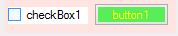 哈哈是不是丑死了?
做了一个不停变色的按钮,可以通过勾选checkbox停下来,代码如下:
复合控件果然简单呀,我都能学会~
 using System;

 using System.Collections.Generic;

 using System.ComponentModel;

 using System.Diagnostics;

 using System.Drawing;

 using System.Linq;

 using System.Text;

 using System.Threading.Tasks;

 using System.Windows.Forms;

 namespace ComponentComposite

 {

     [ToolboxBitmap(typeof(Timer))]

     public partial class Component1:UserControl

     {

         private Color _colFColor;

         private Color _colBColor;

         public Color colFColor { get { return _colFColor; } set { _colFColor = value; checkBox1.ForeColor = _colFColor; } }

         public Color colBColor { get { return _colBColor; } set { _colBColor = value; checkBox1.BackColor = _colBColor; } }

         public Component1()

         {

             InitializeComponent();

         }

         public Component1(IContainer container)

         {

             container.Add(this);

             InitializeComponent();

         }

         private void timer1_Tick(object sender, EventArgs e)

         {   Random rdm=new Random();

             int i1=rdm.Next(,);int i2=rdm.Next(,);int i3=rdm.Next(,);

             button1.BackColor = System.Drawing.Color.FromArgb(i1, i2, i3);

         }

         private void checkBox1_CheckedChanged(object sender, EventArgs e)

         {

             timer1.Enabled = (timer1.Enabled)?false:true;

         }

     }

 }
上午跟人家学了一个渐变按钮,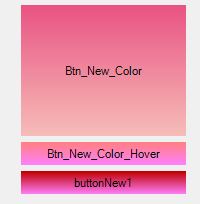
如图,现在试试可不可以组合。嗯可以组合,但是好像不是自动变化颜色的呀
winform 控件开发1——复合控件的更多相关文章
- WinForm控件开发总结目录
WinForm控件开发总结(一)------开篇 WinForm控件开发总结(二)------使用和调试自定义控件 WinForm控件开发总结(三)------认识WinForm控件常用的Attrib ...
- 浅谈Winform控件开发(一):使用GDI+美化基础窗口
写在前面: 本系列随笔将作为我对于winform控件开发的心得总结,方便对一些读者在GDI+.winform等技术方面进行一个入门级的讲解,抛砖引玉. 别问为什么不用WPF,为什么不用QT.问就是懒, ...
- C# Winform开发以及控件开发的需要注意的,被人问怕了,都是基础常识
我是搞控件开发的,经常被人问,所以把一些问题记录了下来!如果有人再问,直接把地址丢给他看. 一. 经常会有人抱怨Winform界面闪烁,下面有几个方法可以尽可能的避免出现闪烁 1.控件的使用尽量以纯色 ...
- C# 扩展方法奇思妙用高级篇六:WinForm 控件选择器
在Web开发中,jQuery提供了功能异常强大的$选择器来帮助我们获取页面上的对象.但在WinForm中,.Net似乎没有这样一个使用起来比较方便的选择器.好在我们有扩展方法,可以很方便的打造一个. ...
- WinForm控件使用文章收藏整理完成
对C# WinForm开发系列收集的控件使用方面进行整理, 加入了一些文章, 不断补充充实, 完善这方面. 基础 - 常用控件 C# WinForm开发系列 - CheckBox/Button/Lab ...
- C# WinForm控件、自定义控件整理(大全)
转:http://www.cnblogs.com/top5/archive/2010/04/29/1724039.html 对C# WinForm开发系列收集的控件使用方面进行整理, 加入了一些文章, ...
- Winform控件Tag使用规范
背景 Tag在WinForm控件中经常被用来存储临时数据,类型为object,但是当程序中多个地方使用到Tag时,容易造成Tag使用的混乱,Tag是如此重要的一个属性,应该要好好考虑下如何有效的使用T ...
- .Net WinForm 控件键盘消息处理剖析
在WinForm控件上我们可以看到很多关于键盘消息处理的方法,比如OnKeyDown, OnKeyPress, ProcessCmdKey, ProcessDialogKey,IsInputKey等等 ...
- WinForm 控件键盘消息处理剖析(转)
一直想整理键盘事件的调用顺序,刚好看见园子里的这篇文章,写的不错,就转载了:http://www.cnblogs.com/tedzhao/archive/2010/09/07/1820557.html ...
随机推荐
- JVM内存配置
JVM内存主要分为两个部分,分别是PermanentSapce和HeapSpace. PermantSpace主要负责存放加载的Class类级对象如class本身,method,field等反射对象, ...
- java Conditions
//Listing 7-2. Achieving Synchronization in Terms of Locks and Conditions import java.util.concurren ...
- javascript的alert()的消息框不弹出或者弹出信息有误
有时不知道什么,有时javascript的alert()的消息框不弹出或者弹出信息有误,代码是这么写的: //提示信息 public static void alert(TemplateControl ...
- Redis学习笔记(8)-发布/订阅
package cn.com; import java.util.List; import redis.clients.jedis.Jedis; public class Redis_PubSub { ...
- Spring整合CXF之发布WebService服务
今天我们来讲下如何用Spring来整合CXF,来发布WebService服务: 给下官方文档地址:http://cxf.apache.org/docs/writing-a-service-with-s ...
- 371. Sum of Two Integers
不用加减法计算两个整数的和.这道题其实是考察一些基本的布尔代数知识.我们知道,二进制表示时: 0 + 0 = 00 1 + 0 = 01 0 + 1 = 01 1 + 1 = 10 所以,两个二进制整 ...
- oracle 变量声明 初始化 赋值
DECLARE sname VARCHAR2(20); BEGIN sname:='xxx'; sname:=sname||' and tom'; dbms_output.put_line(sname ...
- Progress Reporting
Progress reporting is a key activity of project management. The project manager issues regular repor ...
- Java学习-004-传世经典Helloworld
此文主要通过一个广为人知的传世经典应用(Helloworld)讲述 Java 程序的结构,Java 程序的开发步骤,以及 Java 程序是如何运行的. 一.开发 Java 程序步骤 开发 Java 程 ...
- 开发报表时将已有User做成下拉列表,第一项为label为ALL,value为null
SELECT 'All' AS LABLE_NAME, NULL AS USER_NAMEUNION ALLSELECT USER_NAME AS LABLE_NAME, USER_NAME from ...