
[原创]java WEB学习笔记70:Struts2 学习之路-- struts2拦截器源码分析,运行流程
本博客的目的:①总结自己的学习过程,相当于学习笔记 ②将自己的经验分享给大家,相互学习,互相交流,不可商用
内容难免出现问题,欢迎指正,交流,探讨,可以留言,也可以通过以下方式联系。
本人互联网技术爱好者,互联网技术发烧友
微博:伊直都在0221
QQ:951226918
-----------------------------------------------------------------------------------------------------------------------------------------------------------------------------------------------------------------------------------------------------------
1.运行流程
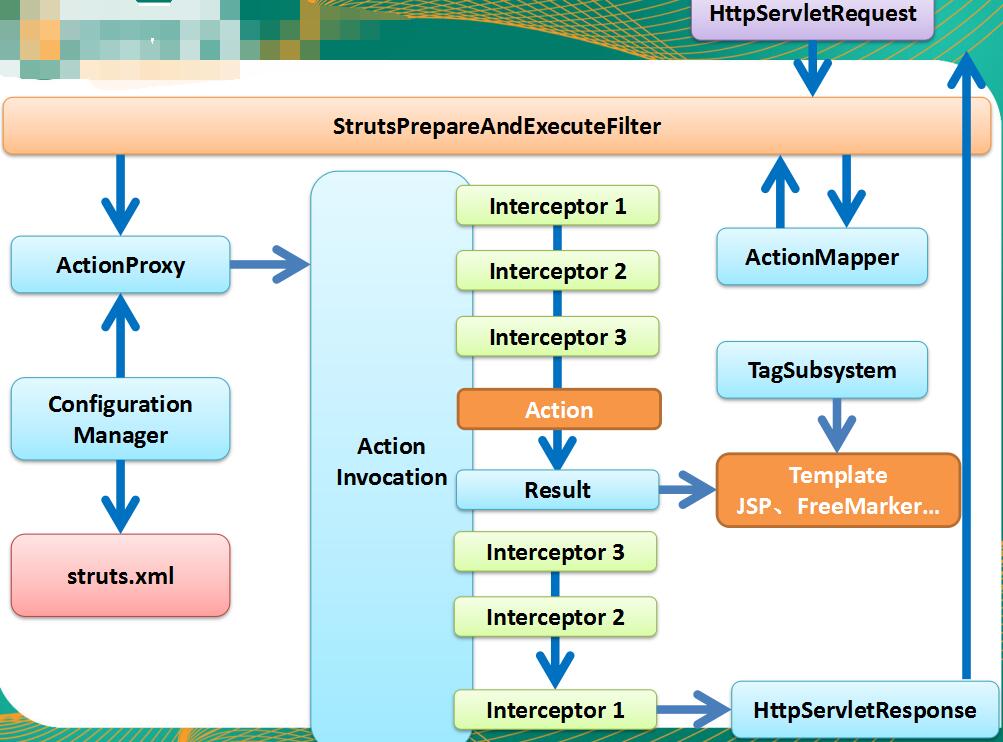
相关的几个 API
ActionMapping:Simple class that holds the action mapping information used to invoke a Struts action. The name and namespace are required
ActionMapper:When given an HttpServletRequest, the ActionMapper may return null if no action invocation request matches, or it may return an ActionMapping that describes an action invocation for the framework to try
ActionProxy:ActionProxy is an extra layer between XWork and the action so that different proxies are possible.
ActionInvocation:An ActionInvocation represents the execution state of an Action. It holds the Interceptors and the Action instance. By repeated re-entrant execution of the invoke() method, initially by the ActionProxy, then by the Interceptors, the Interceptors are all executed, and then the Action and the Result.
Struts2 运行流程分析:
1. 请求发送给 StrutsPrepareAndExecuteFilter
2. StrutsPrepareAndExecuteFilter 询问 ActionMapper: 该请求是否是一个 Struts2 请求(即是否返回一个非空的 ActionMapping 对象)
3. 若 ActionMapper 认为该请求是一个 Struts2 请求,则 StrutsPrepareAndExecuteFilter 把请求的处理交给 ActionProxy
4. ActionProxy 通过 Configuration Manager 询问框架的配置文件,确定需要调用的 Action 类及 Action 方法
5. ActionProxy 创建一个 ActionInvocation 的实例,并进行初始化
6. ActionInvocation 实例在调用Action的过程前后,涉及到相关拦截器(Intercepter)的调用。
7. Action 执行完毕,ActionInvocation 负责根据 struts.xml 中的配置找到对应的返回结果。调用结果的 execute 方法,渲染结果。在渲染的过程中可以使用Struts2 框架中的标签。
8. 执行各个拦截器 invocation.invoke() 之后的代码
9. 把结果发送到客户端
实际代码:
StrutsPrepareAndExecuteFilter
  public void doFilter(ServletRequest req, ServletResponse res, FilterChain chain) throws IOException, ServletException {

         HttpServletRequest request = (HttpServletRequest) req;

         HttpServletResponse response = (HttpServletResponse) res;

         try {

             prepare.setEncodingAndLocale(request, response);

             prepare.createActionContext(request, response);

             prepare.assignDispatcherToThread();

             if (excludedPatterns != null && prepare.isUrlExcluded(request, excludedPatterns)) {

                 chain.doFilter(request, response);

             } else {

                 request = prepare.wrapRequest(request);

                 ActionMapping mapping = prepare.findActionMapping(request, response, true);

                 if (mapping == null) {

                     boolean handled = execute.executeStaticResourceRequest(request, response);

                     if (!handled) {

                         chain.doFilter(request, response);

                     }

                 } else {

                     execute.executeAction(request, response, mapping);

                 }

             }

         } finally {

             prepare.cleanupRequest(request);

         }

     }
PrepareOperations
  public ActionMapping findActionMapping(HttpServletRequest request, HttpServletResponse response, boolean forceLookup) {

         ActionMapping mapping = (ActionMapping) request.getAttribute(STRUTS_ACTION_MAPPING_KEY);

         if (mapping == null || forceLookup) {

             try {

                 mapping = dispatcher.getContainer().getInstance(ActionMapper.class).getMapping(request, dispatcher.getConfigurationManager());

                 if (mapping != null) {

                     request.setAttribute(STRUTS_ACTION_MAPPING_KEY, mapping);

                 }

             } catch (Exception ex) {

                 dispatcher.sendError(request, response, servletContext, HttpServletResponse.SC_INTERNAL_SERVER_ERROR, ex);

             }

         }

         return mapping;

     }
DefaultActionMapper
   public ActionMapping getMapping(HttpServletRequest request, ConfigurationManager configManager) {

         ActionMapping mapping = new ActionMapping();

         String uri = getUri(request);

         int indexOfSemicolon = uri.indexOf(";");

         uri = (indexOfSemicolon > -1) ? uri.substring(0, indexOfSemicolon) : uri;

         uri = dropExtension(uri, mapping);

         if (uri == null) {

             return null;

         }

         parseNameAndNamespace(uri, mapping, configManager);

         handleSpecialParameters(request, mapping);

         return parseActionName(mapping);

     }
 public void executeAction(HttpServletRequest request, HttpServletResponse response, ActionMapping mapping) throws ServletException {

         dispatcher.serviceAction(request, response, servletContext, mapping);

     }
  public void serviceAction(HttpServletRequest request, HttpServletResponse response, ServletContext context,

                               ActionMapping mapping) throws ServletException {

         Map<String, Object> extraContext = createContextMap(request, response, mapping, context);

         // If there was a previous value stack, then create a new copy and pass it in to be used by the new Action

         ValueStack stack = (ValueStack) request.getAttribute(ServletActionContext.STRUTS_VALUESTACK_KEY);

         boolean nullStack = stack == null;

         if (nullStack) {

             ActionContext ctx = ActionContext.getContext();

             if (ctx != null) {

                 stack = ctx.getValueStack();

             }

         }

         if (stack != null) {

             extraContext.put(ActionContext.VALUE_STACK, valueStackFactory.createValueStack(stack));

         }

         String timerKey = "Handling request from Dispatcher";

         try {

             UtilTimerStack.push(timerKey);

             String namespace = mapping.getNamespace();

             String name = mapping.getName();

             String method = mapping.getMethod();

             Configuration config = configurationManager.getConfiguration();

             ActionProxy proxy = config.getContainer().getInstance(ActionProxyFactory.class).createActionProxy(

                     namespace, name, method, extraContext, true, false);

             request.setAttribute(ServletActionContext.STRUTS_VALUESTACK_KEY, proxy.getInvocation().getStack());

             // if the ActionMapping says to go straight to a result, do it!

             if (mapping.getResult() != null) {

                 Result result = mapping.getResult();

                 result.execute(proxy.getInvocation());

             } else {

                 proxy.execute();

             }

             // If there was a previous value stack then set it back onto the request

             if (!nullStack) {

                 request.setAttribute(ServletActionContext.STRUTS_VALUESTACK_KEY, stack);

             }

         } catch (ConfigurationException e) {

             // WW-2874 Only log error if in devMode

             if (devMode) {

                 String reqStr = request.getRequestURI();

                 if (request.getQueryString() != null) {

                     reqStr = reqStr + "?" + request.getQueryString();

                 }

                 LOG.error("Could not find action or result\n" + reqStr, e);

             } else {

                 if (LOG.isWarnEnabled()) {

                     LOG.warn("Could not find action or result", e);

                 }

             }

             sendError(request, response, context, HttpServletResponse.SC_NOT_FOUND, e);

         } catch (Exception e) {

             if (handleException || devMode) {

                 sendError(request, response, context, HttpServletResponse.SC_INTERNAL_SERVER_ERROR, e);

             } else {

                 throw new ServletException(e);

             }

         } finally {

             UtilTimerStack.pop(timerKey);

         }

     }
DefaultActionProxyFactory
 public ActionProxy createActionProxy(String namespace, String actionName, String methodName, Map<String, Object> extraContext, boolean executeResult, boolean cleanupContext) {

         ActionInvocation inv = new DefaultActionInvocation(extraContext, true);

         container.inject(inv);

         return createActionProxy(inv, namespace, actionName, methodName, executeResult, cleanupContext);

     }

 public ActionProxy createActionProxy(ActionInvocation inv, String namespace, String actionName, String methodName, boolean executeResult, boolean cleanupContext) {

         DefaultActionProxy proxy = new DefaultActionProxy(inv, namespace, actionName, methodName, executeResult, cleanupContext);

         container.inject(proxy);

         proxy.prepare();

         return proxy;

     }
DefaultActionProxy
  public String execute() throws Exception {

         ActionContext nestedContext = ActionContext.getContext();

         ActionContext.setContext(invocation.getInvocationContext());

         String retCode = null;

         String profileKey = "execute: ";

         try {

             UtilTimerStack.push(profileKey);

             retCode = invocation.invoke();

         } finally {

             if (cleanupContext) {

                 ActionContext.setContext(nestedContext);

             }

             UtilTimerStack.pop(profileKey);

         }

         return retCode;

     }
DefaultActionInvocation
 public String invoke() throws Exception {

         String profileKey = "invoke: ";

         try {

             UtilTimerStack.push(profileKey);

             if (executed) {

                 throw new IllegalStateException("Action has already executed");

             }

             if (interceptors.hasNext()) {

11                 final InterceptorMapping interceptor = interceptors.next();

12                 String interceptorMsg = "interceptor: " + interceptor.getName();

13                 UtilTimerStack.push(interceptorMsg);

14                 try {

15                                 resultCode = interceptor.getInterceptor().intercept(DefaultActionInvocation.this);

16                             }

17                 finally {

18                     UtilTimerStack.pop(interceptorMsg);

19                 }

20             } else {

21                 resultCode = invokeActionOnly();

22             }


             // this is needed because the result will be executed, then control will return to the Interceptor, which will

             // return above and flow through again

             if (!executed) {

                 if (preResultListeners != null) {

                     for (Object preResultListener : preResultListeners) {

                         PreResultListener listener = (PreResultListener) preResultListener;

                         String _profileKey = "preResultListener: ";

                         try {

                             UtilTimerStack.push(_profileKey);

                             listener.beforeResult(this, resultCode);

                         }

                         finally {

                             UtilTimerStack.pop(_profileKey);

                         }

                     }

                 }

                 // now execute the result, if we're supposed to

                 if (proxy.getExecuteResult()) {

                     executeResult();

                 }

                 executed = true;

             }

             return resultCode;

         }

         finally {

             UtilTimerStack.pop(profileKey);

         }

     }
[原创]java WEB学习笔记70:Struts2 学习之路-- struts2拦截器源码分析,运行流程的更多相关文章
- struts2拦截器源码分析
前面博客我们介绍了开发struts2应用程序的基本流程(开发一个struts2的实例),通过前面我们知道了struts2实现请求转发和配置文件加载都是拦截器进行的操作,这也就是为什么我们要在web.x ...
- JUC源码学习笔记5——线程池,FutureTask,Executor框架源码解析
JUC源码学习笔记5--线程池,FutureTask,Executor框架源码解析 源码基于JDK8 参考了美团技术博客 https://tech.meituan.com/2020/04/02/jav ...
- Spring学习笔记(13)——aop原理及拦截器
原理 AOP(Aspect Oriented Programming),也就是面向方面编程的技术.AOP基于IoC基础,是对OOP的有益补充. AOP将应用系统分为两部分,核心业务逻辑(Core bu ...
- 比特币学习笔记(二)---在windows下调试比特币源码
根据我一贯的学习经验,学习开源代码的话,单单看是不够的,必须一边看一边调试才能尽快理解,所以我们要想法搭建windows下bitcoin源码的调试环境. 紧接着昨天的进度,想要调试linux下的比特币 ...
- (转)Bootstrap 之 Metronic 模板的学习之路 - (2)源码分析之 head 部分
https://segmentfault.com/a/1190000006684122 下面,我们找个目录里面想对较小的文件来分析一下源码结构,我们可以看到,page_general_help.htm ...
- (转)Bootstrap 之 Metronic 模板的学习之路 - (4)源码分析之脚本部分
https://segmentfault.com/a/1190000006709967 上篇我们将 body 标签主体部分进行了简单总览,下面看看最后的脚本部门. 页面结尾部分(Javascripts ...
- struts2源码分析-初始化流程
这一篇文章主要是记录struts.xml的初始化,还原struts2.xml的初始化流程.源码依据struts2-2.3.16.3版本. struts2初始化入口,位于web.xml中: <fi ...
- Struts2 源码分析-----拦截器源码解析 --- ParametersInterceptor
ParametersInterceptor拦截器其主要功能是把ActionContext中的请求参数设置到ValueStack中,如果栈顶是当前Action则把请求参数设置到了Action中,如果栈顶 ...
- 关于阅读Struts2部分拦截器源码的记录
Struts2中的拦截器在ActionInvocation对象的invoke()方法中执行. ActionInvocation对象从配置文件中读取Interceptor对象,加入到自己的存取拦截器的容 ...
随机推荐
- membership 在web.config中配置信息
<?xml version="1.0" encoding="utf-8"?><configuration> <configSect ...
- LINQ延迟查询的例子
//linq延迟查询.两次查询结果不同 List<string> l = new List<string>() { "aaa", "bbb&quo ...
- asr,tts,vsr
http://max.book118.com/html/2014/0814/9432056.shtm ASR技术的基础主要是信号处理和概率模型. 信号处理技术 语音信号处理 谱分析 基于时间的 ...
- ECharts SSH+JQueryAjax+Json+JSP将数据库中数据填充到ECharts中
本文引用自:http://blog.csdn.net/ArcticFoxHan/article/details/38071641 1.导入包,搭建SSH框架 导入Jquery的JS包,<sc ...
- Shell 字符串常见操作
参考文章:http://blog.csdn.net/chen_jp/article/details/8922582 一 字符替换 origin=原字符串 str=替换后的字符串 替换命令: str= ...
- yii2 实现多表联查
- __proto__和protaotype的区分
直接看这样一个例子. var XXX = function(){}; var p = new XXX(); 可以把上面的例子拆分为如下一个过程: var p={}; //初始化一个对象p p.__pr ...
- Javascript实现提示错误的信息直接出现在输入框后
可以在输入框后加个<span id="error"></span>,当验证错误时这样处理document.getElementById('error').i ...
- ArcGIS API for Silverlight开发入门准备
原文:ArcGIS API for Silverlight开发入门准备 微软的Silverlight提供了跨浏览器和跨平台开发环境,在Web中可用于创建和展现富互联网应用(RIA,Rich Inter ...
- CALayer的使用
http://blog.csdn.net/maylorchao/article/details/42652161 http://www.jianshu.com/p/8b0d694d1c69城觅