
python下的orm基本操作(1)--Mysql下的CRUD简单操作(含源码DEMO)
最近逐渐打算将工作的环境转移到ubuntu下,突然发现对于我来说,这ubuntu对于我这种上上网,收收邮件,写写博客,写写程序的时实在是太合适了,除了刚接触的时候会不怎么完全适应命令行及各种权限管理,apt-get命令相当的方便,各种原先在windows下各种奇怪错误在ubuntu下都没有出现了,好了,我就不说废话了,今天大致简单的介绍下python下的ORM to Mysql 的操作(注意:一定要看官网的文档!)
refer:http://docs.sqlalchemy.org/en/latest/orm/tutorial.html
一,准备环境
1.安装mysql-server (在此之前请准备好Python的环境)
2.安装mysql-python 这里有点坑,我直接使用apt-get命令没有成功,后来使用pip安装成功的
~$ pip install mysql-python
3.安装sqlalchemy
准备环境OK之后,安装sqlalchemy
~$ pip install sqlalchemy
如果你在第二步 pip install mysql-python 如图的类似的问题,这是需要安装connector for c 一些环境,如果你是x64的环境,请选中里面的x86,x64,都要安装
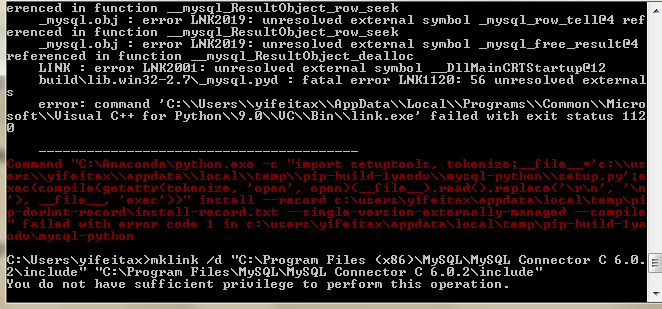
下载列表:http://dev.mysql.com/downloads/connector/c/6.0.html#downloads

参考的解决方案:http://stackoverflow.com/questions/1972259/cannot-open-include-file-config-win-h-no-such-file-or-directory-while-inst
环境都准备OK之后,我们来大致看一下如何使用sqlalchemy 的ORM
二,实际操作
1 创建engine对象
这里,engine类似我们的连接字符串,它指示了你会连接到哪种类型的数据库,用户名,密码,地址等,这里,我示例的是mysql数据库,
# -*- coding: UTF-8 -*-

from sqlalchemy import create_engine

from sqlalchemy.ext.declarative import declarative_base

from sqlalchemy import Column, Integer, String

from sqlalchemy.orm import sessionmaker

engine = create_engine('mysql://root:password@127.0.0.1:3306/test?charset=utf8',echo=True)
关于其它类型的数据库的连接字符串的写法,参考:
http://docs.sqlalchemy.org/en/rel_1_0/core/engines.html#sqlalchemy.create_engine
2.定义映射关系
#declare a Mapping,this is the class describe map to table column

Base = declarative_base()
3.定义连接管理器
#connect session to active the action

Session = sessionmaker(bind=engine)

session = Session()
4.表结构与类结构映射
class Person(Base):

    __tablename__ = 'Person'

    Id = Column(Integer, primary_key=True,autoincrement=True)

    Pname = Column(String,nullable=False,default='')

    Address = Column(String,nullable=False,default='')

    Age = Column(Integer,nullable=False,default=0)

    def __repr__(self):

        return 'the info is ID %s Pname is %s Address is %s and Age is %s' % \

        (self.Id, self.Pname, self.Address,  self.Age)
根据以上的代码,就可以完整的操作Mysql了,完整的代码如下:
# -*- coding: UTF-8 -*-

__author__ = 'Bruce'

from sqlalchemy import create_engine

from sqlalchemy import Column, Integer, String

from sqlalchemy.orm import sessionmaker

from sqlalchemy.ext.declarative import declarative_base

#declare the connecting to the server

engine = create_engine('mysql://account:password@127.0.0.1:3306/test?charset=utf8',echo=False)

#declare a Mapping,this is the class describe map to table column

Base = declarative_base()

#connect session to active the action

Session = sessionmaker(bind=engine)

session = Session()

class Person(Base):

    __tablename__ = 'Person'

    Id = Column(Integer, primary_key=True,autoincrement=True)

    Pname = Column(String,nullable=False,default='')

    Address = Column(String,nullable=False,default='')

    Age = Column(Integer,nullable=False,default=0)

    def __repr__(self):

        return 'the info is ID %s Pname is %s Address is %s and Age is %s' % \

        (self.Id, self.Pname, self.Address,  self.Age)

if __name__ == '__main__':

    #add one

    p = Person(Pname='bruce', Address='beijing', Age=22)

    session.add(p)

    session.commit()

    #query one

    p_1 = session.query(Person).filter_by(Pname='bruce').first()

    print p_1

    #delete one

    p_2 = session.query(Person).filter_by(Pname='bruce').first()

    if p_2:

        session.delete(p_2)

        session.commit()

    #edit one

    p_3 = session.query(Person).filter_by(Pname='bruce').first()

    if p_3:

        p_3.Age = 55

        session.commit()
python下的orm基本操作(1)--Mysql下的CRUD简单操作(含源码DEMO)的更多相关文章
- Linux下使用FreeTDS访问MS SQL Server 2005数据库(包含C测试源码)
Linux下使用FreeTDS访问MS SQL Server 2005数据库(包含C测试源码) http://blog.csdn.net/helonsy/article/details/7207497 ...
- 原创:用python把链接指向的网页直接生成图片的http服务及网站(含源码及思想)
原创:用python把链接指向的网页直接生成图片的http服务及网站(含源码及思想) 总体思想: 希望让调用方通过 http调用传入一个需要生成图片的网页链接生成一个网页的图片并返回图片链接 ...
- MySQL安装(yum、二进制、源码)
MySQL安装(yum.二进制.源码) 目录 1.1 yum安装... 2 1.2 二进制安装-mysql-5.7.17. 3 1.2.1 准备工作... 3 1.2.2 解压.移动.授权... 3 ...
- Python 基于python实现的http接口自动化测试框架(含源码)
基于python实现的http+json协议接口自动化测试框架(含源码) by:授客 QQ:1033553122 欢迎加入软件性能测试交流 QQ群:7156436 由于篇幅问题,采用百度网 ...
- MySQL数据库企业级应用实践(多实例源码编译)
MySQL数据库企业级应用实践(多实例源码编译) 链接:https://pan.baidu.com/s/1ANGg3Kd_28BzQrA5ya17fQ 提取码:ekpy 复制这段内容后打开百度网盘手机 ...
- Python --链接MYSQL数据库与简单操作 含SSH链接
项目是软硬件结合,在缺少设备的情况,需要通过接口来模拟实现与设备的交互,其中就需要通过从数据库读取商品的ID信息 出于安全考虑 现在很多数据库都不允许通过直接访问,大多数是通过SSH SSH : 数 ...
- Winform下CefSharp的引用、配置、实例与报错排除(源码)
Winform下CefSharp的引用.配置.实例与报错排除 本文详细介绍了CefSharp在vs2013..net4.0环境下,创建Winfrom项目.引用CefSharp的方法,演示了winfro ...
- Entity Framework7 入门之全功能.NET版本下使用EF7(含源码)另附数据迁移常见错误处理
Entity Framework7 入门之全功能.NET(Console, WinForms, WPF等)使用EF7 昨天,我们介绍了EF的新特性和开发计划,如果你还不了解,请移步 Entity Fr ...
- vs2017 asp.net 网站发布问题 (发布路径下含源码文件)
使用vs2010版本,网站发布后会自动将源码发不为.dll程序集,但vs2017需要进行设置,其他版本没有试过. vs2017网站发布: 1. 2. 这里给一个你想用的名字,之后它会出现在你的程序文件 ...
随机推荐
- Java httpclient请求,解决乱码问题
public class HttpPostRequestUtil { public HttpPostRequestUtil() { } public static String post(String ...
- PS脚本获取网络适配器状态
1. Get-WmiObject -Class Win32_NetworkAdapterConfiguration ` -filter "IPEnabled = $true" 2. ...
- TextEdit 回车事件
<dxe:TextEdit Name="txtSearchPatientName" KeyDown="txtSearchPatientName_KeyDown_1& ...
- MySql 执行语句错误 Err] 1064 - You have an error in your SQL syntax; check the manual that corresponds to your MySQL server version for the right syntax to use near
关于用Power Designer 生成sql文件出现 错误 [Err] 1064 - You have an error in your SQL syntax; check the manual ...
- FoLlow 的技术博客
酷壳 http://coolshell.cn 老赵点滴- 追求编程之美 http://blog.zhaojie.me/ Pixel-In-Gene Blog
- 菜鸟调错(八)—— Maven编译错误:不兼容的类型的解决方案
泛型在实际的工作中应用非常广泛,关于泛型就不在这里赘述了,感兴趣请戳<重新认识泛型>.项目中用到了如下的泛型: public <T> T query(String sql, R ...
- How to get the Current Controller Name, Action, or ID in ASP.NET MVC
public static class HtmlRequestHelper { public static string Id(this HtmlHelper htmlHelper) { var ro ...
- Mac下MySQL卸载方法 转载
mac下mysql的DMG格式安装内有安装文件,却没有卸载文件……很郁闷的事. 网上搜了一下,发现给的方法原来得手动去删. 很多文章记述要删的文件不完整,后来在stackoverflow这里发现了一个 ...
- Kafka 消息监控 - Kafka Eagle
1.概述 在开发工作当中,消费 Kafka 集群中的消息时,数据的变动是我们所关心的,当业务并不复杂的前提下,我们可以使用 Kafka 提供的命令工具,配合 Zookeeper 客户端工具,可以很方便 ...
- linux epoll 开发指南-【ffrpc源码解析】
摘要 关于epoll的问题很早就像写文章讲讲自己的看法,但是由于ffrpc一直没有完工,所以也就拖下来了.Epoll主要在服务器编程中使用,本文主要探讨服务器程序中epoll的使用技巧.Epoll一般 ...