
opencv 3.0 DPM Cascade 检测 (附带TBB和openMP加速)
opencv 3.0 DPM cascade contrib模块
转载请注明出处,楼燚(yì)航的blog,http://www.cnblogs.com/louyihang-loves-baiyan/
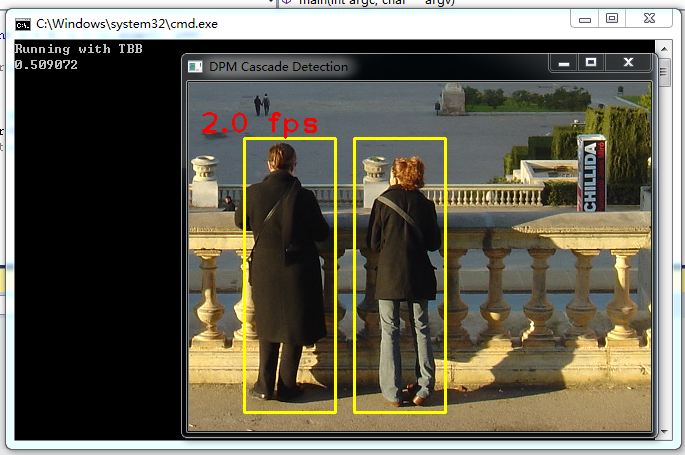
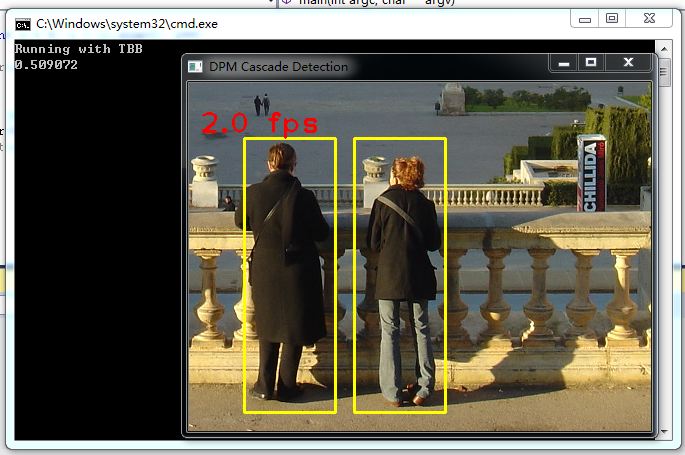
在opencv3.0 中 加入DPM检测的C++代码,目前开源的DPMC++代码不多,在2.4的opencv 版本中,DPM模块中在检测时用的是latentSVM,这个是标准的DPM matlab源码中使用的分类器,不过在在voc_release 5.01版本中已经也加入了cascade。这一版本的C++ DPM也加入了级联分类器,并做了TBB和openMP加速,先晒一张TBB加速后的图
x64, release 开启TBB加速,TBB加速的效果比较明显,在0.5S左右
目前工程化的代码比较少,在这之前我还试了yuxiaoguo 的DPM代码,这里我放一个链接yuxiaoguo,作者的硕士毕设完成的是将DPM源码实现了C++的版本,并做了不少优化。
首先感谢这么有奉献精神的人士,让大家在学习应用DPM的时候有了更多的资源,他已经开源了,相关的代码可以在其博客上下到,首先的性能还不错。
今天我主要说一下怎么跑opencv 3.0 中的DPM代码,需要说明的是在3.0模块中,DPm的相关部分已经被剥离了,在opencv_contrib这个模块中,这里给出模块的github链接,必须到上面去下,原始的3.0SDK中已经没有了
下面是链接
https://github.com/Itseez/opencv_contrib
你可以直接把代码建工程,链接到相应的另外的opencv库,也可以直接把模块编译进去,生成库文件
生成库文件的具体步骤如下:
http://segmentfault.com/a/1190000003496009
但是我跟着步骤,用cmake做了configure,去除了部分没有的选项,添加了额外的contrib module,configure generate没有任何报错,在用visual studio 2013 打开工程,在cmake targets 中直接Build install,生成的时候报了不少错,因为着急看效果,因此也懒得折腾了,如果谁有碰到opencv编译报错,可以把相关的处理过程贴一下。
DPM +TBB and openMP
这一版本的opencv DPM检测代码加入了TBB并行加速和openMP并行加速,有个开关可以控制
开启TBB加速
需要定义HAVE_TBB这个宏,不想在文件里加的话,直接全局生效,右键点击工程-->属性-->c/c++-->预处理器-->预处理器定义,点击下拉框中的编辑里天机即可
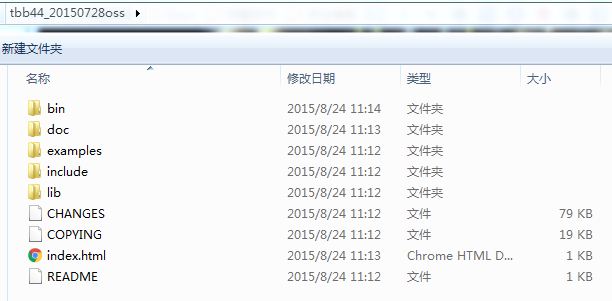
接着还需要下载tbb这个库,TBB是英特尔推出的并行库
这里是官网链接https://www.threadingbuildingblocks.org
具体的配置我就不再详述了,跟opencv 配置一样,添加path变量,在工程属性页中添加include头文件路径和相应的库目录和链接的库名字
开启openMP加速
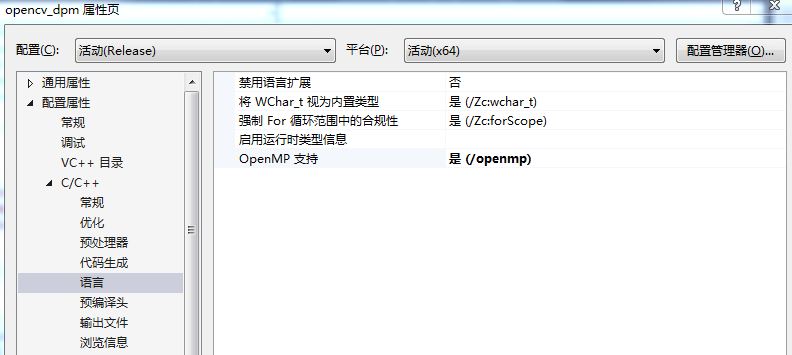
直接在工程的属性页中C++页卡,语言下面选择openMP支持即可
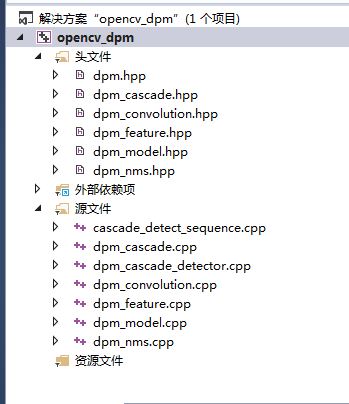
因此我这里选择了直接建立工程,直接把项目clone 到本地,打开DPM的文件夹,
建立工程列表如下:
主函数:
#include "dpm.hpp"

#include <opencv2/core.hpp>

#include <opencv2/imgproc.hpp>

#include <opencv2/highgui.hpp>

#include <stdio.h>

#include <iostream>

#include <fstream>

using namespace cv;

using namespace cv::dpm;

using namespace std;

int save_results(const string id, const vector<DPMDetector::ObjectDetection> ds, ofstream &out);

static void help()

{

    cout << "\nThis example shows object detection on image sequences using \"Deformable Part-based Model (DPM) cascade detection API\n"

       "Call:\n"

       "./example_dpm_cascade_detect_sequence <model_path> <image_dir>\n"

       "The image names has to be provided in \"files.txt\" under <image_dir>.\n"

       << endl;

}

static bool readImageLists( const string &file, vector<string> &imgFileList)

{

    ifstream in(file.c_str(), ios::binary);

    if (in.is_open())

    {

        while (in)

        {

            string line;

            getline(in, line);

            imgFileList.push_back(line);

        }

        return true;

    }

    else

    {

        cerr << "Invalid image index file: " << file  << endl;

        return false;

    }

}

void drawBoxes(Mat &frame,

        vector<DPMDetector::ObjectDetection> ds,

        Scalar color,

        string text);

int main( int argc, char** argv )

{

    const char* keys =

    {

        "{@model_path    | | Path of the DPM cascade model}"

        "{@image_dir     | | Directory of the images      }"

    };

    CommandLineParser parser(argc, argv, keys);

    //string model_path(parser.get<string>(0));

    //string image_dir(parser.get<string>(1));

    //string image_list = image_dir + "/files.txt";

	string model_path ="D:\\WorkSpace\\VS_Projects\\opencv_dpm\\opencv_dpm\\inriaperson.xml";

	string image_dir = "D:\\DataSet\\INRIAPerson";

	string image_list = "D:\\DataSet\\INRIAPerson\\Test\\pos1.lst";

    if( model_path.empty() || image_dir.empty() )

    {

        help();

        return -1;

    }

    vector<string> imgFileList;

    if ( !readImageLists(image_list, imgFileList) )

        return -1;

#ifdef HAVE_TBB

    cout << "Running with TBB" << endl;

#else

#ifdef _OPENMP

    cout << "Running with OpenMP" << endl;

#else

    cout << "Running without OpenMP and without TBB" << endl;

#endif

#endif

    cv::Ptr<DPMDetector> detector = \

    DPMDetector::create(vector<string>(1, model_path));

    namedWindow("DPM Cascade Detection", 1);

    // the color of the rectangle

    Scalar color(0, 255, 255); // yellow

    Mat frame;

    for (size_t i = 0; i < imgFileList.size(); i++)

    {

        double t = (double) getTickCount();

        vector<DPMDetector::ObjectDetection> ds;

		string imageFile = image_dir + "\\" + imgFileList[i];

		Mat image = imread(imageFile);

        frame = image.clone();

        if (image.empty()) {

            cerr << "\nInvalid image:\n" << imgFileList[i] << endl;

            return -1;

        }

        // detection

        detector->detect(image, ds);

        // compute frame per second (fps)

        t = ((double) getTickCount() - t)/getTickFrequency();//elapsed time

		cout << t << endl;

        // draw boxes

        string text = format("%0.1f fps", 1.0/t);

        drawBoxes(frame, ds, color, text);

        // show detections

        imshow("DPM Cascade Detection", frame);

		waitKey(0);

        //if ( waitKey(30) >= 0)

        //    break;

    }

    return 0;

}

void drawBoxes(Mat &frame, \

        vector<DPMDetector::ObjectDetection> ds, Scalar color, string text)

{

    for (unsigned int i = 0; i < ds.size(); i++)

    {

        rectangle(frame, ds[i].rect, color, 2);

    }

    // draw text on image

    Scalar textColor(0,0,250);

    putText(frame, text, Point(10,50), FONT_HERSHEY_PLAIN, 2, textColor, 2);

}
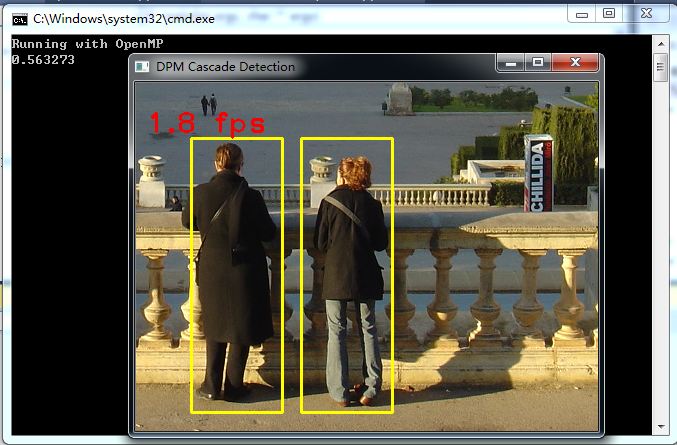
在x64 release 模式下,图像的分辨率480*360,测试的是Inria行人数据集
不开加速的检测时间如下:大约在0.6~0.7秒之间
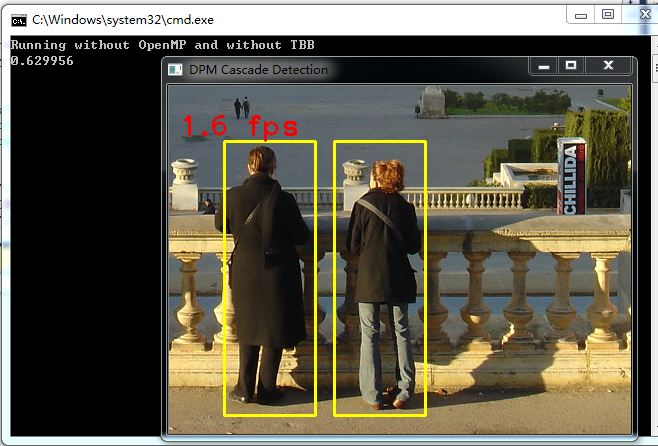
x64, release 开启TBB加速,TBB加速的效果比较明显,在0.5S左右
x64, release 开启openMP加速,openMP加速不如TBB加速明显,在0.5S~0.6S之间
代码写的非常规整,有较高的参考价值
opencv 3.0 DPM Cascade 检测 (附带TBB和openMP加速)的更多相关文章
- OpenCV 学习笔记 07 目标检测与识别
目标检测与识别是计算机视觉中最常见的挑战之一.属于高级主题. 本章节将扩展目标检测的概念,首先探讨人脸识别技术,然后将该技术应用到显示生活中的各种目标检测. 1 目标检测与识别技术 为了与OpenCV ...
- OpenCV实战:人脸关键点检测(FaceMark)
Summary:利用OpenCV中的LBF算法进行人脸关键点检测(Facial Landmark Detection) Author: Amusi Date: 2018-03-20 ...
- 基于OpenCV读取摄像头进行人脸检测和人脸识别
前段时间使用OpenCV的库函数实现了人脸检测和人脸识别,笔者的实验环境为VS2010+OpenCV2.4.4,opencv的环境配置网上有很多,不再赘述.检测的代码网上很多,记不清楚从哪儿copy的 ...
- cvSmooth函数 和 OpenCV自带的人脸检测
记录cvSmooth函数的用法和 OpenCV自带的人脸检测. (1)cvSmooth函数 void cvSmooth( const CvArr* src, CvArr* dst,int smooth ...
- Install OpenCV 3.0 and Python 2.7+ on OSX
http://www.pyimagesearch.com/2015/06/15/install-OpenCV-3-0-and-Python-2-7-on-osx/ As I mentioned las ...
- 基于opencv和qt的人脸检测小系统
摘要:利用opencv读取视频.图片并检测人脸,利用QT显示窗口,功能选择等 环境:Ubuntu18.04.OpenCV3.4.0.QT5.10.1 效果图: 代码如下(比较简单没什么注释): mai ...
- 常用的OpenCV 2.0函数速查
OpenCV 2.0函数释义列表 1.cvLoadImage:将图像文件加载至内存: 2.cvNamedWindow:在屏幕上创建一个窗口: 3.cvShowImage:在一个已创建好的窗口中显示图像 ...
- ubantu16.04+mxnet +opencv+cuda8.0 环境搭建
ubantu16.04+mxnet +opencv+cuda8.0 环境搭建 建议:环境搭建完成之后,不要更新系统(内核) 转载请注明出处: 微微苏荷 一 我的安装环境 系统:ubuntu16.04 ...
- Setup QT 5.5.1 + OpenCV 3.0 + Visual Studio 2013 on windows 10
1. Install Visual studio 2013 community version which is free to use for personal usage. 2. Setup th ...
随机推荐
- 重新想象 Windows 8.1 Store Apps (80) - 控件增强: WebView 之基本应用, POST 数据, 与 JavaScript 交互
[源码下载] 重新想象 Windows 8.1 Store Apps (80) - 控件增强: WebView 之基本应用, POST 数据, 与 JavaScript 交互 作者:webabcd 介 ...
- Hadoop Pipes Exception: Illegal text protocol command
Hadoop Pipes Exception: Illegal text protocol command 对于Hadoop pipes 出现这样的错误,基本上编译代码依赖的.so和.a 版本不匹配 ...
- 使用PreparedStatement执行SQL语句时占位符(?)的用法
1.Student数据库表 ID name gender 2.Java代码 public static void main(String[] args) { int _id=1; Str ...
- Java的集合框架
01.为什么要使用集合框架? 解析:如果并不知道程序运行时会需要多少对象,或者需要更复杂方式存储对象,那么可以使用Java集合框架. 如果启用集合的删除方法,那么集合中所有元素的索引会自动维护. 集合 ...
- ADO.NET 完整的修改和删除
namespace 完整修改{ class Program { static void Main(string[] args) { bool has = false; Console.Write(&q ...
- javascript基础系列(入门前须知)
-----------------------小历史---------------------------- javascript与java是两种语言,他们的创作公司不同,JavaScript当时是借 ...
- ArcGIS使用Python脚本工具
在Pyhton写的一些代码,用户交互不方便,用户体验比较差,不方便重用.在ArcGIS中可以将用写的Python代码导入到ToolBox中,这样用起来就比较方便了.这里用按要素裁剪栅格的Python来 ...
- javamail 发送邮件demo
package com.suntray.test; import javax.mail.BodyPart; import javax.mail.Message; import javax.mail.M ...
- 安卓开发_浅谈SubMenu(子菜单)
子菜单,即点击菜单后出现一个菜单栏供选择 创建子菜单的步骤: (1) 覆盖Activity的onCreateOptionsMenu()方法,调用Menu的addSubMenu()方法来添加子菜单 (2 ...
- iOS设计模式之策略模式
策略模式(Strategy) 基本理解 面向对象的编程,并不是类越多越好,类的划分是为了封装,但分类的基础是抽象,具有相同属性和功能的对象的抽象集合才是类. 策略模式:它定义了算法家族,分别封装起来, ...