
yield学习续:yield return迭代块在Unity3D中的应用——协程
必读好文推荐:
上面的文章说得太透彻,所以这里就记一下自己的学习笔记了。
首先要说明的是,协程并不是线程,协程是运行在主线程中的,是和主线程同步执行的代码,不同的地方是运行的方法可以被yield return在当前帧进行打断,到下一帧后可以继续从被打断的地方继续运行。
下面我们看一个示例,场景中有一个空的GameObject对象,其绑定了下面的脚本:

 1 using UnityEngine;

 2 using System.Collections;

 3

 4 public class Test : MonoBehaviour

 5 {

 6     int frame = 0;

 7

 8     void Start ()

 9     {

10         this.StartCoroutine(CountDown());

11     }

12

13     void Update ()

14     {

15         Debug.Log("Now is frame: " + (++frame));

16     }

17

18     IEnumerator CountDown()

19     {

20         Debug.Log("step - 1");

21         yield return null;

22         Debug.Log("step - 2");

23         yield return null;

24         Debug.Log("step - 3");

25         yield return null;

26         Debug.Log("step - 4");

27     }

28 }
下面是执行的结果:

下面我们看看运行的逻辑是如何的:
当进入Start方法时开始启动协程,这时候协程开始运行,输出“step1”后遇到第一个yield return后暂停本帧的运行,接下来进入Update方法输出“frame1”,由于协程调用是在Update之后,所以第二帧开始后,先执行了第二个Update输出“frame2”,然后从协程的上次暂停处继续执行,输出“step2”后遇到第二个yield return后暂停本帧的运行,如此反复,当输出“step4”后发现方法已经执行完毕,协程结束。
下面看看yield break的效果,这个语句会立即中断协程的运行,代码如下:
 1 using UnityEngine;

 2 using System.Collections;

 3

 4 public class Test : MonoBehaviour

 5 {

 6     int frame = 0;

 7

 8     void Start ()

 9     {

10         this.StartCoroutine(CountDown());

11     }

12

13     void Update ()

14     {

15         Debug.Log("Now is frame: " + (++frame));

16     }

17

18     IEnumerator CountDown()

19     {

20         Debug.Log("step - 1");

21         yield return null;

22         Debug.Log("step - 2");

23         yield return null;

24         Debug.Log("step - 3");

25         yield break;

26         Debug.Log("step - 4");

27     }

28 }
下面是运行的结果:
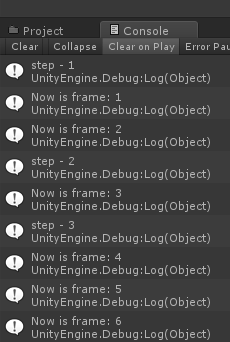
我们可以发现“step4”已经运行不到了。
yield的返回值,我们可以返回null或者数字0,效果是一致的,同时还可以返回3个对象,分别如下:
yield return new WaitForFixedUpdate();
·等待直到下一个固定帧速率更新函数。
yield return new WaitForEndOfFrame();
·等待直到所有的摄像机和GUI被渲染完成后,在该帧显示在屏幕之前。
yield return new WaitForSeconds(1);
·在给定的秒数内,暂停协同程序的执行。
下面我们来看一个例子,修改第一个例子的Test.cs:
 1 using UnityEngine;

 2 using System.Collections;

 3

 4 public class Test : MonoBehaviour

 5 {

 6     int frame1 = 0;

 7     int frame2 = 0;

 8     int frame3 = 0;

 9

10     void Start ()

11     {

12         this.StartCoroutine(CountDown());

13         this.StartCoroutine(CountDown_WaitForFixedUpdate());

14         this.StartCoroutine(CountDown_WaitForEndOfFrame());

15         this.StartCoroutine(CountDown_WaitForSeconds());

16     }

17

18     void Update ()

19     {

20         Debug.Log("Update is frame: " + (++frame1));

21     }

22

23     void FixedUpdate ()

24     {

25         Debug.Log("FixedUpdate is frame: " + (++frame2));

26     }

27

28     void LateUpdate ()

29     {

30         Debug.Log("LateUpdate is frame: " + (++frame3));

31     }

32

33     IEnumerator CountDown()

34     {

35         Debug.Log("yield - step - 1");

36         yield return null;

37         Debug.Log("yield - step - 2");

38         yield return null;

39         Debug.Log("yield - step - 3");

40     }

41

42     IEnumerator CountDown_WaitForFixedUpdate()

43     {

44         Debug.Log("yield WaitForFixedUpdate - step - 1");

45         yield return new WaitForFixedUpdate();

46         Debug.Log("yield WaitForFixedUpdate - step - 2");

47         yield return new WaitForFixedUpdate();

48         Debug.Log("yield WaitForFixedUpdate - step - 3");

49     }

50

51     IEnumerator CountDown_WaitForEndOfFrame()

52     {

53         Debug.Log("yield WaitForEndOfFrame - step - 1");

54         yield return new WaitForEndOfFrame();

55         Debug.Log("yield WaitForEndOfFrame - step - 2");

56         yield return new WaitForEndOfFrame();

57         Debug.Log("yield WaitForEndOfFrame - step - 3");

58     }

59

60     IEnumerator CountDown_WaitForSeconds()

61     {

62         Debug.Log("yield WaitForSeconds - step - 1");

63         yield return new WaitForSeconds(1 / 60 * 3);//大概是三帧的时间

64         Debug.Log("yield WaitForSeconds - step - 2");

65         yield return new WaitForSeconds(1 / 60 * 3);

66         Debug.Log("yield WaitForSeconds - step - 3");

67     }

68 }
运行的结果如下,有点长,我就弄成两张图了:
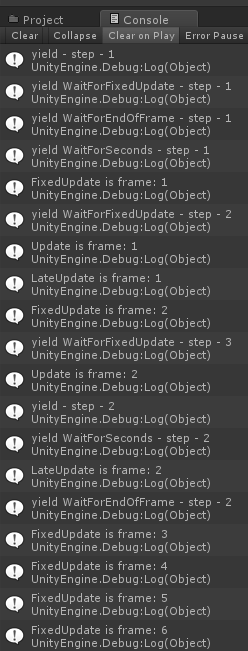
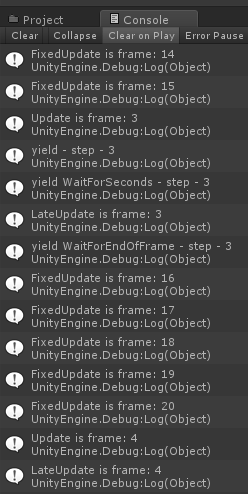
通过输出我们可以得出下面的结果:
- 当帧数波动时,FixedUpdate会进行多次补帧处理,我们可以发现两张图之间FixedUpdate从3一直补帧到15;
- WaitForFixedUpdate表示协程是跟在FixedUpdate之后执行的;
- WaitForEndOfFrame表示协程是跟在LateUpdate之后执行的;
- WaitForSeconds额。。。不用多说了,你指定多久后执行就多久后执行,当然由于是基于帧运算的,所以可能会不准确;
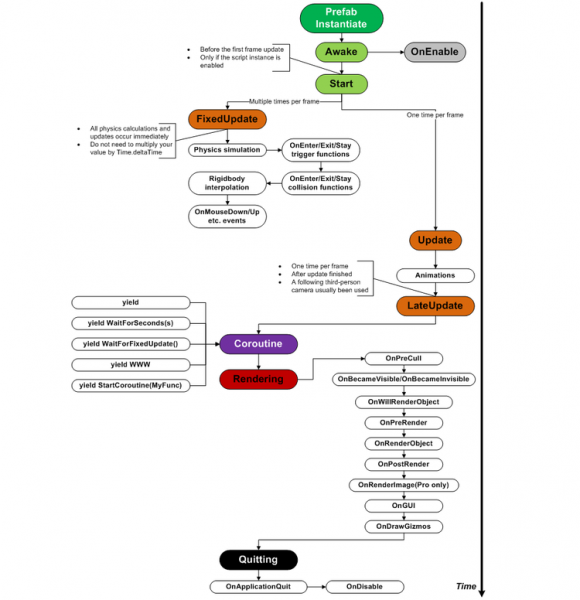
最后补一张开头博客的运行顺序图:
yield学习续:yield return迭代块在Unity3D中的应用——协程的更多相关文章
- 学习PYTHON之路, DAY 10 进程、线程、协程篇
线程 线程是应用程序中工作的最小单元.它被包含在进程之中,是进程中的实际运作单位.一条线程指的是进程中一个单一顺序的控制流,一个进程中可以并发多个线程,每条线程并行执行不同的任务. 直接调用 impo ...
- Python学习笔记整理总结【网络编程】【线程/进程/协程/IO多路模型/select/poll/epoll/selector】
一.socket(单链接) 1.socket:应用层与TCP/IP协议族通信的中间软件抽象层,它是一组接口.在设计模式中,Socket其实就是一个门面模式,它把复杂的TCP/IP协议族隐藏在Socke ...
- php yield关键字以及协程的实现
php的yield是在php5.5版本就出来了,而在初级php界却很少有人提起,我就说说个人对php yield的理解 Iterator接口 在php中,除了数组,对象可以被foreach遍历之外,还 ...
- 再议Python协程——从yield到asyncio
协程,英文名Coroutine.前面介绍Python的多线程,以及用多线程实现并发(参见这篇文章[浅析Python多线程]),今天介绍的协程也是常用的并发手段.本篇主要内容包含:协程的基本概念.协程库 ...
- (转)python协程2:yield from 从入门到精通
原文:http://blog.gusibi.com/post/python-coroutine-yield-from/ https://mp.weixin.qq.com/s?__biz=MzAwNjI ...
- python协程--yield和yield from
字典为动词“to yield”给出了两个释义:产出和让步.对于 Python 生成器中的 yield 来说,这两个含义都成立.yield item 这行代码会产出一个值,提供给 next(...) 的 ...
- Python异步IO之协程(一):从yield from到async的使用
引言:协程(coroutine)是Python中一直较为难理解的知识,但其在多任务协作中体现的效率又极为的突出.众所周知,Python中执行多任务还可以通过多进程或一个进程中的多线程来执行,但两者之中 ...
- 【Python】【容器 | 迭代对象 | 迭代器 | 生成器 | 生成器表达式 | 协程 | 期物 | 任务】
Python 的 asyncio 类似于 C++ 的 Boost.Asio. 所谓「异步 IO」,就是你发起一个 IO 操作,却不用等它结束,你可以继续做其他事情,当它结束时,你会得到通知. Asyn ...
- 流畅python学习笔记:第十六章:协程
通常在python进行编程一般都是使用多线程或者多进程来实现.这里介绍另外一种并发的方式,就是协程,但和多线程以及多进程不一样的是,协程是运行在单线程当中的并发.来看下具体的例子: def simpl ...
随机推荐
- css中table样式
border-spacing:设置相邻单元格的边框间的距离; border-collapse:设置表格的边框是否被合并为一个单一的边框:{separate/collapse/inherit(IE不支持 ...
- 全面了解 Linux 服务器 - 3. 查看 Linux 服务器的硬盘使用情况
1)查看硬盘及分区信息 liuqian@ubuntu:~# fdisk -l ...... ...... Disk /dev/sda: 100 GiB, 107374182400 bytes, 209 ...
- UNIX网络编程-基本API介绍(二)
参考链接:http://www.cnblogs.com/riky/archive/2006/11/24/570713.aspx 1.getsockname和getpeername getsocknam ...
- maven部署tomcat项目,403错误解决
maven部署tomcat项目时403错误的解决方法 web模块的pom文件 pom.xml <plugin> <groupId>org.apache.tomcat.maven ...
- [转] 解决HttpServletResponse输出的中文乱码问题
首先,response返回有两种,一种是字节流outputstream,一种是字符流printwrite. 申明:这里为了方便起见,所有输出都统一用UTF-8编码. 先说字节流,要输出“中国" ...
- 解决sqoop需要输入密码的问题
修改配置文件:vi /etc/sqoop/conf/sqoop-site.xml <property> <name>sqoop.metastore.client.record. ...
- JAVA设计模式之建造模式
在阎宏博士的<JAVA与模式>一书中开头是这样描述建造(Builder)模式的: 建造模式是对象的创建模式.建造模式可以将一个产品的内部表象(internal representation ...
- Android UI 绘制过程浅析(一)LayoutInflater简介
前言 这篇blog是我在阅读过csdn大牛郭霖的<带你一步步深入了解View>一系列文章后,亲身实践并做出的小结.作为有志向的前端开发工程师,怎么可以不搞懂View绘制的基本原理——简直就 ...
- 解决Windows8下Cisco Systems VPN Client的Reason 442: Failed to Enable Virtual Adapter错误
Windows8下使用Cisco Systems VPN Client创建的Cisco IPSec VPN无法连接,提示Reason 442: Failed to Enable Virtual Ada ...
- java后台异步任务执行器TaskManager
java后台异步任务执行器TaskManager 此方式基于MVC方式: 一,使用任务: @Resource private TaskManager taskManager; public strin ...