
用PIL库进行图像处理
一、如果系统里没有安装PIL库的,请先到命令提示符输入“pip install pillow”进行安装
二、之后就可以参考以下的代码
 from PIL import Image

 from pylab import *

 # 添加中文字体支持

 from matplotlib.font_manager import FontProperties

 font = FontProperties(fname=r"c:\windows\fonts\SimSun.ttc", size=14)

 figure()

 pil_im = Image.open('E:\python\Python Computer Vision\Image data\empire.jpg')

 gray()

 subplot(121)

 title(u'原图',fontproperties=font)

 axis('off')

 imshow(pil_im)

 pil_im = Image.open('E:\python\Python Computer Vision\Image data\empire.jpg').convert('L')

 subplot(122)

 title(u'灰度图',fontproperties=font)

 axis('off')

 imshow(pil_im)

 show()
三,可以观看效果


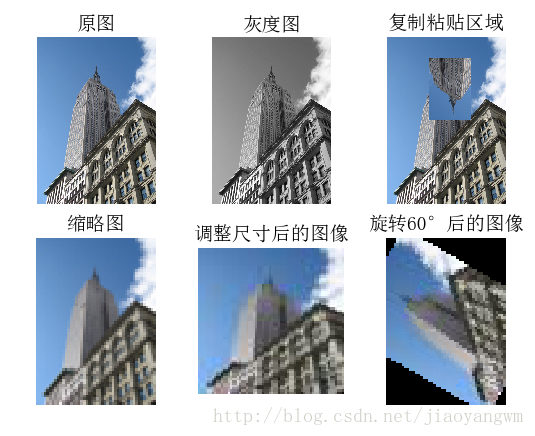
四、其还可以进行旋转等操作
 from PIL import Image

 from pylab import *

 # 添加中文字体支持

 from matplotlib.font_manager import FontProperties

 font = FontProperties(fname=r"c:\windows\fonts\SimSun.ttc", size=14)

 figure()

 # 显示原图

 pil_im = Image.open('E:/python/Python Computer Vision/Image data/empire.jpg')

 print(pil_im.mode, pil_im.size, pil_im.format)

 subplot(231)

 title(u'原图', fontproperties=font)

 axis('off')

 imshow(pil_im)

 # 显示灰度图

 pil_im = Image.open('E:/python/Python Computer Vision/Image data/empire.jpg').convert('L')

 gray()

 subplot(232)

 title(u'灰度图', fontproperties=font)

 axis('off')

 imshow(pil_im)

 # 复制并粘贴区域

 pil_im = Image.open('E:/python/Python Computer Vision/Image data/empire.jpg')

 box = (100, 100, 400, 400)

 region = pil_im.crop(box)

 region = region.transpose(Image.ROTATE_180)

 pil_im.paste(region, box)

 subplot(233)

 title(u'复制粘贴区域', fontproperties=font)

 axis('off')

 imshow(pil_im)

 # 缩略图

 pil_im = Image.open('E:/python/Python Computer Vision/Image data/empire.jpg')

 size = 128, 128

 pil_im.thumbnail(size)

 print(pil_im.size)

 subplot(234)

 title(u'缩略图', fontproperties=font)

 axis('off')

 imshow(pil_im)

 pil_im.save('E:/python/Python Computer Vision/Image data/empire thumbnail.jpg')# 保存缩略图

 #调整图像尺寸

 pil_im=Image.open('E:/python/Python Computer Vision/Image data/empire thumbnail.jpg')

 pil_im=pil_im.resize(size)

 print(pil_im.size)

 subplot(235)

 title(u'调整尺寸后的图像',fontproperties=font)

 axis('off')

 imshow(pil_im)

 #旋转图像45°

 pil_im=Image.open('E:/python/Python Computer Vision/Image data/empire thumbnail.jpg')

 pil_im=pil_im.rotate(45)

 subplot(236)

 title(u'旋转45°后的图像',fontproperties=font)

 axis('off')

 imshow(pil_im)

 show()
查看效果:
用PIL库进行图像处理的更多相关文章
- Python 之 使用 PIL 库做图像处理
http://www.cnblogs.com/way_testlife/archive/2011/04/17/2019013.html Python 之 使用 PIL 库做图像处理 1. 简介. 图像 ...
- [转]Python 之 使用 PIL 库做图像处理
Python 之 使用 PIL 库做图像处理 1. 简介. 图像处理是一门应用非常广的技术,而拥有非常丰富第三方扩展库的 Python 当然不会错过这一门盛宴.PIL (Python Imaging ...
- PIL库,图像处理第三方库
PIL ---> python imaging library 安装需要安装pillow库,包含了21种类,其中Image类是PIL最重要的一个类,可以通过它来处理图像. Python最常用的 ...
- python爬虫基础15-python图像处理,PIL库
Python图像处理-Pillow 简介 Python传统的图像处理库PIL(Python Imaging Library ),可以说基本上是Python处理图像的标准库,功能强大,使用简单. 但是由 ...
- python图像处理之PIL库
PIL库是python语言第三方库,需要通过pip工具安装,安装库的名字是pillow. PIL库支持图像存储,显示和处理,它能够处理几乎所有图片格式,可以完成对图像的缩放,裁剪,叠加以及向图像添加线 ...
- PIL库图像处理
PIL有如下几个模块 Image模块.ImageChops模块.ImageCrackCode模块 ImageDraw模块.ImageEnhance模块.ImageFile模块 ImageFileIO模 ...
- 一秒钟带你走进P图世界-----(python)PIL库的使用
python-----PIL库的使用 一.什么是PIL库 1.PIL(Python Image Library)库是python语言的第三方库,具有强大的图像处理能力,不仅包含了丰富的像素.色彩操作功 ...
- python之PIL库(Image模块)
PIL(Python Image Library)是python的第三方图像处理库,PIL的功能非常的强大,几乎被认定是Python的官方图像处理库了. 由于PIL仅支持到python2.7于是一群志 ...
- 玩转PIL库
1.安装pillow库: 在cmd下,输入简单的命令: pip install pillow 即可安装pillow库. 2.PIL库的简介: 1. PIL库主要有2个方面的功能: (1) 图像归档: ...
随机推荐
- [04-05]box框模型(Box Model)定义了元素框处理元素内容、内边距、边框和外边距的方式
实际占有的宽 = width + 2padding(内边距) + 2border(边框) + 2margin(外边距) 实际占有的高 = height + 2padding + 2border + 2 ...
- [ipsec][crypto] 什么是AEAD加密算法中的AAD 及aad length
AAD 全称:Additianal Authenticated Data 翻译成中文就是附加的验证数据. 在理解AAD之前,需要理解什么是AEAD: AEAD,简单的来说就是一份数据在完成加密的时候同 ...
- LDAP与实现
LDAP是什么? LDAP是轻量目录访问协议,英文全称是Lightweight Directory Access Protocol,一般都简称为LDAP.它是基于X.500标准的,但是简单多了并且可以 ...
- webToImage (网页转图片)模块试用分享
模块介绍: 本模块封装了把 webview 转换成图片的功能.调用本模块的transImage接口,可把当前 webview显示的内容转换成一张图片.注意,本模块只能把当前的webview页面转换为图 ...
- Fiddler死活抓不了HTTPS包解决办法
Fiddler抓取HTTPS设置注意以下操作的前提是,手机已经能够连上Fiddler,这部分的配置过程简单就不赘述了,可参考:手机如何连接Fiddler . 如何继续配置让Fiddler抓取到HTTP ...
- su: authentication failure 解决方法
在Linux上切换root时,密码正确..但提示:su: authentication failure ->sudo passwd ->Password:你当前的密码 ->Enter ...
- php中的echo 与print 、var_dump 的区别
· echo - 可以输出一个或多个字符串 · print - 只允许输出一个字符串,返回值总为 1 提示:echo 输出的速度比 print 快, echo 没有返回值,print有返回值1. ...
- stm32f407以太网及USB OTG快速开发
stm32f407以太网及USB OTG快速开发 引言 想要快速完成网络协议栈和USB OTG功能,使用ST自家的工具STM32CubMx再好不过的了.如果你还不会使用,别着急下面我会一步一步的用图片 ...
- Delphi窗体显示Echarts图表
笨办法,先保存用着 unit Unit1; interface uses Winapi.Windows, Winapi.Messages, System.SysUtils, System.Varian ...
- 关于 RESTful API 中 HTTP 状态码的定义
最近正好使用了一会儿 Koa ,在这说一下自己对各个 请求码的见解和使用场景,懒人直接看 200.400.401.403.404.500 就可以了. 其中 2XX/3XX 其实都是请求成功,但是结果不 ...