
第七节《Git协议与工作协同》
Git提供了丰富的协议支持,包括:SSH、GIT、HTTPS、FTP、FTPS、RSYNC,这些协议可以分为两类:智能协议和哑协议。
<1>智能协议
在会话时使用智能协议,会在会话的两个版本库的各自一段打开相应的程序进行数据交换。使用智能协议最直观的印象就是在数据传输过程中会有清晰的进度显示,而且因为是按需传输所以传输量更小,速度更快。
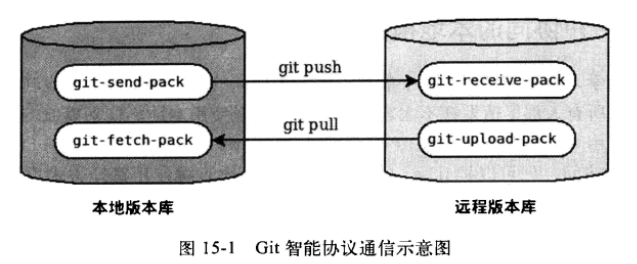
上述协议中SSH、GIT及本地协议(file://)属于智能协议。HTTP协议需要特殊的配置,并且客户端需要使用Git 1.6.6或更高版本才能使用智能协议。
<2>哑协议
在使用哑协议访问远程版本库的时候,远程版本库不会运行辅助程序,而是完全依靠客户端去主动“发现”。客户端需要访问文件.git/info/refs获取当前版本库的引用列表,并根据引用对应的提交ID直接访问对象库目录下的文件。如果对象文件被打包而不是以松散对象形式存在,则Git客户端还要去访问文件.git/objects/info/packs以获得打包文件列表,并据此读取完整的打包文件,从打包文件中获取对象。由此可见哑协议的效率非常低。FTP和RSYNC都属于哑协议。
上面是对两种协议的讲解,接下来我们看下多用户协同操作。
本次实验中,我是在一台机器上进行的,如果有条件的话可以模拟多台,需要一个能够提供多人访问的版本库,我使用本地协议来模拟。
<1>创建一个共享版本库,以裸版本库方式创建
[root@git demo]# git init --bare /path/to/repos/shared.git
Initialized empty Git repository in /path/to/repos/shared.git/
<2>用户user1克隆版本库
[root@git demo]# cd /path/to/user1/workspace/
[root@git workspace]# git clone file:///path/to/repos/shared.git project
Initialized empty Git repository in /path/to/user1/workspace/project/.git/
warning: You appear to have cloned an empty repository.
<3>设置user.name和user.email变量
[root@git workspace]# cd project/
[root@git project]# git config user.name user1
[root@git project]# git config user.email user1@89mc.com
<4>用户user1创建初始数据并提交
[root@git project]# echo Hello > README
[root@git project]# git add README
[root@git project]# git commit -m "initial commit"
[master (root-commit) 4c8f1a2] initial commit
1 files changed, 1 insertions(+), 0 deletions(-)
create mode 100644 README
<5>用户user1将本地版本库的提交推送到上游
[root@git project]# git push origin master
Counting objects: 3, done.
Writing objects: 100% (3/3), 206 bytes, done.
Total 3 (delta 0), reused 0 (delta 0)
Unpacking objects: 100% (3/3), done.
To file:///path/to/repos/shared.git
* [new branch] master -> master
<6>用户user2克隆版本库
[root@git workspace]# cd /path/to/user2/workspace/
[root@git workspace]# git clone file:///path/to/repos/shared.git project
Initialized empty Git repository in /path/to/user2/workspace/project/.git/
remote: Counting objects: 3, done.
Receiving objects: 100% (3/3), 205 bytes, done.
remote: Total 3 (delta 0), reused 0 (delta 0)
<7>同样在user2本地版本库中设置user.name和user.email变量
[root@git workspace]# cd /path/to/user2/workspace/project/
[root@git project]# git config user.name user2
[root@git project]# git config user.email user2@89mc.com
<8>此时查看用户user2的本地版本库拥有和user1用户同样的提交
[root@git project]# git log
commit 4c8f1a214fb14d6ea8fa55676d51793f0adfeab5
Author: user1 <user1@89mc.com>
Date: Mon Aug 28 13:54:42 2017 +0800
initial commit
现在用户user1和user2的工作区是相同的。思考一个问题,如果两人各自在本地版本库中进行独立的提交,然后再分别向共享版本库推送,会相互覆盖吗?测试一下这种情况。
<1>用户user1先在本地版本库中进行提交,然后进行推送
[root@git project]# pwd
/path/to/user1/workspace/project
[root@git project]# mkdir team
[root@git project]# echo "I'm user1" > team/user1.txt
[root@git project]# git add team/
[root@git project]# git commit -m "user1's profile"
[master bae09e9] user1's profile
1 files changed, 1 insertions(+), 0 deletions(-)
create mode 100644 team/user1.txt
[root@git project]# git push
Counting objects: 5, done.
Compressing objects: 100% (2/2), done.
Writing objects: 100% (4/4), 320 bytes, done.
Total 4 (delta 0), reused 0 (delta 0)
Unpacking objects: 100% (4/4), done.
To file:///path/to/repos/shared.git
4c8f1a2..bae09e9 master -> master
通过上面的操作步骤,可以看到用户user1成功地更新了“远程”共享版本库。如果用户user2不知道user1所做的上述操作,仍在基于“远程”版本库旧数据同步而来的本地版本库中的改动,然后用户user2向“远程”共享版本库推送,会有什么结果?我们来验证下。
<1>用户user2创建team/user2.txt文件
[root@git project]# pwd
/path/to/user2/workspace/project
[root@git project]# mkdir team
[root@git project]# echo "I'm user1?" > team/user2.txt
[root@git project]# git add team/
[root@git project]# git commit -m "user2's profile"
[master ecc04cc] user2's profile
1 files changed, 1 insertions(+), 0 deletions(-)
create mode 100644 team/user2.txt
<2>用户user2将本地提交推送到服务器时会出错
[root@git project]# git push
To file:///path/to/repos/shared.git
! [rejected] master -> master (non-fast-forward)
error: failed to push some refs to 'file:///path/to/repos/shared.git'
To prevent you from losing history, non-fast-forward updates were rejected
Merge the remote changes before pushing again. See the 'Note about
fast-forwards' section of 'git push --help' for details.
翻译:到版本库file:///path/to/repos/shared.git
! [被拒绝] master -> maste(非快进)
错误:部分引用向'file:///path/to/repos/shared.git'推送失败
为防止您丢失历史数据,非快进式更新被拒绝
在推送前请先合并远程改动,例如执行'git pull'
用户user2推送失败了。但这不是坏事,反倒是一件好事,因为这避免了用户提交的相互覆盖。Git通过检查推送操作是不是“快进式”的操作,从而保证用户的提交不会相互覆盖。一般情况下,推送只允许“快进式”推送。所谓快进式推送,就是要推送的本地版本库的提交是建立在远程版本库相应分支的现有提交基础上的,即远程版本库相应分支的最新提交是本地版本库最新提交的祖先提交。但现在用户user2执行的推送并非如此,是一个非快进式的推送。
那么如何才能推送成功呢?一个不一定正确的解决方法是:强制推送。
[root@git project]# git push -f
Counting objects: 7, done.
Compressing objects: 100% (3/3), done.
Writing objects: 100% (7/7), 494 bytes, done.
Total 7 (delta 0), reused 3 (delta 0)
Unpacking objects: 100% (7/7), done.
To file:///path/to/repos/shared.git
+ bae09e9...ecc04cc master -> master (forced update)
注意看最后一行输出显示了“强制更新(forced update)”字样。这样用户user1向版本库推送的提交由于用户user2的强制推送被覆盖了。实际上这种情况下user1也可以强制推送,从而用自己的提交再去覆盖用户user2的提交。这样的工作模式不是协同,而是战争!!!
在上面用户user2使用非快进式推送强制更新版本库,实际上是危险的。滥用非快进式推送可能造成提交覆盖大战,正确的使用非快进式推送,应该是在不会造成提交覆盖的前提下,对历史提交进行修补。例如下面例子:
<1>用户user2更改之前错误的录入
[root@git project]# echo "I'm user2" > team/user2.txt
[root@git project]# git diff
diff --git a/team/user2.txt b/team/user2.txt
index 27268e2..95b98b5 100644
--- a/team/user2.txt
+++ b/team/user2.txt
@@ -1 +1 @@
-I'm user1?
+I'm user2
<2>然后user2将修改好的文件提交到本地版本库,采用直接提交还是使用修补式提交,这是个问题。因为前次的提交已经呗推送到共享版本库了,如果采用修补提交会造成前一次提交被覆盖,从而下次推送时造成非快进式推送。
[root@git project]# git add -u
[root@git project]# git commit --amend -m "user2's profile"
[master 36318a6] user2's profile
1 files changed, 1 insertions(+), 0 deletions(-)
create mode 100644 team/user2.txt
<3>采用强制推送,更新远程版本库中的提交这个操作越早越好,在他人还没有来得及和服务器同步钱将修补提交强制更新到服务器上。
[root@git project]# git push -f
Counting objects: 5, done.
Compressing objects: 100% (2/2), done.
Writing objects: 100% (4/4), 324 bytes, done.
Total 4 (delta 0), reused 0 (delta 0)
Unpacking objects: 100% (4/4), done.
To file:///path/to/repos/shared.git
+ ecc04cc...36318a6 master -> master (forced update)
也许上面的操作能解决一些工作协同问题,但是感觉还不是一种很和谐的方法,理性的工作协同要避免非快进式推送,一旦向服务器推送后,如果发现错误,不要使用会更改历史的操作,而是采用不会改变历史提交的反转提交等操作。
如果在向服务器推送过程中,由于他人率先推送了新的提交导致遇到非快进式推送的警告,应该进行如下操作才更为理性:执行git pull获取服务器端最新的提交并和本地提交进行合并,合并成功后再向服务器提交。
例如用户user1在推送时遇到了非快进式推送错误,可以通过如下操作将本地版本库的修改和远程版本库的最新提交进行合并。
<1>用户user1发现推送遇到了非快进式推送
[root@git project]# pwd
/path/to/user1/workspace/project
[root@git project]# git push
To file:///path/to/repos/shared.git
! [rejected] master -> master (non-fast-forward)
error: failed to push some refs to 'file:///path/to/repos/shared.git'
To prevent you from losing history, non-fast-forward updates were rejected
Merge the remote changes before pushing again. See the 'Note about
fast-forwards' section of 'git push --help' for details.
<2>用户user1运行git pull命令
[root@git project]# git pull
remote: Counting objects: 5, done.
remote: Compressing objects: 100% (2/2), done.
remote: Total 4 (delta 0), reused 0 (delta 0)
Unpacking objects: 100% (4/4), done.
From file:///path/to/repos/shared
+ bae09e9...36318a6 master -> origin/master (forced update)
Merge made by recursive.
team/user2.txt | 1 +
1 files changed, 1 insertions(+), 0 deletions(-)
create mode 100644 team/user2.txt
<3>合并之后,看看版本库的提交关系图
[root@git project]# git log --graph --oneline
* fbae0b3 Merge branch 'master' of file:///path/to/repos/shared
|\
| * 36318a6 user2's profile
* | bae09e9 user1's profile
|/
* 4c8f1a2 initial commit
<4>执行git push命令,成功完成到远程版本库的推送
[root@git project]# git push
Counting objects: 10, done.
Compressing objects: 100% (5/5), done.
Writing objects: 100% (7/7), 675 bytes, done.
Total 7 (delta 0), reused 0 (delta 0)
Unpacking objects: 100% (7/7), done.
To file:///path/to/repos/shared.git
36318a6..fbae0b3 master -> master
最后注意:禁止非快进式推送,这种推送方式如果被滥用就会成为项目的灾难,为了限制这种情况,git提供了两种方法,一个是通过版本库配置,另一个是通过版本库的钩子脚本
第一种方法:更改版本库配置
<1>更改服务器版本库的配置变量
[root@git project]# git --git-dir=/path/to/repos/shared.git config receive.denyNonFastForwards true
<2>在用户user1的工作区执行重置操作,以便在后面执行推送时产生非快进式推送
[root@git project]# git reset --hard HEAD^1
HEAD is now at bae09e9 user1's profile
[root@git project]# git log --graph --oneline
* bae09e9 user1's profile
* 4c8f1a2 initial commit
<3>用户user1即便使用强制推送也不会成功
[root@git project]# git push -f
Total 0 (delta 0), reused 0 (delta 0)
remote: error: denying non-fast-forward refs/heads/master (you should pull first)
To file:///path/to/repos/shared.git
! [remote rejected] master -> master (non-fast-forward)
error: failed to push some refs to 'file:///path/to/repos/shared.git'
第七节《Git协议与工作协同》的更多相关文章
- git第七节---git merge和git rebase
# git merge和git rebase 都可以进行分支合并 #git merge 合并后保留记录两个分支的记录 #git rebase合并后会展示成一个分支的记录,另一个分支的提交实际生成了一个 ...
- centos Linux下磁盘管理 parted,df ,du,fdisk,partprobe,mkfs.ext4,mount,/etc/fstab,fsck,e2fsck,mk2efs,tmpfs ,nr_inodes, LVM,传统方式扩容文件系统 第七节课
centos Linux下磁盘管理 parted,df ,du,fdisk,partprobe,mkfs.ext4,mount,/etc/fstab,fsck,e2fsck,mk2efs,tmpf ...
- 协议 - OSI七层网络协议模型
摘自:https://www.cnblogs.com/oneplace/p/5611094.html 互联网协议 本文全文转载阮一峰老师的两篇文章,自己做了一些添加内容 参考:互联网协议入门(一) 互 ...
- SPI协议及其工作原理详解
一.概述. SPI, Serial Perripheral Interface, 串行外围设备接口, 是 Motorola 公司推出的一种同步串行接口技术. SPI 总线在物理上是通过接在外围设备微控 ...
- delphi 线程教学第七节:在多个线程时空中,把各自的代码塞到一个指定的线程时空运行
第七节:在多个线程时空中,把各自的代码塞到一个指定的线程时空运行 以 Ado 为例,常见的方法是拖一个 AdoConnection 在窗口上(或 DataModule 中), 再配合 AdoQ ...
- git概念及工作流程详解
git概念及工作流程详解 既然我们已经把gitlab安装完毕[当然这是非必要条件],我们就可以使用git来管理自己的项目了,前文也多多少少提及到git的基本命令,本文就先简单对比下SVN与git的区别 ...
- TCP协议通讯工作原理
TCP协议通讯工作原理 一.TCP三次握手 传输控制协议(Transport Control Protocol)是一种面向连接的,可靠的传输层协议.面向连接是指一次正常的TCP传输需要通过在TCP ...
- CUDA:Supercomputing for the Masses (用于大量数据的超级计算)-第七节
第七节:使用下一代CUDA硬件,快乐加速度 原文链接 Rob Farber 是西北太平洋国家实验室(Pacific Northwest National Laboratory)的高级科研人员.他在多个 ...
- Httpd服务入门知识-http协议版本,工作机制及http服务器应用扫盲篇
Httpd服务入门知识-http协议版本,工作机制及http服务器应用扫盲篇 作者:尹正杰 版权声明:原创作品,谢绝转载!否则将追究法律责任. 一.Internet与中国 Internet最早来源于美 ...
随机推荐
- navicat for mysql 12中文破解版(安装+破解)--亲测可用
http://www.ddooo.com/softdown/129457.htm#dltab
- Input标签_实现限制输入字符类型(只能输入特定类型字符)
... <input type="text" placeholder="密码" maxlength="20" onKeyPress=& ...
- java中的常用特殊字符
1.转义字符反斜杠(\) 我们知道html中大都是双标签,如果在标签内想要输出带有标签结束符的文本都必须进行转义,html中是采用对应的字符替换,如<可用<替换 在java当中,我们要转义 ...
- JDBC学习DayTwo
一.利用反射及JDBC元数据编写通用的查询方法 1.ResultSetMetaData 定义:描述ResultSet的元数据对象,即从中可以获取到结果集中有多少列.列名是什么. 获取 ResultSe ...
- Mybatis-基于配置文件的配置(——纪念这个即将被抛弃的孩子)
虽然内心相信Mybatis基于配置文件的配置早已经在实战之中被注解所遗忘,但是我相信还是会有一小部分人还是需要这种技术去维护原有使用这种方式去搭建的项目. 废话不多说首先使用框架包是不能少的了.导入M ...
- Redis学习笔记一
Redis 与其他 key - value 缓存产品有以下三个特点: Redis支持数据的持久化,可以将内存中的数据保存在磁盘中,重启的时候可以再次加载进行使用. Redis不仅仅支持简单 ...
- Python3.x - 字符串
Python3 字符串 字符串是 Python 中最常用的数据类型.我们可以使用引号( ' 或 " )来创建字符串. var1 = 'hello world' var2 = "he ...
- 2018-软工机试-D-定西
单点时限: 1.0 sec 内存限制: 256 MB 这么多年你一个人一直在走 方向和天气的节奏会让你忧愁 你说你遇见了一大堆奇怪的人 他们看上去好像都比你开心 ——李志<定西> 这首歌的 ...
- compareTo的用法
在java编程中,我们会偶尔遇到字符串大小比较的问题,compareTo()方法很简单就实现这种功能.该方法用于判断一个字符串是否大于.等于还是小于另一个字符串.判断字符串大小的依据是根据它们在字典表 ...
- 关于indexof和substring经常记不住的点
indexof 找到的字符位置是 字符串从0位开始算起的. lastIndexOf也一样,http://localhost:8080/aaa,的lastIndexOf("/")是2 ...