
Java 图片爬虫,java打包jar文件
1. Java 图片爬虫,制作 .jar 文件
spider.java
spider.java
高清图片api : https://www.xwboke.cn/api/api.php ,每请求一次,会更换一张高清大图。
API1:
API2

import java.io.ByteArrayOutputStream;

import java.io.File;

import java.io.FileOutputStream;

import java.io.IOException;

import java.io.InputStream;

import java.net.URL;

import javax.net.ssl.HttpsURLConnection;

public class spider{

    public static void main(String[] args) throws Exception{

        long start = System.currentTimeMillis();

	System.out.print("start:");

	System.out.println(start);

	for(int i=1;i<=5;i++){

	    String url="https://www.xwboke.cn/api/api.php";

	    getImg(url,i);

	    System.out.println("Finished"+i);

	}

	long end=System.currentTimeMillis();

	System.out.println("run time: "+(end-start)/1000+" s");

    }

    private static void getImg(String u, int i){

        URL url;

	try{

	    url = new URL(u);

	    HttpsURLConnection conn = (HttpsURLConnection) url.openConnection();

	    conn.setRequestMethod("GET");

	    conn.setConnectTimeout(5*1000);

	    InputStream in = conn.getInputStream();

	    byte[] data = readInputStream(in);

	    File f = new File(i+".jpg");

	    FileOutputStream out = new FileOutputStream(f);

	    out.write(data);

	    out.close();

	}catch(IOException e){

	    e.printStackTrace();

	}

    }

    private static byte[] readInputStream(InputStream ins) throws IOException{

        ByteArrayOutputStream out = new ByteArrayOutputStream();

	byte[] buffer = new byte[1024];

	int len = 0;

	while ((len = ins.read(buffer)) != -1){

	    out.write(buffer, 0, len);

	}

	ins.close();

	return out.toByteArray();

    }

}
编译: javac spider.java
执行:java spider
root@kali:~/Desktop# java spider

start:1536475728353

Finished1

Finished2

Finished3

Finished4

Finished5

run time: 19 s

root@kali:~/Desktop#
制作 jar 文件
jar cvf 5imgGet.jar spider.class
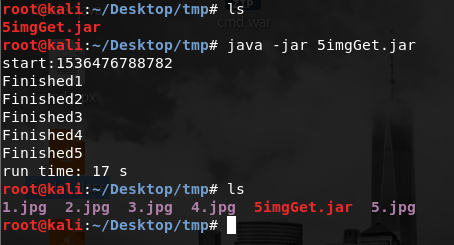
此时直接运行:java -jar 5imgGet.jar
会报错:

直接将jar文件解压开,查看其中的 META-INF/MANIFEST.MF 文件,
root@kali:~/Desktop/tmp# cat META-INF/MANIFEST.MF

Manifest-Version: 1.0

Created-By: 1.8.0_151 (Oracle Corporation)

root@kali:~/Desktop/tmp#
只有两行,在第三行添加 Main-Class: spider,指定主类

保存后执行 :jar umf MANIFEST.MF 5imgGet.jar
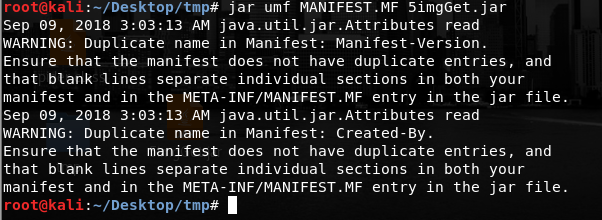
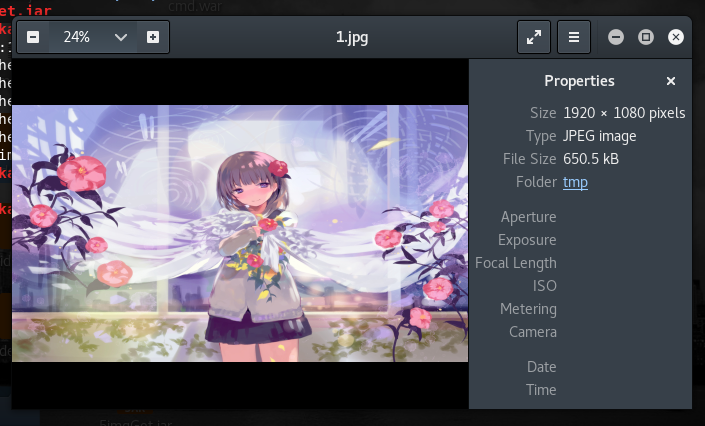
这样,这个jar文件就可以执行了。
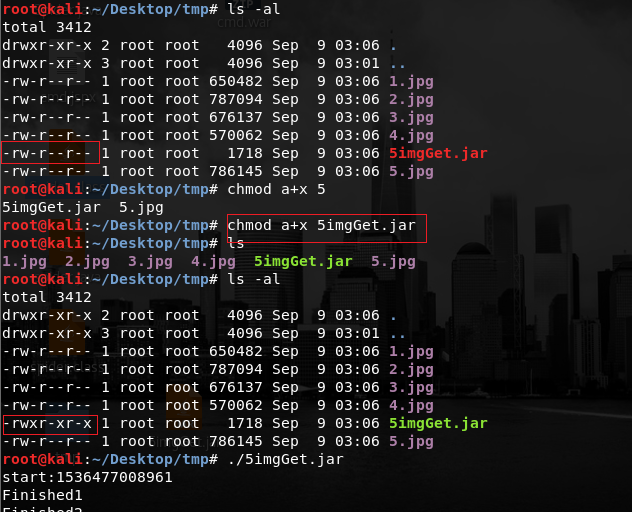
添加执行权限
reference : https://www.cnblogs.com/liang-io/p/9338184.html
Java 图片爬虫,java打包jar文件的更多相关文章
- Intellij打包jar文件,“java.lang.SecurityException: Invalid signature file digest for Manifest main attrib
下面是使用Intellij 打包jar文件的步骤,之后会有运行jar文件时遇到的错误. 打包完成. ================================================== ...
- Eclipse将android项目打包jar文件
Eclipse+android打包jar文件 蔡建良 2016-3-12 以Android-SlideExpandableListView开源框架为例,将源码Library打包成jar文件并包含R.c ...
- 关于在打包Jar文件时遇到的资源路径问题(二)
在关于<关于在打包Jar文件时遇到的资源路径问题(一)>中,以及描述了当资源与可执行JAr分离时的资源路径代码的编写问题,后来想了想,为什么将<Java核心技术卷一>中的程序1 ...
- 关于在打包Jar文件时遇到的资源路径问题(一)
当我们将程序写好,并进行打包成Jar文件时,通常都带有各种资源,这些资源可以是图像或者声音文件,也可以是别的如文本文件或二进制文件等,这些资源都和代码密切相关.例如在一个JPanel类上显示一些可能变 ...
- AndroidStduio3.0 使用gradle将module打包jar文件
AndroidStduio3.0使用gradle将module打包jar文件,首先需要安装gradle. 打开控制台输入 open -e .bash_profile 命令,就可以打开 ...
- Java中基本的打包jar和war文件(包括eclipse打包操作)
前言: 为什么要打jar包? 1.举个例子,当编写一个工具类库,里面有十几个类,每个类对应一个class文件时,为了方便别人调用,是不是要装在一个文件中,方便传递和引用. 2.打jar包还有一个好处, ...
- java 打包jar文件以在没有安装JDK或JRE的机子上运行
前言: java号称“一次编译,到处运行”,但这有个前提,那就是你的机子上得安装java环境.对于开发人员或其他一些比较懂计算机的人来说这没什么,但是对于一些不懂计算机的人来说这会很麻烦,他们更希望的 ...
- Java GUI使用exe4j打包exe文件
exe4j下载地址:http://blog.csdn.net/cciii/article/details/17083531 1. 在MyEclipse将java项目打包成可执行jar文件.项目结构如 ...
- [转载] Java中动态加载jar文件和class文件
转载自http://blog.csdn.net/mousebaby808/article/details/31788325 概述 诸如tomcat这样的服务器,在启动的时候会加载应用程序中lib目录下 ...
随机推荐
- [Swift]LeetCode491. 递增子序列 | Increasing Subsequences
Given an integer array, your task is to find all the different possible increasing subsequences of t ...
- [Swift]LeetCode672. 灯泡开关 Ⅱ | Bulb Switcher II
There is a room with n lights which are turned on initially and 4 buttons on the wall. After perform ...
- Ubuntu12.04下安装NS3.25
实验室项目的需求,要使用到NS3做仿真,使用实验室的电脑,Ubuntu12.04,版本比较低,建议大家使用16.04,这样安装依赖文件时不会出现版本过低的问题 (没管最后也安装成功了).下面就安装步骤 ...
- MySQL数据库导入或者同步大量数据时数据丢失解决方案
相信大家都经常遇到这样的情况,我们在编码的过程中经常需要在调试代码的时候切换到本地的数据库上做修改调试,如果当测试数据库的数据在几十万或者上百万数据的时候,我们无论是通过恢复备份/导入SQL的方式来把 ...
- java自动拆装箱(转载)
转载自:http://www.cnblogs.com/dolphin0520/p/3780005.html 注意:Integer的缓存机制.
- 【Spark篇】---SparkStreaming算子操作transform和updateStateByKey
一.前述 今天分享一篇SparkStreaming常用的算子transform和updateStateByKey. 可以通过transform算子,对Dstream做RDD到RDD的任意操作.其实就是 ...
- BBS论坛(一)
1.1.项目结构搭建 (1)创建flask项目Perfect_bbs,然后搭建项目结构如下: (2)构建蓝图 cms/views.py # cmd/views.py from flask import ...
- 【Git】(1)---工作区、暂存区、版本库、远程仓库
工作区.暂存区.版本库.远程仓库 一.概念 1.四个工作区域 Git本地有四个工作区域:工作目录(Working Directory).暂存区(Stage/Index).资源库(Repository或 ...
- C++版 - 剑指Offer 面试题35:第一个只出现一次的字符 解题报告(华为OJ034-找出字符串中第一个只出现一次的字符)
面试题35:第一个只出现一次的字符 题目:在一个字符串中找到第一个只出现一次的字符.如输入abaccdeff,则输出b.(2006年google的一道笔试题.) 分析: 首先应向确认一下是ASCII字 ...
- 在阿里云 ECS 搭建 nginx https nodejs 环境 (一、 nginx)
首先介绍下相关环境.软件的版本 1.阿里云 ECS . ubuntu-14.04.5 LTS 2.nginx 版本 1.9.2 可能会遇到的问题: 一.在 ssh 服务器上的时候,提示 这个时候需要将 ...