
07Axios
详情:https://pizzali.github.io/2018/10/30/Axios/
JQuery时代,我们使用ajax向后台提交数据请求,Vue时代,Axios提供了前端对后台数据请求的各种方式。
1. 什么是Axios
Axios是基于Promise的Http客户端,可以在浏览器和node.js中使用。
2.为什么使用Axios
Axios非常适合前后端数据交互,另一种请求后端数据的方式是vue-resource,vue-resource已经不再更新了,且只支持浏览器端使用,而Axios同时支持浏览器和Node端使用Vue开发者推荐使用更好的第三方工具,这就是Axios,详细的文件,请参考Evan You的这篇文章。 3. 安装
3.Axios的安装 支持多种方式
3.1npm安装 : npm install axios
cdn
<script src="https://cdn.bootcss.com/axios/0.18.0/axios.min.js"></script>
使用方式介绍 :接下来,我们使用Django,搭建一个后台程序,并使用Vue Cli搭建一个前端程序,使用Axios进行前后端数据交互。
使用Vue Cli创建一个前端程序
vue init webpack luffy_fontend
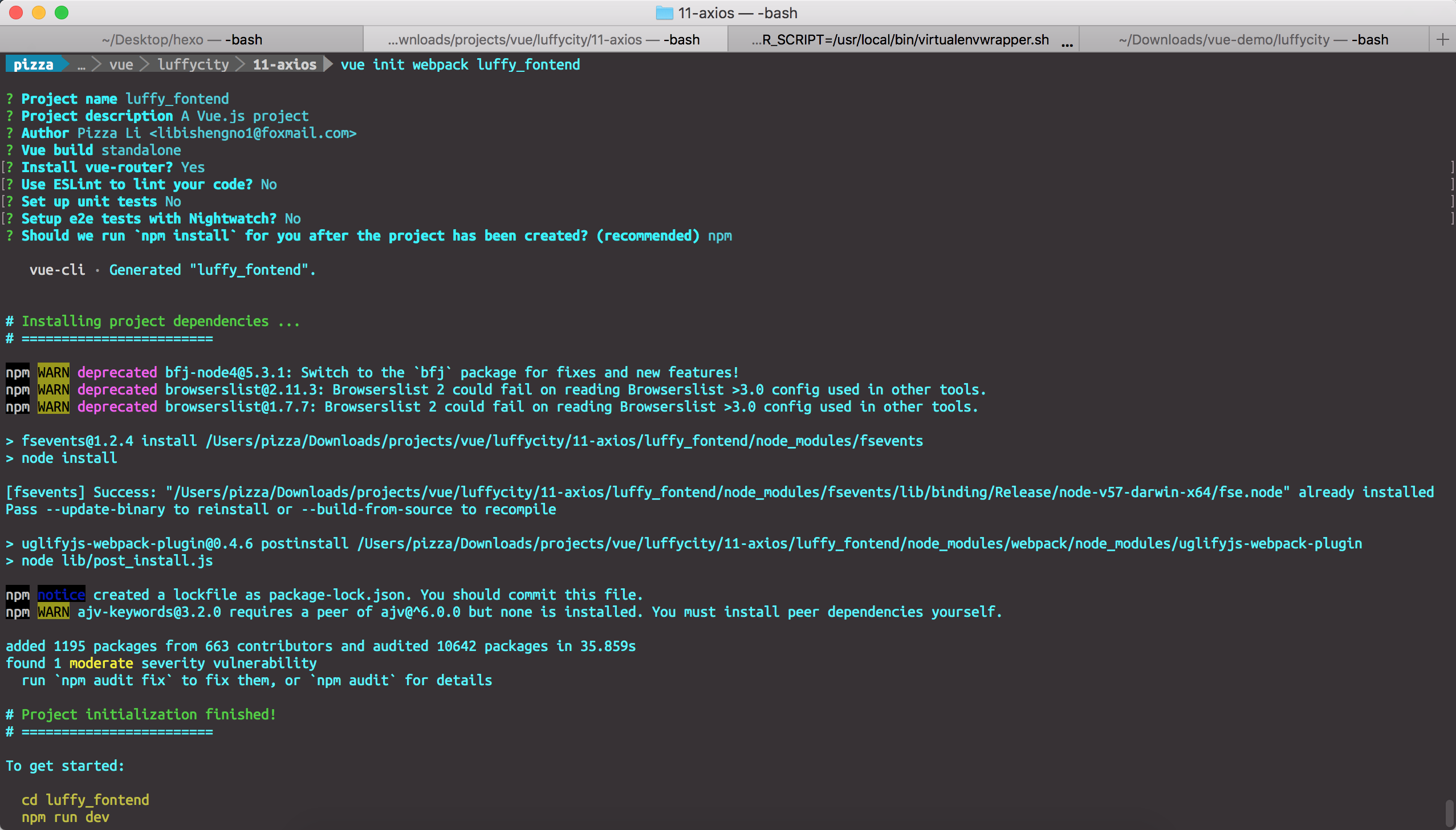
使用Django创建一个后端程序luffy_backend
django-admin startproject luffy_backend
创建一个courses应用
cd luffy_backend

python manage.py startapp courses
在models.py中创建两个类
from django.db import models

# Create your models here.

class Courses(models.Model):

    course_name = models.CharField(max_length=32)

    course_price = models.IntegerField()

    course_teacher = models.CharField(max_length=16)

    start_date = models.DateField(auto_now=True, null=False)

    end_date = models.DateField(auto_now=True, null=False)

    def __str__(self):

        return self.course_name

class Students(models.Model):

    student_name = models.CharField(max_length=16)

    student_id = models.IntegerField()

    student_phone = models.IntegerField()

    student_address = models.CharField(max_length=128)
插入数据
1 |
// courses_courses |
在views.py中写好接口
1 |
from django.shortcuts import render, HttpResponse |
定义接口:
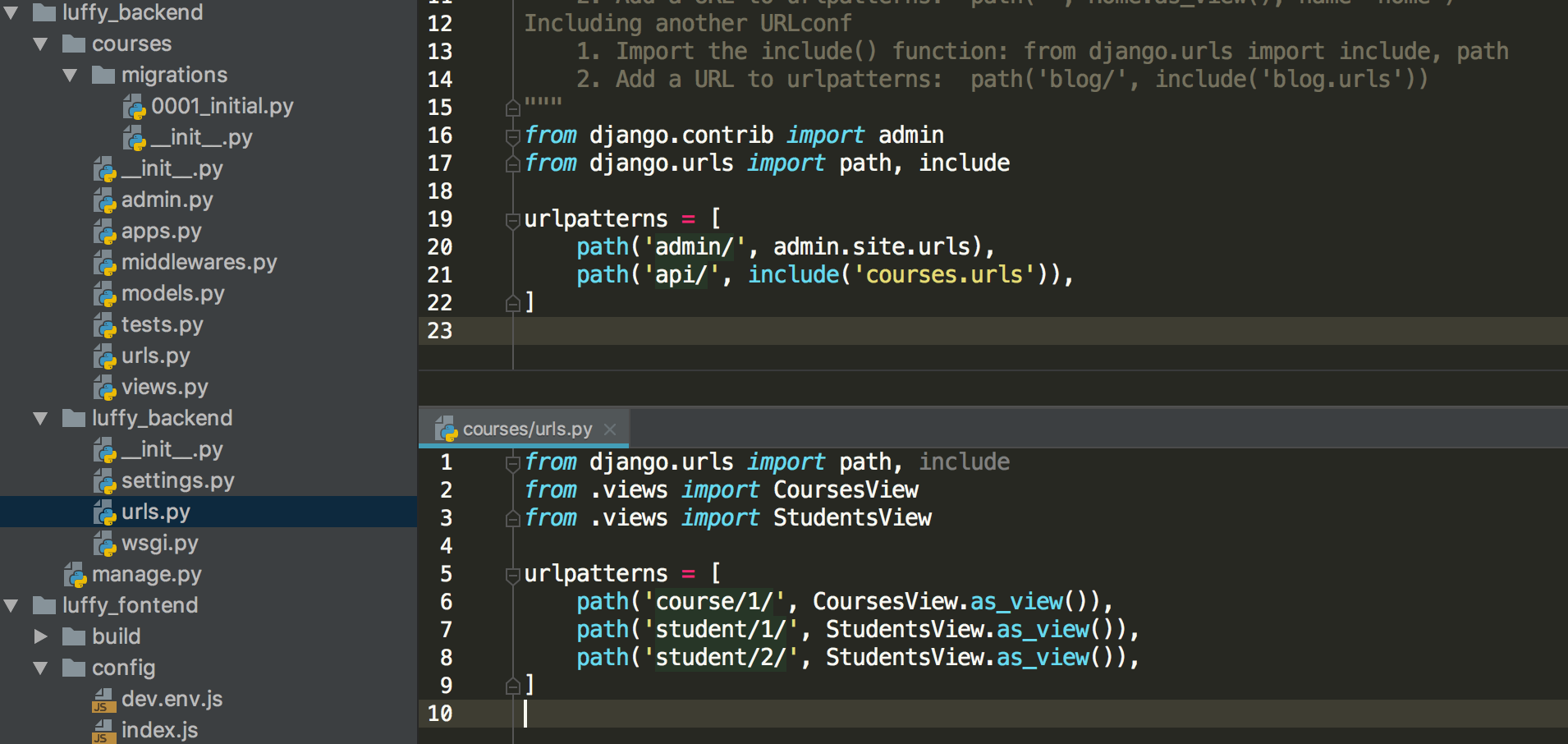
配置后台接口
注意,修改配置文件后,需要重启前端服务器。
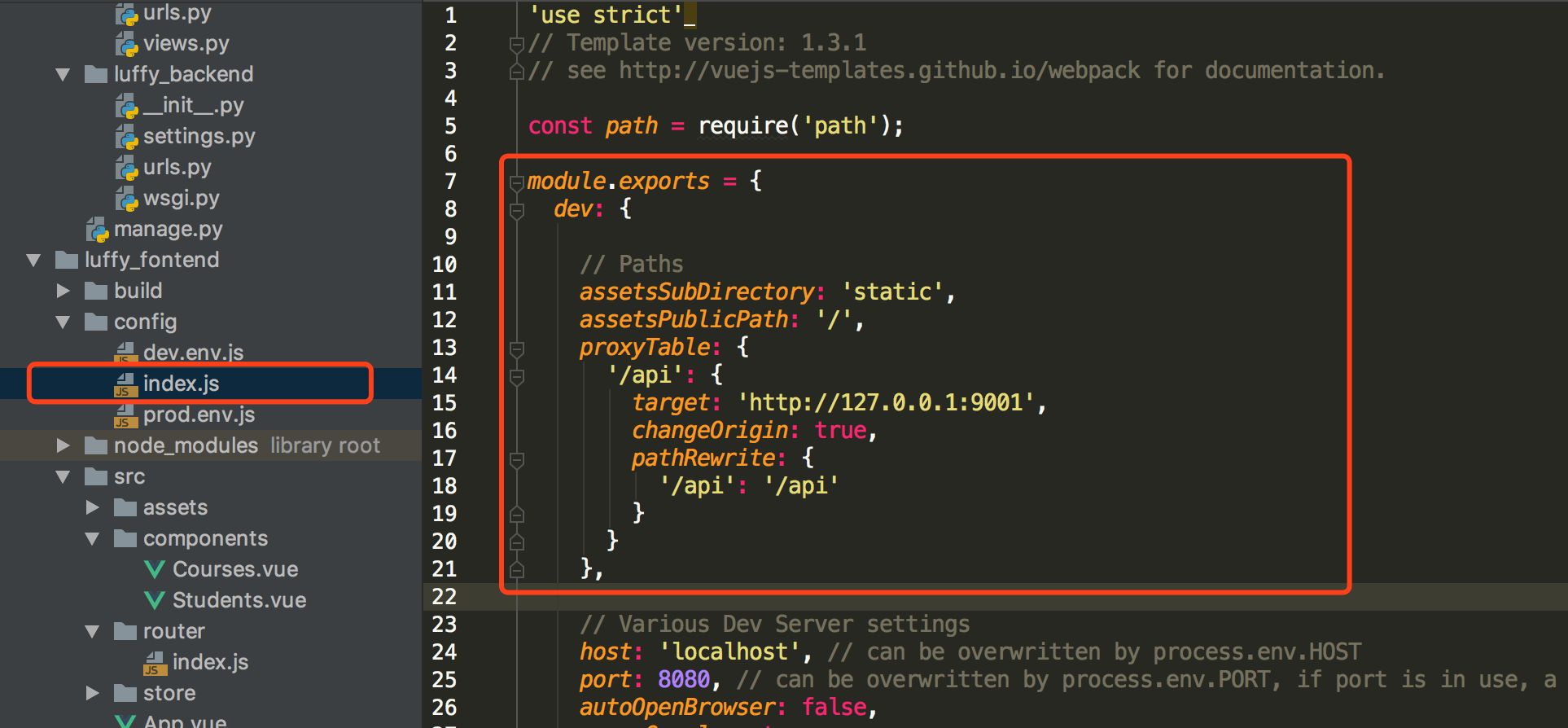
在Vue Cli中使用axios
// The Vue build version to load with the `import` command

// (runtime-only or standalone) has been set in webpack.base.conf with an alias.

import Vue from 'vue'

import App from './App'

import router from './router'

import store from './store'

import axios from "axios"

Vue.prototype.$axios = axios;

Vue.config.productionTip = false;

new Vue({

  el: '#app',

  router,

  template: '<App></App>',

  components: {

    App

  },

  store: store

});
获取课程信息
<template>

  <div>

    <span>这是课程详情页面</span>

    <button @click="getCourses">点击获取全部课程</button>

    <div v-if="isShow">

      <table border="1">

        <thead>

          <tr>

            <th>课程名称</th>

            <th>课程价格</th>

            <th>授课老师</th>

            <th>开课日期</th>

            <th>结课日期</th>

          </tr>

        </thead>

        <tbody>

          <tr v-for="(course, index) in courses" :key="index">

            <td>{{ course.course_name }}</td>

            <td>{{ course.course_price }}</td>

            <td>{{ course.course_teacher }}</td>

            <td>{{ course.start_date }}</td>

            <td>{{ course.end_date }}</td>

          </tr>

        </tbody>

      </table>

    </div>

  </div>

</template>

<script>

  export default {

    name: "Courses",

    data() {

      return {

        isShow: false,

        courses: []

      }

    },

    methods: {

      getCourses: function () {

        let ts = this;

        this.$axios.get('/api/course/1/')

        .then(function (response) {

          ts.isShow = true;

          ts.courses = response.data;

        })

        .catch(function (error) {

          console.log(error);

      });

      }

    }

  }

</script>

<style scoped>

</style>
获取学生信息
<template>

  <div>

    <span>这是学员信息页面</span>

    <button @click="getStudents">点击获取学生信息</button>

    <button @click="changeStudents">点击修改学生信息</button>

    <div v-if="isShow">

      <table border="1">

      <thead>

        <tr>

          <th>学生ID</th>

          <th>学生姓名</th>

          <th>学生电话</th>

          <th>学生地址</th>

        </tr>

      </thead>

      <tbody>

        <tr v-for="(student, index) in students" :key="index">

          <td>{{ student.student_id }}</td>

          <td><input v-model="student.student_name"/></td>

          <td><input v-model="student.student_phone"/></td>

          <td><input v-model="student.student_address"/></td>

        </tr>

      </tbody>

    </table>

    </div>

  </div>

</template>

<script>

  export default {

    name: "Students",

    data() {

      return {

        isShow: false,

        students: []

      }

    },

    methods: {

      getStudents: function () {

        let ts = this;

        this.$axios.get('/api/student/1/')

          .then(function (response) {

            console.log(response);

            ts.isShow = true;

            ts.students = response.data;

          })

          .catch(function (error) {

            console.log(error);

          })

      },

      changeStudents: function () {

        let ts = this;

        this.$axios.post('/api/student/2/', {

          student_name: 1,

          student_id: 100001,

          student_phone: 1347658765,

          student_address: "北京市石景山区智障六中"

        })

          .then(function (response) {

          })

          .catch(function (error) {

            console.log(error);

          })

      }

    }

  }

</script>

<style scoped>

</style>
处理跨域问题
发送post请求时,需要解决跨域问题,我们采用在Django中自定义一个处理跨域问题的中间件来解决这个问题。
from django.utils.deprecation import MiddlewareMixin

class MyCore(MiddlewareMixin):

    def process_response(self, request, response):

        response["Access-Control-Allow-Origin"] = '*'

        if request.method == 'OPTIONS':

            response["Access-Control-Allow-Headers"] = 'Content-Type'

            response["Access-Control-Allow-Methods"] = 'POST, DELETE, PUT'

        return response
07Axios的更多相关文章
随机推荐
- ORA-12537: Network Session: End of file
最近开发组同事使用Azure的Function App访问公司内部的Oracle数据库时,偶尔会遇到"ORA-12537: Network Session: End of file" ...
- Oracle 12c用户和安全管理
前言: Oracle 12c的多租户(multitenant)环境与SQL Server的架构非常相似,CDB$ROOT类似于master.PDB$SEED类似于model.各个pluggable d ...
- 解决vs启动出现“cannot find one or more components .Please reinstall the application”
参考下文: https://blog.csdn.net/novice_growth/article/details/71627395
- c/c++ linux epoll系列2 利用epoll_wait查看是否可以送信
linux epoll系列2 利用epoll_wait查看是否可以送信 write函数本来是非阻塞函数,但是当缓存区被写满后,再往缓存区里写的时候,就必须等待缓存区再次变成可写,所以这是write就变 ...
- 在Visual Studio 2017上配置并使用OpenGL
在Visual Studio 2017上配置并使用OpenGL 作者:凯鲁嘎吉 - 博客园 http://www.cnblogs.com/kailugaji/ 首先在Windows下安装Visual ...
- c#操作SQL Server入门总结
我是一名c#新手.本文只是我是常学习的随笔. 一.下载SQL server软件 听说下载开发板是最好的(开发板如果只是用来学习.研究不算是侵权).在安装的时候,我也遇到了很多问题,在公司的电脑安装第一 ...
- HBase实践案例:知乎 AI 用户模型服务性能优化实践
用户模型简介 知乎 AI 用户模型服务于知乎两亿多用户,主要为首页.推荐.广告.知识服务.想法.关注页等业务场景提供数据和服务, 例如首页个性化 Feed 的召回和排序.相关回答等用到的用户长期兴趣特 ...
- logrotate异常排查
[root@dev240 logrotate.d]# /usr/sbin/logrotate -v /etc/logrotate.conf reading config file /etc/logro ...
- 干货:Vue粒子特效(vue-particles插件)
转:https://www.jianshu.com/p/53199b842d25 image.png 图上那些类似于星座图的点和线,是由vue-particles生成的,不仅自己动,而且能与用户鼠标事 ...
- Spring-data-redis操作redis知识总结
什么是spring-data-redis spring-data-redis是spring-data模块的一部分,专门用来支持在spring管理项目对redis的操作,使用java操作redis最常用 ...