
SpringBoot配置
多模块Maven项目
.gitignore文件
.idea

*.iml

target
out

log

tmp

test
父模块pom文件
<?xml version="1.0" encoding="UTF-8"?>
<project xmlns="http://maven.apache.org/POM/4.0.0"
         xmlns:xsi="http://www.w3.org/2001/XMLSchema-instance"
         xsi:schemaLocation="http://maven.apache.org/POM/4.0.0 http://maven.apache.org/xsd/maven-4.0.0.xsd">
    <modelVersion>4.0.0</modelVersion>

    <groupId>com.xx.x1</groupId>
    <artifactId>x1</artifactId>
    <version>1.0-SNAPSHOT</version>
    <modules>
        <module>api</module>
        <module>common</module>
        <module>manager</module>
        <module>web-base</module>
    </modules>
    <packaging>pom</packaging>

    <parent>
        <groupId>org.springframework.boot</groupId>
        <artifactId>spring-boot-starter-parent</artifactId>
        <version>2.1.1.RELEASE</version>
    </parent>
    <properties>
        <java.version>1.8</java.version>
        <maven.compiler.version>3.6.1</maven.compiler.version>
        <maven.assembly.version>3.1.0</maven.assembly.version>
    </properties>

    <dependencies>
        <dependency>
            <groupId>org.springframework.boot</groupId>
            <artifactId>spring-boot-starter-web</artifactId>
        </dependency>
        <dependency>
            <groupId>junit</groupId>
            <artifactId>junit</artifactId>
            <scope>test</scope>
        </dependency>
        <dependency>
            <groupId>org.mybatis.spring.boot</groupId>
            <artifactId>mybatis-spring-boot-starter</artifactId>
            <version>1.3.2</version>
        </dependency>
        <dependency>
            <groupId>mysql</groupId>
            <artifactId>mysql-connector-java</artifactId>
        </dependency>
        <dependency>
            <groupId>org.projectlombok</groupId>
            <artifactId>lombok</artifactId>
            <version>1.18.4</version>
        </dependency>
        <dependency>
            <groupId>org.apache.commons</groupId>
            <artifactId>commons-lang3</artifactId>
        </dependency>
        <dependency>
            <groupId>com.google.guava</groupId>
            <artifactId>guava</artifactId>
            <version>22.0</version>
        </dependency>
        <!-- https://mvnrepository.com/artifact/org.apache.poi/poi -->
        <dependency>
            <groupId>org.apache.poi</groupId>
            <artifactId>poi</artifactId>
            <version>3.17</version>
        </dependency>
        <!-- https://mvnrepository.com/artifact/org.apache.poi/poi-ooxml -->
        <dependency>
            <groupId>org.apache.poi</groupId>
            <artifactId>poi-ooxml</artifactId>
            <version>3.17</version>
        </dependency>
    </dependencies>
</project>
其中一个子模块pom文件
<?xml version="1.0" encoding="UTF-8"?>
<project xmlns="http://maven.apache.org/POM/4.0.0"
         xmlns:xsi="http://www.w3.org/2001/XMLSchema-instance"
         xsi:schemaLocation="http://maven.apache.org/POM/4.0.0 http://maven.apache.org/xsd/maven-4.0.0.xsd">
    <parent>
        <artifactId>xx</artifactId>
        <groupId>com.xx.x4</groupId>
        <version>1.0-SNAPSHOT</version>
    </parent>
    <modelVersion>4.0.0</modelVersion>

    <artifactId>api</artifactId>
    <dependencies>
        <dependency>
            <groupId>com.xx.x3</groupId>
            <artifactId>web-base</artifactId>
            <version>1.0-SNAPSHOT</version>
        </dependency>
    </dependencies>

    <build>
        <plugins>
            <plugin>
                <groupId>org.apache.maven.plugins</groupId>
                <artifactId>maven-compiler-plugin</artifactId>
                <version>${maven.compiler.version}</version>
                <configuration>
                    <source>${java.version}</source>
                    <target>${java.version}</target>
                </configuration>
                <executions>
                    <execution>
                        <id>compile</id>
                        <phase>compile</phase>
                        <goals>
                            <goal>compile</goal>
                        </goals>
                    </execution>
                    <execution>
                        <id>testCompile</id>
                        <phase>test-compile</phase>
                        <goals>
                            <goal>testCompile</goal>
                        </goals>
                    </execution>
                </executions>
            </plugin>
            <plugin>
                <artifactId>maven-assembly-plugin</artifactId>
                <version>${maven.assembly.version}</version>
                <configuration>
                    <descriptors>
                        <descriptor>assembly/assembly.xml</descriptor>
                    </descriptors>
                </configuration>
                <executions>
                    <execution>
                        <id>aobp-xingxi-api</id>
                        <phase>package</phase>
                        <goals>
                            <goal>single</goal>
                        </goals>
                        <configuration>
                            <finalName>aobp-xingxi-api</finalName>
                            <appendAssemblyId>false</appendAssemblyId>
                        </configuration>
                    </execution>
                </executions>
            </plugin>
        </plugins>
    </build>

</project>
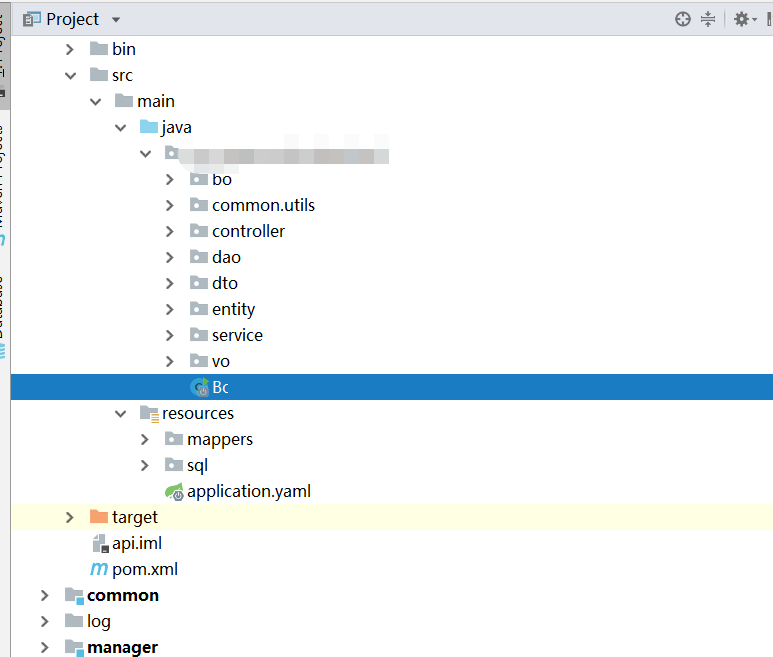
启动类Boot
@SpringBootApplication(scanBasePackages = "com.xx.xxx.xxxx")
@MapperScan(basePackages = "com.xx.xxx.xxxx.api.dao")
@Slf4j
public class Boot {

    public static void main(String[] args) {
        log.info("service starting");
        SpringApplication.run(Boot.class, args).registerShutdownHook();
        log.info("service start success");
    }
}
yaml文件:
server:
  port: 8081
  tomcat:
    basedir: tmp/tomcat

spring:
  datasource:
    hikari:
      minimum-idle: 16
      maximum-pool-size: 32
      driver-class-name: com.mysql.cj.jdbc.Driver
      username:
      password:
    url: jdbc:mysql://localhost/test?useUnicode=true&characterEncoding=utf-8&useJDBCCompliantTimezoneShift=true&useLegacyDatetimeCode=false&serverTimezone=Asia/Shanghai

mybatis:
  mapper-locations: classpath:mappers/*.xml
  type-aliases-package: com.xx.xxx.xxxx.common.entity

save:(创建包)
  dir:
    user: tmp/user
    package: tmp/package
    img: tmp/img

logging:(debug时用于打印sql语句)
  level:
    com.xx.xxx.xxxx.api.dao: debug

创建包时:
@Value("${save.dir.img}")
private String imgDir;

@PostConstruct
void init(){
    File file = new File(imgDir);
    if(!file.exists()){
        file.mkdirs();
    }
}
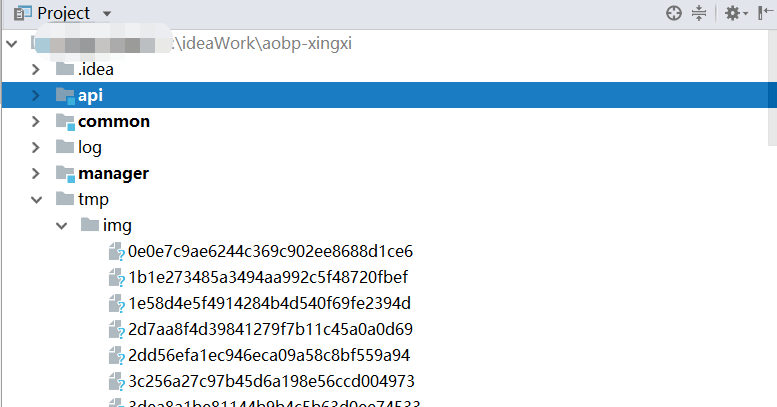
创建文件位置:
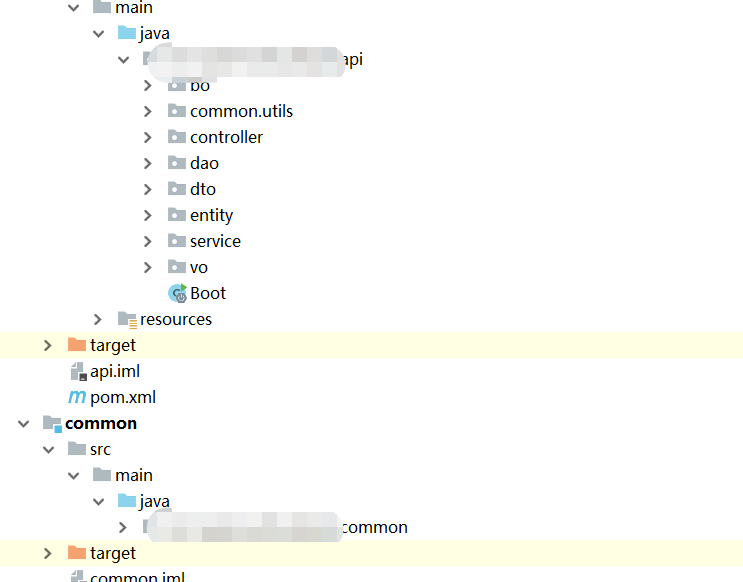
各模块包名
跨域配置:
/**
 * @ClassName: GlobalCorsConfig
 * @Description: 跨域配置
 * @author: yaozhenhua
 * @date: 2018/12/27 15:07
 */
@Configuration
public class GlobalCorsConfig {

    @Bean
    public CorsFilter corsFilter() {
        //1.添加CORS配置信息
        CorsConfiguration config = new CorsConfiguration();
        //放行哪些原始域
        config.setAllowedHeaders(CollectionUtils.arrayToList(new String[]{"*"}));
        //是否发送Cookie信息
        config.setAllowCredentials(true);
        //放行哪些原始域(请求方式)
        config.setAllowedMethods(CollectionUtils.arrayToList(new String[]{"POST", "GET", "PUT", "OPTIONS", "DELETE"}));
        //放行哪些原始域(头部信息)
        config.setAllowedOrigins(CollectionUtils.arrayToList(new String[]{"*"}));

        //2.添加映射路径
        UrlBasedCorsConfigurationSource configSource = new UrlBasedCorsConfigurationSource();
        configSource.registerCorsConfiguration("/**", config);

        //3.返回新的CorsFilter.
        return new CorsFilter(configSource);
    }
}
Controller层全局异常处理器:
@ControllerAdvice
@Slf4j
public class AobpExceptionHandler {

    //声明要捕获的异常
    @ExceptionHandler(Exception.class)
    @ResponseBody
    public Result defaultExceptionHandler(Exception e) {
        if (e instanceof AobpException) {
            log.error(((AobpException) e).getMsg());
            AobpException aobpException = (AobpException) e;
            return Result.error(aobpException.getCode(), aobpException.getMsg());
        }
        log.warn(e.getMessage());
        return Result.error(StatusConstant.STATUS_INTERNAL_ERR);
    }
}
SpringBoot配置的更多相关文章
- SpringBoot配置属性之Server
SpringBoot配置属性系列 SpringBoot配置属性之MVC SpringBoot配置属性之Server SpringBoot配置属性之DataSource SpringBoot配置属性之N ...
- SpringBoot基础系列-SpringBoot配置
原创作品,可以转载,但是请标注出处地址:https://www.cnblogs.com/V1haoge/p/9990680.html SpringBoot基础系列-SpringBoot配置 概述 属性 ...
- springboot上传文件 & 不配置虚拟路径访问服务器图片 & springboot配置日期的格式化方式 & Springboot配置日期转换器
1. Springboot上传文件 springboot的文件上传不用配置拦截器,其上传方法与SpringMVC一样 @RequestMapping("/uploadPicture&q ...
- springboot配置Druid数据源
springboot配置druid数据源 Author:SimpleWu springboot整合篇 前言 对于数据访问层,无论是Sql还是NoSql,SpringBoot默认采用整合SpringDa ...
- springboot配置详解
springboot配置详解 Author:SimpleWu properteis文件属性参考大全 springboot默认加载配置 SpringBoot使用两种全局的配置文件,全局配置文件可以对一些 ...
- SpringBoot 配置 Servlet、Filter、Listener
SpringBoot 配置 Servlet.Filter.Listener 在SpringBoot应用中,嵌入式的 Servlet 3.0+ 容器不会直接使用 ServletContainerInit ...
- SpringBoot 配置静态资源映射
SpringBoot 配置静态资源映射 (嵌入式servlet容器)先决知识 request.getSession().getServletContext().getRealPath("/& ...
- springboot配置server相关配置&整合模板引擎Freemarker、thymeleaf&thymeleaf基本用法&thymeleaf 获取项目路径 contextPath 与取session中信息
1.Springboot配置server相关配置(包括默认tomcat的相关配置) 下面的配置也都是模板,需要的时候在application.properties配置即可 ############## ...
- springboot配置cxf
1.引入两个需要的jar <dependency> <groupId>org.apache.cxf</groupId> <artifactId>cxf- ...
- SpringBoot配置(2) slf4j&logback
SpringBoot配置(2) slf4j&logback 一.SpringBoot的日志使用 全局常规设置(格式.路径.级别) SpringBoot能自动适配所有的日志,而且底层使用slf4 ...
随机推荐
- iview render input每输入一个字符就会自动跳出焦点
假如你绑定的table的数据是tableData,input数据改变的时候你把整行的数据替换掉,就不会造成table重新渲染,导致input失焦了 h('InputNumber', { props: ...
- BOS判断字段为空
- Python——Pycharm基本设置
一.,模板(加入中文UTF-8) #!/usr/bin/env python # -*- coding:utf-8 -*- 设置方法:file->settings->Editor-> ...
- VMware Workstation 10序列号:
VMware Workstation 10序列号:1Y0LW-4WJ9N-LZ5G9-Z81QP-92PN7
- CentOS下安装nvm
1安装版本管理工具git yum install git 查看git版本 git --version 2 安装Node.js版本管理工具nvm curl -o- https://raw.githubu ...
- Educational Codeforces Round 60 (Rated for Div. 2)
A. Best Subsegment 题意 找 连续区间的平均值 满足最大情况下的最长长度 思路:就是看有几个连续的最大值 #include<bits/stdc++.h> using n ...
- git 操作命令详解
git 什么是git 开源的分布式版本控制系统, 用于高效的管理大小项目和文件 代码管理工具 防止代码丢失, 做备份 代码版本管控, 设置节点, 多版本切换 建立分支各自开发, 互不影响, 方便合并 ...
- 【dp】求最长上升子序列
题目描述 给定一个序列,初始为空.现在我们将1到N的数字插入到序列中,每次将一个数字插入到一个特定的位置.我们想知道此时最长上升子序列长度是多少? 输入 第一行一个整数N,表示我们要将1到N插入序列中 ...
- CF993D Compute Power(二分+Dp)
一看到这种求\(min/max\left \{ \frac{\sum a_i}{\sum b_i} \right \}\)的题肯定是\(01\)分数规划,大概可以算作一种二分? 设\(ans\)为当前 ...
- Codeforces 1037E Trips
原题 题目大意: 有\(n\)个人,起初他们都不是朋友.总共有\(m\)天,每天会有两个人成为朋友.他们计划在晚上出去旅游,对于一个人,有如下两种情况: 1.要么他不出去旅游 2.要么有至少\(k\) ...