
通过MultipleOutputs写到多个文件
MultipleOutputs 类可以将数据写到多个文件,这些文件的名称源于输出的键和值或者任意字符串。这允许每个 reducer(或者只有 map 作业的 mapper)创建多个文件。 采用name-m-nnnnn 形式的文件名用于 map 输出,name-r-nnnnn 形式的文件名用于 reduce 输出,其中 name 是由程序设定的任意名字, nnnnn 是一个指明块号的整数(从 0 开始)。块号保证从不同块(mapper 或 reducer)输出在相同名字情况下不会冲突
1、项目需求
假如这里有一份邮箱数据文件,我们期望统计邮箱出现次数并按照邮箱的类别,将这些邮箱分别输出到不同文件路径下。
2、数据集
wolys@21cn.com
zss1984@126.com
294522652@qq.com
simulateboy@163.com
zhoushigang_123@163.com
sirenxing424@126.com
lixinyu23@qq.com
chenlei1201@gmail.com
370433835@qq.com
cxx0409@126.com
viv093@sina.com
q62148830@163.com
65993266@qq.com
summeredison@sohu.com
zhangbao-autumn@163.com
diduo_007@yahoo.com.cn
fxh852@163.com
3、实现
 package com.buaa;

 import java.io.IOException;

 import org.apache.hadoop.conf.Configuration;

 import org.apache.hadoop.conf.Configured;

 import org.apache.hadoop.fs.FileSystem;

 import org.apache.hadoop.fs.Path;

 import org.apache.hadoop.io.IntWritable;

 import org.apache.hadoop.io.LongWritable;

 import org.apache.hadoop.io.Text;

 import org.apache.hadoop.mapreduce.Job;

 import org.apache.hadoop.mapreduce.Mapper;

 import org.apache.hadoop.mapreduce.Reducer;

 import org.apache.hadoop.mapreduce.lib.input.FileInputFormat;

 import org.apache.hadoop.mapreduce.lib.output.FileOutputFormat;

 import org.apache.hadoop.mapreduce.lib.output.LazyOutputFormat;

 import org.apache.hadoop.mapreduce.lib.output.MultipleOutputs;

 import org.apache.hadoop.mapreduce.lib.output.TextOutputFormat;

 import org.apache.hadoop.util.Tool;

 import org.apache.hadoop.util.ToolRunner;

 /**

 * @ProjectName MultipleOutputsDemo

 * @PackageName com.buaa

 * @ClassName EmailMultipleOutputsDemo

 * @Description 统计邮箱出现次数并按照邮箱的类别,将这些邮箱分别输出到不同文件路径下

 * @Author 刘吉超

 * @Date 2016-05-02 15:25:18

 */

 public class EmailMultipleOutputsDemo extends Configured implements Tool {

     public static class EmailMapper extends Mapper<LongWritable, Text, Text, IntWritable> {

         private final static IntWritable one = new IntWritable(1);

         @Override

         protected void map(LongWritable key, Text value, Context context) throws IOException, InterruptedException {

             context.write(value, one);

         }

     }

     public static class EmailReducer extends Reducer<Text, IntWritable, Text, IntWritable> {

         private MultipleOutputs<Text, IntWritable> multipleOutputs;

         @Override

         protected void setup(Context context) throws IOException ,InterruptedException{

             multipleOutputs = new MultipleOutputs< Text, IntWritable>(context);

         }

         protected void reduce(Text Key, Iterable<IntWritable> Values,Context context) throws IOException, InterruptedException {

             // 开始位置

             int begin = Key.toString().indexOf("@");

             // 结束位置

             int end = Key.toString().indexOf(".");

             if(begin >= end){

                 return;

             }

             // 获取邮箱类别,比如 qq

             String name = Key.toString().substring(begin+1, end);

             int sum = 0;

             for (IntWritable value : Values) {

                 sum += value.get();

             }

             /*

              * multipleOutputs.write(key, value, baseOutputPath)方法的第三个函数表明了该输出所在的目录(相对于用户指定的输出目录)。

              * 如果baseOutputPath不包含文件分隔符"/",那么输出的文件格式为baseOutputPath-r-nnnnn(name-r-nnnnn);

              * 如果包含文件分隔符"/",例如baseOutputPath="029070-99999/1901/part",那么输出文件则为029070-99999/1901/part-r-nnnnn

              */

             multipleOutputs.write(Key, new IntWritable(sum), name);

         }

         @Override

         protected void cleanup(Context context) throws IOException ,InterruptedException{

             multipleOutputs.close();

         }

     }

     @SuppressWarnings("deprecation")

     @Override

     public int run(String[] args) throws Exception {

         // 读取配置文件

         Configuration conf = new Configuration();

         // 判断目录是否存在,如果存在,则删除

         Path mypath = new Path(args[1]);

         FileSystem hdfs = mypath.getFileSystem(conf);

         if (hdfs.isDirectory(mypath)) {

             hdfs.delete(mypath, true);

         }

         // 新建一个任务

         Job job = new Job(conf, "MultipleDemo");

         // 主类

         job.setJarByClass(EmailMultipleOutputsDemo.class);

         // 输入路径

         FileInputFormat.addInputPath(job, new Path(args[0]));

         // 输出路径

         FileOutputFormat.setOutputPath(job, new Path(args[1]));

         // Mapper

         job.setMapperClass(EmailMapper.class);

         // Reducer

         job.setReducerClass(EmailReducer.class);

         // key输出类型

         job.setOutputKeyClass(Text.class);

         // value输出类型

         job.setOutputValueClass(IntWritable.class);

         // 去掉job设置outputFormatClass,改为通过LazyOutputFormat设置

         LazyOutputFormat.setOutputFormatClass(job, TextOutputFormat.class);

         return job.waitForCompletion(true)?0:1;

     }

     public static void main(String[] args0) throws Exception {

         // 数据输入路径和输出路径

 //        String[] args0 = {

 //                "hdfs://ljc:9000/buaa/email/email.txt",

 //                "hdfs://ljc:9000/buaa/email/out/"

 //        };

         int ec = ToolRunner.run(new Configuration(), new EmailMultipleOutputsDemo(), args0);

         System.exit(ec);

     }

 }
4、运行效果
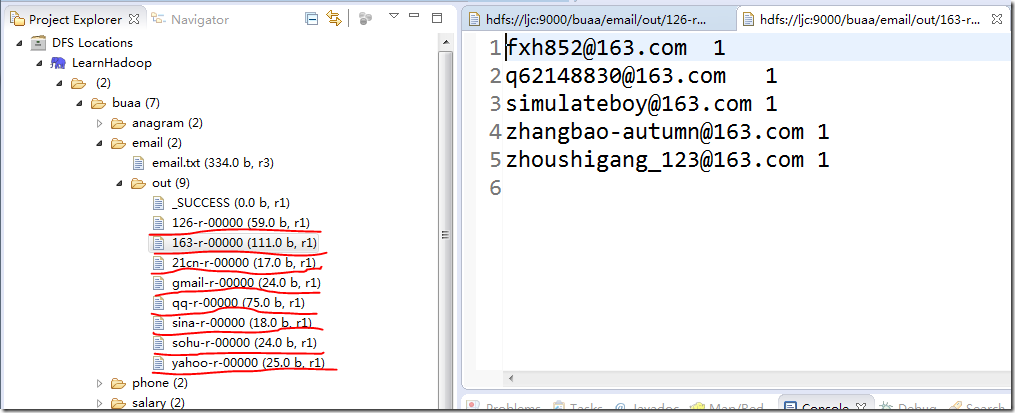
5、注意事项
1、在reducer中调用时,要调用MultipleOutputs以下接口
public void write(KEYOUT key,VALUEOUT value, String baseOutputPath) throws IOException,InterruptedException
如果调用
public <K,V> void write(String namedOutput, K key, V value) throws IOException, InterruptedException
则需要在job中,预先声明named output(如下),不然会报错:named output xxx not defined:
 MultipleOutputs.addNamedOutput(job, "moshouzhengba", TextOutputFormat.class, Text.class, Text.class);

 MultipleOutputs.addNamedOutput(job, "maoxiandao", TextOutputFormat.class, Text.class, Text.class);

 MultipleOutputs.addNamedOutput(job, "yingxionglianmen", TextOutputFormat.class, Text.class, Text.class);
2. 默认情况下,输出目录会生成part-r-00000或者part-m-00000的空文件,需要如下设置后,才不会生成
// job.setOutputFormatClass(TextOutputFormat.class);

LazyOutputFormat.setOutputFormatClass(job, TextOutputFormat.class);
就是去掉job设置outputFormatClass,改为通过LazyOutputFormat设置
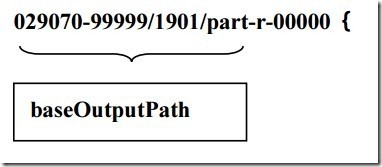
3. multipleOutputs.write(key, value, baseOutputPath)方法的第三个函数表明了该输出所在的目录(相对于用户指定的输出目录)。如果baseOutputPath不包含文件分隔符“/”,那么输出的文件格式为baseOutputPath-r-nnnnn(name-r-nnnnn);如果包含文件分隔符“/”,例如baseOutputPath=“029070-99999/1901/part”,那么输出文件则为
通过MultipleOutputs写到多个文件的更多相关文章
- c# .Net :Excel NPOI导入导出操作教程之List集合的数据写到一个Excel文件并导出
将List集合的数据写到一个Excel文件并导出示例: using NPOI.HSSF.UserModel;using NPOI.SS.UserModel;using System;using Sys ...
- 用C#写的读写CSV文件
用C#写的读取CSV文件的源代码 CSV文件的格子中包含逗号,引号,换行等,都能轻松读取,而且可以把数据转化成DATATABLE格式 using System; using System.Text; ...
- 读、写SD上的文件请按如下步骤进行
1.调用Environment的getExternalStorageState()方法判断手机上是否插入了SD卡,并且应用程序具有读写SD卡的权限.例如使用如下代码//Environment.getE ...
- 事务不提交,也有可能写redo和数据文件
事务不提交,也有可能写redo和数据文件
- Pandas 基础(4) - 读/写 Excel 和 CSV 文件
这一节将分别介绍读/写 Excel 和 CSV 文件的各种方式: - 读入 CSV 文件 首先是准备一个 csv 文件, 这里我用的是 stock_data.csv, 文件我已上传, 大家可以直接下载 ...
- 如何解决iOS6、iOS7 3.5寸和4.0寸屏的适配问题?不要写两个xib文件
如何解决iOS6.iOS7 3.5寸和4.0寸屏的适配问题?不要写两个xib文件
- 【java】File的使用:将字符串写出到本地文件,大小0kb的原因
实现方法: 暂时写一种方法,将字符串写出到本地文件,以后可以补充更多种方法: public static void main(String[] args) { /** * ============== ...
- 自己动手写reg注册表文件
自己动手写reg注册表文件 2015-01-12 20:23 1161人阅读 评论(1) 收藏 举报 分类: 玩转Windows应用层编程(12) 版权声明:本文为博主原创文章,未经博主允许不得转 ...
- C++->以读或写方式打开一个文件
以读或写方式打开一个文件 #include<iostream.h> //.h以C|非C标准引用库文件 #include<fstream.h> #include<std ...
随机推荐
- python运维开发之第二天
一.模块初识: 1.模块定义 python是由一系列的模块组成的,每个模块就是一个py为后缀的文件,同时模块也是一个命名空间,从而避免了变量名称冲突的问题.模块我们就可以理解为lib库,如果需要使用某 ...
- 使用URLClassLoader类载入类实例
Tomcat当中在接受到要调用的Servlet请求后,需要载入相应的Servlet类,然后创建Servlet类实例,从而调用Servlet类实例的service()方法 下面实例的场景,request ...
- http server v0.1_mime.c
#include <string.h> #include "mime.h" static STR_MIME_MAP mime_map[]= { MIME_MAP(MIM ...
- bower的权限问题
装bootstrap的时候,先用sudo指令装了bower,但是一打 bower isntall bootstrap 就报错: Error: EACCES, permission denied '/U ...
- Java语言基础(三) Java注释
Java注释 Java提供了三种注释的方式: ①单行注释:// ②多行注释:/* ... */ ③归档(JavaDoc)注释: /** * 作者:heyiyong * 时间:2013年11月27日 ...
- Android MAVEN项目标准目录结构
1.标准目录结构: src -main –bin 脚本库 –java java源代码文件 –resources 资源库,会自动复制到classes目录里 –fi ...
- 8个超炫酷仿HTML5动画源码
1.jQuery万年历插件 带农历老皇历功能 这是一款基于jQuery的日历插件,这款日历插件和之前分享的日历控件有很大差异,它是一本万年历,包含了农历已经老皇历的功能,是一个挑好日子的工具.同时日历 ...
- 在Ant Build文件中使用正则表达式替换文件内容
这需要在build文件中使用<replaceregexp>标签, 这个标签的使用大概是这个样子的: <replaceregexp file="${src}/build.pr ...
- [转]让程序在崩溃时体面的退出之Unhandled Exception
原文地址:http://blog.csdn.net/starlee/article/details/6613424 程序是由代码编译出来的,而代码是由人写的.人非圣贤,孰能无过.所以由人写的代码有缺陷 ...
- 600字读懂 Git
译注:来自 Hacker School 的 Mary Rose Cook 实现了一个纯 JavaScript 写就的 Git:Gitlet,包含了最主要的一些命令.这个项目一是为了了解 Git 内部原 ...