
SpringMVC框架图解析
Spring框架提供了构造Web应用程序的全能MVC模块。Spring MVC分离了控制器、模型对象、分派器以及处理程序对象的角色,这种分离让它们更容易进行制定。是一个标准的MVC框架。
那你猜一猜哪一部分应该是哪一部分?
SpringMVC框架图
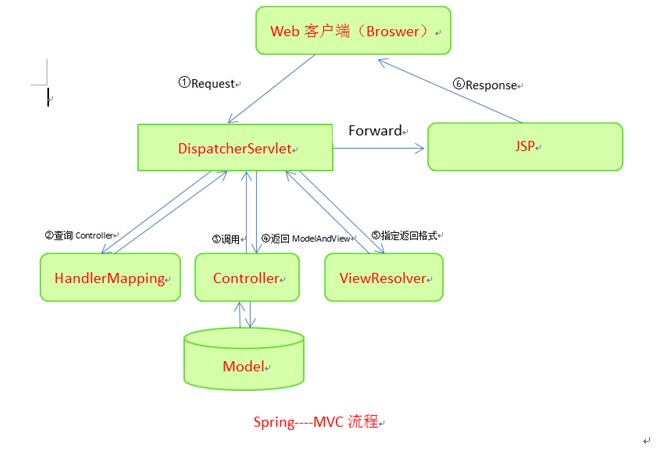
SpringMVC接口解释
DispatcherServlet接口:
Spring提供的前端控制器,所有的请求都有经过它来统一分发。在DispatcherServlet将请求分发给Spring Controller之前,需要借助于Spring提供的HandlerMapping定位到具体的Controller。
HandlerMapping接口:
能够完成客户请求到Controller映射。
Controller接口:
需要为并发用户处理上述请求,因此实现Controller接口时,必须保证线程安全并且可重用。Controller将处理用户请求,这和Struts Action扮演的角色是一致的。一旦Controller处理完用户请求,则返回ModelAndView对象给DispatcherServlet前端控制器,ModelAndView中包含了模型(Model)和视图(View)。从宏观角度考虑,DispatcherServlet是整个Web应用的控制器;从微观考虑,Controller是单个Http请求处理过程中的控制器,而ModelAndView是Http请求过程中返回的模型(Model)和视图(View)。
ViewResolver接口:
Spring提供的视图解析器(ViewResolver)在Web应用中查找View对象,从而将相应结果渲染给客户。
SpringMVC运行原理
1.客户端请求提交到DispatcherServlet
2.由DispatcherServlet控制器查询一个或多个HandlerMapping,找到处理请求的Controller
3.DispatcherServlet将请求提交到Controller
4.Controller调用业务逻辑处理后,返回ModelAndView
5.DispatcherServlet查询一个或多个ViewResoler视图解析器,找到ModelAndView指定的视图
6.视图负责将结果显示到客户端
SpringMVC运行实例
Account类:
- package com.pb.entity;
- public class Account {
- private String cardNo;
- private String password;
- private float balance;
- public String getCardNo() {
- return cardNo;
- }
- public void setCardNo(String cardNo) {
- this.cardNo = cardNo;
- }
- public String getPassword() {
- return password;
- }
- public void setPassword(String password) {
- this.password = password;
- }
- public float getBalance() {
- return balance;
- }
- public void setBalance(float balance) {
- this.balance = balance;
- }
- }
LoginController类:
- package com.pb.web.controller;
- import java.util.HashMap;
- import java.util.Map;
- import javax.servlet.http.HttpServletRequest;
- import javax.servlet.http.HttpServletResponse;
- import org.springframework.web.servlet.ModelAndView;
- import org.springframework.web.servlet.mvc.AbstractController;
- import com.pb.entity.Account;
- public class LoginController extends AbstractController {
- private String successView;
- private String failView;//这两个参数是返回值传给applicationContext.xml,进行页面分配
- public String getSuccessView() {
- return successView;
- }
- public void setSuccessView(String successView) {
- this.successView = successView;
- }
- public String getFailView() {
- return failView;
- }
- public void setFailView(String failView) {
- this.failView = failView;
- }
- @Override
- protected ModelAndView handleRequestInternal(HttpServletRequest request,
- HttpServletResponse response) throws Exception {
- // TODO Auto-generated method stub
- String cardNo=request.getParameter("cardNo");
- String password=request.getParameter("password");
- Account account =getAccount(cardNo,password);
- Map<String ,Object> model=new HashMap<String,Object>();
- if(account !=null){
- model.put("account", account);
- return new ModelAndView(getSuccessView(),model);
- }else{
- model.put("error", "卡号和密码不正确");
- return new ModelAndView(getFailView(),model);
- }
- }//本应该这个方法写在模型层,这地方直接给放在了逻辑层这个地方偷懒了。
- public Account getAccount(String cardNo,String password){
- if(cardNo.equals("123")&&password.equals("123")){
- Account account =new Account();
- account.setCardNo(cardNo);
- account.setBalance(88.8f);
- return account;
- }else{
- return null;
- }
- }
- }
applicationContext.xml
- <?xml version="1.0" encoding="UTF-8"?>
- <beans xmlns="http://www.springframework.org/schema/beans"
- xmlns:xsi="http://www.w3.org/2001/XMLSchema-instance"
- xmlns:aop="http://www.springframework.org/schema/aop"
- xmlns:tx="http://www.springframework.org/schema/tx"
- xsi:schemaLocation="http://www.springframework.org/schema/beans http://www.springframework.org/schema/beans/spring-beans-2.0.xsd
- http://www.springframework.org/schema/aop http://www.springframework.org/schema/aop/spring-aop-2.0.xsd
- http://www.springframework.org/schema/tx http://www.springframework.org/schema/tx/spring-tx-2.0.xsd">
- <bean id="loginController" class="com.pb.web.controller.LoginController">
- <property name="successView" value="showAccount"></property>
- <property name="failView" value="login"></property>
- </bean>
- <bean id="urlMapping" class="org.springframework.web.servlet.handler.SimpleUrlHandlerMapping">
- <property name="mappings">
- <props>
- <prop key="/login.do">loginController</prop>
- </props>
- </property>
- </bean>
- <bean id="viewResolver" class="org.springframework.web.servlet.view.InternalResourceViewResolver">
- <property name="prefix" value="/"></property>
- <property name="suffix" value=".jsp"></property>
- </bean>
- </beans>
Jsp页面:
- <%@ page language="java" contentType="text/html; charset=GB18030"
- pageEncoding="GB18030"%>
- <!DOCTYPE html PUBLIC "-//W3C//DTD HTML 4.01 Transitional//EN" "http://www.w3.org/TR/html4/loose.dtd">
- <html>
- <head>
- <meta http-equiv="Content-Type" content="text/html; charset=GB18030">
- <title>Insert title here</title>
- </head>
- <body>
- <a href="login.jsp">进入</a>
- </body>
- </html>
login.jsp
- <%@ page language="java" contentType="text/html; charset=GB18030"
- pageEncoding="GB18030"%>
- <!DOCTYPE html PUBLIC "-//W3C//DTD HTML 4.01 Transitional//EN" "http://www.w3.org/TR/html4/loose.dtd">
- <html>
- <head>
- <meta http-equiv="Content-Type" content="text/html; charset=GB18030">
- <title>Insert title here</title>
- </head>
- <body>
- ${error }
- <form action="login.do" method="post">
- 账号登陆<br>
- <hr>
- 卡号:<input type="text" name="cardNo"><br>
- 密码:<input type="text" name="password"><br>
- <input type="submit" value="登陆">
- </form>
- </body>
- </html>
showAccount.jsp
- <%@ page language="java" contentType="text/html; charset=GB18030"
- pageEncoding="GB18030"%>
- <!DOCTYPE html PUBLIC "-//W3C//DTD HTML 4.01 Transitional//EN" "http://www.w3.org/TR/html4/loose.dtd">
- <html>
- <head>
- <meta http-equiv="Content-Type" content="text/html; charset=GB18030">
- <title>Insert title here</title>
- </head>
- <body>
- 账户信息<br>
- 卡号:${account.cardNo }<br>
- 密码:${account.password }<br>
- 钱数:${account.balance }<br>
- </body>
- </html>
Web.xml
- <?xml version="1.0" encoding="UTF-8"?>
- <web-app xmlns:xsi="http://www.w3.org/2001/XMLSchema-instance"
- xmlns="http://java.sun.com/xml/ns/j2ee"
- xmlns:javaee="http://java.sun.com/xml/ns/javaee"
- xmlns:web="http://java.sun.com/xml/ns/javaee/web-app_2_5.xsd" xsi:schemaLocation="http://java.sun.com/xml/ns/j2ee http://java.sun.com/xml/ns/j2ee/web-app_2_4.xsd" version="2.4">
- <welcome-file-list>
- <welcome-file>index.jsp</welcome-file>
- </welcome-file-list>
- <servlet>
- <servlet-name>Dispatcher</servlet-name>
- <servlet-class>org.springframework.web.servlet.DispatcherServlet</servlet-class>
- <init-param>
- <param-name>contextConfigLocation</param-name>
- <param-value>classpath:applicationContext.xml</param-value>
- </init-param>
- </servlet>
- <servlet-mapping>
- <servlet-name>Dispatcher</servlet-name>
- <url-pattern>*.do</url-pattern>
- </servlet-mapping>
- </web-app>
SpringMVC框架图解析的更多相关文章
- Java框架之SpringMVC 04-视图解析-Spring表单-JSON-上传下载
SpringMVC 视图解析 请求处理方法(controller方法)执行完成后,最终返回一个 ModelAndView 对象,即使出现异常也会返回一个 ModelAndView 对象.对于那些返回 ...
- SpringMVC框架——视图解析
SpringMVC视图解析,就是将业务数据绑定给JSP域对象,并在客户端进行显示. 域对象: pageContext.request.session.application 业务数据绑定是有ViewR ...
- 【转载】SpringMVC框架介绍
转自:http://com-xpp.iteye.com/blog/1604183 SpringMVC框架图 SpringMVC接口解释 DispatcherServlet接口: Spring提 ...
- springMVC框架下JQuery传递并解析Json数据
springMVC框架下JQuery传递并解析Json数据
- (转)springMVC框架下JQuery传递并解析Json数据
springMVC框架下JQuery传递并解析Json数据 json作为一种轻量级的数据交换格式,在前后台数据交换中占据着非常重要的地位.Json的语法非常简单,采用的是键值对表示形式.JSON 可以 ...
- SpringMVC框架中的异常解析器-ExceptionHandler和HandlerExceptionResolver
SpringMVC框架中,处理异常还是挺方便的,提供了一个异常解析器. 处理局部异常 @Controller public class AccessController { /** * 处理这个Con ...
- SpringMVC 框架系列之初识与入门实例
微信公众号:compassblog 欢迎关注.转发,互相学习,共同进步! 有任何问题,请后台留言联系! 1.SpringMVC 概述 (1). MVC:Model-View-Control Contr ...
- 【Spring系列】自己手写一个 SpringMVC 框架
参考文章 一.了解SpringMVC运行流程及九大组件 1.SpringMVC的运行流程 1)用户发送请求至前端控制器DispatcherServlet 2)DispatcherServlet收到请求 ...
- 自己手写一个SpringMVC 框架
一.了解SpringMVC运行流程及九大组件 1.SpringMVC 的运行流程 · 用户发送请求至前端控制器DispatcherServlet · DispatcherServlet收到请求调用 ...
随机推荐
- CSS入门学习(转)
一.基础学习 1.何为CSS CSS是Cascading Style Sheets(层叠样式表)的简称,是一种标记语言,它不需要编译,可以直接由浏览器执行(属于浏览器解释型语 言). CSS文件也可以 ...
- CSS3 @font-face详细用法(转)
@font-face是CSS3中的一个模块,他主要是把自己定义的Web字体嵌入到你的网页中,随着@font-face模块的出现,我们在Web的开发中使用字体就不用再为只能使用Web安全字体烦恼了! ...
- DataTable去重复方法
//去掉重复行 DataTable table=new DataTable(); DataView dv = table.DefaultView; table = dv.ToTable(true, n ...
- 哥的第一个Jquery程序
<%@ Page Language="C#" AutoEventWireup="true" CodeFile="Default.aspx.cs& ...
- backbone学习笔记(一)
因为工作的需要,从今天起对backbone的学习过程做下记录. 学习计划: 1.1周看基本知识(2014/1/18-2014/1/25) 2.基本知识总结(2014/1/26) 3.半周按教程写hel ...
- gearmand的安装
1.安装gperf libuuid-devel yum install -y gperf libuuid-devel 2.安装 libevent yum install libevent libeve ...
- linux文件系统结构和权限
linux文件系统的目录结构 熟话说的好,好记性不如烂笔头,虽然没用笔,但动动手指还是可以的.下面的目录结构都是摘抄过来的,动动手指来加深下印象吧,还能练习下打字速度,哈哈,多好啊. ...突然又改变 ...
- underscorejs-min学习
2.16 min 2.16.1 语法: _.min(list, [iteratee], [context]) 2.16.2 说明: 返回list中的最小值. list为集合,数组.对象.字符串或arg ...
- JS定义对象方法?
第一种:构造函数形式 把参数作为构造函数的参数传递,这样对于对象的初始化更灵活一点 <script language="javascript"><!-- /** ...
- SqlServer将数据库中的表复制到另一个数据库
前述: 文章来自百度经验 操作: 在使用SqlServer的过程中,我们可能需要将表从一个数据库复制到另一个数据库中,今天,为大家介绍这种操作的具体方法及步骤. 复制表结构 1 首先,打开并连接Sql ...