
[Javascript] Drawing Paths - Curves and Arcs
window.onload = function() {

    var canvas = document.getElementById("canvas"),

        context = canvas.getContext("2d");

    context.beginPath();

    context.moveTo(0,300);

    for(var x = 1; x < 300; x++){

        var y = 300 + Math.sin(x * 0.02) *100;

        context.lineTo(x,y);

    }

    context.stroke();

};

quadraticCurveTo() & bezierCurveTo():
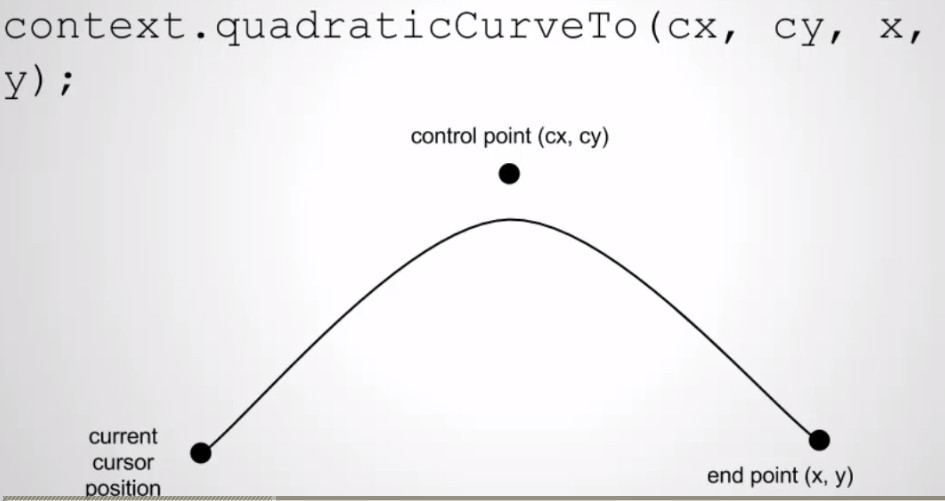
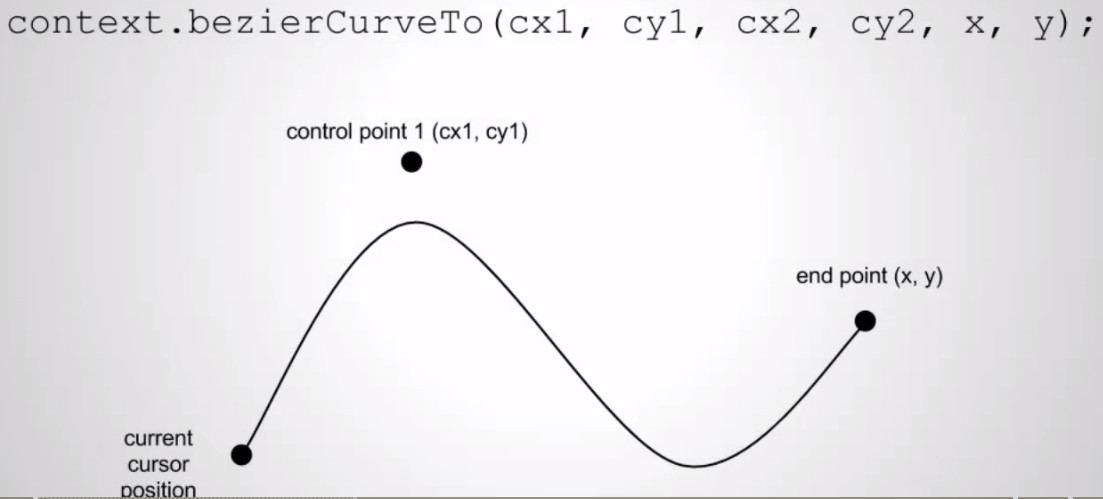
window.onload = function() {

    var canvas = document.getElementById("canvas"),

        context = canvas.getContext("2d");

    var p0 = {

        x: Math.random() * 600,

        y: Math.random() * 600

    };

    var p1 = {

        x: Math.random() * 600,

        y: Math.random() * 600

    };

    var p2 = {

        x: Math.random() * 600,

        y: Math.random() * 600

    };

    context.beginPath();

    context.moveTo(p0.x, p0.y);

    context.quadraticCurveTo(p1.x, p1.y, p2.x, p2.y);

    context.stroke();

    context.closePath();

    drawPoint(p0);

    drawPoint(p1);

    drawPoint(p2);

    function drawPoint(p) {

        context.fillRect(p.x - 4, p.y - 4, 8, 8);

    }

};

window.onload = function() {

    var canvas = document.getElementById("canvas"),

        context = canvas.getContext("2d");

    var p0 = {

        x: Math.random() * 600,

        y: Math.random() * 600

    };

    var p1 = {

        x: Math.random() * 600,

        y: Math.random() * 600

    };

    var p2 = {

        x: Math.random() * 600,

        y: Math.random() * 600

    };

    var p3 = {

        x: Math.random() * 600,

        y: Math.random() * 600

    };

    context.beginPath();

    context.moveTo(p0.x, p0.y);

    context.bezierCurveTo( p1.x, p1.y, p2.x, p2.y, p3.x, p3.y);

    context.stroke();

    context.closePath();

    drawPoint(p0);

    drawPoint(p1);

    drawPoint(p2);

    drawPoint(p3);

    function drawPoint(p) {

        context.fillRect(p.x - 4, p.y - 4, 8, 8);

    }

};


window.onload = function() {

    var canvas = document.getElementById("canvas"),

        context = canvas.getContext("2d");

    context.beginPath();

    context.arc(200,200,100,0,2);

    context.stroke();

    context.closePath();

    context.beginPath();

    context.arc(400,400,100,0,2, true);

    context.stroke();

    context.closePath();

};

window.onload = function() {

    var canvas = document.getElementById("canvas"),

        context = canvas.getContext("2d");

    context.beginPath();

    context.arc(300,300,100,0, Math.PI * 2);

    context.stroke();

    context.closePath();

};

[Javascript] Drawing Paths - Curves and Arcs的更多相关文章
- [Javascript] Drawing Paths - Lines and Rectangles
<!DOCTYPE html> <html> <head> <meta name="description" content=" ...
- JavaScript Learning Paths(ES5/ES6/ES-Next)
JavaScript Learning Paths(ES5/ES6/ES-Next) JavaScript Expert refs https://developer.mozilla.org/en-U ...
- [Javascript] Drawing Styles on HTML5 Canvas
window.onload = function() { var canvas = document.getElementById("canvas"), context = can ...
- 【Javascript】js图形编辑器库介绍
10个JavaScript库绘制自己的图表 jopen 2015-04-06 18:18:38 • 发布 摘要:10个JavaScript库绘制自己的图表 JointJS JointJS is a J ...
- HTML5资料
1 Canvas教程 <canvas>是一个新的用于通过脚本(通常是JavaScript)绘图的HTML元素.例如,他可以用于绘图.制作图片的组合或者简单的动画(当然并不那么简单).It ...
- leaflet地图库
an open-source JavaScript libraryfor mobile-friendly interactive maps Overview Tutorials Docs Downlo ...
- GDI+ Tutorial for Beginners
原文 GDI+ Tutorial for Beginners GDI+ is next evolution of GDI. Using GDI objects in earlier versions ...
- IGeometryCollection Interface
Come from ArcGIS Online IGeometryCollection Interface Provides access to members that can be used fo ...
- HTML <canvas> 学习笔记
Professional JavaScript for Web Developers P552 Basic Usage The <canvas> element requires a ...
随机推荐
- 选择排序SelectSort
/** * * @author Administrator * 功能:选择排序法 */ package com.test1; import java.util.Calendar; public cla ...
- wzplayer2 for windows ActiveX 试用地址
提供wzplayer2 for windows ActiveX,测试地址:http://www.coolradio.cn/IE.htm 大家使用时候必须允许未签名ActiveX下载和运行,否则将无法正 ...
- tarjan 算法讲解(转)
转自:https://www.byvoid.com/blog/scc-tarjan/ 網誌 列表 標籤 項目 關於 聯繫 四月142009 作者:byvoid 閱讀: 158882 計算機科學 圖論 ...
- 基于.NET平台的分布式应用程序的研究
摘 要:.NET框架是Microsoft用于生成分布式Web应用程序和Web服务的下一代平台.概述了用于生成分布式应用程序的.NET框架的基本原理.重点讲述了.NET框架的基础:公共语言运行时(CLR ...
- DataGrid能否动态合并一笔订单下面的多个交易
/** * author ____′↘夏悸 * create date 2012-11-5 **/ $.extend($.fn.datagrid.methods, { autoMergeCells : ...
- sdfsdf
http://www.cocoachina.com/bbs/read.php?tid-234704.html 选择工程->Build Settings -> Code Signing -& ...
- c# 无损高质量压缩图片代码
/// <summary> /// 无损压缩图片 /// </summary> /// <param name="sFile">原图片</ ...
- http://www.cnblogs.com/eye-like/p/4121219.html
c# 操作Word总结 在医疗管理系统中为保存患者的体检和治疗记录,方便以后的医生或其他人查看.当把数据保存到数据库中,需要新建很多的字段,而且操作很繁琐,于是想到网页的信息创建到一个word文本中, ...
- 安卓使用WIFI调试程序
不知怎么回事,USB老是掉,真心烦.于是想着用WIFI可不可以调试呢,去百度一搜,果然可以.下面我说一下我的方案. 1.使用APWIFI创建WIFI热点,用安卓手机连接该热点,试试手机可以上网不. 2 ...
- 谈谈分布式事务之三: System.Transactions事务详解[下篇]
在前面一篇给出的Transaction的定义中,信息的读者应该看到了一个叫做DepedentClone的方法.该方法对用于创建基于现有Transaction对 象的“依赖事务(DependentTra ...