
zepto源码研究 - zepto.js - 6(模板方法)
width height 模板方法 读写width/height
['width', 'height'].forEach(function(dimension){

    //将width,hegiht转成Width,Height,用于document获取

    var dimensionProperty =

        dimension.replace(/./, function(m){ return m[0].toUpperCase() })

    $.fn[dimension] = function(value){

      var offset, el = this[0]

      //读时,是window 用innerWidth,innerHeight获取

      if (value === undefined) return isWindow(el) ? el['inner' + dimensionProperty] :

          //是document,用scrollWidth,scrollHeight获取

          isDocument(el) ? el.documentElement['scroll' + dimensionProperty] :

          (offset = this.offset()) && offset[dimension]   //TODO:否则用 offsetWidth offsetHeight

      //写

      else return this.each(function(idx){

        el = $(this)

        //设值,支持value为函数

        el.css(dimension, funcArg(this, value, idx, el[dimension]()))

      })

    }

  })
/./ 是匹配除换行(\n)以外所有的字符,不加/g,只会匹配一个字符,这里匹配的是h或w
var name = "height".replace(/./,function(m){ console.log(m); return m[0].toUpperCase()});
console.log(name);
h
Height
<div id="high" style="width: 150px;height: 41px;float: left;border: 2px solid red;margin: 10px;padding: 10px;background-color: blue;" id="test">

        <div style="height:100%;"></div>

 </div>

$("#high").height()

65

$("#high")[0].offsetHeight

65
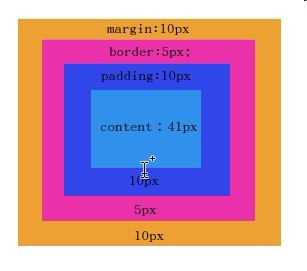
$("#high").height()即offsetHeight包含content,padding,border在内,style=“height:41px” 指的是content为41px;因为默认样式为:box-sizing:content-box,如果指定box-sizing:border-box;则sthle=“height:41px",指的是offsetHeight为41px;
offsetHeight:指的是元素视口高度。
scrollHeight:指的是元素内部的实际高度,因此document求高度要用到它。
innerHeight: 只读属性,声明了窗口的文档显示区的高度和宽度,以像素计。这里的宽度和高度不包括菜单栏、工具栏以及滚动条等的高度。
document.documentElement.clientHeight:与window.innerHeight的效果一样
outerHeight: 只读属性,声明了窗口的高度,包含工具栏。
详细信息请点击:http://www.cnblogs.com/yuteng/articles/1894578.html
注意: 这里的height()可以接受函数作为参数
Generate the "after","prepend","before","append","insertAfter","insertBefore","appendTo", and "prependTo" methods adjacencyOperators = [ 'after', 'prepend', 'before', 'append' ],
adjacencyOperators = [ 'after', 'prepend', 'before', 'append' ],
adjacencyOperators.forEach(function(operator, operatorIndex) {

    var inside = operatorIndex % 2 //=> prepend, append  有余数 注意forEach遍历出的索引从0开始

    $.fn[operator] = function(){

      // arguments can be nodes, arrays of nodes, Zepto objects and HTML strings

      //nodes  HTML字符串生成的DOM集

      var argType, nodes = $.map(arguments, function(arg) {

            argType = type(arg)

            //传参非 object、array、null,就直接调用zepto.fragment生成DOM

            return argType == "object" || argType == "array" || arg == null ?

                arg : zepto.fragment(arg)

          }),

      //如果$长度>1,需要克隆里面的元素

          parent, copyByClone = this.length > 1

      if (nodes.length < 1) return this     //为0,不需要操作,直接返回

      //遍历源$,执行插入   _指代此参数无效或不用

      return this.each(function(_, target){

        parent = inside ? target : target.parentNode //prepend, append取父元素

        // convert all methods to a "before" operation

        //用insertBefore模拟实现

        target = operatorIndex == 0 ? target.nextSibling :   //after,target等于下一个兄弟元素,然后将DOM通过insertBefore插入到target前

            operatorIndex == 1 ? target.firstChild :   //prepend target为parent的第一个元素,然后将DOM通过insertBefore插入到target前

                operatorIndex == 2 ? target :       // before  直接将将DOM通过insertBefore插入到target前

                    null                                //  append  直接调用$(target).append

        //父元素是否在document中

        var parentInDocument = $.contains(document.documentElement, parent)

        //遍历待插入的元素

        nodes.forEach(function(node){

          //克隆

          if (copyByClone) node = node.cloneNode(true)

          //定位元素不存在,,没法执行插入操作,直接删除,返回

          else if (!parent) return $(node).remove()

          //插入节点后,如果被插入的节点是SCRIPT,则执行里面的内容并将window设为上下文

          //插入元素

          parent.insertBefore(node, target)

          //如果父元素在document里,修正script标签。原因是script标签通过innerHTML加入DOM不执行。需要在全局环境下执行它

          if (parentInDocument) traverseNode(node, function(el){

            if (el.nodeName != null && el.nodeName.toUpperCase() === 'SCRIPT' &&

                (!el.type || el.type === 'text/javascript') && !el.src)

              window['eval'].call(window, el.innerHTML)

          })

        })

      })

    }

    // after    => insertAfter

    // prepend  => prependTo

    // before   => insertBefore

    // append   => appendTo

    /**

     * 插入方法转换

     * @param html

     * @returns {*}

     */

    $.fn[inside ? operator+'To' : 'insert'+(operatorIndex ? 'Before' : 'After')] = function(html){

      $(html)[operator](this)

      return
this

    }

  })
因为 ’after‘,’prepend‘,’before‘,’append‘ 都可用insertBefore来实现,所以这四个函数的内容格式是一样的,这里就可以用工厂模式来循环生产这四个函数。
这里大致流程如下:
// 可传递多个参数包括字符串和对象
$.fn[operator] = function () {
    // arguments.map 针对arguments里面的数组进行处理,将里面的字符串项转化为对象

    // this.forEach 循环对每一个调用者target做对应操作

    // 因最后要做parent.insertBefore操作,所以这里要根据operator 确认与target有关的parent

    // 因用insertBefore来模拟实现,这里要选择对应的参照节点并统一赋值给target

    // 执行 parent.insertBefore(node, target);

    // 如果node为script,则还必须将里面的脚本内容用window.eval()来执行
}
这里有几个小技巧说一下:
1:inside = operatorIndex % 2 ,parent = inside?target:target.parentNode如果对一个数组中的特定项进行不同的操作,可以对索引取余数,因为在js里面0代表false,正数代表true
2:target.nextSibling 表示取节点的下一个兄弟节点,这里经过测试,如果target在页面上为最后一个节点,则target.nextSibling 依然会返回一个虚拟节点,如下例子
$("#high")[0].nextSibling

结果:

#text

baseURI: "file:///home/zhutao/Documents/lib/zepto/test/defer.html"

childNodes: NodeList[0]

data: "↵"

firstChild: null

lastChild: null

length: 1

nextElementSibling: null

nextSibling: null

nodeName: "#text"

nodeType: 3

nodeValue: "↵"

ownerDocument: document

parentElement: div#first.test

parentNode: div#first.test

previousElementSibling: div#high

previousSibling: div#high

textContent: "↵"

wholeText: "↵"

__proto__: CharacterData
3:node.cloneNode(deep),deep为true,则将子节点也clone进去,否则不会clone子节点,这跟clone对象是一个道理,例子如下:
$("#clone")[0].cloneNode(true);
<div id="clone" data-test="测试" style="height:50px;width: 50px;border:1px solid red;overflow: hidden">
<div data-index="1111">clone测试</div>
</div>
$("#clone")[0].cloneNode();
<div id="clone" data-test="测试" style="height:50px;width: 50px;border:1px solid red;overflow: hidden"></div>
4:window.eval() 与 eval()的区别:window.eval() = window.eval.call(window,script); eval() = window.eval.call(this,script); ,eval()常在闭包函数使用 这里的this指的是闭包的环境变量。如下例子 :
var x = 5;

function fn(){

    var x = 'jack';

    window.eval('x=10;');

}

fn();

console.log(x); // -->5

10

undefined

var x = 5;

function fn(){

    var x = 'jack';

    eval('x=10;');

}

fn();

console.log(x); // -->5

 5

undefined
(例子来自:http://www.cnblogs.com/snandy/archive/2011/03/16/1986055.html)
zepto源码研究 - zepto.js - 6(模板方法)的更多相关文章
- zepto源码研究 - zepto.js - 1
简要:网上已经有很多人已经将zepto的源码研究得很细致了,但我还是想写下zepto源码系列,将别人的东西和自己的想法写下来以加深印象也是自娱自乐,文章中可能有许多错误,望有人不吝指出,烦请赐教. 首 ...
- zepto源码研究 - deferred.js(jquery-deferred.js)
简要:zepto的deferred.js 并不遵守promise/A+ 规范,而在jquery v3.0.0中的defer在一定程度上实现了promise/A+ ,因此本文主要研究jquery v3. ...
- zepto源码研究 - fx_methods.js
简要:依赖fx.js,主要是针对show,hide,fadeIn,fadeOut的封装. 源码如下: // Zepto.js // (c) 2010-2015 Thomas Fuchs // Zept ...
- zepto源码研究 - fx.js
简要:zepto 提供了一个基础方法animate来方便我们运用css动画.主要针对transform,animate以及普通属性(例如left,right,height,width等等)的trans ...
- zepto源码研究 - zepto.js (zepto.init)
简要:当我们用$()时,便会直接调用zepto.init 生成zepto对象,那zepto.init是如何根据不同类型的参数来生产指定对象呢? zepto.init = function(select ...
- zepto源码研究 - ajax.js($.ajax具体流程分析)
简要:$.ajax是zepto发送请求的核心方法,$.get,$.post,$.jsonp都是封装了$.ajax方法.$.ajax将jsonp与异步请求的代码格式统一起来,内部主要是先处理url,数据 ...
- zepto源码研究 - ajax.js($.ajaxJSONP 的分析)
简要:jsonp是一种服务器和客户端信息传递方式,一般是利用script元素赋值src来发起请求.一般凡是带有src属性的元素发起的请求都是可以跨域的. 那么jsonp是如何获取服务器的数据的呢? j ...
- zepto源码研究 - zepto.js - 5(dom属性管理)
index: $.fn = {...... indexOf: emptyArray.indexOf,} index: function(element){ //这里的$(element)[0]是为了将 ...
- zepto源码研究 - callback.js
简要:$.Callbacks是一个生成回调管家Callback的工厂,Callback提供一系列方法来管理一个回调列表($.Callbacks的一个私有变量list),包括添加回调函数, 删除回调函数 ...
随机推荐
- bzoj4306: 玩具厂
Description 在JIH考察的地图中有N个城市,被公路依次连成了一个环,JIH想在这些城市中建一个玩具厂.城市和公路都被编号为1..N,i号公路连接i-1号城市与i号城市(1号公路连接N号城市 ...
- javaWeb中一个按钮提交两个表单
一个按钮提交两个表单,有时候会用到,一般会很容易想到使用 onclick="document.form1.submit();document.form2.submit();" 的方 ...
- iOS开发之WKWebView简单使用
iOS开发之WKWebView简单使用 iOS开发之 WKWebVeiw使用 想用UIWebVeiw做的,但是突然想起来在iOS8中出了一个新的WKWebView,算是UIWebVeiw的升级版. ...
- URL加载系统----iOS工程师必须熟练掌握
URL加载系统----iOS工程师必须熟练掌握 iOS根本离不开网络——不论是从服务端读写数据.向系统分发计算任务,还是从云端加载图片.音频.视频等. 当应用程序面临处理问题的抉择时,通常 ...
- Tomcat基础教程(二)
上一篇说到了Tomcat的介绍,下载及安装,这一篇我会详述Tomcat服务器结构 一.Tomcat服务器结构图: Tomcat服务器中可以配置多个Service,每个Service可以包含多个Conn ...
- solr拼写检查代码逻辑
自定义的solr搜索系统作为web应用发布到tomcat后,运行过程中其搜索代码逻辑如下: 用户solr搜索应用发送搜索请求URL,solr应用的org.apache.solr.servlet.Sol ...
- ASP.NET MVC 5使用CrystalReport(水晶报表)
原文:ASP.NET MVC 5使用CrystalReport(水晶报表) http://downloads.businessobjects.com/akdlm/cr4vs2010/CRforVS ...
- Android应用开发学习笔记之AsyncTask
作者:刘昊昱 博客:http://blog.csdn.net/liuhaoyutz 在上一篇文章中我们学习了多线程和Handler消息处理机制,如果有计算量比较大的任务,可以创建一个新线程执行计算工作 ...
- 【HDOJ】1063 Exponentiation
这道题目莫名其妙的wa,又莫名其妙的过了. import java.util.Scanner; import java.math.BigDecimal; public class Main { pub ...
- centos ppp拨号
CentOS 6.4 电信ADSL 拨号连接的配置,亲测 .下载 rp-pppoe-3.8.tar.gz http://down1.chinaunix.net/distfiles/rp-pppoe-3 ...