
标准Gitlab命令行操作指导
gitlab是一个分布式的版本仓库,总比只是一个本地手动好些,上传你的本地代码后后还能web GUI操作,何乐不为?
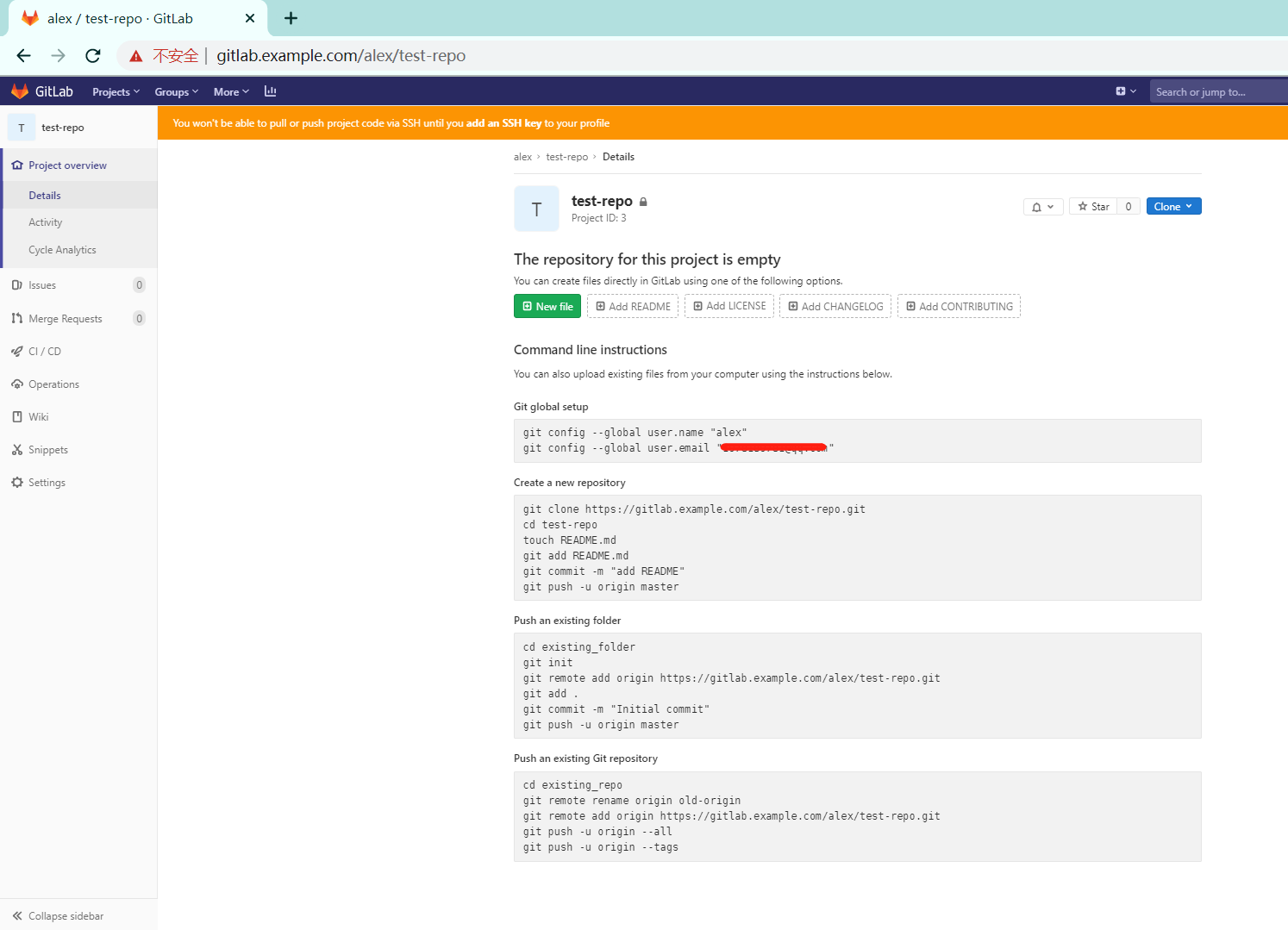
贴上刚刚搭建的gitlab,看看git 如何操作标准命令行操作指导
1.命令行操作指引
yum install git
Command line instructions

You can also upload existing files from your computer using the instructions below.

Git global setup

git config --global user.name "alex"

git config --global user.email "your@example.com"

Create a new repository

git clone https://gitlab.example.com/alex/test-repo.git

cd test-repo

touch README.md

git add README.md

git commit -m "add README"

git push -u origin master

Push an existing folder

cd existing_folder

git init

git remote add origin https://gitlab.example.com/alex/test-repo.git

git add .

git commit -m "Initial commit"

git push -u origin master

Push an existing Git repository

cd existing_repo

git remote rename origin old-origin

git remote add origin https://gitlab.example.com/alex/test-repo.git

git push -u origin --all

git push -u origin --tags
PS:
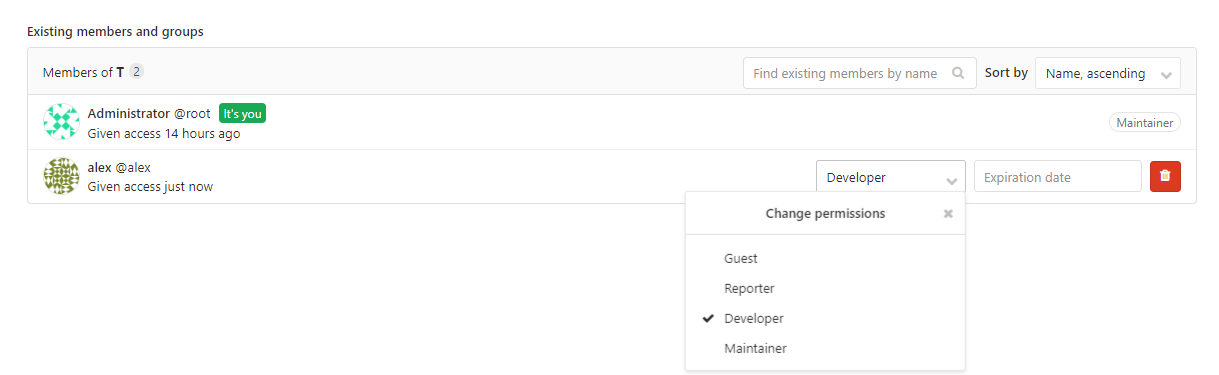
2.deveolper创建分支与提交合并分支
git -c http.sslverify=false clone https://gitlab.example.com/root/test-repo.git

cd test-repo

git checkout -b release-1.0

#操作完成后,本地添加并提交修改后的版本分支

git add .

git commit -m"release-1.0"

git-c http.sslVerify=false push origin release-l.0
然后gitlab上提交 Create merge request,同时提示Assignee给lead看就完成deveploer的操作了,等待上级的确认操作即可

[root@vps ~]# gitlab-ctl stop

ok: down: alertmanager: 1s, normally up

ok: down: gitaly: 0s, normally up

ok: down: gitlab-exporter: 0s, normally up

ok: down: gitlab-workhorse: 1s, normally up

ok: down: grafana: 0s, normally up

ok: down: logrotate: 1s, normally up

ok: down: nginx: 0s, normally up

ok: down: node-exporter: 1s, normally up

ok: down: postgres-exporter: 0s, normally up

ok: down: postgresql: 0s, normally up

ok: down: prometheus: 0s, normally up

ok: down: redis: 0s, normally up

ok: down: redis-exporter: 1s, normally up

ok: down: sidekiq: 0s, normally up

ok: down: unicorn: 0s, normally up
[root@vps ~]#
标准Gitlab命令行操作指导的更多相关文章
- Ubuntu server版上使用命令行操作VPNclient
Ubuntu server版上使用命令行操作VPNclient VPN,虚拟专用网络,这个技术还是非常有用的.近期笔者參与的项目中就使用上了VPN,大概情况是这种.有两个开发团队,在异地,代码服务器在 ...
- linux下使用script和scriptreplay对命令行操作进行录像
转自:linux下用script和scriptreplay对命令行操作录像 在Linux中可以使用script命令来记录命令行的操作过程,并使用scriptreplay命令对命令操作进行回放,操作步骤 ...
- 命令行操作svn和git和git
前几天在写代码的时候电脑突然坏掉,老大交代的任务没完成,非常痛恨自己用svn或者git保存代码,相信很多程序员遇到过,硬盘坏掉,存在硬盘中的代码丢失,无法找回的问题,svn和git可谓程序员界的福音, ...
- mysql 命令行操作入门(详细讲解版)
之前分享过多次Mysql主题,今天继续分享mysql命令行入门 1. 那么多mysql客户端工具,为何要分享命令行操作? -快捷.简单.方便 -在没有客户端的情况下怎么办 -如果是mysql未开启 ...
- windows下使用TortoiseGit代替Git命令行操作
windows下使用TortoiseGit代替Git命令行操作 大家在使用svn的时候,都非常喜欢使用小乌龟,也就是TortoiseSVN:那么git也有小乌龟版本,即TortoiseGit. 1.安 ...
- linux快速入门 1.1命令行操作
http://lovesoo.org/linux-command-line-operation.html 1.1命令行操作 目录: <wp_nokeywordlink>Shell简介 &l ...
- MongoDB命令行操作
本文专门介绍MongoDB的命令行操作.其实,这些操作在MongoDB官网提供的Quick Reference上都有,但是英文的,为了方便,这里将其稍微整理下,方便查阅. 这里用来做测试的是远端(10 ...
- Ant命令行操作
Ant命令行操作 Ant构建文件可以将项目编译,打包,測试,它是Apache软件基金会jakarta文件夹中的一个子项目,具有跨平台性,操作简单,并且非常easy上手. 关于Ant执行,能够在项目中找 ...
- SVN的命令行操作
最近在进行svn二次开发,使用的是svnkit.看了很多svnkit的api,渐渐发现都是和SVN的命令行操作对应的.顺便研究一下svn的命名行操作. 1.将文件checkout到本地目录: 基本命令 ...
随机推荐
- HarmonyOS开发者看过来,HDD上海站传递的重要信息都在这里
4月17日,颇有HarmonyOS年度总结性质的HarmonyOS开发者日活动上海站正式开始. 活动中,华为消费者业务AI与智慧全场景业务部副总裁段孟对HarmonyOS生态建设的最新进展做了发言,并 ...
- babel配置文件.babelrc详解
一:理解 babel之配置文件.babelrc 基本配置项 1. 什么是babel? 它是干什么用的? ES6是2015年发布的下一代javascript语言标准,它引入了新的语法和API,使我们编写 ...
- Day01_09_数据类型
数据类型 数据类型分类 *基本数据类型 *引用数据类型 基本数据类型 --第一类 整数型 byte short int long --第二类 浮点型 float double --第三类 布尔型 bo ...
- 基于.Net Core 5.0 Worker Service 的 Quart 服务
前言 看过我之前博客的人应该都知道,我负责了相当久的部门数据同步相关的工作.其中的艰辛不赘述了. 随着需求的越来越复杂,最近windows的计划任务已经越发的不能满足我了,而且计划任务毕竟太弱智,总是 ...
- HTML5中meta属性的使用详解
meta属性在HTML中占据了很重要的位置.如:针对搜索引擎的SEO,文档的字符编码,设置刷新缓存等.虽然一些网页可能没有使用meta,但是作为正规军,我们还是有必要了解一些meta的属性,并且能够熟 ...
- Windows本地安全策略
目录 本地安全策略 密码策略 账户策略 审核策略 用户权限分配 安全选项 本地安全策略 安全策略是影响计算机安全性的安全设置的组合.可以利用本地安全策略来编辑本地计算机上的帐户 系统安全策略包括下面的 ...
- Windows中的用户和组以及用户密码处理
目录 用户帐户 Windows 默认账户 Windows 内置用户账户 查看.创建和删除账户 组账户 内置组账户 组的查看.创建和删除 Windows中对用户密码的处理 LM-hash NTLM-ha ...
- 解决在Vim中鼠标右键不能粘贴问题
最近维护一台服务器,使用putty登录后,用vim时,鼠标右键不能 粘贴而是进入了visual模式.网上查找一番找到了解决方法: 方 法一:在普通模式下键入" :set mouse-=a&q ...
- 学习Canvas绘图与动画基础 制作弧和圆(五)
1 <!DOCTYPE html> 2 <html> 3 <head lang="en"> 4 <meta charset="U ...
- Root mapping definition has unsupported parameters
使用ElasticSearch创建映射报错 Root mapping definition has unsupported parameters 原因 使用的ES版本为7.2.0,不再支持创建指定类型 ...