
Spring Cloud05: Zuul 服务网关
一、什么是Zuul 服务网关
Zuul 是 Netflix 提供的⼀个开源的 API ⽹关服务器,是客户端和⽹站后端所有请求的中间层,对外开放 ⼀个 API,将所有请求导⼊统⼀的⼊⼝,屏蔽了服务端的具体实现逻辑,Zuul 可以实现反向代理的功 能,在⽹关内部实现动态路由、身份认证、IP 过滤、数据监控等。Zuul也是Spring Cloud集成的组件,通过它来实现服务网关。
二、Zuul的功能列表
\1. 身份认证与安全:识别每个资源的验证要求,并拒绝那些与要求不符合的请求。
\2. 审查与监控:在边缘位置追踪有意义的数据和统计结果,从而带来精确的生产视图。
\3. 动态路由:动态的将请求路由到不同的后端集群。
\4. 压力测试:逐渐增加指向集群的流量,以了解性能。
\5. 负载分配:为每一种负载类型分配对应容量,并弃用超出限定值的请求。
\6. 静态响应处理:在边缘位置直接建立部分响应,从而避免其转发到内部集群。
\7. 多区域弹性:跨越AWS Region进行请求路由,旨在实现ELB(Elastic Load Balancing)使用的多样化,以及让系统的便越更贴近系统的使用者。
三、实战!
1.创建maven工程,pom.xml配置如下:
    <dependency>

		 <groupId>org.springframework.cloud</groupId>

		 <artifactId>spring-cloud-starter-netflix-eureka-client</artifactId>

		 <version>2.0.2.RELEASE</version>

	 </dependency>

	 <dependency>

		 <groupId>org.springframework.cloud</groupId>

		 <artifactId>spring-cloud-starter-netflix-zuul</artifactId>

		 <version>2.0.2.RELEASE</version>

	 </dependency>
2.创建配置文件application.yml配置如下:
server:

  port: 8030

spring:

  application:

    name: gateway

eureka:

  client:

    service-url:

      defaultZone: http://localhost:8761/eureka/

zuul:

  routes:

    provider: /p/**
属性说明
* zuul.routes.provider: 给服务提供者 provider 设置映射,可以不需要再记住服务提供者的端口
3.创建启动类,代码如下:
package com.zing;

import org.springframework.boot.SpringApplication;

import org.springframework.boot.autoconfigure.EnableAutoConfiguration;

import org.springframework.cloud.netflix.zuul.EnableZuulProxy;

@EnableZuulProxy

@EnableAutoConfiguration

public class ZuulApplication {

	public static void main(String[] args) throws Exception {

		SpringApplication.run(ZuulApplication.class, args);

	}

}
注解说明
* @EnableZuulProxy : 包含了 @EnableZuulServer ,设置该类是⽹关的启动类。
* @EnableAutoConfiguration :可以帮助 Spring Boot 应⽤将所有符合条件的 @Configuration 配置加载到当前 Spring Boot 创建并使⽤的 IOC 容器中。
四、Zuul的负载均衡
1.修改服务提供者的 controller 层代码,具体如下:
package com.zing.controller;

import java.util.Collection;

import org.springframework.beans.factory.annotation.Autowired;

import org.springframework.beans.factory.annotation.Value;

import org.springframework.web.bind.annotation.DeleteMapping;

import org.springframework.web.bind.annotation.GetMapping;

import org.springframework.web.bind.annotation.PathVariable;

import org.springframework.web.bind.annotation.PostMapping;

import org.springframework.web.bind.annotation.PutMapping;

import org.springframework.web.bind.annotation.RequestBody;

import org.springframework.web.bind.annotation.RequestMapping;

import org.springframework.web.bind.annotation.RestController;

import com.zing.entity.Student;

import com.zing.repository.StudentRepository;

@RestController //在Spring中@RestController的作用等同于@Controller + @ResponseBody。

@RequestMapping("/student")

public class StudentHandler {

	@Autowired

	private StudentRepository studentRepository;

	@Value("${server.port}")

	private String port;

	@GetMapping("/findAll")

	public Collection<Student> findAll(){

		return studentRepository.findAll();

	}

	@GetMapping("/findById/{id}")

	public Student findById(@PathVariable("id") long id) {

		return studentRepository.findById(id);

	}

	@PostMapping("/save")

	public void save(@RequestBody Student s) {

		studentRepository.saveOrUpdate(s);

	}

	@PutMapping("/Update")

	public void Update(@RequestBody Student s) {

		studentRepository.saveOrUpdate(s);

	}

	@DeleteMapping("/deleteById/{id}")

	public void deleteById(@PathVariable("id") long id) {

		studentRepository.deleteById(id);

	}

	@GetMapping("/index")

	public String index() {

		return "当前端口:" + this.port;

	}

}
注解说明
* @Value("${server.port}"):获取当前项目application.yml配置文件中的server.port属性值。
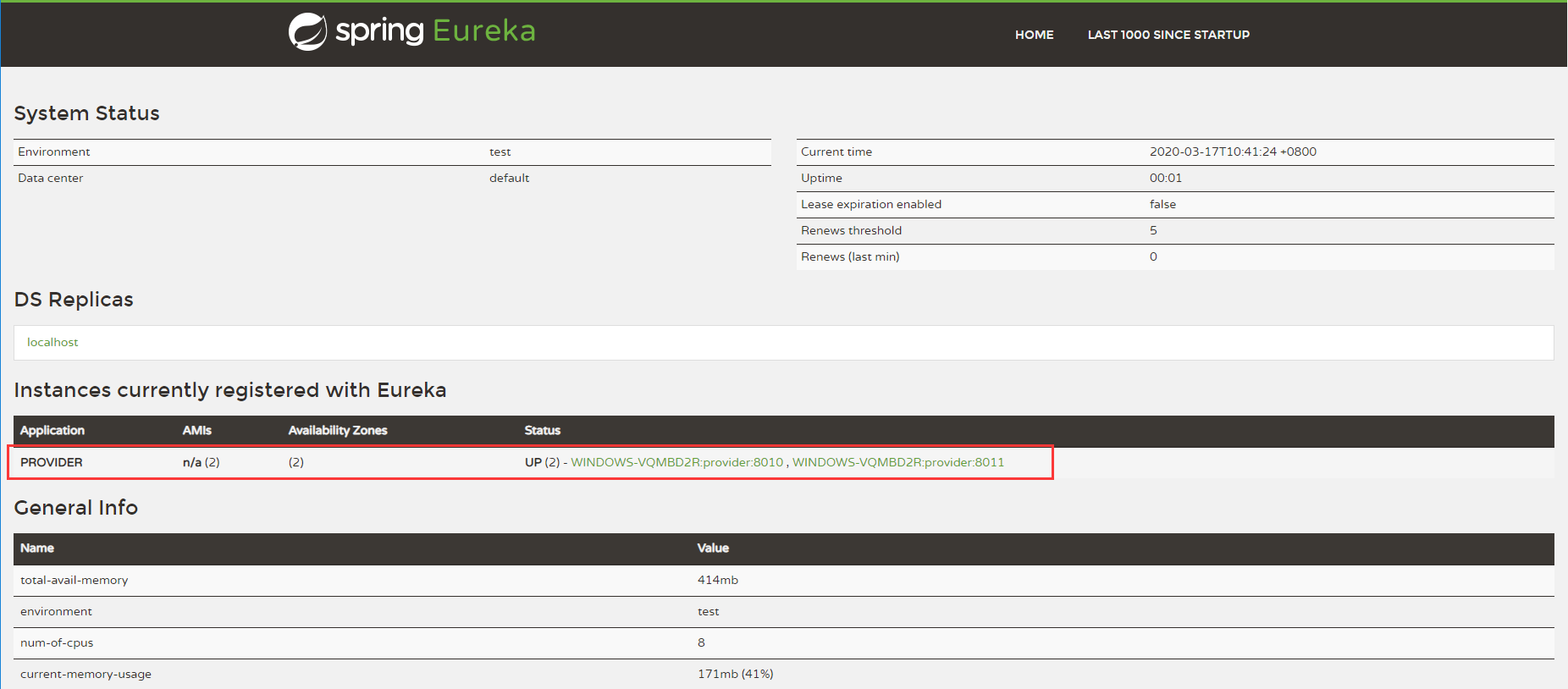
2.首先启动注册中心,然后启动服务提供者,修改端口为8011后,再建一个启动类再次启动,我们就可以在注册中心看到两个prider服务,如图:
3.启动zuul的启动类,我们可以访问 http://localhost:8030/p/student/index查看调用服务的端口,我们不断的刷新,可以看到端口是交替出现的:


五、总结
zuul 服务网关是微服务架构中不可或缺的的部分。通过服务网关统一向外系统提供REST API的过程中,除了具备服务路由、负载均衡之外,它还具备了权限控制等功能。
Spring Cloud05: Zuul 服务网关的更多相关文章
- Spring Cloud 系列之 Netflix Zuul 服务网关
什么是 Zuul Zuul 是从设备和网站到应用程序后端的所有请求的前门.作为边缘服务应用程序,Zuul 旨在实现动态路由,监视,弹性和安全性.Zuul 包含了对请求的路由和过滤两个最主要的功能. Z ...
- spring cloud: zuul: 微网关-简单使用与路由配置
spring cloud: zuul: 微网关-简单使用与路由配置 首先引入依赖 <dependency> <groupId>org.springframework.cloud ...
- Spring Cloud (14) 服务网关-过滤器
Spring Cloud Zuul作为网关所具备的最基本的功能:路由,还具备另外一个核心的功能:过滤器. 过滤器 通过Spring Cloud Zuul实现的路由功能,我们的微服务可以通过统一的API ...
- Spring Cloud Gateway 服务网关快速上手
Spring Cloud Gateway 服务网关 API 主流网关有NGINX.ZUUL.Spring Cloud Gateway.Linkerd等:Spring Cloud Gateway构建于 ...
- Spring Cloud Zuul与网关中间件
Spring Cloud Zuul与网关中间件_网易订阅 http://dy.163.com/v2/article/detail/DC7L8UV10511HSJK.html
- spring cloud 系列第6篇 —— zuul 服务网关 (F版本)
源码Gitub地址:https://github.com/heibaiying/spring-samples-for-all 一.zuul简介 1.1 API 网关 api 网关是整个微服务系统的门面 ...
- Spring Cloud (13) 服务网关-路由配置
传统路由配置 所谓传统路由配置方式就是在不依赖于服务发现机制情况下,通过在配置文件中具体制定每个路由表达式与服务实例的映射关系来实现API网关对外部请求的路由.没有Eureka服务治理框架帮助的时候, ...
- Spring Cloud (12) 服务网关-基础
通过前几篇介绍,已经可以构建一个简单的微服务架构了,如下图: 通过eureka实现服务注册中心以及服务注册发现,通过ribbon或feign实现服务的消费以及负载均衡,通过spring cloud c ...
- Spring Cloud 之 服务网关
在微服务架构体系中,使用API 服务网关后的系统架构图如下: API服务网关的主要作用如下: 服务访问的统一入口 服务访问的负载均衡功能 服务访问的路由功能 在SpringCloud中,基于Netfl ...
随机推荐
- PowerShell-6.文件操作
1.显示文本内容 Get-Content "°C:\\Program Files (x86)\\PsUpdate\\b.dat" 2.得到b.dat文件内容,然后把里面的所有'C' ...
- 【vue-06】webpack npm
什么是Webpack Webpack是一款模块加载器兼打包工具,他能把各种资源,比如js,css,less转化成一个静态文件,减少页面的请求,提高效率. 安装Webpack 在安装webpack之前, ...
- linux集群压测部署方案
我们今天主要分享的内容从三方面讲解. 集群压力机部署 shell脚本简介 shell脚本搞定压力机部署 集群压力机部署 linux.png 分布式压测背景介绍 在企业项目实战时,如果被压的服务器处 ...
- Spring MVC工作原理及源码解析(一) MVC原理介绍、与IOC容器整合原理
MVC原理介绍 Spring MVC原理图 上图是Spring MVC工作原理图(图片来自网上搜索),根据上图,我们可以得知Spring MVC的工作流程如下: 1.用户(客户端,即浏览器)发送请求至 ...
- c++如何理解map对象的value_type是pair类型
map 是以 pair形式插入的.map中的元素的类型value_typetypedef pair<const Key, Type> value_type;value_type 被声明为 ...
- sosreport命令 然后diff 正常的操作系统例如centos
nux学习笔记:有用的linux命令 发表于 2018-06-25 | 分类于 linux| 字数统计: 1,269 | 阅读时长 ≈ 6 写在前面 这着笔记,整理一些网上搜集到有用的linu ...
- Centos7 安装 htop
此安装方法是目前位置我了解到的最简介.最快速的安装方法.本人亲验: 系统版本: CentOS Linux release 7.3.1611 (Core) 安装步骤: yum -y instal ...
- Zabbix agent端 配置
Zabbix agent端 配置 agent端环境 zabbix-client:RHEL8 IP:192.168.121.11 一.安装 Zabbix 源 [root@zabbix-client ~] ...
- ActiveMQ FileServer漏洞(详细)
半个月前,巡检时发现服务器出现不明进程,对其进行了处理,由于当时没有做详细记录,在这里把大致过程描述一下. 症状: ps命令发现出现几个不明进程, 1.于/tmp下运行的,名称随机的进程.占用CPU高 ...
- 说明位图,矢量图,像素,分辨率,PPI,DPI?
说明位图,矢量图,像素,分辨率,PPI,DPI? 显示全部 关注者 28 被浏览 7,031 关注问题写回答 邀请回答 添加评论 分享 2 个回答 默认排序 刘凯 21 人赞同了 ...